Choosing the best premium flight stick for VR in 2026 means balancing realism, precision, and comfort. For serious flight sim enthusiasts, the Honeycomb Foxtrot Aviation Stick offers authentic aircraft controls, ideal for those who prioritize realism. Meanwhile, the Thrustmaster Sol-R1 stands out for its advanced hall effect technology and sci-fi aesthetic, perfect for space combat fans who want high accuracy. For VR users, the Tyco Tech HOTAS for Meta Quest provides an immersive, adjustable experience designed specifically for VR headsets. Each of these options caters to different needs, but all aim to elevate VR flight simulation to a new level.

Get the latest gadgets delivered free with Prime
- Fast, free delivery on millions of items
- Prime Video, Amazon Music and more included
- Member-only deals all year
However, tradeoffs exist: the Honeycomb is primarily for PC flight sims and may require calibration, while the Thrustmaster’s high-tech features come at a premium price and a complex setup. The Tyco Tech HOTAS excels in VR immersion but lacks controllers and is specific to Meta Quest headsets. Your choice depends on your platform, budget, and desired level of realism.
Complete the kit



Key Takeaways
- The Honeycomb Foxtrot is best for those seeking authentic, customizable aircraft control on PC.
- Thrustmaster Sol-R1 offers high precision with hall effect tech but is complex and costly.
- Tyco Tech HOTAS provides immersive VR control for Meta Quest users but lacks controllers and broader compatibility.
- All options involve tradeoffs between realism, ease of use, and price.
- Understanding your primary use case and platform is key to selecting the best premium VR flight stick.
| Honeycomb Foxtrot Aviation Stick |  | Best Overall for Authentic Aircraft Control | Compatible Devices: PC | Controller Type: Joystick with POV switch, four action buttons, rocker switches, trigger and left/right twist | Connectivity Technology: USB | VIEW ON AMAZON | See Our Full Breakdown |
| Thrustmaster Sol-R1 Hall-Effect Space Combat Flight Sim Joystick – PC | 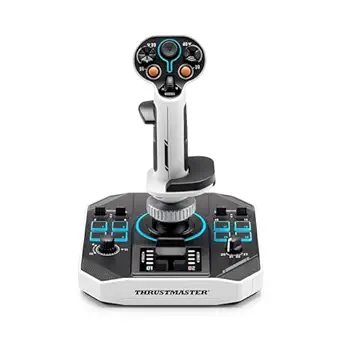 | Best for High-Precision Space and Flight Simulation | Number of action buttons: 21 | Trigger buttons: 2 | Hat switches: 2 | VIEW ON AMAZON | See Our Full Breakdown |
| Tyco Tech HOTAS Flight Stick System for Meta Quest VR Headsets |  | Best for VR Immersion with Meta Quest | Compatibility: Meta Quest 2, Quest 3, Quest 3s, Quest Pro | Control Type: Joystick | Additional Features: Ergonomic, adjustable tension, premium steel | VIEW ON AMAZON | See Our Full Breakdown |
| Thrustmaster T-Flight Hotas X USB Flight Sim Stick & Throttle |  | Best for PC Beginners and Versatile Setup | Number of action buttons: 12 | Number of axes: 5 | Detachable throttle: Yes | VIEW ON AMAZON | See Our Full Breakdown |
| Turtle Beach VelocityOne Flightstick Universal Sim Controller |  | Best for Xbox and PC with High Customization | Compatibility: Xbox Series X|S, Xbox One, PC | Number of Programmable Buttons: 27 | Axes: 8 | VIEW ON AMAZON | See Our Full Breakdown |
| premium flight stick for vr | Compatibility |
|---|---|
| Honeycomb Foxtrot Aviation Sti | — |
| Thrustmaster Sol-R1 Hall-Effec | — |
| Tyco Tech HOTAS Flight Stick S | Meta Quest 2, Quest 3, Quest 3s, Quest Pro |
| Thrustmaster T-Flight Hotas X | PC |
| Turtle Beach VelocityOne Fligh | Xbox Series X|S, Xbox One, PC |
More Details on Our Top Picks
Honeycomb Foxtrot Aviation Stick
The Honeycomb Foxtrot Aviation Stick stands out for delivering a highly realistic flying experience, especially suited for aircraft like Airbus jets and aerobatics planes. Its linear resistance system with adjustable tension allows for smooth, precise control that closely mimics real aircraft handling. Programmable switches enhance customization, making it a favorite among serious flight simmers. Compared to other options, its primary limitation is that it’s designed mainly for PC use and requires calibration for optimal performance. It’s a natural choice for those who want authentic feel but are willing to manage some setup complexity.
Pros:- Realistic flight control experience
- Highly customizable switches and buttons
- Adjustable tension for smooth movement
Cons:- Designed mainly for PC, not VR or consoles
- Requires setup and calibration
- Limited to aircraft simulation
Best for: Serious flight simulation enthusiasts seeking authentic aircraft control
Not ideal for: Casual gamers or VR users without a PC or those seeking plug-and-play convenience
- Compatible Devices:PC
- Controller Type:Joystick with POV switch, four action buttons, rocker switches, trigger and left/right twist
- Connectivity Technology:USB
- Additional Features:Ergonomic, Motion Sensor
- Button Quantity:18
- Hardware Platform:PC
Our verdict“An excellent choice for those prioritizing authentic, customizable aircraft control on PC, despite requiring some setup.”
Thrustmaster Sol-R1 Hall-Effect Space Combat Flight Sim Joystick – PC
The Thrustmaster Sol-R1 elevates flight control with its hall effect sensors, providing drift-free, high-precision movement. Its 21 programmable buttons and ergonomic, ambidextrous design make it ideal for complex space combat and flight simulation. The sci-fi inspired backlit look adds to immersion, especially in VR environments. Compared to traditional joysticks, the Sol-R1’s tech delivers exceptional accuracy, but it’s more complex to set up and is limited to PC. Its premium price suits dedicated enthusiasts willing to invest in top-tier control, though beginners may find the features overwhelming.
Pros:- High-precision hall effect sensors
- Multiple programmable buttons
- Ergonomic, ambidextrous design with customization
Cons:- Premium price point
- Complex setup process
- Limited to PC compatibility
Best for: Enthusiasts seeking top-tier precision and customization in PC VR space and flight sims
Not ideal for: Casual users or those on a budget, or console gamers
- Number of action buttons:21
- Trigger buttons:2
- Hat switches:2
- Mini stick:Yes
- Technology:Hall Effect AccuRate
- Axes:X, Y, Z
Our verdict“This joystick suits players who demand the highest accuracy and are comfortable with complex setup, making it less ideal for casual VR users.”
Tyco Tech HOTAS Flight Stick System for Meta Quest VR Headsets
The Tyco Tech HOTAS for Meta Quest is designed specifically for VR flight experiences, offering a realistic control system with adjustable tension and high-quality steel components. Its ergonomic design and compatibility with Quest 2, Quest 3, and Quest Pro make it perfect for VR pilots who want immersive control during VTOL VR or similar titles. While it provides excellent tactile feedback and build quality, it’s limited to Meta Quest headsets and does not include controllers or rudder pedals. This pick is ideal for VR users seeking a dedicated, immersive HOTAS experience without needing a full cockpit setup.
Pros:- Realistic, immersive VR control
- Adjustable tension for personalized feel
- Premium materials and USA-made quality
Cons:- Includes only HOTAS system, no controllers
- Limited to Meta Quest platform
- Requires additional straps for attachment
Best for: Meta Quest VR users wanting immersive flight control
Not ideal for: PC-only users or those wanting a universal setup for multiple platforms
- Compatibility:Meta Quest 2, Quest 3, Quest 3s, Quest Pro
- Control Type:Joystick
- Additional Features:Ergonomic, adjustable tension, premium steel
- Made in:USA
Our verdict“This VR-specific HOTAS excels in immersion for Meta Quest users but is less versatile for other platforms or full cockpit setups.”
Thrustmaster T-Flight Hotas X USB Flight Sim Stick & Throttle
The Thrustmaster T-Flight Hotas X offers a balanced mix of affordability and functionality, making it suitable for newcomers and seasoned users alike. Its ergonomic design and fully programmable controls allow for a customized experience, and the detachable throttle adds flexibility. While it’s ready to go out of the box and offers decent resistance, it’s not as refined as higher-end models for ultra-realistic flight. It’s an excellent starter or secondary stick for PC flight enthusiasts who want reliable performance without the complexity of premium systems.
Pros:- Ergonomic and comfortable for long sessions
- Fully programmable controls
- Detachable throttle for flexible configurations
Cons:- Limited to PC compatibility
- Basic resistance adjustment
- Less premium build compared to high-end models
Best for: PC users new to VR flight sims or seeking an affordable, versatile setup
Not ideal for: VR purists or those seeking ultra-high precision and customization
- Number of action buttons:12
- Number of axes:5
- Detachable throttle:Yes
- Compatibility:PC
- Programmable controls:Yes
- Adjustable resistance:Yes
Our verdict“A solid choice for beginners or budget-conscious users wanting a reliable, versatile flight stick for PC VR gaming.”
Turtle Beach VelocityOne Flightstick Universal Sim Controller
The VelocityOne Flightstick stands out for its broad compatibility, supporting Xbox Series X|S, Xbox One, and PC. It features a high number of programmable buttons (27), adjustable throttle and flaps, and an OLED display for flight management. Its ambidextrous, reversible design caters to both right- and left-handed users, adding to its versatility. However, its setup can be complex, and it requires additional accessories like rudder pedals for a full experience. This pick makes the most sense for dedicated flight simmers who want a comprehensive control system across multiple platforms.
Pros:- Highly customizable with many programmable buttons
- Supports both Xbox and PC
- Ambidextrous design with OLED display
Cons:- Complex initial setup
- Requires additional accessories for full setup
- Higher price point
Best for: Dedicated flight sim players needing a versatile, high-end controller for Xbox and PC
Not ideal for: Casual gamers or users seeking simple plug-and-play options
- Compatibility:Xbox Series X|S, Xbox One, PC
- Number of Programmable Buttons:27
- Axes:8
- Display:OLED Flight Management
- Lighting:RGB LED zones
Our verdict“Ideal for serious flight enthusiasts seeking a multi-platform, feature-rich controller with extensive customization options, despite its setup complexity.”
How We Picked
Our selection process focused on products that deliver a premium experience, combining high-quality build, advanced features, and compatibility with VR setups. We prioritized options that offer realistic control, customization, and immersion, with a particular emphasis on VR-specific designs. Each product was evaluated for its role in enhancing flight simulation, ease of use, and value for the price. We also considered user feedback and technical specifications to ensure these picks meet the needs of dedicated VR flight enthusiasts.
| premium flight stick for vr | Compatibility |
|---|---|
| Honeycomb Foxtrot Aviation Sti | — |
| Thrustmaster Sol-R1 Hall-Effec | — |
| Tyco Tech HOTAS Flight Stick S | Meta Quest 2, Quest 3, Quest 3s, Quest Pro |
| Thrustmaster T-Flight Hotas X | PC |
| Turtle Beach VelocityOne Fligh | Xbox Series X|S, Xbox One, PC |
Factors to Consider When Choosing Premium Flight Stick For Vr
Choosing the right premium flight stick for VR in 2026 depends on your specific needs, platform, and budget. Whether you’re looking for absolute realism, high-tech precision, or immersive VR control, understanding key features can help you make an informed decision. This guide will walk you through essential considerations, including compatibility, control fidelity, customization, and ease of use, to match you with the best option for your flight simulation journey.
Platform Compatibility
First, determine whether you need a device that works with PC, Xbox, or VR headsets like Meta Quest. Some options, like the Honeycomb or Thrustmaster Sol-R1, are PC-only and excel in realism and precision. The Tyco Tech HOTAS is designed specifically for Meta Quest VR, offering immersive tactile control. The Turtle Beach VelocityOne provides multi-platform compatibility, suitable for those who switch between Xbox and PC. Matching your platform with your preferred setup ensures seamless integration and maximum enjoyment.
Realism and Control Fidelity
For authentic aircraft feel, products like the Honeycomb Foxtrot or Thrustmaster Sol-R1 deliver high-fidelity control with adjustable resistance and programmable buttons. VR-specific options, like the Tyco Tech HOTAS, focus on immersive tactile feedback designed for VR environments. Think about whether you want a traditional joystick, HOTAS system, or a combination—each offers different levels of realism and complexity. Prioritize features like adjustable tension and high-precision sensors if realism is your main goal.
Ease of Use and Setup
Some controllers, especially high-end models like the Thrustmaster Sol-R1 or VelocityOne, require significant setup and calibration, which can be daunting for newcomers. Simpler, plug-and-play options like the Thrustmaster T-Flight Hotas X offer immediate usability. VR-specific systems like the Tyco Tech HOTAS are designed for quick attachment but may need additional straps or accessories. Consider your comfort with technical setup versus plug-and-play convenience when choosing.
Additional Features and Customization
Look for features that enhance your experience, such as programmable buttons, adjustable tension, OLED displays, and RGB lighting. These add to immersion and allow you to tailor controls to your preferences. For VR setups, tactile feedback and ergonomics are especially important. Assess whether you prefer a device with extensive customization or a more straightforward, ready-to-go design.
Frequently Asked Questions
Are premium VR flight sticks compatible with all flight games?
Most premium flight sticks are designed to be compatible with a wide range of flight simulation games, especially on PC. However, compatibility can vary depending on the platform and specific software. It’s wise to check each device’s supported titles and whether it offers customizable mappings to ensure it works seamlessly with your preferred flight games.
Do I need special VR controllers for immersive VR flight simulation?
Not necessarily. Many VR flight enthusiasts use standard controllers or HOTAS systems designed for PC, which can be mounted or attached to VR headsets for immersion. For Meta Quest VR headsets, dedicated systems like the Tyco Tech HOTAS provide a more tactile experience. Additional accessories like straps or mounts might be necessary to secure controllers for a stable VR flight experience.
Is a high-end flight stick worth the investment for VR?
For dedicated flight sim fans or VR enthusiasts seeking maximum immersion and realism, investing in premium controllers can significantly enhance the experience. High-precision sensors, adjustable controls, and immersive feedback justify the higher price, especially if you spend many hours in VR flight games. Casual players may find mid-range options sufficient without the added expense.
Can I use a regular flight stick with VR headsets?
Yes, most traditional flight sticks can be used with VR if they are compatible with your PC and game software. However, they won’t provide the same immersive tactile feedback as VR-specific HOTAS systems. To maximize VR immersion, consider mounting or attaching your flight stick securely and adjusting controls for comfort during extended sessions.
What additional accessories might I need for a complete VR flight setup?
Depending on your chosen system, you may want rudder pedals, additional switches, or mounting brackets to enhance realism and comfort. For full cockpit immersion, these accessories allow for more precise control and a more authentic experience. Some VR-specific controllers or HOTAS systems come with these features integrated or as optional add-ons.
Conclusion
If you primarily fly on PC and seek authentic aircraft control, the Honeycomb Foxtrot offers superb realism. For space combat or high-precision PC flight sims, the Thrustmaster Sol-R1 delivers exceptional accuracy at a premium price. VR users with Meta Quest headsets will find the Tyco Tech HOTAS system perfect for immersive VTOL or similar experiences. Finally, for newcomers or those on a budget, the Thrustmaster T-Flight Hotas X provides reliable performance without overwhelming complexity. Your ideal choice hinges on your platform, budget, and how much realism you desire in VR.
As an affiliate, we earn on qualifying purchases.Columbus Day / Indigenous Peoples' Day Picks
long weekend sales