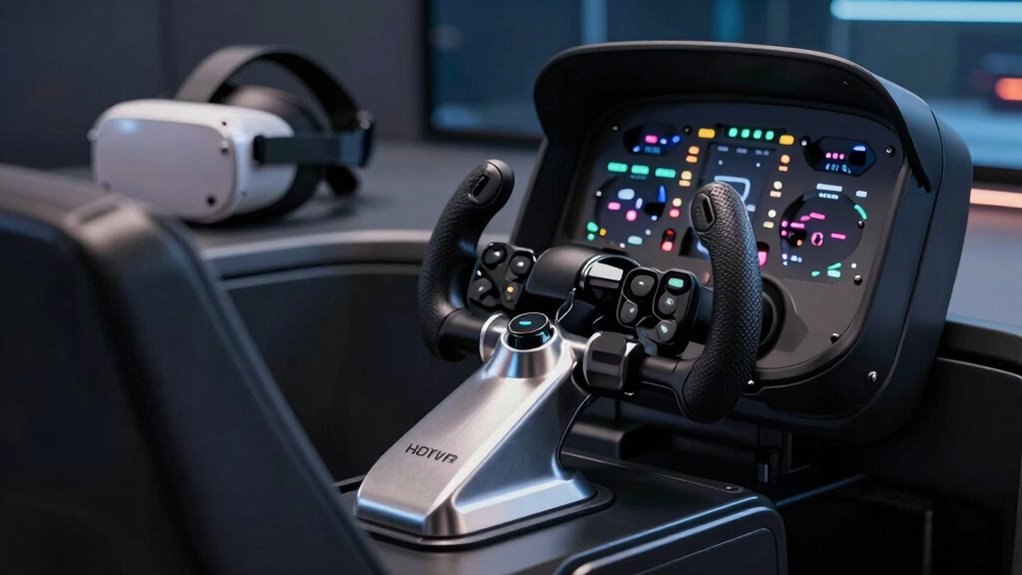

If you’re exploring hotas for VR flight sim, you’re likely seeking a setup that offers precise control, durability, and comfort for extended sessions. The Thrustmaster T.Flight Hotas 5 stands out as the best overall choice due to its balanced performance and compatibility. For those on a tighter budget, the Thrustmaster T-Flight Hotas One offers solid features at a lower price, while the Logitech G X56 HOTAS provides a premium experience with advanced customization options. However, buyers face tradeoffs between realism, ease of use, and cost—higher-end models often deliver more immersive control but can be complex and expensive. Continue reading for a detailed breakdown of each option and which one suits your VR flight sim needs best.

Get the latest gadgets delivered free — and shop member deals
- Fast, free delivery on millions of items
- Access to Prime Big Deal Days deals on October 6–7
- Prime Video, Amazon Music and more included
Complete the kit



Key Takeaways
- The best overall hotas combines precision, build quality, and broad compatibility, with the Thrustmaster T.Flight Hotas 5 leading the pack.
- Budget options like the Thrustmaster T-Flight Hotas One still provide good performance for casual VR flight sims without breaking the bank.
- Premium controllers such as the Logitech G X56 offer extensive customization, but often come with a steeper learning curve and higher price.
- Mounting solutions and space considerations are important—some setups require dedicated space or mounts for optimal use.
- Compatibility across platforms varies; double-check if your VR headset and PC or console are fully supported before purchasing.
| Thrustmaster T.Flight Hotas 5 Microsoft Flight Simulator Edition Flight Stick for PS5, PS4, and PC |  | Best Overall for Microsoft Flight Simulator Enthusiasts | Compatibility: PlayStation 5, PlayStation 4, PC (Windows 10/11) | Control Axes: 5, including Z-axis | Buttons: 14 action buttons | VIEW ON AMAZON | See Our Full Breakdown |
| Thrustmaster T-Flight Hotas One MSFS 2024 Collector Edition – Xbox & PC |  | Best for Xbox and PC Flight Sim Fans Ready for Expansion | Compatibility: Xbox Series X|S and PC | Axes: 5, including Z-axis | Buttons: 14 | VIEW ON AMAZON | See Our Full Breakdown |
| Hikig 2 Pack Desk Mount for Flight Sim Hand-Controller Compatible with Logitech X52, X56, Hotas, Thrustmaster HOTAS Warthog, T.16000M, T.Flight, SimTask Farmstick, Sol-R1, Sol-R2, VKB, VPC, Winwing |  | Best for Customizable, Stable Mounting of Flight Controllers | Compatible Devices: Logitech X52, X56, Thrustmaster T.16000M, VKB, VPC, Winwing | Mounting Type: Tabletop | Weight Capacity: 386 kg | VIEW ON AMAZON | See Our Full Breakdown |
| Logitech G X56 HOTAS Throttle, Joystick, and Pro Flight Rudder Pedals Bundle |  | Best Complete VR Flight Control Bundle | Brand: Logitech G | Model: X56 HOTAS | Included Components: Throttle, joystick, and rudder pedals | VIEW ON AMAZON | See Our Full Breakdown |
| Thrustmaster T-Flight Hotas One Flight Stick & Throttle – Xbox & PC |  | Best Budget-Friendly for Entry-Level Flight Sim Enthusiasts | Compatibility: Windows PC and Xbox Series X|S | Design: Ergonomic, adjustable resistance | Programmable Buttons: Yes | VIEW ON AMAZON | See Our Full Breakdown |
| Thrustmaster T-Flight Hotas X USB Flight Sim Stick & Throttle |  | Best Value for Casual & Intermediate Flight Sim Enthusiasts | Number of action buttons: 12 | Number of axes: 5 | Detachable throttle: Yes | VIEW ON AMAZON | See Our Full Breakdown |
| Thrustmaster HOTAS Warthog A10 Replica Flight Stick & Throttle Set |  | Best for Serious Enthusiasts & Military-Grade Realism | Control Type: Flight stick and throttle set | Compatibility: PC | Material: Mostly metal | VIEW ON AMAZON | See Our Full Breakdown |
| Thrustmaster T16000M FCS HOTAS Flight Stick for PC |  | Best for Precision & Versatility in Intermediate VR Flight Sims | Compatible Devices: PC | Controller Type: Flight Stick | Connectivity Technology: USB | VIEW ON AMAZON | See Our Full Breakdown |
| Logitech G X56 H.O.T.A.S. Throttle and Joystick Flight Simulator Controller |  | Best for Extensive Customization & VR Spaceflight | Color: Black | Platform: PC | Interface: USB | VIEW ON AMAZON | See Our Full Breakdown |
| BUJ Metal Desk Mount for Flight Joysticks and HOTAS Systems |  | Best for Stable, Custom Mounting of HOTAS Systems | Compatible Devices: Various HOTAS systems including Thrustmaster T-Flight X, Logitech G Extreme 3D | Mounting Type: Tabletop | Additional Features: Quick release | VIEW ON AMAZON | See Our Full Breakdown |
| Thrustmaster T-Flight Full Kit HOTAS with Rudder Pedals – Xbox & PC |  | Best Overall for Realism and Versatility | Platform Compatibility: PC & Xbox Series X|S | Included Components: HOTAS flight stick, throttle, rudder pedals | Rudder Pedals: S.M.A.R.T slide rail system, ergonomic support, removable heel rests | VIEW ON AMAZON | See Our Full Breakdown |
| Thrustmaster TFRP Precision Flight Sim Rudder Pedals – PS5, Xbox & PC | 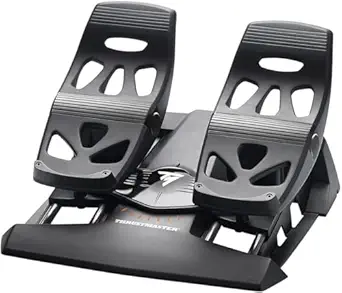 | Best for Precision and Fine Control | Compatibility: PS5, Xbox Series X|S & PC | System: USB and RJ12 connectivity | Sliding System: S.M.A.R.T. sliding rail with four aluminum rails | VIEW ON AMAZON | See Our Full Breakdown |
| Logitech G Saitek X52 Pro Flight Control System – Black/Silver |  | Best for Beginners and Versatile Use | Compatible Devices: PC | Controller Type: Joystick | Connectivity Technology: USB | VIEW ON AMAZON | See Our Full Breakdown |
More Details on Our Top Picks
Thrustmaster T.Flight Hotas 5 Microsoft Flight Simulator Edition Flight Stick for PS5, PS4, and PC
This official Microsoft Flight Simulator licensed stick stands out for its seamless plug-and-play support on PS5, PS4, and PC, making it ideal for dedicated flight sim players. Compared to the Thrustmaster T-Flight Hotas One, it offers a more refined experience with a detachable throttle and adjustable resistance, enhancing comfort and control customization. However, its setup may be overkill for casual gamers or those who don’t prioritize detailed controls, and the optional rudder pedals are sold separately. The 16-bit precision and five axes deliver accurate responsiveness, while the five control axes and 14 buttons support complex maneuvers. The multidirectional hat switch and rapid-fire trigger add to the realism, but the overall setup requires desk or lap space and some adjustment for comfort.
Pros:- Official Microsoft Flight Simulator license ensures compatibility and quality
- Detachable throttle and adjustable resistance improve comfort and customization
- Precise 16-bit control with multiple axes and buttons
Cons:- Dedicated rudder pedals are sold separately, increasing total cost
- Setup may be complex for newcomers or casual players
Best for: Serious Microsoft Flight Simulator players seeking a highly precise, licensed stick with customizable features
Not ideal for: Casual gamers or users with limited space who prefer simple, plug-and-play controllers
- Compatibility:PlayStation 5, PlayStation 4, PC (Windows 10/11)
- Control Axes:5, including Z-axis
- Buttons:14 action buttons
- Trigger:Rapid-fire
- Hat Switch:Multidirectional
- Throttle:Detachable
- Joystick Resistance:Adjustable
- Plug & Play:Yes
Our verdict“This pick best suits dedicated flight sim enthusiasts who want authentic controls and are comfortable with a more involved setup.”
Thrustmaster T-Flight Hotas One MSFS 2024 Collector Edition – Xbox & PC
This licensed flight control system offers high precision with five axes and 14 buttons, making it ideal for those who want a versatile setup on Xbox Series X|S or PC. Its detachable throttle and expandability with pedals mirror the features of the Thrustmaster T.Flight Hotas 5 but with a focus on console use. The 10-bit control precision is slightly less fine than the 16-bit of the Microsoft edition, but it still delivers responsive control. Compared to the Logitech X56 bundle, it emphasizes compatibility with Xbox, but this may limit some advanced customization options. The dual rudder system and adjustable resistance support realistic flying, yet the extra cost of expansion accessories can add up for casual users. Its ergonomic design makes it suitable for long sessions on console or PC, but beginners may find the complexity daunting.
Pros:- Officially licensed by Microsoft with seamless Xbox compatibility
- High precision controls with multiple axes and buttons
- Detachable throttle and expandable with pedals
Cons:- Rudder pedals sold separately, adding to overall cost
- Could be complex for users new to flight simulation
Best for: Xbox players who want a premium, expandable flight stick compatible with PC
Not ideal for: Complete novices seeking a simple, out-of-the-box controller without additional investments
- Compatibility:Xbox Series X|S and PC
- Axes:5, including Z-axis
- Buttons:14
- Precision:10-bit
- Detachable Throttle:Yes
- Rudder System:Dual rudder
- Adjustable Resistance:Yes
- Expandable:Yes, with pedals
Our verdict“This controller is best for Xbox users looking for a high-quality, expandable system that can grow with their skills.”
Hikig 2 Pack Desk Mount for Flight Sim Hand-Controller Compatible with Logitech X52, X56, Hotas, Thrustmaster HOTAS Warthog, T.16000M, T.Flight, SimTask Farmstick, Sol-R1, Sol-R2, VKB, VPC, Winwing
This universal desk mount excels for users who own various flight controllers, providing a stable, adjustable platform that enhances realism. Unlike dedicated hotas systems like the Logitech X56 or Thrustmaster Warthog, this mount focuses on setup flexibility and ergonomic comfort, supporting vertical adjustments to suit different desktop heights. Its weight capacity and secure clamping system prevent slipping during intense flights, making it a reliable choice for VR flight sims where stability matters. However, its heavy weight and tabletop-only design make it less portable and unsuitable for those needing a mobile solution. This mount doesn’t add controls but boosts existing setups, making it ideal for users who already own controllers and want a sturdy, customizable cockpit feel.
Pros:- Supports a wide range of controllers from popular brands
- Adjustable height for ergonomic comfort
- Secure clamping system for stability
Cons:- Heavy weight may be cumbersome for some users
- Limited to tabletop mounting only, no portability
Best for: VR flight sim enthusiasts with multiple controllers seeking a stable, adjustable mounting solution
Not ideal for: Users new to flight sim who need an all-in-one control system or portable setup
- Compatible Devices:Logitech X52, X56, Thrustmaster T.16000M, VKB, VPC, Winwing
- Mounting Type:Tabletop
- Weight Capacity:386 kg
- Item Weight:5.27 kg
- Color:Black
- Adjustability:Vertical
Our verdict“This mount is ideal for advanced users who want a reliable, customizable platform for their existing flight controllers in VR setups.”
Logitech G X56 HOTAS Throttle, Joystick, and Pro Flight Rudder Pedals Bundle
This bundle combines the Logitech G X56 HOTAS throttle and joystick with self-centering Pro Flight Rudder Pedals, offering a comprehensive control setup for serious VR flight sim enthusiasts. Its customizable RGB lighting and tactile controls help create an immersive cockpit environment, with adjustable tension and differential toe brakes supporting precise aircraft handling. Compared to the Thrustmaster T-Flight systems, the X56 bundle provides more advanced control surface customization, but it also involves a steeper learning curve, especially for users unfamiliar with multi-component systems. While the bundle’s complexity suits experienced pilots, beginners might find it overwhelming. The self-centering rudders and adjustable tension give realistic feedback, but the software required for lighting and control customization adds another layer of setup.
Pros:- Complete bundle with throttle, joystick, and rudder pedals
- Highly customizable with RGB lighting and adjustable tension
- Precise control with tactile feedback and differential toe brakes
Cons:- Complex setup with multiple components and software requirements
- Steeper learning curve for new users
Best for: VR flight sim players seeking a high-fidelity, all-in-one control setup with extensive customization
Not ideal for: Beginners or casual players who prefer a simple, plug-and-play experience
- Brand:Logitech G
- Model:X56 HOTAS
- Included Components:Throttle, joystick, and rudder pedals
- Lighting:RGB backlighting
- Rudder Pedal Mechanism:Self-centering
- Pedal Tension:Adjustable
- Braking Control:Differential toe brakes
- Recommended Use:PC and VR flight simulation
Our verdict“This bundle is perfect for dedicated VR flight sim fans who want the most immersive and customizable control environment.”
Thrustmaster T-Flight Hotas One Flight Stick & Throttle – Xbox & PC
The Thrustmaster T-Flight Hotas One offers an accessible yet realistic flight control experience for newcomers on Xbox and PC. Its ergonomic design with adjustable resistance and programmable buttons makes it a versatile choice for various aircraft types. Compared with more complex systems like the Logitech X56, it simplifies the setup process while still providing essential controls, making it suitable for beginners not ready to invest heavily. The detachable throttle adds flexibility, but the control precision is somewhat lower than premium options, which could impact highly detailed flight maneuvers. Also, expansion options like rudder pedals require separate purchases, adding to the initial investment.
Pros:- Affordable, beginner-friendly, with adjustable resistance
- Detachable throttle for flexible setup
- Compatible with PC and Xbox for versatile gaming
Cons:- Requires separate purchase for rudder pedals
- Limited control precision compared to high-end systems
Best for: Entry-level flight sim players on Xbox or PC who want a realistic experience without high costs
Not ideal for: Advanced users or VR players seeking extensive customization or professional-grade controls
- Compatibility:Windows PC and Xbox Series X|S
- Design:Ergonomic, adjustable resistance
- Programmable Buttons:Yes
- Detachable Throttle:Yes
- Expandable:Yes, with rudder pedals
- Connection:USB
Our verdict“This controller makes the most sense for newcomers who want a solid, affordable flight stick with room to expand later.”
Thrustmaster T-Flight Hotas X USB Flight Sim Stick & Throttle
The Thrustmaster T-Flight Hotas X stands out as a versatile entry-level option that offers a comfortable ergonomic design and customizable controls. Compared to the more advanced Thrustmaster T16000M, it sacrifices some precision but provides a more straightforward setup suitable for newcomers. Its detachable throttle and programmable buttons make it flexible, yet it’s limited to PC compatibility and may require manual calibration for peak performance. This pick makes the most sense for casual players or those just starting with VR flight sims who want reliable controls without breaking the bank.Pros:- Ergonomic design ensures comfort during long sessions
- Fully programmable controls for customization
- Detachable throttle offers flexible setup
Cons:- Limited to PC compatibility, restricting use with other platforms
- May require manual calibration for optimal accuracy
Best for: Casual flight sim players or beginners looking for an affordable, plug-and-play HOTAS setup
Not ideal for: Serious sim pilots or users seeking ultra-precise control, as it may lack the fine-tuning needed for advanced VR flight experiences
- Number of action buttons:12
- Number of axes:5
- Detachable throttle:Yes
- Adjustable resistance:Yes
- Compatibility:PC
Our verdict“This HOTAS is ideal for newcomers or casual players who want an affordable, user-friendly control setup for VR flight sims.”
Thrustmaster HOTAS Warthog A10 Replica Flight Stick & Throttle Set
The Thrustmaster HOTAS Warthog offers an authentic, military-grade experience with its durable metal construction and Hall Effect sensors, making it ideal for high-fidelity VR flight simulations. Unlike the T16000M, it provides a more immersive and tactile experience with 55 programmable buttons and dual throttles, but this comes at a significantly higher price and complexity. Its robust build and extensive control options are perfect for seasoned sim pilots willing to invest time in setup, though beginners or casual users might find it overwhelming and costly. This set is best suited for dedicated enthusiasts seeking maximum realism and durability in VR flight experiences.Pros:- Authentic military-grade replica with durable metal build
- High-precision Hall Effect sensors for smooth control
- Extensive 55 programmable controls for customization
Cons:- High price point may be prohibitive for casual users
- Complex setup and configuration required
Best for: Advanced flight sim enthusiasts or military simulation fans who prioritize authenticity and customization
Not ideal for: Casual players or those new to VR flight sims who prefer a simple, plug-and-play solution
- Control Type:Flight stick and throttle set
- Compatibility:PC
- Material:Mostly metal
- Number of programmable buttons:55
- Sensor Technology:Hall Effect (H.E.A.R.T.)
Our verdict“This premium HOTAS set is perfect for dedicated VR flight sim fans who value realism and extensive control options, despite its cost and complexity.”
Thrustmaster T16000M FCS HOTAS Flight Stick for PC
The Thrustmaster T16000M FCS stands out for its high-precision Hall effect sensors, offering smooth and accurate control that rivals the Warthog at a more accessible price point. It features 16 customizable buttons and a comfortable ergonomic design, making it suitable for those who want detailed control without the complexity of the Warthog. Compared to the X-56, it provides a simpler setup with fewer controls but still maintains high accuracy, especially important in VR environments where precision enhances immersion. It may be slightly complex for absolute beginners due to the number of features, but it balances performance and usability well. It’s a solid choice for intermediate VR pilots seeking accuracy without the premium cost.Pros:- High-precision Hall effect sensors for accurate control
- Multiple customizable buttons and axes
- Ergonomic design for extended use
Cons:- May be complex for users unfamiliar with advanced controls
- Requires USB connection, limiting portability
Best for: Intermediate VR flight sim enthusiasts who want precision without the complexity of high-end setups
Not ideal for: Total beginners or casual players who prefer straightforward controls with minimal setup
- Compatible Devices:PC
- Controller Type:Flight Stick
- Connectivity Technology:USB
- Button Quantity:30
- Hardware Platform:PC (Windows 10, 8, 7, Vista)
- Weight:3 pounds
Our verdict“This pick offers a strong balance of precision and usability, making it ideal for serious VR flight sim users who want accuracy without overwhelming complexity.”
Logitech G X56 H.O.T.A.S. Throttle and Joystick Flight Simulator Controller
The Logitech G X56 excels in offering a comprehensive control layout with 189+ programmable controls, RGB lighting, and adjustable stick force, making it highly adaptable for VR flight and space sims. Its twin throttles and mini analog sticks provide nuanced control over complex maneuvers, surpassing the simpler T16000M or Thrustmaster T-Flight in customization. However, it requires two USB 2.0 ports and runs only on Windows, which can limit flexibility and accessibility. Its advanced features make it ideal for VR pilots who crave detailed control and visual feedback, though less experienced players or those with limited PC ports may find it overwhelming. This controller is designed for users seeking maximum control customization in VR environments.Pros:- Extensive programmable controls for complex simulations
- Adjustable stick force with four spring options
- Precise 16-bit axis with hall-effect sensors
Cons:- Requires two USB 2.0 ports, which may be limiting
- Limited to Windows systems, reducing cross-platform flexibility
Best for: VR flight and space sim players who desire extensive programmability and advanced controls
Not ideal for: Casual players or users with limited USB ports or non-Windows systems
- Color:Black
- Platform:PC
- Interface:USB
- Programmable Controls:189+
- Lighting:RGB
- Stick Axis:16-bit
Our verdict“This controller is best suited for VR flight and space sim enthusiasts demanding maximum customization and precision, despite its setup complexity.”
BUJ Metal Desk Mount for Flight Joysticks and HOTAS Systems
The BUJ Metal Desk Mount provides a sturdy, adjustable platform that enhances stability during intense VR flight sessions, making it a practical accessory compared to standalone HOTAS setups like the T-Flight X. Its durable metal construction and silicone padding protect your desk while securing your controls firmly, which is vital during aggressive maneuvers. However, it’s limited to specific compatible models and may be bulky for small desks, adding to the setup’s footprint. This mount makes the most sense for dedicated VR pilots seeking a reliable, stable base for their HOTAS, especially when using heavier or more complex setups like the Warthog or X56.Pros:- Sturdy metal construction ensures durability
- Adjustable clamp fits various desk thicknesses
- Silicone padding prevents desk damage and slippage
Cons:- Limited to listed compatible devices
- Bulky design may be unsuitable for small spaces
Best for: Dedicated VR pilots with compatible HOTAS systems seeking stability and durability
Not ideal for: Casual players or those with small desks who prefer portable or minimal setups
- Compatible Devices:Various HOTAS systems including Thrustmaster T-Flight X, Logitech G Extreme 3D
- Mounting Type:Tabletop
- Additional Features:Quick release
- Material:Metal
- Color:Black
Our verdict“This mount is ideal for VR pilots who want a stable, robust platform for their HOTAS systems, especially heavier models, despite its size limitations.”
Thrustmaster T-Flight Full Kit HOTAS with Rudder Pedals – Xbox & PC
This bundle stands out for its comprehensive approach, offering a full HOTAS setup with rudder pedals that replicate a real cockpit experience. Compared to the Logitech G Saitek X52 Pro, it provides more control options and tactile feedback, making it ideal for serious flight sim enthusiasts. However, the setup process can be complex, and its larger footprint demands ample space, which might deter casual users. The inclusion of smooth, ergonomic rudder pedals and multiple programmable buttons ensures precise control across diverse flight genres. While the cost is higher, the authentic feel and platform compatibility with both PC and Xbox Series X|S make it a flexible choice. Overall, this kit makes the most sense for dedicated flight simmers who want immersive controls and don’t mind a steeper learning curve.
Pros:- Authentic cockpit control with full HOTAS system
- Smooth, ergonomic rudder pedals with advanced support
- Compatible with both PC and Xbox Series X|S
- Extensive control options for various flight genres
Cons:- Complex setup may be daunting for beginners
- Bulkier design requires significant space
- Higher price point may deter casual users
Best for: Serious flight sim players seeking a full, realistic cockpit experience on PC and Xbox.
Not ideal for: Casual gamers or those with limited space who prefer simpler, plug-and-play setups.
- Platform Compatibility:PC & Xbox Series X|S
- Included Components:HOTAS flight stick, throttle, rudder pedals
- Rudder Pedals:S.M.A.R.T slide rail system, ergonomic support, removable heel rests
- Buttons:14 programmable buttons, rapid fire trigger, multidirectional hat switch
- Axes:5 axes
- Additional Features:Official Xbox buttons for social features and menu navigation
Our verdict“This full kit is best suited for dedicated flight sim enthusiasts who prioritize realism and control fidelity over simplicity.”
Thrustmaster TFRP Precision Flight Sim Rudder Pedals – PS5, Xbox & PC
Compared with the Thrustmaster T-Flight Full Kit, the TFRP Rudder Pedals focus solely on delivering highly realistic pedal control, with a smooth sliding rail system and self-centering axis that enhances accuracy. They are ideal for players who want to upgrade their existing setup or prefer dedicated pedals over a full HOTAS system. While the TFRP provides excellent precision and customizable settings via T.A.R.G.E.T. software, it demands secure mounting and a stable surface, which could be a challenge for some. Its compatibility across PS5, Xbox, and PC makes it versatile, but the premium price can be a barrier for casual users. Overall, these pedals make the most sense for experienced flight simmers seeking authentic pedal input and fine-tuned control.
Pros:- Highly realistic and precise pedal control
- Smooth sliding motion with advanced rail system
- Customizable via T.A.R.G.E.T. software
- Compatible across PS5, Xbox, and PC
Cons:- Requires secure mounting for stability
- Setup complexity may challenge newcomers
- Premium pricing limits accessibility for casual users
Best for: Enthusiasts looking to enhance their existing rig with precise rudder control on multiple platforms.
Not ideal for: Beginners or casual players who might find the setup and cost overwhelming without prior experience.
- Compatibility:PS5, Xbox Series X|S & PC
- System:USB and RJ12 connectivity
- Sliding System:S.M.A.R.T. sliding rail with four aluminum rails
- Pedal Type:Self-centering rudder axis, differential brake pedals
- Design:Ergonomic with removable heel rests
- Base:Large, stable base
Our verdict“These pedals are ideal for seasoned flight sim fans seeking authentic, fine control over their rudder inputs across multiple gaming platforms.”
Logitech G Saitek X52 Pro Flight Control System – Black/Silver
The X52 Pro offers a balanced blend of realism and user-friendliness, featuring programmable controls, an LCD display, and illuminated buttons for quick adjustments. Compared to the Thrustmaster T-Flight Full Kit, it is lighter and easier to install, making it accessible for newcomers to VR flight sims. However, its heavier weight can require sturdy mounting solutions, and the complex setup might be intimidating for absolute beginners. The split throttle and stick design provide precise control, especially with detents and resistance adjustments, but it lacks the full cockpit immersion of a dedicated HOTAS setup. This system makes the most sense for those who want a capable, customizable control system without the bulk or high cost of full kits, especially if they mainly fly combat or general aviation sims on PC.
Pros:- Realistic flight controls with programmable options
- Illuminated buttons and LCD display enhance usability
- Adjustable throttle with resistance and detents
- Lightweight and easy to install
Cons:- Heavy weight may need sturdy mounting
- Complex setup could overwhelm beginners
- Limited to PC, not compatible with Xbox consoles
Best for: Entry-level flight sim enthusiasts desiring customizable controls in a compact, PC-compatible package.
Not ideal for: Those seeking full HOTAS immersion or platform-specific integration with Xbox or newer systems.
- Compatible Devices:PC
- Controller Type:Joystick
- Connectivity Technology:USB
- Additional Features:LCD multi-function display, programmable buttons
- Button Quantity:16
- Hardware Platform:PC
Our verdict“This system is best for newcomers or intermediate players wanting a customizable, space-efficient flight control for PC-based VR flight sims.”
How We Picked
To determine the best hotas for VR flight sim, I focused on several key criteria: performance accuracy, build quality, compatibility with VR setups, ease of use, and overall value. I prioritized controllers that offer precise control inputs necessary for realistic flight simulation while also considering comfort during extended sessions. Durability and ease of setup were also important, especially for users who may need to mount their hotas or integrate it into a full VR cockpit. The ranking reflects a combination of these factors, favoring models that balance realism with accessibility and value. Cost was considered but secondary to functionality and user experience, ensuring selections meet the needs of both casual and serious flight enthusiasts.Factors to Consider When Choosing Hotas For Vr Flight Sim
Choosing the right hotas for VR flight sim involves balancing several factors to match your experience level, budget, and setup. A good hotas should deliver precise inputs, be comfortable for long use, and seamlessly integrate with your VR hardware. Understanding these considerations helps avoid common pitfalls like overspending on features you don’t need or choosing incompatible models that limit your experience. Let’s explore the key factors to keep in mind when selecting the ideal hotas for your virtual flying adventures.Compatibility and Platform Support
Before investing, verify that the hotas supports your VR headset and platform—whether PC, Xbox, or PlayStation. Not all controllers are cross-compatible, which can lead to frustration or the need for additional adapters. Some models are specifically optimized for certain systems, offering better plug-and-play integration. Incompatible controllers may require workarounds or software tweaks, which can detract from the immersive experience. Prioritizing compatibility ensures a smoother setup and more reliable performance during your flights.
Precision and Control Fidelity
High-fidelity control inputs are vital for realistic flight simulation, especially in VR where tactile feedback enhances immersion. Look for controllers with high-resolution sensors, smooth stick movements, and responsive buttons. Features like adjustable tension and programmable controls add to the customization, allowing you to tailor the hotas to your flying style. Cheaper models may sacrifice input accuracy, leading to less precise maneuvers and frustration. Investing in a controller with proven precision can significantly elevate your VR flight experience.
Build Quality and Comfort
A sturdy build ensures your hotas withstands frequent use, while ergonomic design reduces fatigue during long flights. Consider the materials—metal components tend to last longer and feel more authentic than plastic ones. Check for adjustable components like throttle and stick angles to fit your body and setup. Comfort is especially important in VR, where physical strain can break immersion; a well-designed hotas minimizes hand fatigue and offers a natural grip. Remember, a comfortable hotas encourages longer, more enjoyable flight sessions.
Mounting Options and Space Requirements
Some hotas models are designed for desktop use, while others offer mounting features for a more integrated setup. If you have limited space, consider options that include clamps or mounting brackets, or plan for a dedicated flight sim cockpit. Stable mounting prevents unwanted movement during intense maneuvers, enhancing control accuracy. Be mindful of your workspace size and whether you prefer a portable setup or a permanent, dedicated station. Proper mounting also helps in maintaining consistent control feel, which is crucial in VR environments.
Price and Value for Money
Prices for hotas controllers vary widely, reflecting differences in features, build quality, and realism. While high-end models offer the most authentic experience, they come at a premium cost. Budget options provide a decent entry point but may lack advanced features or durability. Consider how much you’re willing to invest based on your flying frequency and desired level of realism. Sometimes, paying a bit more upfront yields a controller that lasts longer and delivers a better overall experience, making it a smarter long-term investment.
Frequently Asked Questions
Can I use a hotas for VR flight sim without a dedicated mounting setup?
Yes, many hotas controllers are designed for desktop use and can be operated without a dedicated mount. However, stability is key—if the hotas shifts during intense maneuvers, it can affect control accuracy. Using clamps or simple mounts can improve stability without requiring a full cockpit setup. For casual VR flight sims, a sturdy desk or table may suffice, but for more immersive and precise control, a dedicated mounting solution enhances the experience significantly.
Are more expensive hotas controllers worth the investment for VR flight sims?
Higher-priced hotas controllers typically offer better build quality, more precise inputs, and advanced features like programmable buttons and customization options. If you spend many hours in VR flight sims or seek a highly realistic experience, investing in a premium model can be worthwhile. However, for casual users or beginners, mid-range options often provide excellent value without the steep price. It’s important to match the controller’s features with your level of engagement and budget to avoid overspending on unnecessary features.
Do I need special features for VR compatibility?
Most modern hotas controllers are compatible with VR setups, but certain features enhance the experience. Look for controllers with smooth, responsive sticks and buttons that can be easily mapped within your flight sim software. Some models offer haptic feedback or adjustable tension that add to immersion. Compatibility with your VR hardware’s tracking and input systems is also crucial—double-check manufacturer specs to ensure seamless integration, reducing setup hassle and maximizing control fidelity.
Is a dedicated throttle necessary for VR flight sims?
While not strictly necessary, a dedicated throttle significantly improves realism and control during VR flight sessions. It allows for more precise engine and weapon management, mimicking real aircraft controls. Budget controllers often include a basic throttle, but premium models offer more granular control with adjustable tension and multiple axes. For serious flight sim enthusiasts, investing in a dedicated throttle enhances immersion and control fidelity, especially in VR where tactile feedback is limited.
How important is the size and weight of a hotas for VR use?
Size and weight influence both comfort and stability during use. Heavier, well-built controllers tend to feel more substantial and reduce unwanted movement, which is vital in VR to maintain immersion. Smaller or lightweight models are easier to transport and set up but may lack the durability or stability needed for vigorous flying. Consider your available space and how often you’ll move or adjust your setup—balance portability with stability to find the best fit for your VR flight experience.
Conclusion
For casual VR flight sim enthusiasts, the Thrustmaster T-Flight Hotas One provides an affordable yet reliable experience. Serious sim pilots seeking realism should consider the Logitech G X56 for its customization and precision, while those wanting the ultimate in authenticity and durability might opt for the Thrustmaster HOTAS Warthog. Beginners will benefit from models with straightforward controls, whereas advanced users should prioritize controllers with extensive programmability. Ultimately, choosing the right hotas depends on your budget, space, and how immersive you want your VR flying experience to be.Evergreen bestsellers Picks
bestsellers
As an affiliate, we earn on qualifying purchases.