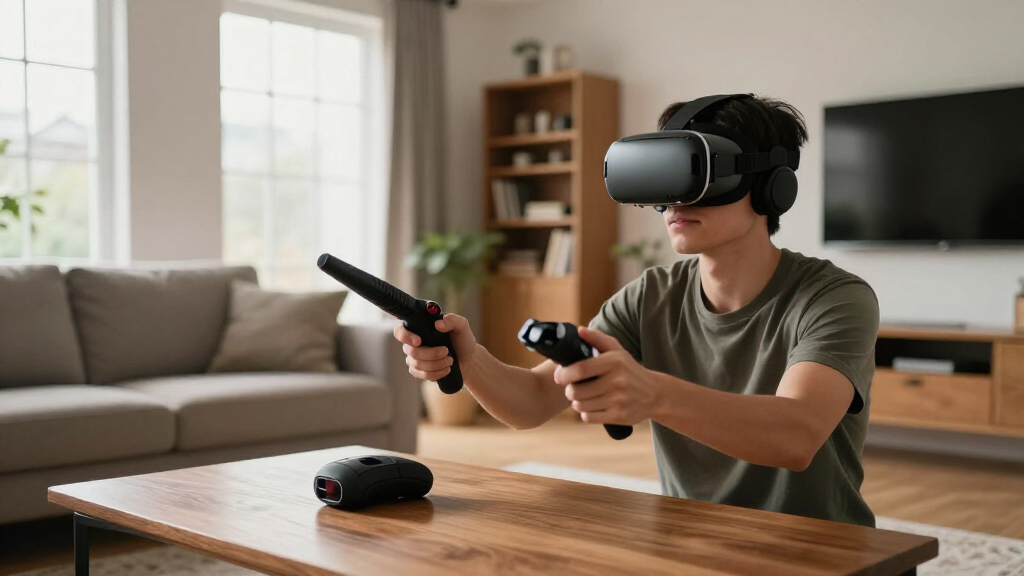
If you’re looking for the best flight stick for VR, you’ll find a range of options that balance realism, comfort, and compatibility. The DeadEyeVR Advanced Flight Stick stands out for its magnetic HOTAS design, offering precise control, while the Thrustmaster T16000M FCS provides excellent value with reliable performance. Many options struggle with balancing immersive controls and ease of setup, often forcing buyers to choose between premium features and affordability. Continue reading for a detailed comparison to help you pick the right flight stick for your VR setup.
Get ready for Prime Big Deal Days — try Prime free
Exclusive member deals on October 6–7, plus fast free delivery. Cancel anytime.
Start your free trialAs an affiliate, we earn on qualifying purchases.
Complete the kit



Key Takeaways
- The most expensive models tend to offer the best build quality and more extensive customization options.
- Compatibility with VR headsets and PCs varies, so matching the flight stick to your hardware is critical.
- Magnetic HOTAS systems like DeadEyeVR provide superior precision but often come at a higher price point.
- Entry-level options like Thrustmaster T-Flight Hotas X are more affordable but may lack some advanced features.
- Comfort and layout significantly impact long gaming sessions, making ergonomic design a key consideration.
| DeadEyeVR Advanced Flight Stick – Magnetic HOTAS Joystick Adapter |  | Best VR-specific modular flight control | Compatibility: Touch controllers | Handle: Detachable magnetic handle | Range of Motion: Wide spherical movement | VIEW ON AMAZON | See Our Full Breakdown |
| GRS Arcade Flight Stick |  | Best for nostalgic and classic arcade flight games | Compatible Devices: Windows | Controller Type: Joystick | Connectivity Technology: USB | VIEW ON AMAZON | See Our Full Breakdown |
| Tyco Tech HOTAS Flight Stick System for Meta Quest VR Headsets |  | Best fully customizable VR HOTAS system | Compatibility: Meta Quest 2, Quest 3, Quest 3s, Quest Pro | Control Type: Joystick | Material: ABS, PLA Plus, Steel | VIEW ON AMAZON | See Our Full Breakdown |
| Thrustmaster T16000M FCS Flight Pack (Compatible with PC) |  | Best high-precision PC flight joystick | Compatibility: PC via USB | Buttons: 16 action buttons | Hat Switch: 8-way | VIEW ON AMAZON | See Our Full Breakdown |
| Thrustmaster T-Flight Hotas X USB Flight Sim Stick & Throttle – PC |  | Best for casual PC flight enthusiasts | Number of action buttons: 12 | Number of axes: 5 | Detachable throttle: Yes | VIEW ON AMAZON | See Our Full Breakdown |
| Logitech G X56 H.O.T.A.S Throttle and Joystick Flight Simulator Controller |  | Best for Serious Flight Sim Enthusiasts and Professional-Grade VR | Control Surface Options: All control surfaces required for flight simulation | Programmable Controls: 189 | Lighting: RGB backlighting | VIEW ON AMAZON | See Our Full Breakdown |
| flight stick for vr | Compatibility |
|---|---|
| DeadEyeVR Advanced Flight Stic | Touch controllers |
| GRS Arcade Flight Stick | — |
| Tyco Tech HOTAS Flight Stick S | Meta Quest 2, Quest 3, Quest 3s, Quest Pro |
| Thrustmaster T16000M FCS Fligh | PC via USB |
| Thrustmaster T-Flight Hotas X | PC |
| Logitech G X56 H.O.T.A.S Throt | Windows 7, 8.1, 10, 11 |
More Details on Our Top Picks
DeadEyeVR Advanced Flight Stick – Magnetic HOTAS Joystick Adapter
This flight stick stands out for transforming your touch controllers into a realistic flight experience with a simple magnetic attachment. Unlike traditional physical sticks like the Thrustmaster T16000M FCS, it offers a more immersive, VR-centric solution without the need for dedicated hardware. The wide spherical motion provides a natural feel, but it’s limited to compatible touch controllers, which could restrict setup flexibility. For VR pilots seeking an easy-to-use, immersive adapter, this makes a compelling choice, though it may require additional mounting accessories for certain configurations.
Pros:- Easy to attach and detach touch controllers
- Provides a wide range of motion for realistic flight simulation
- Simple setup process
Cons:- Limited to compatible touch controllers
- May require additional mounting accessories for certain setups
Best for: VR users who want a quick, immersive flight control using their existing touch controllers
Not ideal for: PC gamers seeking a dedicated, high-precision joystick with extensive customization options
- Compatibility:Touch controllers
- Handle:Detachable magnetic handle
- Range of Motion:Wide spherical movement
- Includes:Controller cup, spherical base, velcro strips, velcro pads
- Made in:USA
Our verdict“This pick is best for VR enthusiasts seeking a quick, immersive attachment that leverages existing controllers.”
GRS Arcade Flight Stick
The GRS Arcade Flight Stick excels for fans of classic arcade flight titles like TRON and After Burner, featuring an industrial-grade design that feels durable and authentic. Its switchable 4 and 8-way restrictor makes it versatile for different game styles, but it’s primarily suited for PC with USB connectivity and doesn’t include an encoder board, which could complicate setup for beginners. Compared to more advanced or VR-oriented options, this stick prioritizes retro arcade feel, making it less suitable for modern VR flight sims.
Pros:- Industrial arcade-quality design
- Switchable restrictor for 4 and 8-way control
- Easy to install and compatible with most classic flight games
Cons:- USB encoder board not included, adding setup complexity
- Limited compatibility details and features
Best for: Players who enjoy vintage arcade-style flight games on PC and prefer a robust, tactile joystick
Not ideal for: VR users or those seeking highly customizable or modern flight controls
- Compatible Devices:Windows
- Controller Type:Joystick
- Connectivity Technology:USB
- Button Quantity:8
- Hardware Platform:PC
Our verdict“Ideal for nostalgic gamers who want a durable, arcade-style flight stick for classic PC games.”
Tyco Tech HOTAS Flight Stick System for Meta Quest VR Headsets
The Tyco Tech HOTAS Flight Stick System offers a high level of realism for Meta Quest VR users, with adjustable tension and a smooth throttle, making it a strong choice for immersive VR flight experiences. Unlike the DeadEyeVR Adapter, which is controller-based, this system provides a dedicated physical stick, but it doesn’t include VR controllers itself, requiring users to have compatible headsets. Its 3D printed build and tension customization appeal to enthusiasts willing to fine-tune their setup, though it’s not compatible with some popular titles like Star Wars Squadrons.
Pros:- Provides realistic flight control in VR
- Customizable tension for personalized feel
- High-quality 3D printed construction
Cons:- Does not include VR controllers
- Not compatible with some popular VR flight titles
Best for: VR users with Meta Quest who want a tactile, customizable HOTAS system for flight sims
Not ideal for: VR players seeking plug-and-play or compatibility with all VR flight games without additional setup
- Compatibility:Meta Quest 2, Quest 3, Quest 3s, Quest Pro
- Control Type:Joystick
- Material:ABS, PLA Plus, Steel
- Adjustable Tension:Yes, 4-8 elastic bands
- Includes:HOTAS system only
Our verdict“Best suited for dedicated VR pilots who want a customizable, physical HOTAS experience on Meta Quest.”
Thrustmaster T16000M FCS Flight Pack (Compatible with PC)
The Thrustmaster T16000M FCS Flight Pack offers a comprehensive setup for serious PC flight sim enthusiasts, with 16 programmable action buttons and a twist rudder for precise control. Compared to simpler controllers like the Thrustmaster T-Flight Hotas X, it provides more axes and customization options, but it requires software setup through T.A.R.G.E.T to unlock full potential. Its ambidextrous design makes it suitable for both hands, but it’s limited to PC, which excludes VR or console users.
Pros:- High precision with H.E.A.R.T technology
- Ambidextrous design for flexible use
- Full customization via T.A.R.G.E.T software
Cons:- Requires software configuration for full features
- Limited to PC compatibility
Best for: Dedicated PC flight sim players who want precision and extensive customization
Not ideal for: Console or VR users looking for plug-and-play or integrated controls
- Compatibility:PC via USB
- Buttons:16 action buttons
- Hat Switch:8-way
- Axes:4 including twist rudder
- Ambidextrous:Yes
Our verdict“Ideal for PC users who prioritize accuracy and custom control profiles for serious flight simulation.”
Thrustmaster T-Flight Hotas X USB Flight Sim Stick & Throttle – PC
The Thrustmaster T-Flight Hotas X combines affordability with a full-size, ergonomic design that’s suitable for both civil and military flight games. Its programmable throttle and adjustable resistance allow for a tailored experience, and the detachable throttle adds flexibility. When compared to the more advanced Thrustmaster T16000M FCS, it’s more accessible for beginners but offers fewer axes and less overall precision. It’s a straightforward choice for casual players who want a reliable, ready-to-go setup.
Pros:- Ergonomic design for comfort
- Fully programmable controls
- Detachable throttle for flexible setup
Cons:- Limited to PC only
- Fewer axes and features than higher-end models
Best for: Casual PC flight gamers looking for an easy-to-use, adjustable stick and throttle combo
Not ideal for: Serious flight sim pilots seeking extensive customization or VR compatibility
- Number of action buttons:12
- Number of axes:5
- Detachable throttle:Yes
- Compatibility:PC
- Adjustable resistance:Yes
- Built-in memory:Yes
Our verdict“Best for casual or beginner PC flight enthusiasts seeking a straightforward, comfortable control setup.”
Logitech G X56 H.O.T.A.S Throttle and Joystick Flight Simulator Controller
The Logitech G X56 H.O.T.A.S stands out for its high level of customization and precision, making it a top choice for dedicated flight sim players who want a realistic experience. Compared to the Thrustmaster T16000M FCS Flight Pack, which offers excellent accuracy at a lower price, the X56 provides more programmable controls (189 vs. fewer on T16000M), and RGB lighting for better visual integration with high-end setups. However, its complex setup and requirement for multiple USB ports could overwhelm beginners or those with limited system resources. Its 16-bit hall-effect sensors deliver precise control, ideal for VR pilots who demand accuracy. The twin throttles with friction adjustment further enhance realism, but the premium price makes it less accessible for casual users.
Pros:- Highly customizable with 189 programmable controls
- Accurate 16-bit hall-effect sensors for precise control
- RGB backlighting enhances visual integration with high-end setups
- Twin throttles with friction adjuster and throttle lock
Cons:- Requires multiple USB ports, limiting on some systems
- Complex setup may be intimidating for beginners
- Premium price point may be prohibitive for casual users
Best for: Serious flight sim fans and VR users who prioritize customization and realism over simplicity and cost
Not ideal for: Casual gamers or VR newcomers seeking an easy plug-and-play experience without extensive setup
- Control Surface Options:All control surfaces required for flight simulation
- Programmable Controls:189
- Lighting:RGB backlighting
- Connectivity:2x USB ports
- Compatibility:Windows 7, 8.1, 10, 11
- Control Sensors:16-bit hall-effect sensors
- Throttle:Twin throttles with friction adjuster and throttle lock
- Cable Length:2 meters
Our verdict“This controller is best suited for VR flight enthusiasts who want professional-grade customization and are comfortable with complex setup processes.”
How We Picked
These products were selected based on a combination of performance, build quality, compatibility with VR systems, user reviews, and overall value. Priority was given to controllers that offer precise control and immersion, which are essential for VR flying experiences. We also considered ease of setup and durability, ensuring each pick is practical for different user levels. The ranking reflects a balance between premium features and affordability, helping different types of buyers find suitable options.| flight stick for vr | Compatibility |
|---|---|
| DeadEyeVR Advanced Flight Stic | Touch controllers |
| GRS Arcade Flight Stick | — |
| Tyco Tech HOTAS Flight Stick S | Meta Quest 2, Quest 3, Quest 3s, Quest Pro |
| Thrustmaster T16000M FCS Fligh | PC via USB |
| Thrustmaster T-Flight Hotas X | PC |
| Logitech G X56 H.O.T.A.S Throt | Windows 7, 8.1, 10, 11 |
Factors to Consider When Choosing Flight Stick For Vr
Choosing the right flight stick for VR involves several factors that go beyond basic features. It’s important to consider compatibility with your VR headset and PC, as well as the feel and layout of the controls. Ergonomics can make or break long gaming sessions, so comfort should be prioritized. Additionally, look at the customization options and build quality to ensure your setup lasts over time. Budget constraints also influence whether you opt for high-end precision or more affordable, functional models.Compatibility with VR and PC
Ensuring your flight stick works seamlessly with your VR headset and PC setup is vital. Some controllers are designed specifically for PC, while others may require adapters or additional software. Check the manufacturer’s specifications to confirm VR support, especially if you plan to use it with popular titles. Compatibility issues can result in lag or control problems, reducing immersion and enjoyment.
Control Precision and Feedback
High-precision controls and force feedback can significantly improve the realism of VR flying. Magnetic HOTAS systems like DeadEyeVR excel here, providing smooth, responsive movements that mimic real aircraft controls. Cheaper models may lack this nuance, leading to a less immersive experience. Consider how much control fidelity matters for your gaming style and whether force feedback enhances your enjoyment.
Ergonomics and Comfort
Long VR sessions demand a controller that fits comfortably in your hands and offers intuitive button placement. An ergonomic design reduces fatigue and allows for quicker reactions during intense flying sequences. Some models feature adjustable grips or customizable layouts, which can tailor the experience to your preferences. Skipping this consideration might lead to discomfort or even injury over prolonged use.
Build Quality and Durability
Durability matters, especially if you plan to use your flight stick frequently. Higher-end models often feature metal components and reinforced bases, while budget options may use plastic that wears over time. A well-built controller maintains precise control and avoids the frustration of broken parts. Investing in quality can save money and hassle in the long run.
Price and Value
Balancing cost against features is key. While premium models offer advanced controls and better build quality, they come with higher price tags. Conversely, affordable options can provide good basic functionality but may lack customization and realism. Consider your budget and how important immersion and control fidelity are to your VR flying experience. Sometimes, spending a bit more yields a significantly better experience that lasts years.
Frequently Asked Questions
Can I use a flight stick for VR without additional software?
Most flight sticks are designed to work with standard drivers and don’t require extra software for basic functionality. However, to unlock advanced features like button remapping or force feedback customization, you might need dedicated software. Compatibility with VR is generally seamless if the device is recognized by your PC, but always check the manufacturer’s specs to confirm VR support.
Is force feedback necessary for an immersive VR experience?
Force feedback enhances realism by providing tactile responses that mimic aircraft movements, which can heighten immersion in VR. While not essential, it adds a layer of sensory feedback that can make flying feel more authentic. If you prioritize immersion and have a higher budget, a force feedback-enabled flight stick is worth considering.
How important is the number of buttons on a flight stick for VR?
Having enough programmable buttons is crucial for accessing various controls quickly without breaking immersion. In VR, where your view is often centered on the virtual cockpit, physical buttons that are easy to reach can significantly improve gameplay. However, more buttons also mean a steeper learning curve, so choose an option that balances accessibility with simplicity based on your experience level.
Can I upgrade my flight stick later if I start with a budget model?
Yes, most flight sticks are modular and can be replaced or upgraded over time. Starting with an entry-level model allows you to test your interest in VR flying without a large initial investment. As your skills grow, you can switch to higher-end controllers that offer better precision, build quality, and customization. Just ensure your current setup is compatible with future upgrades.
What is the typical lifespan of a VR flight stick?
The lifespan depends on build quality and usage frequency. Higher-end models with metal components can last several years with proper care, while cheaper plastic models might wear out sooner. Regular maintenance, such as cleaning and avoiding excessive force, can extend the life of your device. Investing in a durable model is especially worthwhile if you plan to use it regularly for VR flights.
Conclusion
If you want the best overall experience, the DeadEyeVR Advanced Flight Stick offers unmatched control and immersion, perfect for serious VR pilots. For those on a budget, the Thrustmaster T-Flight Hotas X provides reliable performance without breaking the bank, making it ideal for beginners. The Logitech G X56 stands out as a premium choice with extensive customization for dedicated enthusiasts. If you’re new to flight sims and want an easy setup, consider models with ergonomic layouts and straightforward controls. Ultimately, matching your budget, hardware setup, and flying style will lead you to the right choice.
NFL season / tailgating Picks
team gear
As an affiliate, we earn on qualifying purchases.