Smart displays are quietly replacing old control panels because they offer you a more intuitive and customizable way to manage connected devices. You can use voice commands to control functions easily, reducing the need for manual buttons or switches. They respond faster, minimize errors, and often learn your habits for better automation. Plus, their sleek design improves overall aesthetics. If you keep exploring, you’ll discover how these innovative systems are transforming environments effortlessly.
Key Takeaways
- Smart displays offer intuitive, voice-enabled interfaces that simplify system control and reduce manual errors.
- They allow personalized customization, making operation easier for multiple users without complex manuals.
- Seamless integration with connected devices creates a cohesive, automated environment responsive to user needs.
- These displays enhance operational efficiency and environment adaptability across industries and commercial spaces.
- They support automation and touch control, gradually replacing manual control panels with sleek, intelligent solutions.

Smart displays are replacing control panels in various industries at a rapid pace. You notice this shift in settings like manufacturing plants, smart homes, and commercial spaces. You notice this shift in settings like manufacturing plants, smart homes, and commercial spaces. The reason is simple: smart displays offer a more intuitive, efficient way to manage complex systems. Instead of fiddling with buttons and switches, you can simply talk to the display, thanks to voice recognition technology. This feature allows you to control lights, adjust temperatures, or operate machinery hands-free, making your tasks quicker and less cumbersome. It also reduces errors, as voice commands are processed directly and accurately, minimizing misinterpretations that can happen with manual controls.
Beyond voice recognition, user customization plays a significant role in the appeal of these new systems. You can tailor the interface to suit your preferences, whether that means setting up personalized dashboards or choosing specific voice commands that feel most natural to you. This customization means you don’t have to learn a complicated manual every time you want to change settings. Instead, you can create a user-friendly environment that adapts to your needs, enhancing both usability and productivity. When you have multiple users, each can set up their preferred controls, making the system more versatile and accessible for everyone involved. User interface design is a crucial aspect of these systems, ensuring they are accessible and easy to operate for everyone.
Smart displays also integrate seamlessly with other connected devices, creating a cohesive environment that responds to your commands instantly. For instance, in a smart home, you can ask your display to lower the blinds, turn on the coffee maker, or check security cameras—all through voice commands or simple touch interactions. This interconnectedness streamlines your routines and reduces the need for multiple remote controls or manual adjustments. Because these displays are designed to learn from your habits, they evolve over time, becoming more intuitive and responsive to your specific needs. Additionally, the connectivity features allow for real-time updates and remote management, further enhancing their practicality.
The shift from traditional control panels to smart displays isn’t just about convenience; it’s about empowering you to manage systems more effectively. With voice recognition and user customization, these displays put control at your fingertips—or better yet, at your voice. They adapt to your preferences, simplify complex operations, and make your environment smarter and more responsive. As more industries adopt this technology, you’ll find that the days of clunky, manual control panels are fading into the past, replaced by sleek, intelligent displays that understand and anticipate your needs.
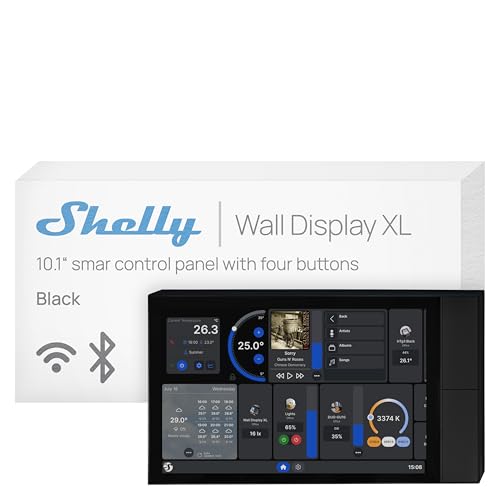
Shelly Wall Display XL Black – 10.1 Inch Touchscreen WiFi Smart Home Control Panel, Built-in 5A Relay, Works with Alexa, Google, HomeKit, Home Assistant, 4 Buttons, Lux Sensor, Neutral Wire Required
Shelly Wall Display XL Black is a sleek 10.1” Wi-Fi smart home control panel with built-in relay switching…
As an affiliate, we earn on qualifying purchases.
As an affiliate, we earn on qualifying purchases.
Frequently Asked Questions
How Secure Are Smart Displays Against Hacking Attempts?
Smart displays are relatively secure, but you should stay alert to hacking vulnerabilities. They use encryption protocols to protect your data, making it harder for hackers to access sensitive information. However, no device is completely invulnerable. You can improve security by regularly updating software, using strong, unique passwords, and enabling two-factor authentication. Staying cautious helps keep your smart display safe from potential hacking attempts.
Can Smart Displays Operate Without an Internet Connection?
Smart displays generally require an internet connection for full functionality, but some models offer offline functionality through local control. This means you can often operate basic features, like adjusting settings or viewing information, without being connected online. However, more advanced features, such as voice commands or remote access, usually depend on an active internet connection. So, while offline control is possible, it’s limited compared to online operation.
What Is the Typical Lifespan of a Smart Display Device?
A smart display typically lasts around 3 to 5 years, but device durability and battery longevity vary by model. You can expect newer devices to be more robust, with better build quality and longer-lasting batteries. Regular updates and careful handling extend its lifespan. To maximize your device’s longevity, keep it clean, avoid extreme temperatures, and follow manufacturer recommendations. Eventually, hardware wear and technological advancements may require replacement.
Are Smart Displays Compatible With All Existing Control Systems?
You might find that smart displays don’t seamlessly blend with all existing control systems, facing compatibility challenges like fitting puzzle pieces that don’t quite match. While they excel with modern setups, legacy integration can be tricky, requiring adapters or custom solutions. This means you should check whether your current system is compatible before upgrading, ensuring a smooth shift rather than a forced fit.
How Do Smart Displays Handle Data Privacy Concerns?
Smart displays handle data privacy concerns by using data encryption to protect your information during transmission and storage. They also require user authentication, such as passwords or biometric verification, to guarantee only authorized individuals access sensitive data. This combination helps keep your personal and control system data secure, giving you peace of mind as smart displays become more common in managing your home or workplace environments.

Domars AR Smart Glasses with Display Screen, Built-in HD Camera & Ring Control, AI HUD Privacy Teleprompter Glasses for Speech, 268-Language Offline Translator for Business, Study Abroad and Travel
FLAWLESS PRESENTATIONS WITH INVISIBLE TELEPROMPTER: Step onto any stage or in front of the camera with absolute confidence….
As an affiliate, we earn on qualifying purchases.
As an affiliate, we earn on qualifying purchases.
Conclusion
Think of smart displays as the new lighthouse guiding your home’s technology. They stand tall and bright, quietly replacing the old, flickering control panels that once led the way. As you navigate your daily routines, these modern beacons make everything smoother and more intuitive. Soon, the outdated controls will fade into the shadows, replaced by the steady glow of smarter, sleeker interfaces—illuminating your life with ease and innovation.

5-inch Touch Screen Control Panel Replacement Parts Compatible for Bambu Lab P1P and P1S 3D Printers Accessories
Dedicated Compatibility for P1P & P1S – This 5-inch touch screen control panel is designed specifically as a…
As an affiliate, we earn on qualifying purchases.
As an affiliate, we earn on qualifying purchases.

Amazon Echo Hub (newest model), 8” smart home control panel, Designed for Alexa+, Compatible with thousands of devices
Echo Hub — An easy-to-use Alexa-enabled control panel for your smart home devices—just ask Alexa or tap the…
As an affiliate, we earn on qualifying purchases.
As an affiliate, we earn on qualifying purchases.