By customizing your fan curves, you can achieve quieter operation and better cooling efficiency. Instead of sticking to default speeds, you can set fans to run only when needed, reducing noise and energy use. Adjusting the curves allows you to find the “sweet spot” where airflow meets minimal noise. If you want to learn how to fine-tune your system for best silence and performance, keep exploring this essential tweak.
Key Takeaways
- Many overlook fan curves, missing the chance to balance noise and cooling efficiency effectively.
- Proper fan curve adjustments can significantly reduce fan noise during low-demand periods.
- Understanding and customizing fan curves prevents unnecessary high-speed fan operation.
- Fine-tuning fan curves optimizes thermal management while maintaining a quieter system.
- Skipping fan curve tweaks can lead to louder operation and decreased system lifespan.

Understanding fan curves is essential if you want to optimize your cooling system, whether for a computer, HVAC setup, or industrial process. Fan curves graphically show how a fan’s airflow (measured in CFM) varies with pressure, helping you fine-tune performance for both efficiency and noise reduction. Many overlook these curves, missing out on quieter operation and better thermal management. When you understand the relationship between fan speed and airflow, you can avoid running fans at full blast constantly, which often leads to unnecessary noise levels. Instead, you can set your system to operate at ideal points where airflow meets thermal demands without creating disruptive sound.
By analyzing fan curves, you realize that running fans at maximum speed isn’t always necessary. In many cases, a slight reduction in speed can considerably lower noise levels while still maintaining effective thermal management. This is especially important in environments where noise pollution is a concern, like offices or living spaces. You can adjust fan settings or control algorithms to keep temperatures within safe limits, but without the constant whine of high-speed fans. This balance not only creates a quieter environment but can also extend the lifespan of your fans, as they aren’t pushed to their limits constantly. Understanding fan curves also enables you to better anticipate how your system will respond to varying workloads and environmental conditions. Recognizing the importance of system efficiency plays a significant role in achieving optimal fan operation.
Furthermore, understanding these curves helps you identify the most efficient operating point for your fans. Instead of relying on default or arbitrary speeds, you optimize for a sweet spot where airflow is sufficient, and noise is minimized. It’s a smart way to maximize your system’s energy efficiency and reduce wear and tear. Proper thermal management relies on this knowledge too—knowing how much airflow you need at different temperature thresholds allows you to set fan curves that ramp up only when necessary. This targeted approach prevents overheating while avoiding the constant noise associated with fans running at full speed. Additionally, fan curve analysis can help you troubleshoot performance issues more effectively, saving time and resources. Gaining a clear understanding of fan performance characteristics can also lead to more precise and reliable cooling solutions.
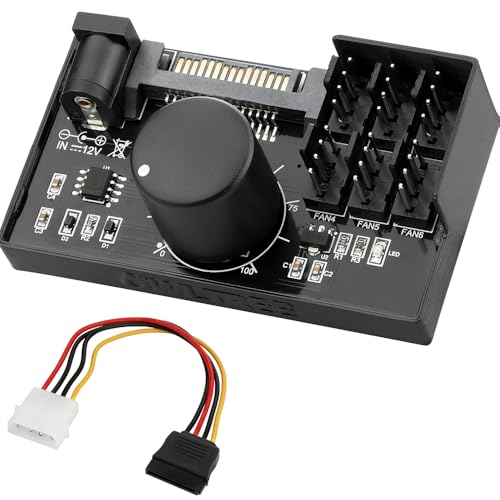
4 Pin 12V PWM Fan Controller 6 Fans Supported , PC Fan Adapter Hub Powered by SATA and DC 5525, Cooling Fan Speed Knob with Max Total 60W 5A Output
- Fan Support: Supports 6 PWM 4-pin fans
- Power Compatibility: Compatible with SATA and DC 5525
- Power Output: Max 60W total power
As an affiliate, we earn on qualifying purchases.
As an affiliate, we earn on qualifying purchases.
Frequently Asked Questions
Can Fan Curves Improve Noise Levels Without Affecting Cooling?
Yes, adjusting fan curves can improve noise levels without harming cooling efficiency. You can set fans to run at lower speeds when temperatures are manageable, reducing fan noise considerably. This tweak allows your system to stay cool during light loads while remaining quiet, giving you a better experience. Just make certain you don’t lower fan speeds too much, or cooling might become less effective during heavy workloads.
Are Fan Curves Compatible With All Types of Cooling Systems?
Fan curves are compatible with most cooling systems, but your focus should be on thermal management and hardware compatibility. You can tailor fan speeds to optimize noise levels and cooling efficiency, regardless of whether you use air cooling, liquid cooling, or hybrid setups. However, make certain your system’s fans and controllers support customizable fan curves, and check if your hardware can handle the adjustments without risking overheating or hardware damage.
How Often Should I Adjust My Fan Curves?
You should adjust your fan curves whenever you notice increased fan noise or temperature instability. Regular tweaks help keep your system quiet and cool, especially during heavy loads or temperature changes. Check your settings every few months or after hardware upgrades. Fine-tuning fan curves guarantees ideal airflow, minimizes noise, and maintains temperature stability, giving you a smoother, quieter computing experience without overheating or unnecessary noise.
Do Fan Curves Impact Overall System Lifespan?
Yes, adjusting fan curves can positively impact your system’s lifespan through better thermal management. When you optimize fan efficiency, your components stay cooler, reducing wear and tear. Proper fan curves prevent overheating, which can damage hardware over time. By maintaining ideal temperatures, you prolong your system’s durability, ensuring it runs smoothly longer. So, tweaking those curves isn’t just quiet—it’s a smart way to protect your investment.
Can Software-Based Fan Curves Cause Hardware Damage?
Imagine software-based fan curves as a gentle current guiding your hardware’s flow. If your system’s hardware compatibility isn’t perfect, or if software limitations cause abrupt changes, it might stress components, risking damage. However, properly set, these curves act like a calm stream, balancing cooling and noise. As long as you guarantee compatibility and avoid overly aggressive settings, software-based fan curves won’t harm your hardware, just tune your system quietly and safely.
Conclusion
By mastering fan curves, you can fine-tune your system’s noise and cooling balance, making your experience both quieter and more efficient. Imagine adjusting your fan profile so your PC stays silent during light tasks but ramps up cooling during gaming or rendering. For instance, a gamer might set a gentle fan curve for browsing and a more aggressive one for intense gaming sessions. Small tweaks like these elevate your system’s performance without sacrificing silence.