
TL;DR

Get the latest gadgets delivered free — and shop member deals
- Fast, free delivery on millions of items
- Access to Prime Big Deal Days deals on October 6–7
- Prime Video, Amazon Music and more included
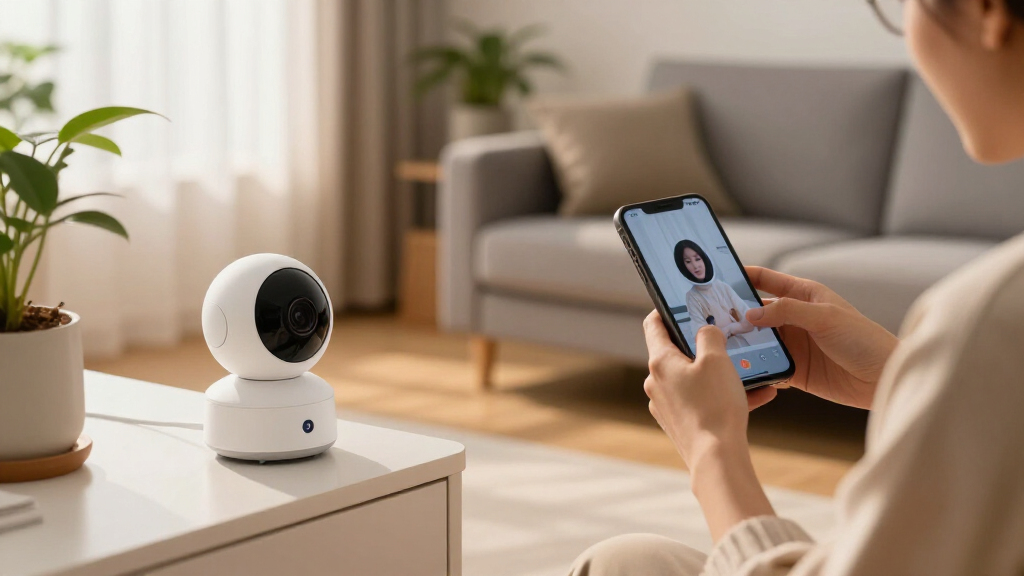
Smart home security cameras deter burglars, cut police response time, and give you evidence — but only if you pick the right storage model and lock down your account. Local storage beats cloud subscriptions for privacy and long-term cost, while two-factor authentication stops the vast majority of account takeovers. Placement matters as much as hardware: a camera at eye level near an entry point outperforms three cameras covering the wrong angles.
A burglar casing your street makes a decision in about 60 seconds. One of the first things they look for, according to interviews with convicted burglars, is a visible camera. That little white dome under your eaves isn’t just recording — it’s negotiating.
But here’s what the camera ads don’t tell you: the fanciest 4K camera with AI person-detection is useless if a stranger can log into your account, or if your footage vanishes because you skipped a subscription payment. The gap between a security camera and a security system comes down to three decisions you make before checkout.
In this guide, you’ll learn how to choose storage (local vs. cloud), what security features are non-negotiable, where to mount cameras for real evidentiary value, and a 5-step setup that takes one afternoon.
Visible cameras deter about 60% of burglars before any crime happens — mount them where they can be seen, not hidden.
Local storage on a microSD card costs ~$20 over ten years versus $360–$1,800 for cloud subscriptions; pair both only for your highest-value cameras.
Two-factor authentication with an authenticator app blocks over 99% of automated account takeovers — enable it before your first clip records.
Mount cameras at 48–60 inches near entry chokepoints so footage captures faces, not hoodie tops; the front door alone covers 34% of break-ins.
Set motion zones to exclude the public sidewalk on day one, or alert fatigue will train you to ignore every notification within a week.
Why Cameras Work Before Anyone Breaks In: The 60-Second Deterrence Window
Smart home security cameras prevent most crimes through deterrence, not footage. Research from the University of North Carolina at Charlotte, which surveyed convicted burglars on how they picked targets, found that about 60% said visible cameras would push them to choose a different house. That’s deterrence working silently, 24 hours a day, before a single clip gets recorded.
Think of a camera like a guard dog that never sleeps and never gets distracted by a squirrel. The burglar doesn’t know if it’s a $40 camera or a $400 one. They just know the risk of being recorded went up, and risk is the one thing burglars hate paying for.
The catch: cameras only deter if they’re visible. A hidden camera inside your living room catches a crime after it happens. A visible camera at the front door stops it from happening. You want both jobs covered — deterrence outside, evidence inside.
Footage solves yesterday’s crime. Visibility prevents tomorrow’s.
Real-world example: a neighbor of mine had a package thief hit four houses on his street. Three homes had no cameras. His doorbell cam caught the thief’s face at 2 p.m. — but the theft attempt at his house never happened. The thief walked up, saw the camera light blink, and turned around. The footage shows a crime that didn’t occur. That’s the win.
Local Storage vs. Cloud Subscriptions: The Table That Saves You $180 a Year
Smart cameras store footage one of two ways: local storage (a microSD card or hub inside your home) or cloud storage (encrypted uploads to the manufacturer’s servers). Neither is universally better — local wins on cost and privacy, cloud wins on convenience and theft-proofing. The right choice depends on where you live and what you’re protecting.
| Feature | Local Storage (microSD/hub) | Cloud Subscription |
|---|---|---|
| Monthly cost | $0 | $3–$15/month per camera or per account |
| 10-year cost | ~$20 (card replacements) | ~$360–$1,800 |
| If camera is stolen | Footage may be lost | Footage survives — stored off-site |
| Privacy control | Full — data never leaves your home | Depends on vendor policy |
| Remote viewing | Usually free via app | Included |
| Works offline | Yes (most models) | No — needs internet |
Here’s the math nobody puts on the box: a $15/month cloud plan is $1,800 over ten years — more than the camera itself, often three times over. Meanwhile, a $25, 256 GB microSD card holds roughly 2–4 weeks of continuous 1080p footage on most cameras, and good models loop-record over the oldest clips automatically.
Theft is the counterargument, and it’s real. If someone yanks your doorbell off the wall, the SD card goes with it. The best setups pair both: local storage as the free default, cloud as a paid backup for the one or two cameras that matter most — usually the front door and driveway.
One more thing: check the vendor’s retention policy before you buy. Some cheap brands keep footage on their servers with weak access controls. Reputable brands (as of 2024, this includes Google Nest, Ring, Apple HomeKit Secure Video, and Eufy’s local-storage lineup) publish how long clips are stored and whether they’re end-to-end encrypted. Read that page. It’s more important than the resolution spec.
The 3 Features That Actually Stop Hackers (and the Specs That Don’t Matter)
The three features that actually protect your camera feed are two-factor authentication (2FA), end-to-end encryption, and regular firmware updates. Everything else — 4K resolution, AI face recognition, gesture controls — is decoration. Hackers don’t crack encryption; they log in with leaked passwords.
Remember the viral compilations of strangers talking through people’s baby monitors and doorbells? Almost none of those were sophisticated attacks. They were accounts protected by passwords reused from other breaches. A unique password plus 2FA closes that door almost completely. According to Microsoft security research, MFA blocks over 99.2% of automated account-takeover attempts.
- Turn on 2FA the moment you set up the app. Use an authenticator app, not SMS — SIM-swapping makes text codes the weakest link.
- Use a unique password stored in a password manager. Never reuse one from email or shopping accounts.
- Enable automatic firmware updates. Check monthly that they’re actually installing — some cameras silently stall.
What about end-to-end encryption? It means only your devices can decrypt the footage — not the vendor, not a hacked server. Apple HomeKit Secure Video does this by default; Ring and Nest offer it on some plans. It matters because footage of your family’s daily routine is exactly what you don’t want leaking.
A camera is a microphone and lens pointed into your home that someone else built. Treat account security with the same seriousness as your bank login.
Where to Mount Cameras So Footage Actually Identifies Someone
Camera placement determines evidentiary value more than resolution does. The goal is a face-height capture at a chokepoint — a spot every visitor must pass — rather than a wide overhead shot of the top of heads. A 1080p camera catching a face at 8 feet beats a 4K camera shooting the back of a hoodie at 30 feet, every single time.
Why does this matter so much? Because the entire value of evidence footage hinges on two questions police and prosecutors actually ask: Can you identify this person? and Can you place them at the scene? A crisp image of the top of a head answers neither. Identification requires pixels-per-face — roughly 80 pixels across the face at minimum for a usable likeness, and ideally far more for something a witness can confirm. Every foot of distance between lens and subject eats those pixels, and mounting high adds a second penalty: steep downward angles distort facial geometry and often hide the face entirely behind a cap brim. This is why resolution specs mislead buyers — a 4K sensor spread across a 30-foot-wide driveway delivers fewer pixels per face than 1080p filling the frame at a doorway.
- Front door: covers 34% of break-in entry points (FBI burglary data consistently ranks it first). Mount at 48–60 inches, angled toward the approach path — this catches the face before the person reaches the door and turns away from the camera.
- Back or side door: the second most-used entry. These are out of street view, which burglars love — no passing witnesses, no deterrence from foot traffic. This is where evidence matters more than visibility, so prioritize image quality here.
- Driveway or garage: catches vehicle plates and package thieves. Aim along the approach, not straight down — plates are readable only when the camera sees them at a shallow angle as the car moves toward or away from the lens.
- Ground-floor windows hidden from the street: the preferred scout-and-enter route for experienced burglars. Coverage here is a tradeoff: these spots are hard to reach with wiring and often poorly lit, so consider a camera with good low-light performance or a motion-activated floodlight built in.
Avoid two classic mistakes. First, mounting so high that rain glare and ceiling-angle shots make faces unrecognizable — prosecutors and police routinely reject footage that only shows headwear, and rejected footage means no charges, no insurance claim support, and no recovered property. The implication is stark: a badly placed camera gives you the feeling of security while delivering almost none of its substance. Second, pointing a camera at your neighbor’s property or the sidewalk. Beyond the awkwardness, several US states have privacy statutes about recording areas where people have a reasonable expectation of privacy — and footage captured improperly can be inadmissible and expose you to liability, turning your security tool into a legal liability. Point at your own doors and paths.
There’s also a tension worth naming: deterrence wants cameras high and visible; evidence wants them low and close to chokepoints. High mounts are harder to tamper with and seen from farther away, but they sacrifice identifiability. The practical compromise is a two-layer approach — a highly visible camera at eye level where tampering is risky (a lit front porch), and tamper-resistant high mounts only for blind spots where nobody legitimate passes. And pair every camera with motion-activated lighting: at night, an unlit camera at 48 inches captures a dark silhouette, while the same camera with a triggered floodlight captures a face. Lighting is the cheapest image upgrade you’ll ever buy.
Practical scenario: your camera catches someone opening your side gate at 1 a.m. If the camera was placed at head height along the gate’s approach path, you get a clean face shot and license plate if a vehicle was involved. Mounted 14 feet up under the eave? You get a dark blob in a hoodie. Same camera, same night, totally different outcome — and in the first case there’s a case; in the second, there isn’t.
A 5-Step Setup You Can Finish This Saturday
Smart home security camera setup takes about 60–90 minutes for a two-camera system if you follow a sequence. Do it in this order — skipping steps is how people end up with cameras recording the wrong thing for six months.
- Walk your property like a burglar. Enter through every door and window yourself. Note which spots are hidden from the street — those get cameras first.
- Mount and aim before wiring anything permanent. Use the live view on your phone while a helper walks the approach path. Confirm you’d recognize their face from the feed.
- Insert local storage and test loop recording. Verify clips save, and check the app’s playback the same day. A faulty SD card discovered during a break-in is heartbreak.
- Lock the account: unique password, authenticator-app 2FA, auto-updates on. Takes ten minutes; blocks nearly all remote attacks.
- Set motion zones and alert schedules. Exclude the street and sidewalk, or you’ll get 40 alerts a day and start ignoring them within a week — alert fatigue defeats the whole system.
Budget note: a solid two-camera local-storage setup runs $80–$200 total. The same hardware pushed to cloud plans adds $60–$360 annually, forever. Spend the difference on a third camera for the back door instead.
Frequently Asked Questions
Are smart security cameras worth it without a subscription?
Yes, if you choose models with local storage. Cameras from brands like Eufy, Tapo, and Reolink record to microSD cards or hubs with no monthly fee, and you still get free motion alerts and live viewing. A $25 card holds 2–4 weeks of 1080p footage. Subscriptions mainly buy off-site backup and longer clip retention.
Can hackers watch my smart camera feed?
Almost all reported camera hacks came from weak or reused passwords, not broken encryption. Enable two-factor authentication with an authenticator app, use a unique password, and keep firmware updated — that combination blocks over 99% of automated account-takeover attempts. Choosing brands with end-to-end encryption adds another layer.
How many security cameras does a typical house need?
Most homes are well covered with 2–4 cameras: front door, back or side door, and driveway. The front door alone accounts for roughly a third of break-ins. Add a fourth only if you have a hidden ground-floor window or a long rear garden — coverage at chokepoints matters more than camera count.
Wired, wireless, or battery-powered cameras — which should I pick?
Battery cameras are easiest to install but lose power detection and can have their batteries pulled out — good for renters. Wired cameras deliver reliable continuous recording and never need charging, ideal for permanent homes. Wire-free with a hub (like Eufy or Ring’s plug-in models) splits the difference. For entry points you care most about, wired wins.
Is it legal to point a security camera at the street or a neighbor’s yard?
Rules vary by state and country, but the general principle is that recording public streets from your property is usually fine, while capturing areas where people have a reasonable expectation of privacy — a neighbor’s backyard, bathroom windows — can violate wiretapping or privacy statutes. Use motion zones to limit recording to your own driveway, doors, and paths.
Conclusion
If you remember one thing: an average camera with 2FA, local storage, and smart placement outperforms an expensive camera with none of them. The $99 doorbell with a locked-down account and a face-height view of your front path protects you better than a $400 4K flagship aimed at your roofline from twenty feet up.
Start small this weekend — one camera at the front door, one at the back, a microSD card in each, and 2FA switched on before you mount anything. Then walk to your curb and look back at your house. If you can see the cameras blinking back at you, so can everyone deciding whether your home is worth the risk.
Fall Picks
fall essentials
As an affiliate, we earn on qualifying purchases.