
Choosing the best hotas systems for flight simulators involves balancing realism, control precision, and ease of use. The Thrustmaster HOTAS Warthog stands out as the top overall pick thanks to its premium build and authentic feel. For more budget-friendly options, the Thrustmaster T-Flight Hotas X offers solid performance at a lower price, though it lacks some of the advanced features of high-end models. The Logitech G X56 strikes a good middle ground, providing extensive programmability and RGB lighting for customization enthusiasts. As you compare options, consider how much realism versus ease of setup and price point matter for your experience. Keep reading for a detailed breakdown of each system to help you make an informed choice.
Key Takeaways
- High-end models like the Thrustmaster HOTAS Warthog offer unmatched realism but come with a higher price and complexity.
- Programmability and customization are common differentiators, especially in mid-range options like the Logitech G X56.
- Build quality and compatibility vary; premium systems often feature metal components, while budget options may use plastic.
- Ease of setup and user interface are more prominent in systems designed for consoles like Xbox, versus PC-focused models.
- Tradeoffs between price and features are significant; knowing your preferred flight style helps determine the best value.



More Details on Our Top Picks
Thrustmaster HOTAS Warthog Flight Stick and Throttle – Metal Dual Throttle System, Official Replica of the U.S Air Force A-10C Aircraft Controls, Precision Flight Simulator Controller for PC
This pick stands out for its authentic military-grade build, being a 1:1 replica of the U.S. Air Force A-10C controls, and its metal construction offers unmatched durability. The inclusion of Hall Effect sensors on the stick ensures long-lasting, precise control, making it ideal for advanced sim pilots demanding realism. Compared to the Logitech X52, which offers a more user-friendly setup and a multi-function display, the Warthog focuses on raw durability and authentic feel, though it sacrifices some convenience and ease of use. The dual throttle system adds a layer of realism for modern aircraft, but its weight and size may be a drawback for desk space. The extensive customization with 55 programmable buttons makes it perfect for combat simulations, though the setup process can be intimidating for beginners. This system is best suited for dedicated enthusiasts and professionals who prioritize realism and durability.
Pros:- Exceptional durability with almost entirely metal construction
- Ultra-precise Hall Effect sensors for long-lasting accuracy
- Dual throttle system for realistic engine management
- 55 fully programmable buttons for deep customization
Cons:- High cost makes it less accessible for casual users
- Large, heavy build may require dedicated space and complex setup
- Learning curve can be steep for beginners
Best for: Advanced military flight enthusiasts and professional sim pilots needing authentic controls.
Not ideal for: Casual gamers or newcomers who prefer plug-and-play ease over ultra-realistic features.
- Construction:Almost entirely metal
- Sensors:Hall Effect
- Buttons:55 programmable
- Throttle System:Dual metal throttles
- Compatibility:PC
- Design:Replica of U.S. Air Force A-10C controls
- Control Features:Multiple switches, hats, toggles
- Precision:Ultra-smooth, reliable control
- Durability:Near-armor quality
Bottom line: This system makes the most sense for serious sim enthusiasts seeking maximum realism and durability.
This pick makes the most sense for users who desire a touch display combined with extensive programmable controls—a feature absent in the Logitech X52 and Thrustmaster Warthog. The 139 programmable buttons and OLED head-up display deliver unparalleled customization and real-time info, enhancing immersion and control. Compared to the Logitech G X56, which emphasizes military-grade precision and multiple control surfaces, the VelocityOne offers more advanced tech features like the touch display and haptic throttle detents, making it ideal for tech-savvy and detail-oriented pilots. However, its complex setup and potentially overwhelming interface could deter beginners. The system’s adjustable stick height and multi-zone RGB lighting also cater to personalization, though its high price reflects its feature-rich design. Best suited for experienced sim pilots who want a highly customizable and modern control setup.
Pros:- Touch OLED head-up display for real-time data
- 139 programmable controls for deep customization
- Adjustable stick height for ergonomic fit
- Multi-zone RGB lighting for personalization
Cons:- High price point limits accessibility
- Setup can be complex and time-consuming
- Interface may be overwhelming for beginners
Best for: Power users seeking maximum control customization and integrated display features.
Not ideal for: Entry-level users or those seeking simple plug-and-play experience.
- Controls:139 programmable buttons
- Display:OLED head-up
- Adjustability:Height adjustable
- Lighting:RGB multi-zone
- Connectivity:USB
- Compatibility:Windows 10 & 11
- Special Features:Haptic throttle detents
- Design:Touch display integrated
- Control Surface:Joystick & throttle
Bottom line: This system is best for experienced flight simmers who want cutting-edge tech and extensive control options.
Logitech G X56 H.O.T.A.S Throttle and Joystick Flight Simulator Game Controller, 4 Spring Options, +189 Programmable Controls, RGB Lighting, 2x USB, PC – Black
This pick is ideal for those who want a balance of precision and customization—more flexible than the Logitech X52 but less complex than the Warthog. The 189 programmable controls and multiple spring options allow for tailored feel and performance, making it a strong choice for both combat and space sims. Compared to the X52, which offers a simpler setup, the X56 provides more control over stick tension and more extensive programmable options, though its size and complexity can be intimidating for casual players. The RGB lighting adds aesthetic customization, and the twin USB ports support multiple peripherals. However, the learning curve can be steep, and some users report software stability issues. It’s a versatile option for dedicated enthusiasts who want more than basic controls but less complexity than premium systems like the Warthog. This makes sense for experienced sim pilots seeking a flexible, feature-rich HOTAS system.
Pros:- 189 programmable controls for extensive customization
- Multiple spring settings for tailored stick feel
- RGB lighting for aesthetic personalization
- Dual USB ports for peripheral flexibility
Cons:- Steep learning curve for new users
- Size and complexity may be overwhelming
- Software stability issues reported by some users
Best for: Intermediate to advanced flight sim enthusiasts desiring high customization and adaptable controls.
Not ideal for: Beginners or casual players who prefer straightforward plug-and-play devices.
- Controls:189 programmable
- Spring Options:4 adjustable
- Lighting:RGB
- Connectivity:2x USB
- Compatibility:PC
- Control Surfaces:Joystick & twin throttles
- Size:Large
- Features:Multiple tension springs
- Design:Black with RGB lighting
Bottom line: This system suits dedicated pilots who want a highly customizable HOTAS with versatile features.
Logitech G X52 Flight Control System – Standard Packaging
This pick makes sense for newcomers or casual enthusiasts who want a reliable, straightforward setup. The X52 offers a precision centering joystick with non-contact axes, providing smooth control without the complexity of high-end systems. The multi-function display adds some immersion, showing data directly from compatible games, though it’s less advanced than the OLED display of the VelocityOne. The tension-adjustable throttle with detents makes it suitable for a variety of aircraft, but the system is generally less durable and feature-rich than the Warthog or X56. The plug-and-play compatibility with Windows systems and relative ease of use make it ideal for beginners who want to learn without a steep learning curve. However, advanced pilots may find it limiting for complex setups. This is perfect for casual users or those starting out in flight simulation.
Pros:- Reliable and easy to set up
- Precision centering joystick with non-contact axes
- Multi-function display for data readout
- Adjustable throttle with detents
Cons:- Less durable compared to high-end systems
- Limited programmability and customization
- Design may feel basic for advanced users
Best for: Beginners and casual flight sim players looking for dependable, easy-to-use controls.
Not ideal for: Experienced pilots seeking highly detailed and customizable systems.
- Controls:Precision centering joystick
- Display:Multi-function
- Throttle:Adjustable with detents
- Connectivity:USB
- Compatibility:Windows
- Build:Standard plastic
- Ease of Use:Plug-and-play
- Control Surface:Joystick + throttle
Bottom line: This system is best for entry-level users or casual pilots wanting a dependable, simple setup.
Logitech G Saitek X52 Pro Flight Control System, Controller and Joystick Simulator, LCD Display, Illuminated Buttons, 2xUSB, PC – Black/Silver
This pick is ideal for users who want a mid-range system with a good balance of features and ease of use. The X52 Pro offers a highly adjustable handle and illuminated buttons for better visibility in low-light, plus a multi-function LCD display that enhances immersion. It’s a step up from the basic X52, adding more control over tension and responsiveness with adjustable tension springs, making it suitable for both combat and space sims. Compared to the Warthog, it’s less rugged but more accessible and easier to set up, appealing to those seeking a capable yet manageable HOTAS. Some users note that the software can be temperamental, and the overall durability is not on the same level as the Warthog, but its cost makes it attractive for dedicated hobbyists. This is a smart choice for pilots who want good control options without the complexity of high-end systems.
Pros:- Adjustable tension springs for personalized feel
- Illuminated buttons for better visibility
- Multi-function LCD display
- 2x USB ports for peripherals
Cons:- Less rugged than the Warthog
- Software stability issues reported
- Still relatively complex for beginners
Best for: Intermediate pilots who want a versatile, customizable, and easy-to-manage HOTAS.
Not ideal for: High-end professionals or those seeking maximum durability and realism.
- Controls:Adjustable tension springs
- Display:LCD multi-function
- Lighting:Illuminated buttons
- Connectivity:2x USB
- Control Surfaces:Joystick & throttle
- Compatibility:PC
- Design:Black/Silver
- Features:Multi-function display
- Price:Moderate
Bottom line: This makes sense for dedicated hobbyists seeking a reliable, feature-rich system at a reasonable price.
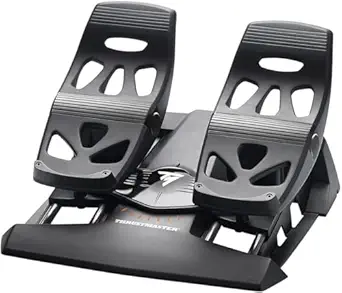
Thrustmaster TFRP Flight Rudder Pedals – Realistic Flight Simulator Controls with Sliding Rail System for Smooth Precision – Compatible with PS5, Xbox Series X|S & PC
This set of rudder pedals stands out for its exceptional smoothness and realistic feel, thanks to Thrustmaster’s exclusive S.M.A.R.T sliding rail system, which surpasses basic pedal designs found in entry-level options. Compared to the Thrustmaster T16000M FCS HOTAS, which offers excellent control for a stick, the TFRP pedals add a crucial component for authentic ground handling and taxiing, especially for serious sim pilots. While the self-centering rudder axis and differential brake pedals deliver precise maneuvering, a notable tradeoff is the larger footprint and higher price point, which might deter casual users. This choice perfectly suits dedicated enthusiasts who want comprehensive control over ground movements and are willing to invest in quality hardware. However, those with limited space or on a tight budget should consider simpler pedal sets.
Pros: Excellent sliding mechanism with friction-free rails; highly realistic pedal feel; adjustable resistance and spacing; compatible with PS5, Xbox Series X|S, and PC.
Cons: Bulky size may require dedicated space; higher cost compared to basic pedals; assembly can be slightly complex for beginners.
Verdict: This set is ideal for experienced flight simmers who prioritize ground control realism and have space for a sturdy pedal setup.
Specs: Compatible Devices: PS5, Xbox Series X|S, PC; Power Source: Not specified; Dimensions: 13.62 x 21.42 x 15.83 inches; Weight: 4.9 pounds; Connectivity: USB; Additional Features: Sliding Motion Advanced Rail Track, Self-centering Rudder, Differential Brakes.Pros:- Exceptional smooth sliding rails for realistic control
- Accurate rudder and differential brake response
- Adjustable resistance and ergonomic design
- Compatible with multiple consoles and PC
Cons:- Large footprint may not fit small setups
- Costlier than entry-level pedals
- Assembly can be a bit involved for beginners
Best for: Serious flight simulator enthusiasts who want authentic rudder and ground control with high precision.
Not ideal for: Casual gamers or those with limited space who prefer smaller or more affordable pedal options.
- Compatible Devices:PS5, Xbox Series X|S, PC
- Connectivity:USB
- Dimensions:13.62 x 21.42 x 15.83 inches
- Weight:4.9 pounds
- Additional Features:Sliding Motion Rail, Self-centering Rudder, Differential Brakes
Bottom line: This set makes the most sense for dedicated sim pilots seeking immersive ground handling, provided they have space and are willing to invest.
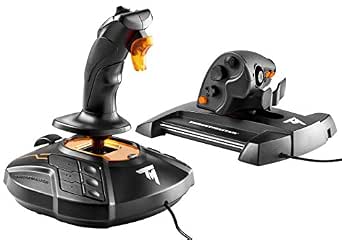
Thrustmaster T16000M FCS HOTAS (Compatible with PC)
This flight stick makes the list for its Hall effect magnetic sensors that provide highly accurate, smooth input, outperforming many cheaper options like the Thrustmaster T-Flight Full Kit. Compared to the Thrustmaster T-Flight X, which has a simpler design, the T16000M offers full 6 degrees of freedom and programmable buttons that appeal to serious sim pilots. The twist rudder axis enhances realism for space and aircraft maneuvers, but the tradeoff is a slightly steeper learning curve and higher price. This model is best suited for users who want detailed customization and precise control, especially in complex sims like DCS or X-Plane. Those new to flight sims or casual players might find the extensive features overwhelming or unnecessary.
Pros: Hall effect magnetic sensors for accuracy; 6 axes and 14 buttons for comprehensive control; programmable with Thrustmaster T.A.R.G.E.T. software; ergonomic grip with textured buttons.
Cons: Slightly complex setup for beginners; more expensive than entry-level sticks; the base can feel a bit heavy for extended use.
Verdict: This pick makes the most sense for dedicated flight sim pilots seeking high precision and customization on PC or compatible consoles.
Specs: Compatible Devices: PC; Connectivity: USB; Action Buttons: 14; Axes: 6 including twist rudder; Dimensions: Not specified; Weight: Not specified; Additional Features: Hall effect magnetic sensors, programmable buttons, ergonomic design.Pros:- Highly precise Hall effect sensors for smooth input
- Full 6 degrees of freedom with programmable buttons
- Ergonomic grip with textured controls
- Excellent software customization with T.A.R.G.E.T.
Cons:- Setup complexity may challenge new users
- Higher price point compared to basic sticks
- Heavy base can be tiring during long sessions
Best for: Avid flight sim players who demand high accuracy and extensive control customization on PC.
Not ideal for: Beginners or casual users who prefer plug-and-play simplicity or are on a strict budget.
- Compatible Devices:PC
- Connectivity:USB
- Action Buttons:14
- Axes:6
- Additional Features:Hall effect sensors, programmable buttons
Bottom line: This model is best for experienced pilots who want maximum control precision and customization on a PC platform.
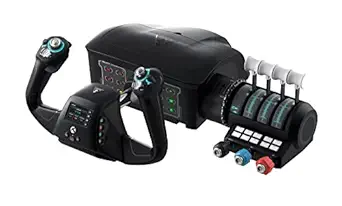
Turtle Beach VelocityOne Flight Universal Control System – Xbox Series X & Xbox Series S, Xbox One & Windows 10 & 11 PCs with Yoke Handle, Throttle Quadrant, Trim Wheel & Rudder Controls
This comprehensive system earns its spot for providing an immersive, authentic cockpit experience with a full yoke, throttle quadrants, and rudder controls. Unlike standalone sticks or pedals like the Thrustmaster T.16000M HOTAS, the VelocityOne integrates multiple controls into a single setup, ideal for users wanting plug-and-play versatility and realism. The 180° yoke handle, coupled with the modular throttle and trim wheel, offers precise and intuitive control for a wide range of aircraft and space sims. While the all-in-one design is convenient, it can be less flexible for custom setups and may feel bulky for limited space users. This system targets flight sim enthusiasts and newcomers seeking a complete, realistic cockpit without complex assembly. Casual players or those with limited space should consider simpler controllers.
Pros: Fully integrated yoke, throttle, and rudder controls; realistic 180° yoke rotation; customizable throttle and trim; full-color flight management display.
Cons: Bulky design may not suit small desks; higher price compared to separate components; some features may require software configuration.
Verdict: This all-in-one system is ideal for users who want a seamless, immersive cockpit experience and are ready to invest in a comprehensive setup for Xbox or Windows.
Specs: Compatible Devices: Xbox Series X|S, Xbox One, Windows 10/11; Power Source: Not specified; Dimensions: 19.01 x 7.2 x 19.5 inches; Weight: 10 pounds; Connectivity: USB; Additional Features: Full yoke handle, modular throttle, flight management display, rudder controls.Pros:- All-in-one design with yoke, throttle, and rudder
- 180° realistic yoke rotation with hall effect sensor
- Customizable throttle and trim controls
- Built-in flight management display for quick setup
Cons:- Bulky footprint not ideal for small desks
- Higher price for a full system
- Some features need software setup and calibration
Best for: Enthusiasts and newcomers seeking a complete, realistic flight cockpit with easy setup on Xbox or PC.
Not ideal for: Space-constrained users or those preferring modular, component-based controls over an integrated system.
- Compatible Devices:Xbox Series X|S, Xbox One, Windows 10/11
- Connectivity:USB
- Dimensions:19.01 x 7.2 x 19.5 inches
- Weight:10 pounds
- Additional Features:180° yoke, modular throttle, flight display, rudder controls
Bottom line: Best suited for serious flight fans seeking a sleek, immersive cockpit experience with minimal complexity.
Thrustmaster T-Flight Hotas One Microsoft Flight Simulator 2024 Collector’s Edition – Flight Stick & Throttle Controller for Xbox Series X|S & PC, Official Flight Simulator Controller
This controller provides officially licensed controls for Microsoft Flight Simulator 2024 with a straightforward, ergonomic design, making it ideal for newcomers and casual players. Compared to the Thrustmaster T16000M FCS HOTAS, which offers more precise sensors and customization, the T-Flight Hotas One focuses on ease of use and accessibility, with simplified button layout and basic control axes. The detachable throttle adds flexibility, but the overall build and fewer programmable options mean it’s less suited for advanced pilots wanting in-depth customization. This model fits best for beginners or players on a budget who want to enjoy MSFS2024 without the complexity of high-end hardware, but experienced simmers may find it limiting.
Pros: Officially licensed for MSFS2024; ergonomic design with comfortable grip; detachable throttle for flexible setup; affordable price for beginners.
Cons: Limited customization and fewer buttons; less precise control than higher-end models; basic construction may not withstand heavy use.
Verdict: This is a solid entry-level controller for those new to flight sims or casual players who want official MSFS control without extra complexity.
Specs: Compatible Devices: Xbox Series X|S, PC; Connectivity: USB; Action Buttons: 14; Axes: 5; Dimensions: 18.7 x 14.21 x 12.68 inches; Weight: 12.4 pounds; Additional Features: Detachable throttle, official MSFS buttons.Pros:- Official MSFS2024 license for seamless compatibility
- Ergonomic, comfortable grip
- Detachable throttle for flexible setup
- Affordable for new players
Cons:- Limited button customization
- Less precise than higher-end HOTAS systems
- Build quality is basic and may wear over time
Best for: Beginners or casual flight sim players seeking official MSFS2024 controls at an affordable price.
Not ideal for: Experienced pilots or enthusiasts wanting detailed controls, sensors, and extensive customization.
- Compatible Devices:Xbox Series X|S, PC
- Connectivity:USB
- Action Buttons:14
- Axes:5
- Additional Features:Detachable throttle, official MSFS buttons
Bottom line: Best suited for entry-level users wanting authentic MSFS experience without the complexity or cost of advanced hardware.
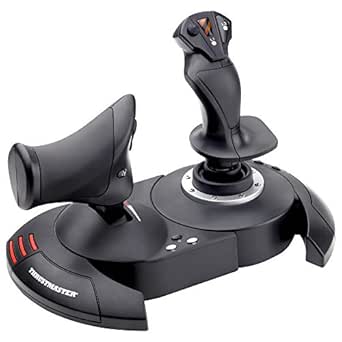
Thrustmaster T-Flight Hotas X (Compatible with PC)
The Thrustmaster T-Flight Hotas X earns its place in this list by offering a remarkable balance of features and affordability, especially when compared to pricier options like the Thrustmaster HOTAS Warthog. Its 12 programmable buttons and 5 axes ensure versatility, while the adjustable resistance provides a customizable feel, making it suitable for newcomers who want more than just a basic joystick. The inclusion of a detachable throttle and a weighted base enhances stability, but the design is somewhat compact, which may be limiting for users with larger hands or those seeking a more immersive experience. Compared to premium systems like the Turtle Beach VelocityOne, this model lacks a touch display and extensive controls, but it compensates with straightforward plug-and-play functionality. The throttle’s middle position can feel sticky, which might frustrate some, but overall, its responsiveness and programmability make it a solid choice for budget-conscious gamers or beginners.
Pros:- Highly affordable price point for a fully programmable HOTAS system
- Easy plug-and-play setup with all functions pre-configured
- Detachable throttle allows flexible positioning
- Adjustable resistance for personalized feel
Cons:- Throttle has a sticky middle position, which can hinder smooth operation
- Compact design may be uncomfortable for larger hands or extended use
- Build quality is lower than premium models like the Saitek X52 or Warthog
Best for: Beginners or casual flight sim players who want a reliable, programmable HOTAS without breaking the bank.
Not ideal for: Serious simulation enthusiasts or those seeking the most precise, high-end controls for professional training or extended play sessions.
- Compatible Devices:PC, PS3
- Controller Type:Flight Stick
- Connectivity Technology:USB
- Additional Features:Programmable buttons, adjustable resistance, detachable throttle
- Item Weight:2165 grams
- Item Dimensions:10.39 x 9.53 x 10.43 inches
Bottom line: This pick makes the most sense for entry-level users or budget-conscious gamers seeking a versatile and straightforward HOTAS system for flight simulation.
How We Picked
Our evaluation focused on several key factors that matter most to flight simulator enthusiasts. Performance and control precision are paramount, so we prioritized systems with responsive sticks and realistic feedback. Usability was also critical; models with straightforward setup, clear layout, and intuitive controls scored higher. Build quality and durability were assessed through material choice and construction, ensuring longevity over extended use. Compatibility with major platforms and software was another factor, as many users seek versatile systems that work across PC and consoles. Finally, we considered value, balancing features against price to identify options that deliver the best experience for different budgets and skill levels.Factors to Consider When Choosing Best Hotas Systems For Flight Simulators
Selecting the best hotas system requires understanding your specific needs and how different features impact your gameplay experience. While price is always a factor, prioritizing control fidelity, build quality, and compatibility can prevent common frustrations. A good hotas system should feel natural, offer reliable control, and integrate seamlessly with your flight simulator software. Considering these broader aspects helps avoid overspending on unnecessary features or ending up with a product that doesn’t meet your expectations in critical areas.Performance and Control Fidelity
Look for systems with precise, responsive sticks and throttles that mimic real aircraft controls. Features like force feedback or realistic resistance enhance immersion but may increase cost. Cheaper options often sacrifice nuanced control, which can affect your flying precision. Prioritize a system that offers smooth motion and consistent response, especially if you aim for a realistic experience or competitive gameplay.
Build Quality and Durability
Hotas systems with metal components, sturdy bases, and high-quality switches tend to last longer and withstand frequent use. Budget models often rely on plastic parts that may wear out faster or feel less authentic. If you plan to fly regularly or for extended sessions, investing in a robust system reduces the risk of parts breaking and offers a more satisfying tactile experience.
Compatibility and Platform Support
Ensure the hotas system you choose supports your preferred platform, whether PC, Xbox, or PlayStation. Some models are multi-platform, offering flexibility, while others are tailored for specific systems. Compatibility with your flight simulator software and ease of integration are key to avoiding frustration and getting the most out of your setup.
Programmability and Customization
Advanced control systems allow you to assign functions, create macros, and customize button layouts, which can greatly enhance your flying experience. Consider how much control you want over button assignments, especially if you fly complex missions. However, more programmable systems tend to come with steeper learning curves and higher prices, so balance your desire for customization against usability and budget.
Price and Value
Higher-priced systems generally offer more realism, durability, and customization options, but not everyone needs the most premium setup. For casual players or newcomers, mid-range models provide excellent value without overwhelming complexity. Be mindful of features that truly matter for your style of flying to avoid overspending on bells and whistles you won’t use.
Frequently Asked Questions
Can I use a hotas system for both PC and console?
Many modern hotas systems are designed with cross-platform support, especially those for Xbox and PC. However, compatibility varies, so it’s important to verify whether a specific model functions seamlessly across your intended devices. Some systems may require adapters or specific firmware updates, so checking the manufacturer’s specifications ensures you won’t face connectivity issues.
Is a more expensive hotas worth the investment for casual flight simulator players?
For casual users, a mid-range hotas can provide ample control and durability without the high cost of top-tier options. Investing in a more expensive system might not yield noticeable improvements in gameplay experience unless you’re seeking maximum realism or competitive edge. Consider your frequency of use and how serious your flight simulation interests are before splurging on premium models.
What features should I prioritize if I’m new to flight simulators?
Beginners should look for systems that are easy to set up and intuitive to use, with straightforward controls. Features like adjustable tension, clear button layout, and compatibility with beginner-friendly software can help reduce frustration. It’s also wise to choose a system with good support and documentation to assist your learning curve.
How important is programmability in a hotas system?
Programmability allows you to customize controls and assign macros, which can significantly enhance your flying efficiency once you become more experienced. For beginners, basic plug-and-play setups may suffice, but enthusiasts aiming for realism or complex missions benefit from highly programmable systems. Keep in mind that more advanced controls often come with added complexity and cost.
Should I prioritize build quality over features when choosing a hotas?
Build quality directly impacts a hotas system’s longevity and feel, making it a critical factor, especially if you plan to use it heavily. While features like RGB lighting or extensive programmability are appealing, they are secondary to durability and control precision. A well-built system provides a more authentic experience and reduces the risk of early wear or failure.
Conclusion
For those seeking the best overall experience, the Thrustmaster HOTAS Warthog offers unmatched realism and build quality, ideal for dedicated flight sim enthusiasts. Budget-conscious users or newcomers will find the Thrustmaster T-Flight Hotas X or Thrustmaster T-Flight Hotas One provide solid performance without breaking the bank. If you want a versatile, feature-rich system with extensive customization, the Logitech G X56 strikes a compelling balance. Finally, serious sim pilots aiming for professional-grade hardware should consider premium models, but for most, a mid-range setup delivers excellent value and satisfaction.