This checklist is for anyone refreshing a home office in 2026, whether you work from a dedicated room, a shared space, or a compact desk setup. The picks cover comfort and connectivity alongside the screens and input devices that shape your daily workflow.

Get the latest gadgets delivered free with Prime
- Fast, free delivery on millions of items
- Prime Video, Amazon Music and more included
- Member-only deals all year
Each section focuses on one upgrade slot and names a product to consider. The order moves from your chair and desk connections to networking, video, typing, and an additional display, so you can scan for the parts of your setup that need attention most.
Use the checklist to compare each product’s listed features with your actual devices, workspace, and routines. Before buying, confirm dimensions, ports, compatibility, and included components against the manufacturer’s current specifications.
Ergonomic Office Chair
A chair is a central part of a home office because it affects how your workspace feels during long stretches at a desk. The ELABEST X100 Ergonomic Mesh Office Chair with Footrest combines a mesh chair design with a footrest, making it a candidate for people who want seating with a place to extend their legs. Think about how much room you have and whether the chair’s shape and adjustment options suit the way you sit.
A common buying mistake is choosing by appearance or feature names alone. Check the chair’s dimensions, seat height range, weight capacity, and the space needed to recline or use the footrest. Compare those measurements with your desk height and the room around your chair. If possible, review the adjustment details and return terms before ordering, since comfort depends on your proportions and preferences. Also consider whether the mesh, armrests, and footrest fit your daily routine rather than assuming every feature will be useful.
What to look for:
- Seat height range that works with your desk
- Chair dimensions and available floor space
- Footrest clearance when extended
- Adjustment details for recline and armrests
- Weight capacity and assembly requirements
ELABEST X100 Ergonomic Mesh Office Chair with Footrest

The ELABEST X100 is an adjustable mesh office chair with dynamic lumbar support, a reclining backrest, a headrest, and an extendable footrest. It has flip-up armrests, a BIFMA-certified structure rated for up to 300 pounds, and is designed for office work or gaming.
Pros:
- Adjustable lumbar support and headrest
- Reclining design with extendable footrest
- Breathable mesh construction
- Flip-up armrests help save space
Cons:
- Assembly is required
- Designed for indoor use
Best for: People who want mesh seating with a footrest.
Not ideal for: Workspaces with limited room to recline or extend a footrest.
Bottom line: Compare the chair’s measurements and adjustment range with your desk and body before deciding.
USB-C Docking Station
A docking station can make a home office easier to connect by bringing compatible peripherals and displays together at the desk. The Targus USB-C Universal Quad 4K Docking Station with 100W Power Deliver is named for quad 4K display support and 100W power delivery, so it may suit a setup that needs multiple display connections and charging through one dock. Confirm the product’s current specifications and exact model name before purchase.
A frequent mistake is assuming that a dock’s headline capabilities will work with every laptop. Check the computer’s USB-C port capabilities, operating system support, display limits, and whether your intended monitor arrangement is supported. Verify which ports are present, what cables are included, and whether the dock’s power delivery matches your laptop’s needs. Also confirm the number and type of video outputs and the resolution and refresh rates available when several displays are connected. Match these details to your current and planned devices, and make sure the dock can sit near the laptop without straining its cable.
What to look for:
- Laptop support for USB-C docking and display output
- Supported monitor count, resolution, and refresh rates
- Port types and number of available connections
- Power delivery compatibility with your laptop
- Included cables and operating system requirements
Targus USB-C Universal Quad 4K Docking Station with 100W Power Delivery
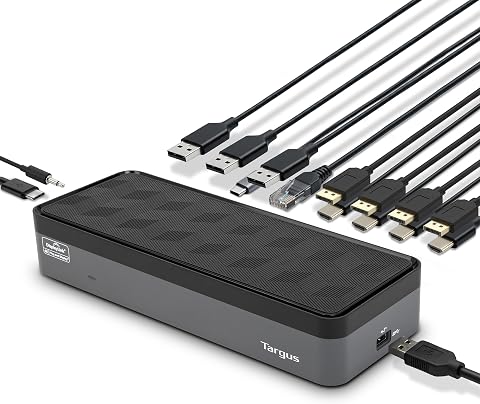
This universal USB-C docking station delivers up to 100W of power and supports one 5K display or up to four 4K displays through DisplayPort and HDMI connections. It includes USB-A and USB-C ports, Gigabit Ethernet, a 3.5 mm audio jack, legacy laptop charging tips, and a USB-C to USB-A adapter.
Pros:
- Supports up to four 4K displays or one 5K display
- Provides up to 100W power delivery
- Includes USB, Gigabit Ethernet, and audio connections
- Adapters and charging tips support legacy laptops
Cons:
- Security lock and VESA mounting bracket are sold separately
- Display refresh rates vary by connection type
Best for: People connecting multiple compatible displays and peripherals.
Not ideal for: Laptops whose USB-C capabilities do not support the planned setup.
Bottom line: Confirm your laptop’s port capabilities and the dock’s multi-display specifications before choosing.
Wi-Fi 7 Router
Reliable wireless access can matter across a home office, especially when work devices are spread across rooms. The NETGEAR Orbi 970 Series WiFi 7 Mesh System (3-Pack) is a three-piece mesh system identified as Wi-Fi 7, making it an option to evaluate for a home that needs coverage from more than one location. Its fit depends on your home layout, internet service, and the devices you use.
A common mistake is buying a newer wireless standard without checking whether the rest of the network can use it. Confirm that your broadband equipment and client devices are compatible, and check the system’s supported wired connections and setup requirements. Think through where each unit can be placed, whether power outlets are available, and whether walls or floors may affect signal paths. Review the manufacturer’s coverage guidance for your home rather than assuming a pack size guarantees coverage everywhere. If you rely on wired connections for a work computer or other equipment, make sure the available ports and their locations suit your desk.
What to look for:
- Compatibility with your internet service and existing equipment
- Support on your laptops, phones, and other client devices
- Placement options for all three units
- Available wired network ports
- Manufacturer guidance for your home’s layout
NETGEAR Orbi 970 Series WiFi 7 Mesh System (3-Pack)

The NETGEAR Orbi 970 Series is a 3-pack WiFi 7 mesh system (router plus 2 satellites) providing up to 10,000 sq ft of coverage and support for up to 200 connected devices. It delivers speeds up to 27 Gbps using patented Quad-Band technology with a dedicated backhaul, and includes 10 Gig and 2.5 Gig wired ports for high-performance connections.
Pros:
- Massive whole-home coverage up to 10,000 sq ft with no dead zones
- Very fast WiFi 7 speeds up to 27 Gbps with dedicated backhaul
- High-speed wired options including 10 Gig ports
- Easy guided setup and remote management via the Orbi app
Cons:
- NETGEAR Armor security requires a paid subscription after 30-day trial
- Real-world speeds vary with devices and internet plan
- Only for use in the US
Best for: Homes with compatible devices and multiple coverage areas.
Not ideal for: Setups where existing equipment or devices cannot use its capabilities.
Bottom line: Check compatibility, unit placement, and wired port needs against your home before selecting a mesh system.
4K Webcam
A webcam is worth checking when video calls, streaming, or content creation are part of your work. The Razer Kiyo V2 Pro Webcam for Streaming and Content Creation, 4K 60 FPS lists 4K at 60 FPS in its product name and is positioned for streaming and content creation. Consider whether those capabilities match the platforms and recording setup you actually use.
One buying mistake is treating a resolution label as a guarantee that every app, computer, or connection will deliver the same result. Confirm operating system and software compatibility, supported video modes, connection type, and any required drivers. Check the camera’s mounting options against your monitor or tripod, and consider its position relative to your lighting and background. Review whether the webcam includes a microphone or other accessories if those matter to you, rather than assuming from the product name. For calls, verify that your conferencing software can use the modes you want; for recording, check the requirements of your capture and editing workflow.
What to look for:
- Computer and operating system compatibility
- Supported resolution and frame rate modes
- Connection type and cable requirements
- Mounting options for your monitor or tripod
- Software support for your calling or recording apps
Razer Kiyo V2 Pro Webcam for Streaming and Content Creation, 4K 60 FPS

The Razer Kiyo V2 Pro delivers ultra‑sharp 4K video at 60 FPS with an 8.3MP Sony STARVIS 2 sensor, ideal for streamers, creators, and professional video calls. AI‑powered auto‑framing keeps you centered while low‑light enhancement and HDR provide clear, vibrant images in challenging lighting.
Pros:
- Ultra‑sharp 4K video at 60 FPS with reduced motion blur.
- AI‑powered auto‑framing and face tracking keep you centered during movement.
- One‑click low‑light enhancement and HDR deliver clear, vibrant images in dim or mixed lighting.
- Extensive manual controls via Razer Synapse for DSLR‑level customization.
Cons:
- No built‑in microphone; external audio is required.
- Relatively large footprint may not fit all monitor setups easily.
- Not water resistant, limiting use in humid environments.
Best for: People whose compatible workflows use high-resolution video.
Not ideal for: Those seeking a webcam mainly for basic calls without needing its listed modes.
Bottom line: Match its supported video modes and mounting options to your apps and workspace.
Mechanical Keyboard
Your keyboard influences how your hands meet the desk throughout the workday, so layout and feel deserve attention. The Keychron Q13 Ultra 8K 96% Alice Layout Wireless Mechanical Keyboard identifies itself as a wireless mechanical keyboard with a 96% Alice layout. That distinctive layout may appeal to people who prefer an angled arrangement, but it is important to inspect the key placement and dimensions before committing.
A common mistake is assuming that a compact percentage layout will include every key you expect or that an Alice layout will feel natural immediately. Review the layout diagram, confirm the operating system and connection options you need, and check how the keyboard switches between wired and wireless use. Look into keycap and switch details if customization or typing feel matters to you. Measure your desk area and consider mouse placement, since the keyboard’s width and shape affect how much room remains. If you rely on a number pad, navigation keys, or function-row shortcuts, verify their positions and access before purchase.
What to look for:
- Layout diagram and placement of frequently used keys
- Keyboard dimensions and desk space
- Operating system and wireless connection support
- Switch and keycap details relevant to your typing preference
- Wired-use options and charging requirements
Keychron Q13 Ultra 8K 96% Alice Layout Wireless Mechanical Keyboard

The Keychron Q13 Ultra 8K is a wireless mechanical keyboard with an ergonomic 96% Alice layout, hot-swappable keys, and customizable RGB backlighting. It supports wired and 2.4 GHz wireless connections with an 8000 Hz polling rate, plus Bluetooth 5.3 for up to three devices.
Pros:
- Ergonomic Alice layout
- Long battery life with backlight off
- Tri-mode connectivity and support for up to three Bluetooth devices
- Hot-swappable switches and customizable RGB lighting
Cons:
- Battery life drops when the backlight is on
- Right-hand orientation may not suit every user
Best for: Typists interested in a wireless Alice-style layout.
Not ideal for: People who need a conventional layout without an adjustment period.
Bottom line: Study the key arrangement and connection details to ensure the layout fits your habits.
Portable Monitor
A portable monitor can add screen space when your desk, travel routine, or laptop setup would benefit from another display. The VisionOwl Portable Dual 15.6-Inch 1080P FHD Monitor with Foldable Desi is described as a dual 15.6-inch 1080P FHD monitor with a foldable design. Check the full product listing for the complete model name and details before comparing it with your laptop and workspace.
A frequent mistake is assuming that every laptop can drive a dual-monitor accessory through a single connection. Verify the laptop’s video output capabilities, supported operating systems, connection types, and any power requirements. Check the monitor’s folded and open dimensions, weight, stand or mounting arrangement, and cable routing to see whether it works on your desk or fits in your bag. Confirm what is included and whether your computer needs adapters or additional power. Also consider where the screens will sit relative to your laptop, since desk depth and viewing angle can affect comfort during extended use.
What to look for:
- Laptop support for the required external displays
- Connection types and power requirements
- Open and folded dimensions and weight
- Stand arrangement and desk depth needs
- Included cables, adapters, and operating system support
VisionOwl Portable Dual 15.6-Inch 1080P FHD Monitor with Foldable Design and VES

The VisionOwl dual-screen monitor features two 15.6-inch IPS displays with 1080p resolution and 107% sRGB color gamut, offering an expansive workspace ideal for multitasking and creative work. It supports quick setup with multiple connectivity options, a durable full-metal build, and flexible viewing modes, making it perfect for mobile professionals.
Pros:
- High-quality 1080p IPS displays with vibrant color reproduction
- Flexible foldable design with adjustable viewing angles
- Multiple connectivity options included for versatile setup
- Durable full-metal construction for professional appearance
Cons:
- Not a continuous waterfall display, limited to extended or mirror modes
- Relatively heavy for portable use at 3.5 pounds
- Requires driver installation for full functionality
Best for: People who need additional displays with a compatible laptop.
Not ideal for: Laptops with limited display output or desks short on space.
Bottom line: Check your laptop’s display support and the monitor’s dimensions before planning your setup.
Start with the upgrades that address a daily bottleneck: check chair fit if comfort is a concern, then confirm the dock and network can support your devices. Add a webcam, keyboard, or portable monitor according to how you work, making compatibility and fit the deciding checks for each purchase.
You do not need to change every part of a home office at once. Work through the checklist against your actual desk, computer, and routines, and choose the upgrades that solve the clearest needs first. A few well-matched additions can make your setup feel more considered and easier to use.