If you’re looking for the best Thunderbolt dock for your VR gaming laptop in 2026, I recommend considering models like the Razer Thunderbolt 5 Dock Chroma or the Anker Prime TB5 Docking Station, as they offer superb data speeds, multiple ports, and strong power delivery. Options such as the UGREEN Thunderbolt 4 Dock and Dell’s SD25TB4 also provide excellent performance for immersive VR setups. Keep exploring these choices to find the perfect match for your needs.
Key Takeaways
- Compatibility with Thunderbolt 4/5 ensures high-speed data transfer and seamless VR headset connection.
- Supports 40-120Gbps transfer speeds for quick game file loading and low latency gameplay.
- Multiple video outputs, including dual 4K/8K displays with HDMI 2.1/DisplayPort 2.1 support.
- Rich port options like Ethernet, SD card slots, USB-A, and USB-C for versatile peripherals.
- Power delivery up to 140W with active cooling guarantees reliable performance during extended VR sessions.
| Razer Thunderbolt 5 Dock Chroma with 11 Ports | 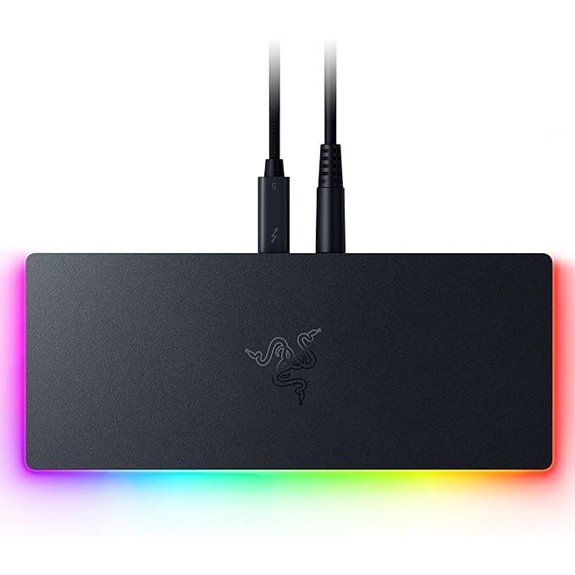 | Top Performance | Number of Ports: 11 ports | Display Support: Up to 8K/Triple 4K at 144Hz | Power Delivery (Charging): 140W PD | VIEW LATEST PRICE | See Our Full Breakdown |
| Anker Prime TB5 Docking Station with 14 Ports | 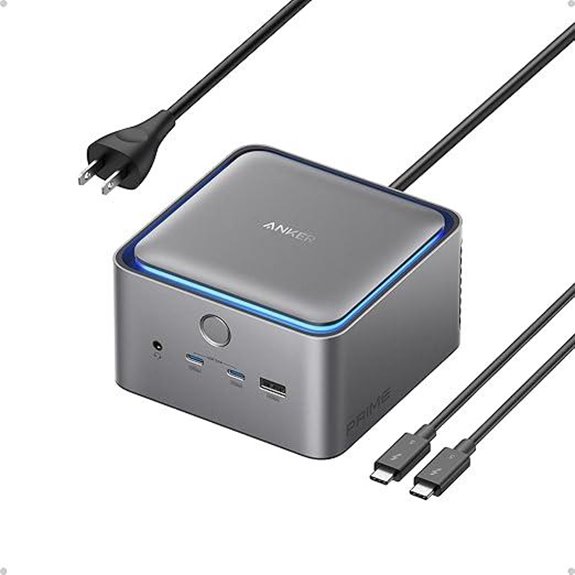 | Versatile Power | Number of Ports: 14 ports | Display Support: Up to 8K@60Hz, dual 8K@60Hz | Power Delivery (Charging): 140W PD | VIEW LATEST PRICE | See Our Full Breakdown |
| UGREEN Thunderbolt 4 Dock 13-in-1 with 8K Display | 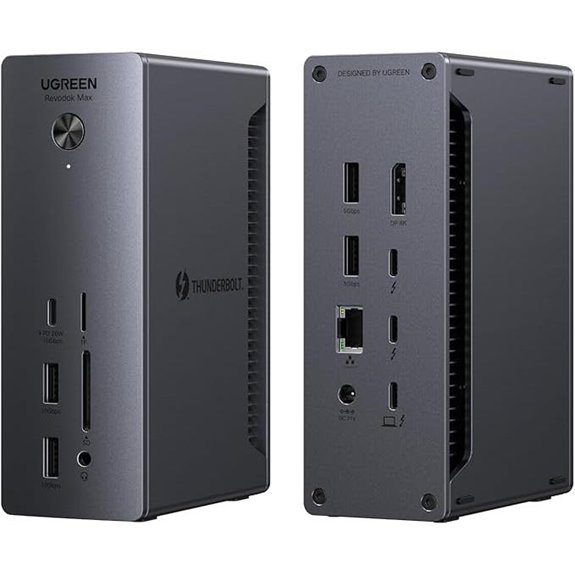 | Professional Grade | Number of Ports: 13 ports | Display Support: Dual 4K@60Hz or 8K@30Hz | Power Delivery (Charging): 180W PD | VIEW LATEST PRICE | See Our Full Breakdown |
| Plugable Thunderbolt 4 Dock with 100W Charging | 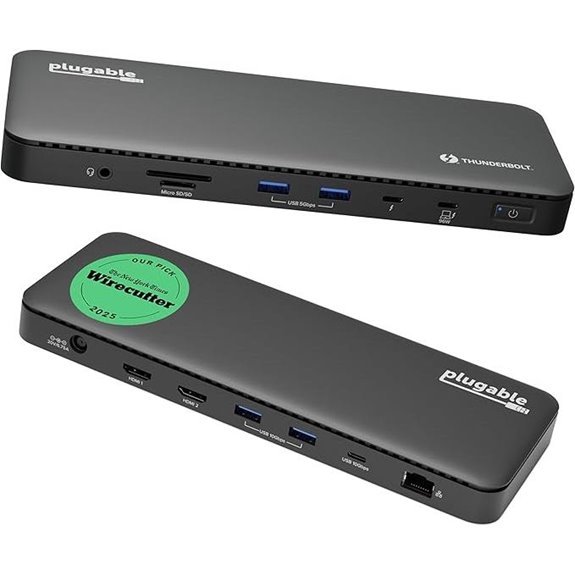 | Reliable Champion | Number of Ports: 13 ports | Display Support: Dual 4K@60Hz or single 8K | Power Delivery (Charging): 100W PD | VIEW LATEST PRICE | See Our Full Breakdown |
| Dell Thunderbolt 4 Smart Dock SD25TB4 (130W 4K 4 Displays) | 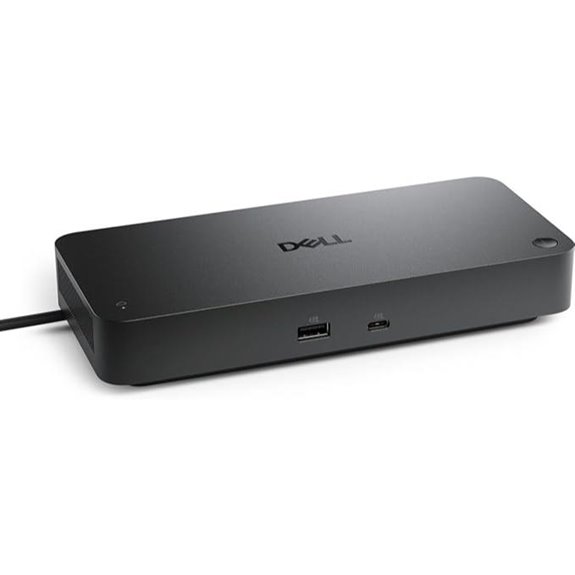 | Enterprise Ready | Number of Ports: Multiple (up to 10+ actual ports listed) | Display Support: Up to 4x 4K or 1x 8K | Power Delivery (Charging): 130W/96W PD | VIEW LATEST PRICE | See Our Full Breakdown |
| External GPU Enclosure Dock for Thunderbolt 3/4 | 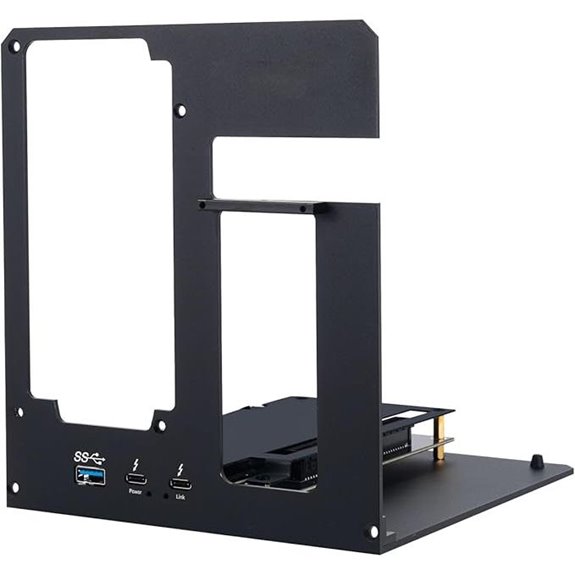 | High-End GPU Support | Number of Ports: 4 ports (external GPU enclosure) | Display Support: External GPU (supports high-end GPU for display) | Power Delivery (Charging): Not applicable (external GPU) | VIEW LATEST PRICE | See Our Full Breakdown |
| Plugable Thunderbolt 4 Dock for MacBook Air & Pro | 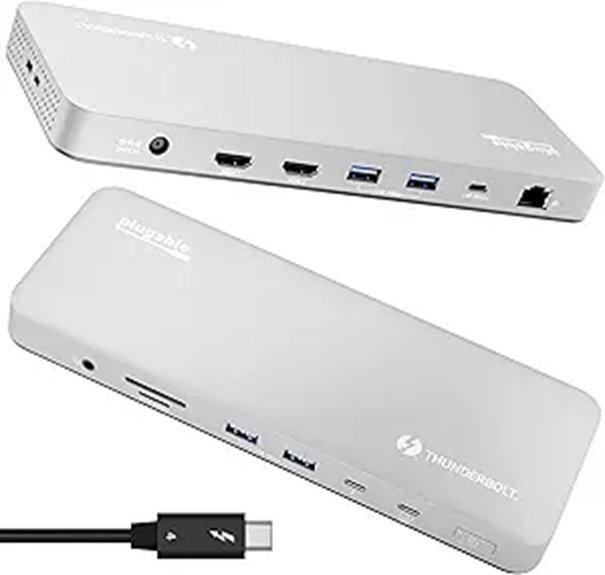 | Mac Compatibility | Number of Ports: 13 ports | Display Support: Dual 4K@60Hz or 6K single | Power Delivery (Charging): 100W PD | VIEW LATEST PRICE | See Our Full Breakdown |

More Details on Our Top Picks
-

Anker Prime TB5 Docking Station, 14-in-1 Thunderbolt 5 Dock with 120Gbps Max Transfer, Thunderbolt Dock with 140W Max Charging, Cooling System, Up to 8K, Dual Display for TBT 5/4 Laptops
14-in-1 Thunderbolt 5 Dock: Equipped with a Thunderbolt 5 upstream port, two Thunderbolt 5 downstream ports, two USB-C...
As an affiliate, we earn on qualifying purchases.
Razer Thunderbolt 5 Dock Chroma with 11 Ports
If you’re looking for a Thunderbolt dock that can handle demanding VR gaming setups and creative workflows, the Razer Thunderbolt 5 Dock Chroma is an excellent choice. It boasts Thunderbolt 5 compatibility, delivering speeds up to 120 Gb/s, perfect for high-resolution displays and fast data transfer. With 11 ports, including Thunderbolt 5, Ethernet, SD card slot, and multiple USB Type A ports, it covers all your peripherals. The built-in M.2 slot supports up to 8TB NVMe SSDs, ensuring quick load times for large files. Its active cooling and 140W charging make it reliable and efficient for intensive tasks, all in a sleek, clutter-free design.
- Number of Ports:11 ports
- Display Support:Up to 8K/Triple 4K at 144Hz
- Power Delivery (Charging):140W PD
- Data Transfer Speed:Up to 120 Gb/s
- Connectivity Types:Thunderbolt 5, Ethernet, Audio, SD, USB-A
- Cooling System:Active cooling
- Additional Feature:Built-in M.2 SSD slot
- Additional Feature:Compact, clutter-free design
- Additional Feature:Active cooling system
-

UGREEN Thunderbolt 4 Dock 13-in-1 40Gbps Docking Station with Dual 4K@60Hz Single 8K Display, 90W Charging for Laptop, 2.5GbE, SD/TF 4.0. Revodok Max 213 for MacBook Surface Pro and More
Comprehensive 13-Port Expansion: Equipped with 2 Thunderbolt 4 ports (40Gbps, 15W), 1 DisplayPort 1.4, 1x 2.5Gb Ethernet, SD/TF...
As an affiliate, we earn on qualifying purchases.
Anker Prime TB5 Docking Station with 14 Ports
The Anker Prime TB5 Docking Station stands out as the top choice for gamers and professionals who demand blazing-fast data transfer and versatile connectivity. With 14 ports, including Thunderbolt 5 upstream and downstream, USB-C, USB-A, SD/TF card readers, Ethernet, audio, and HDMI 2.1/DisplayPort 2.1, it covers all your needs. Supporting up to 120Gbps transfer speeds, it enables rapid large file transfers, while the dual display outputs deliver stunning 8K resolution. Its active cooling system keeps performance steady under heavy loads, and with up to 140W power delivery, it efficiently charges connected devices. Overall, it’s a powerhouse for VR gaming and productivity.
- Number of Ports:14 ports
- Display Support:Up to 8K@60Hz, dual 8K@60Hz
- Power Delivery (Charging):140W PD
- Data Transfer Speed:Up to 120 Gb/s
- Connectivity Types:Thunderbolt 5, Ethernet, HDMI, SD, USB-C/A
- Cooling System:Active cooling
- Additional Feature:Supports dual 8K displays
- Additional Feature:14-in-1 Thunderbolt 5 ports
- Additional Feature:24-month warranty included
-

Plugable Thunderbolt 4 Dock with 100W Charging, Thunderbolt Certified, Laptop Docking Station Dual Monitor Single 8K or Dual 4K HDMI for Windows and Mac, 4X USB, Gigabit Ethernet (TBT4-UD5)
Thunderbolt Certified & Award-Winning Performance: Officially recognized as the Best Thunderbolt Dock 2025 by Wirecutter, this Thunderbolt docking...
As an affiliate, we earn on qualifying purchases.
UGREEN Thunderbolt 4 Dock 13-in-1 with 8K Display
Looking for a versatile dock that can handle demanding VR gaming setups and boost productivity? The UGREEN Thunderbolt 4 Dock 13-in-1 with 8K Display offers extensive connectivity with 13 ports, including dual Thunderbolt 4, 8K display support, Ethernet, SD/TF card readers, and multiple USB ports. It delivers blazing-fast data transfer speeds up to 40Gbps and supports dual 4K monitors or an impressive 8K display. With a 180W power adapter, it charges your laptop up to 90W while connected. Compatible with most Thunderbolt 4, USB4, and USB-C devices, it’s perfect for high-performance gaming, creative work, and multitasking in 2026.
- Number of Ports:13 ports
- Display Support:Dual 4K@60Hz or 8K@30Hz
- Power Delivery (Charging):180W PD
- Data Transfer Speed:Up to 40 Gb/s
- Connectivity Types:Thunderbolt 4, DisplayPort, Ethernet, SD, USB-C/A
- Cooling System:Not specified
- Additional Feature:Supports dual 4K/8K displays
- Additional Feature:180W power input
- Additional Feature:Versatile connectivity options
Plugable Thunderbolt 4 Dock with 100W Charging
For gamers and professionals seeking a reliable, high-performance dock, the Plugable Thunderbolt 4 Dock with 100W charging stands out thanks to its award-winning design and robust connectivity. It’s Thunderbolt Certified and Intel Evo certified, delivering blazing 40Gbps speeds across 13 ports. You can connect dual 4K displays or an 8K monitor, making it perfect for immersive VR setups. With 100W Power Delivery, it efficiently charges laptops and peripherals. Its compatibility spans Windows and Mac systems, ensuring seamless performance. Built for demanding environments, this dock combines speed, versatility, and reliability, making it an excellent choice for serious gamers and professionals alike.
- Number of Ports:13 ports
- Display Support:Dual 4K@60Hz or single 8K
- Power Delivery (Charging):100W PD
- Data Transfer Speed:40 Gb/s
- Connectivity Types:Thunderbolt 4, HDMI, Ethernet, SD, USB-C/A
- Cooling System:Not specified
- Additional Feature:Certified Thunderbolt 4
- Additional Feature:100W Power Delivery
- Additional Feature:Supports dual 4K/8K displays
Dell Thunderbolt 4 Smart Dock SD25TB4 (130W 4K 4 Displays)
If you need a versatile dock that can handle multiple high-resolution displays and fast charging, the Dell Thunderbolt 4 Smart Dock SD25TB4 stands out as an excellent choice for VR gaming laptops in 2026. It supports up to four 4K monitors through HDMI 2.1, DisplayPort 1.4, USB-C, and Thunderbolt 4, making multi-display setups seamless. With 130W power delivery, it charges Dell devices quickly while reducing cable clutter. The dock offers high-speed data transfer, a 2.5GbE Ethernet port, and robust security features like WPA3 encryption. Its eco-friendly design and compact form make it perfect for modern, professional gaming setups.
- Number of Ports:Multiple (up to 10+ actual ports listed)
- Display Support:Up to 4x 4K or 1x 8K
- Power Delivery (Charging):130W/96W PD
- Data Transfer Speed:High-speed (implied 40 Gb/s)
- Connectivity Types:Thunderbolt 4, HDMI, DisplayPort, Ethernet, SD
- Cooling System:Not specified
- Additional Feature:Business security features
- Additional Feature:Eco-friendly recycled materials
- Additional Feature:Supports up to 4 monitors
External GPU Enclosure Dock for Thunderbolt 3/4
An external GPU enclosure dock designed for Thunderbolt 3 and 4 stands out as an essential tool for gamers and professionals seeking maximum performance. It supports Thunderbolt 3/4, USB4, and compatible devices like NUCs and gaming rigs, but requires these ports to function properly. Powered by a certified JHL7440 controller, it delivers workstation-grade graphics, supporting the latest NVIDIA RTX 50 Series and AMD RX 7000 Series GPUs. It also doubles as a hub, with a 10Gbps USB-A port, Thunderbolt 4 port, and daisy chain capabilities. Keep in mind, the package excludes the graphics card and power supply, so plan accordingly.
- Number of Ports:4 ports (external GPU enclosure)
- Display Support:External GPU (supports high-end GPU for display)
- Power Delivery (Charging):Not applicable (external GPU)
- Data Transfer Speed:Not applicable (GPU dock)
- Connectivity Types:Thunderbolt 3/4, USB-A, USB-C, Ethernet
- Cooling System:Not applicable (GPU enclosure)
- Additional Feature:Supports latest RTX and RX GPUs
- Additional Feature:High-performance workstation use
- Additional Feature:Daisy chain port included
Plugable Thunderbolt 4 Dock for MacBook Air & Pro
The Plugable Thunderbolt 4 Dock for MacBook Air & Pro stands out with its seamless plug-and-play design, making it an ideal choice for professionals who need reliable, high-speed connectivity without hassle. It offers 13 versatile ports, including Thunderbolt 4, USB-C, USB-A, SD/microSD, Ethernet, and audio, all supporting fast data transfer and broad device compatibility. With 100W power delivery, it keeps your MacBook charged during demanding tasks. Supports dual 4K displays or a single 6K monitor, perfect for creative work. Built with durable aluminum and backed by lifetime North American support, it’s a reliable, high-performance hub for any MacBook user.
- Number of Ports:13 ports
- Display Support:Dual 4K@60Hz or 6K single
- Power Delivery (Charging):100W PD
- Data Transfer Speed:40 Gb/s
- Connectivity Types:Thunderbolt 4, HDMI, Ethernet, SD, USB-A/C
- Cooling System:Not specified
- Additional Feature:Supports full dual 4K on M4/M5
- Additional Feature:Space gray aluminum finish
- Additional Feature:Lifetime North American support
Factors to Consider When Choosing a Thunderbolt Dock for VR Gaming Laptop

When choosing a Thunderbolt dock for VR gaming, I focus on compatibility with my VR gear and the dock’s data transfer speeds to guarantee smooth performance. I also consider how many displays I can connect and whether it provides enough power delivery for my laptop and peripherals. Ultimately, I keep heat management in mind to prevent overheating during long gaming sessions.
Compatibility With VR Gear
Are you confident your Thunderbolt dock can handle the demands of VR gaming? Ensuring compatibility with your VR gear is essential. First, verify it supports Thunderbolt 4 or 5 standards to handle the high data transfer rates needed for smooth VR experiences. Check that the dock can connect to VR headsets requiring low latency and fast data transfer to prevent lag. It should also deliver enough power to charge your laptop and power VR accessories simultaneously. Additionally, confirm the dock offers multiple high-resolution video outputs, like 4K or 8K, to match your VR display requirements. Finally, make sure its ports—USB-C and USB-A—are compatible with your controllers, sensors, and peripherals for seamless integration and hassle-free gameplay.
High Data Transfer Speeds
High data transfer speeds are fundamental to maximizing your VR gaming experience with a Thunderbolt dock. With speeds of at least 40Gbps, you can handle large VR game files and real-time streaming without lag. Faster data transfer reduces latency, ensuring smoother gameplay and more responsive controls. It also allows for quick loading of game assets, updates, and multimedia content, preventing frustrating delays. Choosing a dock that supports Thunderbolt 4 or Thunderbolt 5 guarantees the bandwidth needed for high-performance VR applications. Consistent high-speed data transfer also prevents bottlenecks when connecting multiple peripherals and external storage devices. Overall, prioritizing speed ensures your VR setup runs seamlessly, delivering immersive experiences without interruptions or performance hiccups.
Multiple Display Support
Supporting multiple external displays is vital for creating an immersive VR gaming setup, and choosing the right Thunderbolt dock can make a significant difference. I look for docks that support dual 4K or even 8K monitors simultaneously, guaranteeing rich visuals and smooth performance. It’s important to check the maximum resolution and refresh rate each port can handle, so your VR experience remains seamless and visually stunning. High bandwidth capacity is essential to prevent performance bottlenecks when running multiple high-resolution displays. I also consider docks that support daisy-chaining monitors through a single Thunderbolt port, reducing cable clutter. Finally, compatibility with my laptop’s graphics capabilities ensures everything works smoothly without compatibility issues, providing a reliable, high-quality multi-monitor setup for VR gaming.
Power Delivery Capacity
Power delivery capacity is a key factor when selecting a Thunderbolt dock for VR gaming laptops, as it determines how well the dock can power your device during intense sessions. I recommend choosing a dock that provides at least 100W of power to guarantee your laptop charges efficiently while gaming. For demanding VR setups or future upgrades, a capacity of 130W or more is ideal, offering extra headroom for high-performance components. It’s vital to verify your laptop’s charging requirements to avoid slow charging or performance issues. Insufficient power delivery can force you to use an additional power source or limit peripheral performance. A dock with ample power capacity ensures your laptop remains charged, peripherals run smoothly, and your VR experience stays seamless.
Cooling and Heat Management
When choosing a Thunderbolt dock for a VR gaming laptop, effective cooling and heat management are critical to maintaining peak performance. Overheating can cause thermal throttling, lag, or even hardware damage during intense VR sessions. Docks equipped with active cooling fans or heat sinks help dissipate the heat generated by high data transfer rates and multiple peripherals. Proper airflow design within the dock minimizes thermal buildup, ensuring sustained operation without performance drops. Robust heat dissipation components not only protect the hardware but also extend the lifespan of both the dock and the laptop. Adequate cooling solutions are essential for preventing overheating, which can compromise gaming experience and cause long-term damage. Prioritizing heat management features ensures your setup remains stable during extended, demanding VR gaming sessions.
Port Selection and Variety
Choosing the right Thunderbolt dock for a VR gaming laptop hinges on selecting a variety of ports that can handle all your peripherals and accessories. You’ll want USB-A and USB-C ports for controllers, storage devices, and accessories. HDMI and DisplayPort options are vital for connecting high-resolution VR headsets and multiple monitors, with dual 4K or 8K support being ideal. Multiple Thunderbolt 4 or 5 ports expand your connectivity for external GPUs, sensors, and VR controllers. Fast data transfer rates—up to 120Gbps—are necessary for transferring large VR files and real-time streaming. Additionally, dedicated audio jacks and SD card slots facilitate seamless audio integration and content creation. Prioritizing a versatile port selection ensures your setup remains flexible, efficient, and ready for immersive VR gaming.
Frequently Asked Questions
Can These Docks Support Multiple VR Headsets Simultaneously?
Yes, many Thunderbolt docks can support multiple VR headsets simultaneously, but it depends on their bandwidth and port capabilities. I always check if a dock offers enough Thunderbolt or USB-C ports with high data transfer rates. For seamless VR experiences with multiple headsets, I recommend docks that provide ample high-speed connections to avoid lag or performance issues. Ensuring compatibility and power delivery is also key for smooth multi-headset VR gaming.
Are Thunderbolt Docks Compatible With All VR Gaming Laptops?
Yes, Thunderbolt docks are compatible with most VR gaming laptops, but I always check the specific model’s specs first. Some docks might not support certain GPU configurations or power requirements. I recommend verifying that the dock offers enough bandwidth and ports for your VR setup. When I picked mine, I made sure it was compatible with my laptop’s Thunderbolt version and supported the peripherals I need for immersive VR gaming.
What Is the Maximum Data Transfer Speed for VR Streaming?
Imagine a lightning bolt slicing through the sky—that’s how I see data transfer speeds. For VR streaming, the maximum speed is around 40 Gbps with Thunderbolt 3 or 4. This rapid flow guarantees smooth, high-quality visuals without lag. As I connect my VR headset, I trust these speeds to deliver immersive experiences, making every virtual moment feel real and seamless.
Do These Docks Include Built-In Cooling for Extended VR Sessions?
No, most Thunderbolt docks don’t come with built-in cooling systems. I’ve found that extended VR sessions can cause some docks to heat up, but I usually manage this by ensuring good airflow around my setup or using external cooling solutions. It’s a good idea to check the specs of each dock, though, because some high-end models might offer better thermal management features to keep your gear cool during long gaming sessions.
Can I Connect External GPUS Through These Thunderbolt Docks?
You absolutely can connect external GPUs through these Thunderbolt docks, and it’s a game-changer for VR gaming. I’ve done it myself, and it boosts performance considerably. Just make sure the dock supports Thunderbolt 3 or 4 with enough bandwidth. When I set mine up, I noticed smoother graphics and faster load times. It’s like giving your laptop a powerful upgrade without replacing the whole machine.
Conclusion
Choosing the right Thunderbolt dock can truly elevate your VR gaming experience. Did you know that Thunderbolt 4 offers data transfer rates up to 40Gbps, four times faster than USB 3.0? This speed guarantees smooth, lag-free gameplay and seamless multi-device connections. As I’ve explored, picking a dock tailored to your setup makes all the difference. Invest wisely, and you’ll open the full potential of your VR laptop in 2026 and beyond.