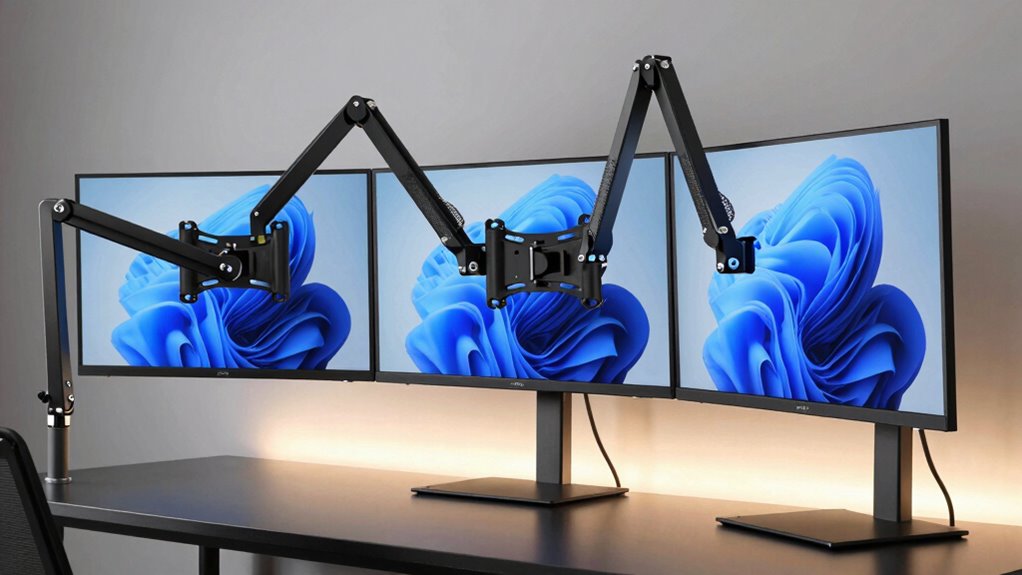

Finding a reliable heavy duty dual monitor arm for large screens under 450 dollars can be challenging. The best options combine strong build quality, high weight capacity, and full adjustability without breaking the bank. The VIVO Dual Ultrawide Monitor Desk Mount stands out for its impressive size support and affordability, while the Mount-It! Dual Ultrawide Mount offers excellent full-motion flexibility. However, most models in this price range face tradeoffs between maximum weight capacity, ease of installation, and adjustability. Continue reading for a detailed comparison of the top picks, so you can choose the right mount for your workspace.

Get the latest gadgets delivered free with Prime
- Fast, free delivery on millions of items
- Prime Video, Amazon Music and more included
- Member-only deals all year
Complete the kit



Key Takeaways
- Heavy duty dual monitor arms under 450 generally balance weight capacity and adjustability, with some sacrificing full motion for stability.
- VESA compatibility and mounting options vary, influencing ease of installation and compatibility with large screens.
- Most top-rated options support ultrawide monitors, but some may have limitations on maximum weight or size, so check specs carefully.
- Build quality and materials significantly affect long-term durability, especially for large, heavy screens.
- Price often reflects features like gas springs, height adjustment, and cable management—prioritize these based on your workspace needs.
| VIVO Dual Ultrawide Monitor Desk Mount for Up to 49 Inch Screens, Heavy Duty Clamp, Black |  | Best Overall for Heavy Ultrawide Monitors | Supports: 2 ultrawide monitors up to 49 inches | Maximum weight per arm: 44 lbs | VESA compatibility: 75x75mm, 100x100mm | VIEW ON AMAZON | See Our Full Breakdown |
| Heavy Duty Dual Monitor Arm for 17-49″ Screens, Vertical Stack, 44 lbs |  | Best for Vertical Stacking and Large Monitors | Supported Screen Size: 17-49 inches | Maximum Load: 44 lbs | Pole Height: 19.69 inches | VIEW ON AMAZON | See Our Full Breakdown |
| Mount-It! Dual Ultrawide Monitor Desk Mount for 17–49” Screens, Height-Adjustable Stacking Arms with Pole, Heavy Duty Gas Spring, Full Motion, VESA 75/100, Clamp or Grommet |  | Best Versatile Installation and Heavy-Duty Support | Supported Screen Size: 17–49 inches | Maximum Load per Arm: 44 lbs | Mounting Options: Clamp or Grommet | VIEW ON AMAZON | See Our Full Breakdown |
| VIVO Premium Aluminum Heavy Duty Dual Monitor Arm for Ultrawide Monitors up to 40 inches and 30 lbs Each, Desk Mount Stand, Pneumatic Height, Max VESA 100×100, Black |  | Best Compact Support for Large Ultrawides | Monitor Size Support: 13” to 40” | Max Weight per Monitor: 30 lbs | VESA Compatibility: 75x75mm or 100x100mm | VIEW ON AMAZON | See Our Full Breakdown |
| monTEK Heavy-Duty Dual Monitor Stand for 24-57″ Screens |  | Best for Heavy and Large Monitors in Versatile Setup | Supports Screen Size: 24-57 inches | Max Weight per Arm: 59.4 lbs for flat monitors | VESA Compatibility: Up to 200×200 mm | VIEW ON AMAZON | See Our Full Breakdown |
| ARES WING Heavy-Duty Gas Spring Dual Ultrawide Monitor Arm 57″ 60Lbs VESA |  | Best Heavy-Duty Support for Large Ultrawide Monitors | Monitor Size Support: 24 to 57 inches | Weight Capacity: 66 lbs per monitor | VESA Compatibility: 75×75 mm, 100×100 mm, 100×200 mm, 200×200 mm | VIEW ON AMAZON | See Our Full Breakdown |
| Dual Monitor Arm Desk Mount for 17-49 Inch Monitors Holds 44 lbs, Black |  | Best Flexible Motion for Large Monitors up to 49″ | Monitor Size Range: 17-49 inches | Weight Capacity: 44 lbs per arm | VESA Compatibility: 75x75mm, 100x100mm | VIEW ON AMAZON | See Our Full Breakdown |
| HUANUO Dual Monitor Stand for 13″–40″ Monitors with USB, Height Adjustable, VESA Mount, Clamp/Grommet Base |  | Best Compact Support with Built-In USB Ports | Supported Screen Size: 13″–40″ | Weight Capacity: 26.4 lbs per arm | VESA Compatibility: 75×75mm, 100×100mm | VIEW ON AMAZON | See Our Full Breakdown |
| Dual Monitor Mount for Screens up to 43 inches – Heavy Duty Adjustable Monitor Arm |  | Best Heavy-Duty Support for Monitors Up to 43″ | Supports Monitors: Up to 43 inches | Max Weight per Monitor: 33.1 lbs | VESA Compatibility: 75x75mm & 100x100mm | VIEW ON AMAZON | See Our Full Breakdown |
| MOUNTUP Dual Monitor Stand for 32-49 Inch Screens, Heavy Duty Dual Monitor Arm with Full Motion, Height Adjustable, VESA Mount |  | Best Overall Heavy Duty Dual Monitor Arm for Large Screens | Supported Screen Size: 32-49 inches | Weight Capacity: 7.7-44 lbs | VESA Compatibility: 75x75mm, 100x100mm | VIEW ON AMAZON | See Our Full Breakdown |
| BenQ ErgoArm BDH01 Dual Monitor Arm for 2 Screens Up to 35” & 44lbs, Black |  | Best for Ergonomic Adjustability of Large Monitors | Supports: Two monitors | Max Screen Size: 35 inches | Max Weight: 44 lbs per monitor | VIEW ON AMAZON | See Our Full Breakdown |
| heavy duty dual monitor arm for large screens under 450 | VESA compatibility |
|---|---|
| VIVO Dual Ultrawide Monitor De | 75x75mm, 100x100mm |
| Heavy Duty Dual Monitor Arm fo | 75x75mm & 100x100mm |
| Mount-It! Dual Ultrawide Monit | — |
| VIVO Premium Aluminum Heavy Du | 75x75mm or 100x100mm |
| monTEK Heavy-Duty Dual Monitor | Up to 200×200 mm |
| ARES WING Heavy-Duty Gas Sprin | 75×75 mm, 100×100 mm, 100×200 mm, 200×200 mm |
| Dual Monitor Arm Desk Mount fo | 75x75mm, 100x100mm |
| HUANUO Dual Monitor Stand for | 75×75mm, 100×100mm |
| Dual Monitor Mount for Screens | 75x75mm & 100x100mm |
| MOUNTUP Dual Monitor Stand for | 75x75mm, 100x100mm |
| BenQ ErgoArm BDH01 Dual Monito | — |
More Details on Our Top Picks
VIVO Dual Ultrawide Monitor Desk Mount for Up to 49 Inch Screens, Heavy Duty Clamp, Black
This VIVO mount excels at supporting large ultrawide monitors up to 49 inches, making it ideal for professionals who need expansive screens. Compared to the Mount-It! model, its pneumatic height adjustment offers smoother positioning, but the heavier build requires a sturdier desk. The cast aluminum construction guarantees durability, yet it adds weight, which could be a challenge for less robust desks. Its full 360° rotation and versatile tilt allow for ergonomic setups, essential for long work sessions. However, assembly can be complex, especially for users unfamiliar with heavy-duty mounts. This pick suits users with strong desks and large display needs who prioritize stability and flexibility, but those with lightweight desks might find it less practical.
Pros:- Supports monitors up to 49 inches and 44 lbs per arm
- Sturdy cast aluminum construction for long-term durability
- Pneumatic height adjustment for effortless positioning
- Full motion including tilt, swivel, and rotation
Cons:- Heavy weight requires a very sturdy desk
- Assembly can be complicated for non-technical users
Best for: Designers or engineers managing ultrawide, high-weight monitors in a permanent setup.
Not ideal for: Casual users or those with lightweight desks, due to its weight and complex assembly.
- Supports:2 ultrawide monitors up to 49 inches
- Maximum weight per arm:44 lbs
- VESA compatibility:75x75mm, 100x100mm
- Material:Cast aluminum
- Clamp capacity:Desktop up to 2 inches thick
- Tilt range:+55° to -25°
- Swivel:180°
- Rotation:360°
- Height adjustment:Pneumatic
Our verdict“This mount is best for professionals with large ultrawide monitors seeking maximum stability and flexibility.”
Heavy Duty Dual Monitor Arm for 17-49″ Screens, Vertical Stack, 44 lbs
This dual arm supports monitors from 17 to 49 inches, with a vertical stacking option that maximizes desk space, making it ideal for users with limited surface area. Unlike the VIVO model, it offers a taller pole (nearly 20 inches) for vertical arrangements, perfect for tasks requiring multiple screens. Its gas spring arms provide smooth, effortless adjustments, but the heavier build may feel bulky on smaller desks. The full motion including tilt, swivel, and rotation ensures ergonomic flexibility, yet the need for VESA-compatible monitors or adapters limits compatibility. This model appeals to gamers and creative professionals who prefer vertical setups, but might be less suitable for those with compact or lightweight desks.
Pros:- Supports up to 49-inch monitors and 44 lbs per arm
- Vertical stacking maximizes desk space
- Smooth gas spring adjustment for precise positioning
- Full motion including tilt, swivel, and rotation
Cons:- Heavy-duty build may be bulky on small desks
- Requires VESA-compatible monitors or adapters
Best for: Gamers or multimedia creators who need space-efficient, large-screen configurations.
Not ideal for: Users with smaller desks or non-VESA compatible monitors, due to size and compatibility restrictions.
- Supported Screen Size:17-49 inches
- Maximum Load:44 lbs
- Pole Height:19.69 inches
- VESA Compatibility:75x75mm & 100x100mm
- Material:Aluminum and steel
- Adjustment:Tilt +50°/-20°, Swivel ±90°, Rotation 360°
Our verdict“This arm is ideal for users needing vertical stacking and support for large, heavy monitors in space-constrained setups.”
Mount-It! Dual Ultrawide Monitor Desk Mount for 17–49” Screens, Height-Adjustable Stacking Arms with Pole, Heavy Duty Gas Spring, Full Motion, VESA 75/100, Clamp or Grommet
This Mount-It! model offers flexible installation options—clamp or grommet—making it suitable for a variety of desks. It supports large ultrawide monitors up to 49 inches, with a height-adjustable pole and full motion, similar to the Heavy Duty Dual Arm but with more installation versatility. Its heavy-duty steel and aluminum construction promise stability, yet the complexity of setting up the clamp or grommet system can pose challenges for less experienced users. The full motion range enhances ergonomic positioning, but the weight and size mean it’s best suited for sturdy desks. This mount makes sense for those who want a customizable setup without sacrificing support for large ultrawides, but it might be overkill for lighter monitors or simpler needs.
Pros:- Supports ultrawide monitors up to 49 inches
- Versatile clamp or grommet mounting options
- Heavy-duty construction for stability
- Full motion with height adjustment
Cons:- Installation can be complex for beginners
- Heavy weight requiring sturdy desk support
Best for: Professional setups requiring flexible installation options and support for large ultrawide monitors.
Not ideal for: Users with very lightweight desks or those seeking a simple, no-drill solution.
- Supported Screen Size:17–49 inches
- Maximum Load per Arm:44 lbs
- Mounting Options:Clamp or Grommet
- Desk Thickness:0.4–1.8 inches
- Tilt:+50°/-20°
- Swivel:180°
- Rotation:180°
- Adjustable Pole Height:Yes
Our verdict“This mount is well-suited for users needing versatile, heavy-duty support with adaptable installation options.”
This VIVO pick supports ultrawide monitors up to 40 inches, making it a more compact choice for those who don’t need full 49-inch support. Its pneumatic height adjustment allows for effortless ergonomic positioning, similar to the VIVO Dual Ultrawide model, but with a focus on smaller ultrawides. The aluminum construction keeps weight manageable, yet some users might find the maximum VESA size restrictive if they own larger VESA patterns. It’s ideal for users who want a sleek, easy-to-install mount for large ultrawides without the bulk of the bigger models, but it’s less suitable for very heavy or larger screens over 40 inches.
Pros:- Supports ultrawide monitors up to 40 inches and 30 lbs
- Smooth pneumatic height adjustment
- Easy, drill-free mounting options
- Full range of motion for ergonomic setup
Cons:- Limited support for larger ultrawides over 40 inches
- Heavy aluminum construction can be cumbersome to adjust
Best for: Professionals or gamers with ultrawide monitors up to 40 inches seeking a clean, space-saving solution.
Not ideal for: Users with monitors exceeding 40 inches or requiring support for heavier screens beyond 30 lbs.
- Monitor Size Support:13” to 40”
- Max Weight per Monitor:30 lbs
- VESA Compatibility:75x75mm or 100x100mm
- Height Adjustment:Pneumatic
- Mounting Options:Clamp or grommet
- Material:Aluminum
Our verdict“This mount is best for users with ultrawides up to 40 inches who prioritize ease of installation and ergonomic flexibility.”
monTEK Heavy-Duty Dual Monitor Stand for 24-57″ Screens
The monTEK stand supports some of the largest monitors in this roundup, with a range of 24 to 57 inches and up to 59.4 lbs per arm for flat screens. This makes it more capable than the VIVO Ultrawide for very large, heavier monitors, especially if you prefer a stand rather than desk clamp solutions. Its vertical stacking design saves space and offers adjustable tilt, swivel, and rotation for ergonomic comfort. However, the high weight capacity and size mean it’s best suited for very sturdy desks and may be overkill for lighter monitors or smaller spaces. Its straightforward installation and cable management are added benefits, but the bulkiness can be a drawback for compact setups.
Pros:- Supports monitors up to 57 inches and 59.4 lbs
- Vertical stacking conserves space
- Full motion including tilt, swivel, rotate, and height adjustment
- Easy installation and integrated cable management
Cons:- Heavy build may require very sturdy desks
- Overly large for small or lightweight monitors
Best for: Professionals or gamers using large, heavy, or curved monitors up to 57 inches who value space efficiency.
Not ideal for: Users with small or lightweight monitors, or those seeking a minimalist setup, due to its bulk and over-spec support.
- Supports Screen Size:24-57 inches
- Max Weight per Arm:59.4 lbs for flat monitors
- VESA Compatibility:Up to 200×200 mm
- Installation:C-clamp or grommet
- Tilt:Adjustable
- Swivel:Adjustable
- Rotation:Adjustable
- Cable Management:Yes
Our verdict“This stand suits users with large, heavy monitors who need maximum support and space efficiency in a robust setup.”
ARES WING Heavy-Duty Gas Spring Dual Ultrawide Monitor Arm 57″ 60Lbs VESA
This option stands out for accommodating ultrawide monitors up to 57 inches and supporting a hefty 66 pounds per arm, making it ideal for large multi-monitor setups. Compared with the Dual Ultrawide Monitor Mount for 24-57” Screens, it offers more robust weight capacity and industrial-grade air springs for smoother, more controlled adjustments. However, its installation can be complex, especially if your monitors lack VESA holes or require adapters. The full range of ergonomic adjustments—tilt, swivel, and height—ensures a highly customizable workspace. Its multiple mounting options add flexibility, but the setup process may be daunting for less experienced users. This pick makes the most sense for professionals using large ultrawides who need maximum stability and adjustability, despite the installation challenge.
Pros:- Supports ultrawide monitors up to 57 inches and 66 lbs per arm
- Full ergonomic adjustments including tilt, swivel, and rotation
- Industrial-grade air springs ensure smooth, durable movement
- Multiple mounting options for flexible installation
Cons:- Requires VESA mounting holes or adapters, which may complicate setup
- Installation can be complex for some users, especially without prior experience
Best for: Professionals and serious content creators with ultrawide or large monitors up to 57 inches and 66 lbs per monitor
Not ideal for: Casual users with smaller monitors or limited VESA mounting options, as installation complexity may be overwhelming
- Monitor Size Support:24 to 57 inches
- Weight Capacity:66 lbs per monitor
- VESA Compatibility:75×75 mm, 100×100 mm, 100×200 mm, 200×200 mm
- Maximum Extension:23 inches
- Height Adjustment:Up to 22.5 inches
- Mounting Options:C-clamp and grommet
Our verdict“This arm is best suited for users needing maximum support and flexibility for large ultrawide monitors, accepting a more involved setup process.”
Dual Monitor Arm Desk Mount for 17-49 Inch Monitors Holds 44 lbs, Black
This model is better suited to users with large monitors, including ultrawides and curved screens up to 49 inches, offering full motion adjustability with tilt, swivel, and rotation. Unlike the ARES WING, it supports slightly smaller maximum monitor sizes and a lower weight capacity of 44 lbs per arm, which may limit support for very heavy ultrawides. Its durable steel and aluminum construction provides stability, while the cable management system keeps clutter at bay. Installation is straightforward with multiple mounting options, but the need for assembly and adjustments may be a hurdle for some. This arm makes the most sense for those seeking versatile movement and stability without the extra bulk of larger support capacities, even if it supports slightly smaller monitors than the ARES WING.
Pros:- Supports large monitors up to 49 inches and 44 lbs
- Full motion adjustability for ergonomic positioning
- Durable construction with cable management
- Multiple mounting options for easy installation
Cons:- Limited to monitors of 49 inches, smaller than some ultrawides
- Supports only up to 44 lbs, restricting very heavy monitors
Best for: Professionals with large, heavy monitors up to 49 inches, especially those needing full motion flexibility
Not ideal for: Users with ultrawide monitors larger than 49 inches or weighing more than 44 lbs, as support limits may be exceeded
- Monitor Size Range:17-49 inches
- Weight Capacity:44 lbs per arm
- VESA Compatibility:75x75mm, 100x100mm
- Maximum Height:27.9 inches
- Maximum Extension:22.4 inches
- Mounting Options:C-clamp, grommet mount
Our verdict“This arm is ideal for users needing full motion for large but not ultrawide monitors, prioritizing flexibility and stability over maximum size support.”
HUANUO Dual Monitor Stand for 13″–40″ Monitors with USB, Height Adjustable, VESA Mount, Clamp/Grommet Base
This pick is better suited for users with smaller large monitors, supporting screens up to 40 inches and 26.4 lbs each, making it less ideal for true ultrawide or very large displays. Compared to the ARES WING, it has a lower weight capacity and smaller maximum monitor size, but its height adjustability and built-in USB ports add convenience for everyday office use. Its space-saving design and cable management help keep a tidy desk, though the desk thickness limit of 3.54 inches may restrict some setups. This stand is perfect for those who prioritize integrated USB charging and compactness over maximum size support, but not for heavy or ultrawide monitors exceeding 40 inches.
Pros:- Supports monitors up to 40 inches and 26.4 lbs
- Includes built-in USB ports for device charging
- Adjustable height and full motion flexibility
- Space-efficient with cable management
Cons:- Limited to monitors up to 40 inches, smaller than ultrawides
- Desk thickness support up to 3.54 inches may not fit all desks
Best for: Office users with large monitors up to 40 inches seeking USB connectivity and space efficiency
Not ideal for: Users with ultrawide or larger monitors over 40 inches or requiring support over 26.4 lbs per arm
- Supported Screen Size:13″–40″
- Weight Capacity:26.4 lbs per arm
- VESA Compatibility:75×75mm, 100×100mm
- Maximum Height Adjustment:21.1 inches
- Extended Reach:25.59 inches
- Mounting Options:Clamp and grommet
Our verdict“This stand is best for office environments with moderately large monitors and a need for USB ports, not for ultrawides or very heavy displays.”
Dual Monitor Mount for Screens up to 43 inches – Heavy Duty Adjustable Monitor Arm
This model is well-suited for users with monitors up to 43 inches and a maximum weight of 33.1 lbs per monitor, offering flexible tilting, swiveling, and height adjustment. Compared with the Dual Ultrawide Mount for 24-57” Screens, it supports smaller maximum monitor sizes and slightly less weight, but its heavy-duty metal construction provides added stability for demanding setups. Its full motion capabilities allow ergonomic positioning, while the cable management and dual mounting options enhance workspace organization. However, it may require some assembly and may not support ultrawides larger than 43 inches. This arm is ideal for professionals with large but not ultrawide monitors needing robust movement and stability, despite size limitations.
Pros:- Supports monitors up to 43 inches and 33.1 lbs
- Full motion with tilt, swivel, and height adjustment
- Heavy-duty metal construction for stability
- Cable management and dual mounting options
Cons:- Supports only up to 43 inches, smaller than ultrawides
- Assembly required and some adjustments needed for perfect fit
Best for: Designers or professionals with large monitors up to 43 inches needing stable, flexible positioning
Not ideal for: Users with ultrawide monitors exceeding 43 inches or demanding support for very heavy displays
- Supports Monitors:Up to 43 inches
- Max Weight per Monitor:33.1 lbs
- VESA Compatibility:75x75mm & 100x100mm
- Tilt Range:Adjustable
- Swivel:Yes
- Rotation:360°
- Height Adjustment:Up to 22.4 inches
Our verdict“This arm is best for users needing strong support and flexible positioning for large monitors up to 43 inches, not for ultrawides or heavier displays.”
MOUNTUP Dual Monitor Stand for 32-49 Inch Screens, Heavy Duty Dual Monitor Arm with Full Motion, Height Adjustable, VESA Mount
This model shines as the most versatile choice for large monitors in the under $450 range, especially when compared to the VIVO Ultrawide Mount. Its support for monitors up to 49 inches and 44 lbs makes it ideal for ultrawide displays or multiple large screens. The full motion adjustments, including rotation, tilt, and height, allow for highly customized setups, crucial for reducing neck strain or optimizing workflow. Its sturdy construction and integrated cable management help maintain a clean workspace, but the stand requires a desk with specific thicknesses, which might limit compatibility. Unlike some less adjustable options, this stand offers extensive flexibility for different monitor sizes and orientations, but heavier monitors may need additional support to prevent sagging. Overall, this pick suits users who want robust, adaptable support for large, heavy screens without sacrificing desk space or ease of movement.
Pros:- Supports a broad range of ultrawide monitors up to 49 inches
- Full motion adjustments for optimal ergonomic positioning
- Sturdy construction with cable management to reduce clutter
- Vertical stacking saves desk space
Cons:- Requires specific desk thickness for secure mounting
- Heavy monitors may need extra support to prevent sagging
- Limited to monitors within the specified weight range
Best for: Professionals needing flexible, heavy-duty support for ultrawide or large monitors, such as designers or video editors.
Not ideal for: Users with thinner desks or limited mounting space, as the clamp and grommet require specific desk thicknesses and hole diameters.
- Supported Screen Size:32-49 inches
- Weight Capacity:7.7-44 lbs
- VESA Compatibility:75x75mm, 100x100mm
- Max Height:28.2 inches
- Extension:up to 22.9 inches
- Desk Thickness:0.39-2.76 inches (clamp), 0.39-1.97 inches (grommet)
Our verdict“This stand is best suited for users who need a highly adjustable, heavy-duty solution for large monitors and have compatible desks.”
BenQ ErgoArm BDH01 Dual Monitor Arm for 2 Screens Up to 35” & 44lbs, Black
The BenQ ErgoArm BDH01 stands out for users prioritizing ergonomic comfort and stable support for large screens, especially when compared to the MountUp stand. Its gas spring mechanism allows effortless height adjustments, making fine-tuning easier for long work sessions. Supporting two monitors up to 35 inches and 44 lbs each, it emphasizes stability and space-saving design, elevating monitors off the desk for a cleaner setup. However, its maximum supported size of 35 inches means it’s less suitable for ultrawide or very large monitors, unlike the MountUp which supports up to 49 inches. Installation can be more complex due to the gas spring mechanism, and the price is higher, reflecting its ergonomic features. This arm is ideal for users who need precise, effortless adjustments and have monitors within its size limit, but it’s less suitable for those with larger screens or strict budget constraints.
Pros:- Supports two large monitors with ease
- Smooth, effortless height adjustment via gas spring
- Space-saving design elevates monitors off the desk
- Sturdy build for heavy monitors
Cons:- Limited to monitors up to 35 inches, less versatile for ultrawides
- Installation may be complex for some users
- Higher price point compared to simpler arms
Best for: Designers or programmers who need ergonomic, space-efficient support for up to 35-inch monitors with easy height adjustments.
Not ideal for: Users with ultrawide monitors larger than 35 inches or those seeking maximum flexibility in monitor size and weight.
- Supports:Two monitors
- Max Screen Size:35 inches
- Max Weight:44 lbs per monitor
- Color:Black
- Adjustment Mechanism:Gas spring
- Features:Ergonomic, space-saving, sturdy construction
Our verdict“This arm is ideal for ergonomic-focused users with medium-sized monitors needing precise, effortless positioning.”

How We Picked
These monitor arms were selected based on their maximum weight capacity, build quality, compatibility with large screens, and user reviews. We prioritized models that clearly support screens over 30 inches and 20+ pounds, ensuring they can handle heavy-duty tasks. Ease of installation, adjustability, and overall stability also factored into the rankings. Our goal was to identify options that deliver reliable performance within the $450 budget, suitable for both professional and enthusiast setups. Products were compared directly on these criteria, with a focus on real-world usability and value for money.Factors to Consider When Choosing Heavy Duty Dual Monitor Arm For Large Screens Under 450
Choosing the right heavy duty dual monitor arm for large screens under 450 involves balancing performance, flexibility, and durability. To make an informed decision, consider key factors such as weight capacity, VESA compatibility, adjustability, and mounting options. Understanding how these elements affect usability can help prevent common mistakes like overloading a mount or ending up with incompatible hardware. Additionally, think about your workspace setup and whether features like cable management or gas springs are priorities. This guide highlights critical considerations to ensure you select a mount that meets your specific needs.Weight Capacity and Screen Size Compatibility
Ensuring your monitor’s weight and size are within the mount’s limits is essential for safety and longevity. Heavy duty mounts designed for large screens often support up to 60 lbs per arm, but not all are equal. Overloading a mount can cause instability or damage, so verify maximum weight and size specifications carefully. Also, check if the mount supports ultrawide screens, which are typically heavier and wider, requiring robust construction. Choosing a model with a higher weight capacity provides peace of mind, especially if you plan to upgrade or add accessories in the future.
VESA Compatibility and Mounting Options
VESA compatibility is a must-have feature, as it ensures your monitor can be securely attached to the arm. Most large-screen mounts support common VESA patterns like 75×75 or 100×100 mm, but some may have limitations at higher sizes. Additionally, consider whether the mount offers clamp or grommet mounting—clamp mounts are easier to install without drilling, while grommet options provide more stability. Proper mounting options prevent damage to your desk and allow for flexible positioning, especially important with larger, heavier monitors.
Adjustability and Full Motion
Full adjustability enables you to customize monitor placement for comfort and ergonomics. Gas springs offer smooth, effortless movement but can be more expensive. Look for height adjustment, tilt, swivel, and rotation features—these are essential for large screens to prevent neck strain. Keep in mind that some mounts sacrifice full motion to maximize stability under heavy loads. Decide which adjustments matter most for your workflow, and verify that the chosen mount can handle the weight while maintaining ease of movement.
Build Quality and Materials
Durability hinges on the quality of materials used, such as aluminum or reinforced steel. Heavy duty mounts subjected to frequent adjustments benefit from high-quality construction to prevent sagging or wear over time. Cheaper materials may save money upfront but can lead to instability or breakage with large, heavy monitors. Consider reviews about long-term performance, especially if you plan to use the mount daily or for extended periods. A well-built mount will remain stable and secure for years, making it a worthwhile investment.
Additional Features and Value
Features like integrated cable management, easy installation, and aesthetic design can enhance your experience. Cable management keeps your workspace tidy and prevents cords from snagging during adjustments. Some mounts include quick-release mechanisms or modular designs for easier setup. While these are not deal-breakers, they add convenience and can improve overall usability. Balance these extras against your budget and priorities to select a mount that offers the best value for your needs.
Frequently Asked Questions
Can I mount a large, heavy monitor on any dual monitor arm?
Not all dual monitor arms are suitable for very large or heavy monitors. Always check the maximum weight capacity and VESA support before purchasing. Large screens often require sturdier mounts with reinforced arms and heavier-duty mounting hardware. Choosing a model that explicitly states support for monitors over 30 inches and 20+ pounds reduces the risk of instability or damage. Proper mounting ensures safety and long-term performance, especially for heavy, ultrawide displays.
Is a gas spring monitor arm better for large screens?
Gas spring arms offer smoother, more effortless adjustments, which can be beneficial when handling large, heavy monitors. They typically provide better flexibility for height, tilt, and swivel compared to spring-loaded or rigid mounts. However, gas springs can be more expensive and may require maintenance or replacement over time. For large screens, investing in a high-quality gas spring mount can improve ergonomics, but ensure it supports the weight of your specific monitor model.
What is the easiest way to install a heavy-duty dual monitor arm?
Most heavy-duty dual monitor arms are designed for straightforward installation with clamp or grommet options. Clamp mounts are generally easier and require no drilling, making them suitable for most desks. Grommet mounts provide more stability but involve drilling into your desk, which may be more complex. Reading the manufacturer’s instructions carefully and having basic tools on hand makes installation smoother. Choosing a mount with a simple, tool-free setup can save time and reduce frustration.
How do I know if a dual monitor arm will fit my desk setup?
Check the mounting options and clearance requirements of the mount relative to your desk space. Some mounts need sufficient desk thickness or space behind the clamp for installation. Measure your desk’s thickness and available space before purchasing. Also, verify the arm’s reach and height range to ensure comfortable viewing angles. Proper fitment prevents awkward positioning and ensures stability, especially for large monitors that exert more force on the mount.
Are budget-friendly heavy-duty mounts reliable for large screens?
Budget-friendly models can work well if they meet your specific size and weight requirements, but they often compromise on durability and adjustability. Cheaper mounts may use lower-quality materials, leading to sagging or instability over time. Reading detailed reviews and checking for high weight capacity ratings is essential before choosing a budget option. Sometimes, spending a bit more on a trusted brand can provide greater peace of mind and longer-lasting performance with large, heavy monitors.
Conclusion
For general office use and moderate workloads, the VIVO Dual Ultrawide Monitor Desk Mount offers excellent value with solid support for large screens. If flexibility and full motion are priorities, the Mount-It! Dual Ultrawide Mount makes a compelling choice, especially for ergonomic setups. For those willing to invest in premium durability and features, the BenQ ErgoArm BDH01 is ideal, though slightly above the budget. Beginners or casual users should focus on straightforward, easy-to-install models like the VIVO options, while professionals needing maximum stability should consider models with higher weight capacities and robust build quality. Tailoring your choice to your specific monitor size, workspace, and usage habits ensures long-term satisfaction.Black Friday Picks

Kindle Paperwhite (16 GB) – 7 Glare-Free Display, Black
As an affiliate, we earn on qualifying purchases.