For large monitors, the best ergonomic desk converter needs enough room for the display and a stable base, while letting you position the keyboard at a comfortable height. I’d choose the Rocelco 46-Inch Height-Adjustable Converter as the best overall fit in this lineup, with its wide work surface and retractable keyboard tray. The Mount-It! Electric Converter with Dual Monitor Arm stands out for buyers who want monitor mounts and powered adjustment, while the VIVO 48-Inch Converter is a strong option for a broad desktop. The main tradeoffs are footprint, monitor support, adjustment method, and whether the keyboard tray leaves enough room for your setup. Read on for how these 13 options compare and which one best fits your desk.

Get the latest gadgets delivered free with Prime
- Fast, free delivery on millions of items
- Prime Video, Amazon Music and more included
- Member-only deals all year
Complete the kit


Key Takeaways
- Wide platforms lead this roundup: the 46-, 47-, and 48-inch models offer more room to arrange large screens than the 32-inch converters, though they also claim more desk space.
- Monitor arms change the setup: the two Mount-It! models with dual monitor arms suit buyers who want displays elevated independently of the work surface; confirm arm compatibility and screen weight before choosing.
- Keyboard trays solve a different problem than desktop width: a broad platform can fit large displays, while a separate tray helps place the keyboard lower and closer to the user.
- Compact and corner models serve specific desks: the 32-inch options and VIVO corner converter make more sense when workspace shape or available surface matters more than fitting several large displays.
- Adjustment style affects daily use: the electric Mount-It! offers powered height changes, while manual risers avoid relying on a motor and suit buyers comfortable with hands-on adjustment.
| Rocelco 46-Inch Height-Adjustable Standing Desk Converter with Retractable Keyboard Tray, Black |  | Best for Ergonomic Typing | Work surface: 45.75 x 23.25 inches | Keyboard tray: 25.75 x 11.25 inches | Height adjustment: 5 to 20 inches | VIEW ON AMAZON | See Our Full Breakdown |
| SANODESK 42-Inch Height-Adjustable Standing Desk Converter with Keyboard Tray, Black |  | Best for a Wide Keyboard Tray | Desktop dimensions: 41.7 x 16.3 inches | Keyboard tray dimensions: 34.6 x 12.2 inches | Height adjustment: 4.7 to 19.6 inches | VIEW ON AMAZON | See Our Full Breakdown |
| FLEXISPOT 42-Inch Standing Desk Converter with Keyboard Tray, Walnut |  | Best for a Walnut Finish | Dimensions: 24.9 x 42 x 19.6 inches | Weight: 35.1 lbs | Desktop capacity: 33 lbs | VIEW ON AMAZON | See Our Full Breakdown |
| Mount-It! 48-Inch Standing Desk Converter |  | Best for Maximum Desktop Space | Work surface: 48.5 x 23.25 inches | Height range: 6 to 19.25 inches | Weight capacity: 33 lbs | VIEW ON AMAZON | See Our Full Breakdown |
| TechOrbits 32-Inch Standing Desk Converter with Keyboard Tray |  | Best Compact Pick | Work surface width: 31.5 inches | Dimensions: 31.5 x 24.4 x 4.3 inches | Height range: 4.3 to 19.7 inches | VIEW ON AMAZON | See Our Full Breakdown |
| VIVO 38-Inch Corner Standing Desk Converter |  | Best for Corner Desks | Top surface: 37.5 x 18 inches | Keyboard tray: 37 x 12 inches | Height adjustment range: 4.3–20 inches | VIEW ON AMAZON | See Our Full Breakdown |
| Mount-It! Electric Standing Desk Converter with Dual Monitor Arm, 47.2-Inch Desktop and Keyboard Tray | 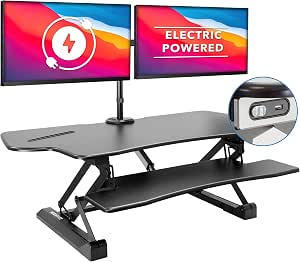 | Best Premium Electric Pick | Desktop dimensions: 47.2 x 23.2 inches | Height adjustment range: 6.3–19.3 inches | Monitor capacity: Two monitors up to 32 inches each | VIEW ON AMAZON | See Our Full Breakdown |
| Mount-It! 47-Inch Height-Adjustable Standing Desk Converter with Dual Monitor Arms |  | Best for Adjustable Monitor Positioning | Work surface: 47 x 23 inches | Height adjustment range: 5.9–19.3 inches | Monitor capacity: Two monitors up to 32 inches each | VIEW ON AMAZON | See Our Full Breakdown |
| 37-Inch Height-Adjustable Desk Converter with Keyboard Tray |  | Best for Higher Equipment Capacity | Desktop dimensions: 37 x 25 inches | Keyboard tray dimensions: 29.5 x 11.8 inches | Height adjustment range: 5.9–18.8 inches | VIEW ON AMAZON | See Our Full Breakdown |
| VIVO 32-Inch Height-Adjustable Standing Desk Riser |  | Best Compact Pick | Model: DESK-V000S | Desktop dimensions: 31.5 x 15.8 inches | Height range: 4.9–19.7 inches | VIEW ON AMAZON | See Our Full Breakdown |
| FLEXISPOT 42-Inch Height-Adjustable Standing Desk Converter with Keyboard Tray |  | Best for a Stable Spring Lift | Platform width: 42 inches | Lift mechanism: Mechanical spring | Main platform capacity: 33 lbs | VIEW ON AMAZON | See Our Full Breakdown |
| VIVO 48-Inch Standing Desk Converter, Black (DESK-V048KB) |  | Best for a Wide Dual-Monitor Setup | Desktop dimensions: 47.6 × 15.7 in | Keyboard tray dimensions: 47.6 × 11.8 in (10.2 in at center) | Desktop weight capacity: 33 lbs | VIEW ON AMAZON | See Our Full Breakdown |
| JOY worker 32-Inch Height-Adjustable Standing Desk Converter |  | Best Compact Pick for Two Monitors | Desktop dimensions: 31.5 × 15.7 inches | Keyboard tray dimensions: 24.4 × 11.8 inches | Height range: 4.9–19.3 inches | VIEW ON AMAZON | See Our Full Breakdown |
More Details on Our Top Picks
Rocelco 46-Inch Height-Adjustable Standing Desk Converter with Retractable Keyboard Tray, Black
The Rocelco’s 45.75-inch-wide surface leaves room for multiple monitors, while its retractable keyboard tray places typing below the main desktop. That separation can help keep screens higher without pushing the keyboard onto the same crowded surface. Compared with the SANODESK 42-Inch Converter, the Rocelco offers more desktop depth and a higher stated load limit, though SANODESK’s much wider tray gives more room for a keyboard and mouse. The gas piston adjusts continuously from 5 to 20 inches, and the unit arrives assembled, which makes setup simpler than models that require tray attachment. Its 45-pound capacity still calls for checking the combined weight of monitors and accessories, and it needs a sturdy existing desk unless paired with an optional floor stand.
Pros:- 45.75 x 23.25-inch work surface accommodates multiple monitors
- Retractable keyboard tray separates typing from the monitor surface
- Gas piston provides continuous height adjustment from 5 to 20 inches
- Arrives fully assembled
Cons:- Requires an existing desk unless paired with the optional floor stand
- 45-pound capacity limits heavier monitor and accessory setups
Best for: Multi-monitor users who want a separate, retractable keyboard tray and a converter that arrives assembled
Not ideal for: People without a sturdy existing desk or whose monitor setup and accessories exceed the 45-pound capacity
- Work surface:45.75 x 23.25 inches
- Keyboard tray:25.75 x 11.25 inches
- Height adjustment:5 to 20 inches
- Weight capacity:Up to 45 lbs
- Adjustment mechanism:Gas piston assist
- Features:Retractable keyboard tray and cable grommet
- Assembly:No assembly required
- Color:Black
Our verdict“Choose the Rocelco if a spacious monitor surface and retractable typing tray matter more than a wider keyboard platform.”
SANODESK 42-Inch Height-Adjustable Standing Desk Converter with Keyboard Tray, Black
The 34.6-inch keyboard tray is the defining advantage here: it gives a full-size keyboard and mouse more lateral room than the Rocelco’s 25.75-inch tray. The 41.7-inch top is sized for a two-monitor setup, but its 16.3-inch depth offers less front-to-back space than the Rocelco or Mount-It! 48-Inch converter. Its spring lift spans 4.7 to 19.6 inches, covering a useful seated-to-standing range without relying on a gas piston. The tradeoff is a modest 33-pound main-surface limit, plus a 4.4-pound tray limit that suits lightweight typing gear rather than a heavy support or accessories. The tray also needs to be attached during setup, so this is a stronger fit for buyers who value keyboard room over an out-of-box ready configuration.
Pros:- 41.7-inch-wide top is intended to fit two monitors
- 34.6-inch keyboard tray offers broad keyboard and mouse space
- Spring lift adjusts from 4.7 to 19.6 inches
- Reinforced steel frame
Cons:- Main surface supports up to 33 lbs
- Keyboard tray capacity is only 4.4 lbs
- Keyboard tray must be attached during assembly
Best for: Dual-monitor users who want generous side-to-side room for a keyboard and mouse
Not ideal for: Owners of heavy monitor setups or anyone needing a deep desktop for large displays and accessories
- Desktop dimensions:41.7 x 16.3 inches
- Keyboard tray dimensions:34.6 x 12.2 inches
- Height adjustment:4.7 to 19.6 inches
- Main surface capacity:33 lbs
- Keyboard tray capacity:4.4 lbs
- Lift mechanism:Mechanical spring
- Frame material:Reinforced steel
- Color:Black
Our verdict“Pick the SANODESK if your priority is a roomy keyboard and mouse tray for a moderate-weight dual-monitor setup.”
FLEXISPOT 42-Inch Standing Desk Converter with Keyboard Tray, Walnut
This FLEXISPOT pairs a 42-inch walnut-look wood top with a metal frame and spring lift, giving a large-monitor workstation a warmer appearance than the black Rocelco or SANODESK. Its 33-pound desktop limit matches the SANODESK’s, so the finish and quick setup are the main reasons to choose it over that similarly sized option. The product data lists a 24.9-inch depth, which gives more front-to-back room than SANODESK’s 16.3-inch top; that can help when arranging monitors and desk accessories. It arrives nearly assembled, but its 35.1-pound unit weight may make repositioning awkward. The keyboard tray is included, though its 4.4-pound limit restricts what belongs there. Buyers with especially heavy displays should compare the stated capacity with their full equipment load before choosing it.
Pros:- 42-inch walnut-finish desktop gives a warmer look than black alternatives
- 24.9-inch stated depth offers room for monitor placement and accessories
- Reinforced steel frame with mechanical spring lift
- Arrives nearly assembled
Cons:- Desktop capacity is limited to 33 lbs
- Keyboard tray supports only 4.4 lbs
- 35.1-pound unit weight can make moving it cumbersome
Best for: Buyers fitting a large-monitor setup into a home office who prefer a walnut finish and minimal setup
Not ideal for: People who frequently move their converter or need a keyboard tray that can hold heavier equipment
- Dimensions:24.9 x 42 x 19.6 inches
- Weight:35.1 lbs
- Desktop capacity:33 lbs
- Keyboard tray capacity:4.4 lbs
- Material:Wood top, metal frame and base
- Color:Walnut
- Adjustment system:Mechanical spring lift
- Included component:Keyboard tray
Our verdict“Choose this FLEXISPOT for a nearly assembled, walnut-finish workstation when your monitors fit within its 33-pound desktop limit.”
Mount-It! 48-Inch Standing Desk Converter
For buyers who need the most room for broad or multiple displays, the 48.5 x 23.25-inch work surface is the standout: it is wider and deeper than the SANODESK 42-Inch model. Dual gas springs raise the platform from 6 to 19.25 inches, and the lower keyboard tray keeps typing gear off the monitor surface. A device slot adds a designated place for a small device, while the lifetime warranty sets it apart from the other listed models. The size has practical costs: this converter needs a large existing desk, and its 33-pound limit is lower than the Rocelco’s 45 pounds despite the larger platform. It ships mostly assembled, but buyers should still check desk space and total equipment weight before committing to its wide footprint.
Pros:- 48.5 x 23.25-inch surface provides the largest listed work area in this batch
- Dual gas springs adjust the platform from 6 to 19.25 inches
- Includes a keyboard tray and device slot
- Ships mostly assembled and includes a lifetime warranty
Cons:- 33-pound capacity is lower than the Rocelco’s 45-pound limit
- Wide footprint requires an existing desk with ample tabletop space
Best for: People with a broad existing desk and two monitors who want generous surface area and a lower keyboard tray
Not ideal for: Small-desk owners or users whose monitors, stands, and accessories weigh more than 33 lbs
- Work surface:48.5 x 23.25 inches
- Height range:6 to 19.25 inches
- Weight capacity:33 lbs
- Frame material:Steel
- Adjustment mechanism:Dual gas springs
- Included features:Keyboard tray and device slot
- Warranty:Lifetime
- Color:Black
Our verdict“The Mount-It! suits buyers who need a very wide monitor platform and have enough desk space for its footprint.”
TechOrbits 32-Inch Standing Desk Converter with Keyboard Tray
At 31.5 inches wide, the TechOrbits is the compact choice for a desk that cannot accommodate the Mount-It! 48-Inch converter’s broad platform. Its stated capacity for dual monitors may suit a lighter two-screen setup, but the narrower surface leaves less room for wide monitor stands and accessories. The 4.3-to-19.7-inch pneumatic lift gives it a broad adjustment range, and the keyboard tray keeps typing gear below the main surface. Its mostly assembled format reduces setup work to attaching the tray. The tradeoffs matter for large monitors: the 33-pound capacity requires a careful equipment-weight check, and the particle-board top may be less appealing to buyers seeking a more robust material. This is better suited to compact screens or carefully arranged monitor arms than to a crowded, heavy workstation.
Pros:- 31.5-inch width fits tighter desk setups than 42- and 48-inch converters
- Pneumatic lift adjusts from 4.3 to 19.7 inches
- Includes a keyboard tray
- Mostly assembled, with only tray attachment required
Cons:- 33-pound maximum capacity may constrain heavier monitor setups
- Particle-board top may not suit buyers seeking a more durable top material
- Narrower work surface leaves less room for broad stands and accessories
Best for: Users with limited desk width who need a sit-stand platform for a lightweight monitor setup
Not ideal for: Owners of large, heavy monitors or wide stands that need more surface area and load capacity
- Work surface width:31.5 inches
- Dimensions:31.5 x 24.4 x 4.3 inches
- Height range:4.3 to 19.7 inches
- Maximum weight capacity:33 lbs (14.97 kg)
- Top material:Particle board
- Frame material:Aluminum
- Included feature:Keyboard tray
- Assembly:Mostly assembled; attach the keyboard tray
Our verdict“Choose the TechOrbits when desk width is limited and your monitor setup fits within its compact surface and 33-pound capacity.”
VIVO 38-Inch Corner Standing Desk Converter
The 37.5-inch surface and synchronized keyboard tray make this VIVO a practical fit for a corner desk where a large monitor setup needs room to spread out. Its 4.3–20-inch pneumatic lift offers a taller maximum height than the Mount-It! electric converter, though that model provides monitor arms and a wider, deeper desktop. Here, monitors sit directly on the work surface, so check their combined weight against the 33-pound desktop limit and leave space for a keyboard on the tray. The tray supports only 4.4 pounds, which can rule out heavier peripherals. I’d choose this model for a corner workstation that needs a simple height-adjustable platform and minimal assembly; buyers who want mounted monitor positioning or a heavier-duty tray should look elsewhere.
Pros:- Wide 37.5-inch surface suits a dual-monitor arrangement
- Keyboard tray moves with the desktop during height changes
- Pneumatic lift adjusts up to 20 inches
- Minimal assembly requires attaching the tray
Cons:- Keyboard tray capacity is limited to 4.4 pounds
- Desktop supports up to 33 pounds
- Requires an existing desk
Best for: People with an existing corner desk who want room for two monitors and a keyboard tray that rises with the desktop
Not ideal for: Users with a heavy keyboard or accessories on the tray, or anyone who needs monitor arms and independent screen positioning
- Top surface:37.5 x 18 inches
- Keyboard tray:37 x 12 inches
- Height adjustment range:4.3–20 inches
- Desktop weight capacity:33 lbs
- Keyboard tray capacity:4.4 lbs
- Frame material:Steel
- Assembly:Attach keyboard tray; place on desk
Our verdict“Choose this VIVO for a corner desk setup that needs a broad surface and synchronized tray, provided your tray load is light.”
Mount-It! Electric Standing Desk Converter with Dual Monitor Arm, 47.2-Inch Desktop and Keyboard Tray
For a large-monitor workstation, the main case for this Mount-It! is its combination of a 47.2 x 23.2-inch desktop, electric height control, and arms for two VESA-compatible screens up to 32 inches. One-touch adjustment reduces the effort of changing positions compared with the gas-spring Mount-It! 47-Inch model, while the arms free some of the desktop for other gear. That convenience comes with a power requirement and a 33-pound desktop limit; monitor arms are rated for 22 pounds each, so check both the screen and accessory loads. Its adjustment range tops out at 19.3 inches, slightly below the VIVO corner model’s 20 inches. I’d pick it for users who value powered adjustments and adjustable screen placement, but skip it if outlets are scarce or your monitors exceed the arm limits.
Pros:- One-touch electric height adjustment
- Arms support two VESA-compatible monitors up to 32 inches each
- Large 47.2 x 23.2-inch desktop with keyboard tray
- Built-in USB charger and device channel
Cons:- Electric adjustment requires access to power
- Each monitor arm supports up to 22 pounds
- Desktop capacity is limited to 33 pounds
Best for: Dual-monitor users with VESA-compatible screens up to 32 inches who want powered height changes and adjustable screen placement
Not ideal for: People without convenient power access or users whose monitors weigh more than 22 pounds per arm
- Desktop dimensions:47.2 x 23.2 inches
- Height adjustment range:6.3–19.3 inches
- Monitor capacity:Two monitors up to 32 inches each
- Monitor arm capacity:22 lbs per arm
- Monitor compatibility:VESA 75×75 and 100×100
- Desktop weight capacity:33 lbs
- Features:One-touch electric adjustment, keyboard tray, device channel, USB charger
- Material:Steel
Our verdict“Pick this model if powered adjustment and dual monitor arms matter more to you than avoiding a power connection.”
Mount-It! 47-Inch Height-Adjustable Standing Desk Converter with Dual Monitor Arms
This gas-spring Mount-It! pairs a 47 x 23-inch surface with arms for two monitors up to 32 inches, giving large-screen users more control over placement than the VIVO 38-Inch Corner converter, which puts monitors directly on its top. The arms tilt, swivel, and rotate, so it’s easier to arrange screens around viewing preferences while reserving some desk space. Its 5.9–19.3-inch adjustment range covers many sit-to-stand setups, and the gas spring avoids the electric model’s need for power. The tradeoff is a 33-pound total weight limit, which leaves less headroom for monitors and desk gear than the 37.5-pound 37-Inch converter. I’d favor this version when manual adjustment and screen positioning are priorities; users with especially heavy equipment should check the full load before choosing it.
Pros:- Supports two monitors up to 32 inches each
- Monitor arms tilt, swivel, and rotate
- Gas spring adjusts the work surface without a power connection
- Rubber foot pads help protect the desk surface
Cons:- Total weight capacity is 33 pounds
- Requires a desk surface for placement
Best for: People building a dual-monitor workstation who want to tilt, swivel, and rotate VESA-mounted screens without powered adjustment
Not ideal for: Users with heavy monitors and accessories that may exceed the 33-pound capacity, or anyone without an existing desk
- Work surface:47 x 23 inches
- Height adjustment range:5.9–19.3 inches
- Monitor capacity:Two monitors up to 32 inches each
- Weight capacity:33 lbs
- Adjustment mechanism:Gas spring
- Material:Steel
- Features:Keyboard tray, dual adjustable monitor arms, device channel, rubber foot pads
Our verdict“Choose this Mount-It! for a large dual-monitor setup that needs flexible screen positioning and manual height adjustment.”
37-Inch Height-Adjustable Desk Converter with Keyboard Tray
The standout here is its 37.5-pound desktop capacity, the highest stated limit among these five, paired with space for two specified monitors. That gives it a little more load headroom than either Mount-It! 47-Inch converter, whose desktop capacity is 33 pounds. The 37 x 25-inch top is broad front to back, while the 29.5 x 11.8-inch tray rises with the work surface and can be detached for assembly. Its pneumatic lift adjusts from 5.9 to 18.8 inches, a lower maximum than the VIVO 38-Inch model. Monitor fit is also bounded by the listed 17–32-inch screen size and 2.2–19.8-pound weight per monitor. I’d choose it for a substantial dual-screen load on a mid-size surface, but taller users may find its height range limiting.
Pros:- Desktop supports up to 37.5 pounds
- Accommodates two specified 17–32-inch monitors
- Keyboard tray rises with the desktop
- Pneumatic lift and detachable tray simplify adjustment and assembly
Cons:- Maximum height is 18.8 inches, below the VIVO 38-Inch converter
- Monitor weight is limited to 2.2–19.8 pounds each
- Height range may not suit users outside the suggested stature range
Best for: Dual-monitor users who want a 37-inch converter with a 25-inch-deep surface and more desktop load capacity than the Mount-It! options
Not ideal for: Taller users outside the suggested 1.5–1.9 m range or people with monitors outside the stated size and weight limits
- Desktop dimensions:37 x 25 inches
- Keyboard tray dimensions:29.5 x 11.8 inches
- Height adjustment range:5.9–18.8 inches
- Desktop weight capacity:37.5 lbs
- Monitor compatibility:Two 17–32-inch monitors, 2.2–19.8 lbs each
- Lift mechanism:Pneumatic
- Material:Iron and wood
- Item weight:25.2 lbs
Our verdict“Pick this converter when a two-monitor setup needs extra desktop load capacity and a deeper work surface.”
VIVO 32-Inch Height-Adjustable Standing Desk Riser
The 31.5 x 15.8-inch desktop makes this VIVO the compact choice in a batch that also includes 47-inch converters designed for expansive dual-monitor setups. Its keyboard tray rises alongside the top, and the pneumatic spring lifts the workstation as high as 19.7 inches, close to the VIVO corner model’s 20-inch maximum. The space constraint matters for large monitors: at 26 pounds of total capacity, it has less load headroom than the 37-Inch converter, and the provided data does not specify monitor-size compatibility. I’d use it for one large monitor or a carefully measured compact setup, after checking the combined load and available depth. Buyers who want two large screens, monitor arms, or room for extensive desk accessories are better served by either Mount-It! 47-Inch model.
Pros:- Compact 31.5 x 15.8-inch desktop fits tighter work areas
- Keyboard tray rises with the desktop
- Pneumatic adjustment reaches 19.7 inches
- Minimal assembly and a 3-year warranty
Cons:- Desktop capacity is limited to 26 pounds
- Small surface offers less room than the 47-inch Mount-It! converters
- Requires an existing desk
Best for: People with a small existing desk who need a compact riser for one large monitor and a keyboard tray
Not ideal for: Dual-large-monitor users or people whose monitor and accessories together exceed 26 pounds
- Model:DESK-V000S
- Desktop dimensions:31.5 x 15.8 inches
- Height range:4.9–19.7 inches
- Weight capacity:26 lbs
- Lift mechanism:Pneumatic spring lift
- Color:Black
- Warranty:3 years
Our verdict“Choose this VIVO for a smaller desk and a lighter monitor setup; look to a 47-inch model if you need room for two large screens.”
FLEXISPOT 42-Inch Height-Adjustable Standing Desk Converter with Keyboard Tray
The 42-inch platform gives a dual-monitor setup room to spread out, while the mechanical spring lift avoids relying on a gas spring. Its reinforced steel frame is designed for stability, though the 33-pound platform limit means I would check the combined weight of large monitors and accessories before choosing it. Compared with the VIVO 48-Inch Standing Desk Converter, this FLEXISPOT takes up less width but gives up some desktop space and has no listed height range. The keyboard tray is detachable, which can suit a setup that sometimes needs more surface below, but it must be installed and supports only 4.4 pounds. Nearly pre-assembled delivery helps make setup straightforward once that tray is fitted.
Pros:- 42-inch platform provides space for a dual-monitor layout
- Mechanical spring lift does not rely on a gas spring
- Reinforced steel frame is designed for stability
- Nearly pre-assembled setup reduces assembly work
Cons:- Main platform is limited to 33 pounds
- Keyboard tray requires installation and supports only 4.4 pounds
Best for: Dual-monitor users who want a wide platform and prefer a mechanical spring lift over a gas-spring design.
Not ideal for: People with heavy monitors or accessories whose combined weight approaches or exceeds the 33-pound platform limit, or buyers who need a specified height range.
- Platform width:42 inches
- Lift mechanism:Mechanical spring
- Main platform capacity:33 lbs
- Keyboard tray capacity:4.4 lbs
- Frame:Reinforced steel
- Keyboard tray:Detachable
- Color:Black
Our verdict“Choose this FLEXISPOT for a wide, stable-feeling dual-monitor workspace with a mechanical spring lift, provided your equipment fits its weight limit.”
VIVO 48-Inch Standing Desk Converter, Black (DESK-V048KB)
At 47.6 inches wide, this VIVO offers the broadest listed desktop in this batch, giving dual monitors and a laptop room to share the surface. Its keyboard tray moves with the desktop, so your keyboard follows the height change instead of staying behind on the desk. The 4.5-to-20-inch adjustment range also gives a clear reference for checking whether the raised position fits your desk and posture. Compared with the FLEXISPOT 42-Inch, it provides more width and a stated height range, but its tray capacity is slightly lower at 4 pounds. The desktop itself is capped at 33 pounds, so large displays and accessories still need a weight check. Minimal assembly helps, though this converter needs an existing desk to sit on.
Pros:- 47.6-inch desktop offers generous width for monitors and a laptop
- Keyboard tray moves in sync with the desktop
- Height adjusts from 4.5 to 20 inches
- Minimal assembly is required
Cons:- Desktop capacity is limited to 33 pounds
- Keyboard tray capacity is limited to 4 pounds
- Requires an existing desk
Best for: People with two monitors plus a laptop who have a broad existing desk and want the keyboard to rise with the work surface.
Not ideal for: Users with a narrow desk, a keyboard setup weighing more than 4 pounds, or no existing desk to support the converter.
- Desktop dimensions:47.6 × 15.7 in
- Keyboard tray dimensions:47.6 × 11.8 in (10.2 in at center)
- Desktop weight capacity:33 lbs
- Keyboard tray weight capacity:4 lbs
- Height adjustment range:4.5–20 in
- Frame material:Steel
- Model:DESK-V048KB
- Color:Black
Our verdict“Pick the VIVO when a wide dual-monitor surface and a synced keyboard tray matter more than minimizing desk footprint.”
JOY worker 32-Inch Height-Adjustable Standing Desk Converter
This 31.5-inch-wide converter makes a smaller footprint work for two monitors, with a two-tier layout and a removable keyboard tray. Its height range of 4.9 to 19.3 inches covers both seated and standing positions, while two-step tray installation keeps setup simple. The compact size may suit a crowded desk better than the VIVO 48-Inch, but it leaves less room to spread out accessories or add a laptop alongside larger displays. Its 28.6-pound top-tier limit is also lower than the 33-pound limits listed for the VIVO and 42-inch FLEXISPOT, so monitor weight matters here. The engineered-wood construction and white finish offer a different look from those black steel-framed options, with capacity and surface area as the main compromises.
Pros:- 31.5-inch desktop suits tighter desk spaces
- Two-tier layout can accommodate up to two monitors
- Removable keyboard tray raises with the desktop
- Tray installs in two steps
Cons:- Top tier capacity is limited to 28.6 pounds
- Desktop is narrower than the VIVO 48-Inch and FLEXISPOT 42-Inch options
- Keyboard tray supports only 4.4 pounds
Best for: Desk users with limited surface width who need a two-monitor riser and a removable keyboard tray.
Not ideal for: Owners of heavier monitors or a crowded multi-device setup that needs more than 31.5 inches of desktop width.
- Desktop dimensions:31.5 × 15.7 inches
- Keyboard tray dimensions:24.4 × 11.8 inches
- Height range:4.9–19.3 inches
- Maximum top tier capacity:28.6 lbs
- Maximum keyboard tray capacity:4.4 lbs
- Item weight:26.3 lbs
- Material:Engineered wood
- Color:White
- Assembly:Two-step keyboard tray installation
Our verdict“Choose the JOY worker for a compact two-monitor riser when desk width is tight and your equipment stays within its lower weight limit.”

How We Picked
I compared these converters around the demands of large-monitor setups: usable platform width, keyboard placement, display mounting options, adjustment method, and how well each form factor suits different desk layouts. A wide surface can help accommodate a large screen and accessories, but width alone does not establish stability or a screen’s supported weight. Where product names identify a keyboard tray, monitor arms, electric adjustment, or corner shape, I treated those as meaningful differences in how a setup can be arranged.
The ranking favors models that combine generous workspace with practical ergonomics, then distinguishes them by specialized benefits and space demands. The Rocelco 46-inch model leads for its broad surface and retractable tray; the Mount-It! electric model ranks strongly for powered adjustment and dual arms. Compact converters rank lower for this specific large-monitor use case, though they may be better choices for small desks or simpler setups. Buyers should check each model’s dimensions, weight limits, and compatibility against their own monitor and desk before purchase.
Factors to Consider When Choosing Ergonomic Desk Converters For Large Monitors
A converter’s advertised width is only one part of a comfortable large-monitor setup. I’d first map the screen, keyboard, mouse, and desk dimensions, then decide whether monitor arms or a keyboard tray solve a real positioning problem for me. These factors help avoid buying a wide riser that still leaves the display too low or the keyboard too far away.
Measure the Whole Setup, Not Just the Monitor
Measure the monitor’s base or the reach of its stand, then add space for the keyboard, mouse, and any everyday accessories. A wide display can still fit poorly if its stand consumes much of the usable depth. Check the converter’s actual platform dimensions rather than relying on a size label such as 42 or 48 inches. Also measure the desk beneath it, including space needed for cables and the converter’s base. Buyers often focus on width and discover that the front-to-back space or the tray reduces room for their hands. Leave some open space around the monitor so the work surface remains practical.
Check Weight Limits and Stability
A large monitor can place substantial weight on a converter, especially when paired with a second display or a heavy stand. Compare the combined weight of the screens and accessories with the stated capacity for the platform or monitor arms. Treat the keyboard tray’s capacity separately if the manufacturer lists one. A converter that wobbles or flexes can make typing and display positioning frustrating, even if the screen technically fits. The desk beneath it matters too: a lightweight or uneven desk may move when the converter rises. If capacity or stability details are missing, contact the manufacturer before building a multi-monitor setup around the unit.
Decide Whether You Need Monitor Arms
Monitor arms can free surface area and let you position screens independently of the converter’s worktop. They are especially useful when a monitor’s original stand is wide or when two displays need separate angles. That flexibility comes with compatibility checks: confirm the mounting standard, screen weight range, and arm clearance for your display. Arms also add leverage, so follow the converter’s mounting instructions and capacity limits closely. If you have one monitor with a compact stand, a broad platform may be simpler. Choose arms for positioning flexibility, not just because they appear in a product name.
Set Keyboard Height and Reach
When standing, your shoulders should stay relaxed and your elbows should bend comfortably while you type. A separate keyboard tray can bring the keys lower than the main surface, which helps when the monitor needs to sit higher. Tray size and depth matter: a narrow tray may crowd a full-size keyboard and mouse, while a shallow one can push your hands forward. Check whether the tray retracts and whether it interferes with the desk edge, chair, or stored items. Buyers who use a compact keyboard may not need a tray at all. Prioritize a layout that keeps both the screen and input devices at workable positions.
Choose an Adjustment Method You’ll Use
Electric adjustment can make it easier to switch positions often, particularly when the converter carries a large display. It also adds a motor and calls for a power connection, so check cord routing and the available outlet location. Manual designs avoid that dependency but require more effort to raise and lower. The loaded weight can affect how easy manual adjustment feels, so look for clear instructions on adjusting the unit with equipment installed. If multiple people share a workstation, quick repeatable changes may matter more than a simpler mechanism. Match the adjustment style to how frequently you expect to change height.
Match the Converter to the Desk Shape
A broad rectangular platform suits a conventional desk with enough clear surface, while a corner converter may make better use of an L-shaped workstation. Compact models can preserve space for notebooks or other equipment, but they leave less room for a large monitor’s stand and accessories. Check the converter’s footprint at both its lowest and highest positions, including any parts that extend beyond the base. Watch for shelves, wall clearance, and desk accessories that could block movement. A good fit depends on the whole room and desk layout, not just the available tabletop width. Sketching the footprint before buying can reveal conflicts that product photos hide.
Frequently Asked Questions
Is a 32-inch desk converter wide enough for a large monitor?
It can work for one monitor if the screen’s stand fits the platform and leaves enough room for the keyboard and mouse. A wide stand or a second display may make a 32-inch surface feel crowded. Check the converter’s usable dimensions and compare them with the actual footprint of your equipment. If the monitor can use a compatible arm, that may free surface area, though you must verify mounting and weight limits. For multiple large screens, the wider models in this roundup are a more natural starting point.
Should I choose a converter with a keyboard tray for a large monitor?
A tray can help when raising the monitor on the main platform would otherwise put the keyboard too high. It gives you a separate surface for typing and may make it easier to position your hands comfortably. The tradeoff is added depth and a fixed tray size, which can limit mouse space or feel cramped with a full-size keyboard. Measure your keyboard and mouse together, then compare them with the tray dimensions. If you prefer a single level work surface, a model without a tray may suit you better.
Are monitor arms a better choice than putting a large monitor on the platform?
Arms can improve screen positioning and free the platform from a large monitor stand. They are useful when you need to angle two displays independently or want more room for desk accessories. A platform-mounted monitor may be the simpler option for a single screen, especially if its stand is compact. Before choosing arms, check mounting compatibility, supported screen weight, and the converter’s instructions for arm installation. The arm’s reach and the desk’s position relative to a wall can also limit how you place the display.
Can I put two large monitors on one desk converter?
Possibly, but the platform width and total supported load both matter. Two screens can use much more space than their diagonal measurements suggest because of their stands, bezels, and required viewing angles. A dual-arm model may reduce the stand footprint, but it still needs to support the combined load and fit the converter’s mounting setup. Check the product’s capacity and dimensions against both screens and their accessories. If the workspace remains cramped after measuring, a separate monitor mount or a larger workstation may be a better fit.
Is an electric converter worth choosing over a manual model?
Electric adjustment can be useful when you expect to change height repeatedly or want smoother movement with a heavy monitor setup. It requires a nearby power source and adds powered components that manual models do not have. A manual converter can suit a simpler setup when you adjust height less often and prefer not to manage a power cord. Compare the adjustment process and load guidance rather than assuming either style will feel effortless. The best match depends on how often you move between sitting and standing, and how much equipment the converter carries.
Conclusion
For most buyers building around a large monitor, I’d start with the Rocelco 46-Inch Converter: its wide platform and retractable keyboard tray address both display space and typing position. The FLEXISPOT 42-Inch and SANODESK 42-Inch models are sensible value-oriented picks for buyers who want a broad surface with a keyboard tray, though their exact dimensions and capacities should guide the final choice. For a premium feature set, the Mount-It! Electric Converter with Dual Monitor Arm pairs powered adjustment with display mounting flexibility. Beginners who want a straightforward single-screen riser can look at the VIVO 32-Inch Height-Adjustable Riser, provided their monitor stand fits. For specialized needs, choose the VIVO Corner Converter for an L-shaped workspace or one of the wider VIVO and Mount-It! platforms when you need more surface area. Measure your screens, desk, and input devices before settling on a model.
Fall Picks
fall essentials
As an affiliate, we earn on qualifying purchases.