Finding the right conference camera for a small room means balancing three things: field of view wide enough to capture everyone at a compact table, microphones that can pick up soft speakers from across the room, and a price that doesn’t match what large enterprises pay for boardroom systems. The Logitech MeetUp 4K stands out as the best overall pick thanks to its wide-angle optics, beamforming mics, and polish across every major video platform, while the Yealink UVC34 offers a similar all-in-one approach at a friendlier budget and the Nuroum C10 covers basic needs for teams that just want plug-and-play simplicity. The main tradeoff in this category is between dedicated wide-angle bars built for the room itself and 360° or AI-tracking cameras that follow the action but sacrifice image detail at range. Read on for the full breakdown of all 15 options and which one fits your room, budget, and meeting style.

Get the latest gadgets delivered free with Prime
- Fast, free delivery on millions of items
- Prime Video, Amazon Music and more included
- Member-only deals all year
Complete the kit


Key Takeaways
- All-in-one designs (camera, mics, and speaker in one unit) dominate this lineup because small rooms rarely justify separate components — the Yealink UVC34, Logitech MeetUp, and TONGVEO systems all follow this pattern with very different price points.
- Two Logitech MeetUp variants made the list, and the choice between them comes down to room shape: the expansion mic version suits longer tables where the base unit’s mic pickup falls short.
- 360° cameras like the j5create, PANOCORE360, and TOUCAN excel at capturing everyone equally but produce noticeably softer image quality than fixed wide-angle bars like the MeetUp or AV Access BizEye 90.
- Zoom and platform certification appears only on a few models (the MeetUp and the 4K Zoom Certified webcam), which matters if your IT team enforces platform-approved hardware.
- Several budget 1080p units (the Nuroum C10 and the generic 3-in-1 black webcam) deliver adequate small-room performance, but weak speakers are their most common failure point — plan on external audio if presentations involve media playback.
| Logitech MeetUp 4K Video Conferencing Camera with 3 Beamforming Microphones – Black |  | Best Overall | Video Resolution: Ultra HD 4K | Field of View: 120° (up to 170° with motorized pan/tilt) | Zoom: 5x HD zoom | VIEW ON AMAZON | See Our Full Breakdown |
| Yealink UVC34 4K All-in-One Video Conference Camera System |  | Best Premium Features | Resolution: 4K Ultra HD (1/2.8-inch CMOS, 8MP) | Field of View: 120° | Microphones: 8-mic array, 5 m pickup range | VIEW ON AMAZON | See Our Full Breakdown |
| Nuroum C10 1080p Conference Webcam with Microphone and Speaker | 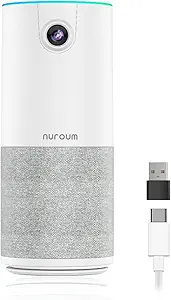 | Best Value | Resolution: 1080p at 30 fps | Field of View: 90° | Microphones: 4 omnidirectional MEMS mics, 10 ft pickup | VIEW ON AMAZON | See Our Full Breakdown |
| j5create 360-Degree All-Around Meeting Webcam |  | Best for Round-Table Rooms | Video Resolution: Full HD 1080p | Frame Rate: 30 Hz | Coverage: 360-degree all-around | VIEW ON AMAZON | See Our Full Breakdown |
| TONGVEO All-in-One Conference Camera and Bluetooth Speakerphone System |  | Best for Flexible Audio Placement | Camera Resolution: 1080p at up to 60 fps | Optical Zoom: 3x | Field of View: 114° | VIEW ON AMAZON | See Our Full Breakdown |
| Logitech MeetUp HD Video Conferencing System with Expansion Mic, Black |  | Best Premium Pick for Growing Rooms | Field of View: 120 degrees | Video Resolutions: Ultra 4K, 1080p, 720p | Audio Pickup Range: 8 to 14 feet with expansion mic | VIEW ON AMAZON | See Our Full Breakdown |
| Bose Professional VB-S All-in-One Video Conference System |  | Best Audio Quality | Camera: 4K Ultra-HD CMOS, 5x digital zoom | Microphones: 4 beamforming noise-reducing mics | Connectivity: Bluetooth | VIEW ON AMAZON | See Our Full Breakdown |
| Logitech BCC950 Desktop Video Conferencing Webcam & Speakerphone – Black |  | Best Value All-in-One | Video Resolution: 1080p HD at 30 fps | Lens: Carl Zeiss | Microphone Range: Up to 8 feet from base | VIEW ON AMAZON | See Our Full Breakdown |
| AV Access BizEye 90 4K Conference Room Camera |  | Best Smart Framing | Sensor: 1/1.8″ CMOS | Video Resolution: 4K UHD at 30 fps | Field of View: 120° | VIEW ON AMAZON | See Our Full Breakdown |
| TONGVEO 3-in-1 4K Webcam with Microphone and Speaker |  | Best Budget All-in-One | Resolution: 4K (3840×2160) at 30fps | Sensor: 1/2.8-inch CMOS, 8.29 MP | Field of View: Adjustable 118° / 100° / 88° | VIEW ON AMAZON | See Our Full Breakdown |
| PANOCORE360 All-in-One 360° Meeting Camera |  | Best for Round-Table Rooms | Video Output: 1080p | Capture: 360° with dual 180° viewing mode | Cameras: Four | VIEW ON AMAZON | See Our Full Breakdown |
| 3-in-1 Conference Room Camera – 1080p Full HD Webcam with Microphone and Speaker (Q95) |  | Best Budget Value | Resolution: 1080p (1920 x 1080) at 30fps | Field of View: 95 degrees | Image Sensor: IMX307 enhanced CMOS | VIEW ON AMAZON | See Our Full Breakdown |
| TOUCAN 360-Degree Video Conference Camera with AI Tracking |  | Best for AI Tracking on a Budget | Video Resolution: 1080p HD | Field of View: 360 degrees | Microphones: 4 noise-reduction microphones | VIEW ON AMAZON | See Our Full Breakdown |
| RayBit 4K Pro AI-Powered Conference Room Camera with Microphone, Speaker & Remote |  | Best Premium Features with Remote Control | Resolution: UHD 4K | Sensor: 1/3-inch CMOS | Viewing Angle: 94 degrees | VIEW ON AMAZON | See Our Full Breakdown |
| 4K AI-Powered Conference Webcam with Microphones, 120° FOV, Zoom Certified |  | Best Certified Pick for Zoom Rooms | Resolution: 4K | Field of View: 120 degrees | AI Features: Auto framing, presenter tracking | VIEW ON AMAZON | See Our Full Breakdown |
| conference camera for small room | Connectivity | Field of View | Microphones | Compatibility |
|---|---|---|---|---|
| Logitech MeetUp 4K Video Confe | USB plug-and-play (BYOD) | 120° (up to 170° with motorized pan/tilt) | 3 beamforming mics, 4 m pickup | — |
| Yealink UVC34 4K All-in-One Vi | USB-B to USB-A, 7 m cable | 120° | 8-mic array, 5 m pickup range | Windows, macOS; Teams and Zoom certified |
| Nuroum C10 1080p Conference We | — | 90° | 4 omnidirectional MEMS mics, 10 ft pickup | Windows, macOS, Linux |
| j5create 360-Degree All-Around | USB UVC/UAC plug-and-play | — | — | Zoom, Teams, Google Meet, Skype, Cisco, Slack and more |
| TONGVEO All-in-One Conference | — | 114° | — | — |
| Logitech MeetUp HD Video Confe | Bluetooth | 120 degrees | 3 | — |
| Bose Professional VB-S All-in- | Bluetooth | — | 4 beamforming noise-reducing mics | Google Meet, Microsoft Teams, Zoom and more |
| Logitech BCC950 Desktop Video | USB plug-and-play | — | — | — |
| AV Access BizEye 90 4K Confere | USB plug and play | 120° | — | — |
| TONGVEO 3-in-1 4K Webcam with | USB 2.0/3.0 plug and play | Adjustable 118° / 100° / 88° | Dual omnidirectional with noise cancellation, up to 16.4 ft pickup | Windows, Mac; Zoom, Teams, WebEx, Google Meet |
| PANOCORE360 All-in-One 360° Me | USB-C or USB-A, USB powered (5V/1.67A) | — | Omnidirectional 3-mic array | PC, Mac; Zoom, Teams, Webex, Google Meet |
| 3-in-1 Conference Room Camera | USB 2.0, 1.8m cable | 95 degrees | — | Windows, macOS; Zoom, Teams, Skype, WebEx |
| TOUCAN 360-Degree Video Confer | — | 360 degrees | 4 noise-reduction microphones | Zoom, Google Voice, Teams; PC, Mac, tablet |
| RayBit 4K Pro AI-Powered Confe | USB plug and play | — | — | PC, Mac, TV; Zoom, Teams, WebEx, Skype, GoToMeeting, BlueJeans |
| 4K AI-Powered Conference Webca | USB plug and play | 120 degrees | Dual AI noise-canceling | — |
More Details on Our Top Picks
Logitech MeetUp 4K Video Conferencing Camera with 3 Beamforming Microphones – Black
This model sets the benchmark for small-room conferencing because it solves the three problems that matter most in tight spaces: fitting everyone in frame, hearing everyone clearly, and mounting flexibly. The 120° field of view expandable to 170° with motorized pan/tilt means a huddle table seated four or five people deep stays visible without anyone crowding the camera, something the Nuroum C10’s fixed 90° lens simply cannot manage with more than two or three participants. Compared with the j5create 360-degree webcam, the MeetUp trades the gimmick of full-room capture for genuinely sharper 4K optics aimed at the wall in front of the table — which, in most small rooms, is where the people actually are. The tradeoff is cost and ecosystem lock-in: expansion microphones cost extra, and full room-mode integration requires Logitech RoomMate and Tap hardware.
Pros:- 4K image quality with a 120°–170° field of view that fits tight seating arrangements
- Beamforming mics reach 4 m, covering a full huddle table without add-ons
- Wall, credenza, or TV mounting plus remote management via Logitech Sync
- Plug-and-play USB BYOD mode alongside Teams Rooms and Zoom Rooms certification
Cons:- Expansion mic sold separately if you need beyond 4 m pickup
- Full integrated room solution requires additional RoomMate and Tap hardware
Best for: Teams outfitting dedicated huddle rooms who want a mount-anywhere, pro-grade system that will scale with room hardware later
Not ideal for: Budget buyers or laptop-based solo users — the price is wasted if you never mount it or use room integration
- Video Resolution:Ultra HD 4K
- Field of View:120° (up to 170° with motorized pan/tilt)
- Zoom:5x HD zoom
- Microphones:3 beamforming mics, 4 m pickup
- Connectivity:USB plug-and-play (BYOD)
- Mounting:Wall, credenza, or TV mount
- Management:Logitech Sync
Our verdict“If your small room is a permanent meeting space rather than a shared desk, this is the camera to build around.”
Yealink UVC34 4K All-in-One Video Conference Camera System
Where the Logitech MeetUp relies on motorized pan to widen its view, the Yealink UVC34 takes a different approach: a fixed 120° 4K lens backed by AI auto-framing and speaker tracking, so the camera decides who to emphasize rather than making you steer it. The 8-microphone array with 5 m pickup actually out-reaches the MeetUp’s stock 4 m range without buying an expansion mic — a real advantage in rooms where people lean back from the table. The standout detail is the automatic electric privacy shutter, a hardware-level safeguard none of the other picks here offer, which matters if the room doubles as a confidential discussion space. The tradeoffs are odd ones: it runs on AAA batteries, and at 1620 g it is heavier than most compact rivals like the Nuroum C10.
Pros:- AI auto-framing and speaker tracking keep the active participant centered automatically
- 8-mic array with 5 m far-field pickup covers larger small-rooms without extras
- Hardware privacy shutter physically blocks the lens between meetings
- Certified plug-and-play for Microsoft Teams and Zoom over a generous 7 m cable
Cons:- Requires AAA batteries, an unusual maintenance point for fixed room hardware
- At 1620 g it is far heavier than typical webcams and less portable
Best for: Security-conscious small teams who want AI framing and a physical privacy shutter without managing an ecosystem of add-ons
Not ideal for: Minimalists who dislike battery maintenance or want a featherweight device they can move between rooms
- Resolution:4K Ultra HD (1/2.8-inch CMOS, 8MP)
- Field of View:120°
- Microphones:8-mic array, 5 m pickup range
- Zoom:5x digital
- Connectivity:USB-B to USB-A, 7 m cable
- Compatibility:Windows, macOS; Teams and Zoom certified
- Weight:1620 g
Our verdict“The strongest AI feature set in this lineup for buyers who prize automated framing and genuine lens privacy.”
Nuroum C10 1080p Conference Webcam with Microphone and Speaker
This pick makes the most sense for buyers who want a genuine all-in-one — camera, four-mic array, and speaker — without paying 4K money. At 384 g with a folded USB-C cable and no power adapter, it is the most portable option here, a stark contrast to the Yealink UVC34 at more than four times the weight. The 90° field of view is the honest limitation: it suits two to four people seated close to the display, not a packed huddle room, so the Logitech MeetUp remains the right call once headcount grows. Audio is where it punches above its price, with noise reduction, full-duplex calling, and automatic gain control keeping conversation natural. Just be aware the 2.2 ft integrated cable may force a USB extension depending on where your display sits.
Pros:- Camera, speaker, and 4-mic array in one compact 384 g device
- Full-duplex audio with noise reduction and automatic gain control
- Driver-free USB-C operation across Windows, macOS, and Linux
- Touch controls for camera off, mute, and volume on the device itself
Cons:- 90° field of view is narrow for group seating
- Included 2.2 ft cable is short for TV-mounted setups
Best for: Small teams or home-office users who need camera plus audio in one affordable, desk-portable device
Not ideal for: Rooms seating more than about four people — the 90° lens and 10 ft mic range get stretched fast
- Resolution:1080p at 30 fps
- Field of View:90°
- Microphones:4 omnidirectional MEMS mics, 10 ft pickup
- Audio:Noise reduction, full duplex, AGC
- Cable:2.2 ft folded USB-C with USB-A adapter
- Weight:384 g
- Compatibility:Windows, macOS, Linux
Our verdict“The smart budget entry point for small groups who value simplicity and portability over wide framing.”
j5create 360-Degree All-Around Meeting Webcam
This option stands out for one specific room shape: the round table. Its 360-degree lens with six display modes means everyone seated around a circular table appears without anyone turning the camera, something directional picks like the Nuroum C10 or Logitech MeetUp handle far less gracefully when participants flank the device. The touch bar for tagging participant locations is a thoughtful touch for active discussions, and USB plug-and-play keeps setup painless across every major conferencing platform. The compromises are real, though: 1080p at 30 fps split across a full panorama yields less per-face detail than the Yealink UVC34’s 4K optics, and first-run setup can involve app permission tweaks and a firmware update before the resolution behaves as advertised.
Pros:- True 360-degree capture fits all seats around a central table
- Six display modes let you switch between panorama and focused views
- Touch bar for marking where participants are sitting
- Broad plug-and-play compatibility with major conferencing apps
Cons:- 1080p spread across 360° means lower detail per participant than 4K rivals
- May require app permissions and a firmware upgrade for full functionality
Best for: Teams that meet around round or square tables and want every seat captured without camera adjustment
Not ideal for: Buyers who prioritize sharp per-person image quality or want zero-setup out of the box
- Video Resolution:Full HD 1080p
- Frame Rate:30 Hz
- Coverage:360-degree all-around
- Viewing Modes:6 display modes
- Microphone:Built-in omnidirectional
- Connectivity:USB UVC/UAC plug-and-play
- Compatibility:Zoom, Teams, Google Meet, Skype, Cisco, Slack and more
Our verdict“A niche but effective choice when the room’s geometry, not image fidelity, is the main challenge.”
TONGVEO All-in-One Conference Camera and Bluetooth Speakerphone System
This model takes an unusual split approach compared with integrated picks like the Yealink UVC34: the camera stays wired while the Bluetooth speakerphone is wireless with its own battery, so you can place the mic where the voices actually are — center of the table — even if the camera mounts near the display. The PTZ head rotates 350° horizontally with 3x optical zoom and AI speaker tracking, giving it genuine reach beyond the fixed lenses elsewhere in this lineup, and 1080p at 60 fps over HDMI delivers smoother motion than the 30 fps norm set by the j5create and Nuroum C10. The tradeoffs are a two-device system to manage rather than one, and a speakerphone that needs recharging every 6–8 hours if you run long meeting days.
Pros:- Wireless battery-powered speakerphone can sit anywhere on the table
- 3x optical zoom PTZ camera with AI facial and speaker tracking
- 1080p at 60 fps over HDMI 2.0 or USB 3.0 for smooth motion
- Bluetooth 5.0, dongle, and USB connectivity options plus echo cancellation
Cons:- Two-component design means more setup and cabling than one-piece rivals
- Speakerphone battery limits runtime to 6–8 hours between charges
Best for: Small-to-medium rooms where the display and the seating area are far apart and mic placement flexibility matters
Not ideal for: Buyers who want a single tidy device — this is a two-piece system with separate charging and cabling
- Camera Resolution:1080p at up to 60 fps
- Optical Zoom:3x
- Field of View:114°
- Camera Rotation:350° pan, 180° tilt
- Interfaces:HDMI 2.0, USB 3.0
- Speakerphone:Bluetooth 5.0 / USB / dongle, 2400 mAh, 6–8 hr runtime
- Audio Pickup:16.4 ft (5 m) full-duplex
Our verdict“The right pick when your room’s layout demands a movable microphone more than a single sleek bar.”
Logitech MeetUp HD Video Conferencing System with Expansion Mic, Black
For teams that want a small-room camera that won’t be outgrown in a year, the MeetUp with Expansion Mic stands out as the most future-proof option in this batch. The 120-degree field of view squeezes everyone into frame even when they’re seated close to the display, and the expansion mic stretches audio pickup from 8 feet out to 14 — meaning a room of six to eight people stays audible without anyone leaning in. Compared with the Logitech BCC950, which tops out at 8 feet of audio range, the MeetUp effectively doubles your usable room size. Unlike the Bose VB-S, it skips auto-framing entirely, so framing is manual. The tradeoff for this flexibility is cost and bulk — this is the heaviest, priciest-feeling device here, and overkill for a two-person huddle space.
Pros:- 120-degree FOV captures people at both the table edge and near the camera
- Expansion mic extends audio pickup from 8 to 14 feet
- Selectable 4K, 1080p, and 720p output matches any network bandwidth
- Doubles as a Bluetooth speakerphone for mobile calls
Cons:- Premium pricing puts it well above all-in-one webcams like the TONGVEO 3-in-1
- No AI auto-framing or speaker tracking, unlike the AV Access BizEye 90
Best for: Teams in huddle rooms seating 4-8 people who expect to grow into a larger space and want room-filling audio without extra hardware
Not ideal for: Solo home-office users or two-person desks — the expansion mic and wide FOV are wasted money in a tiny setup
- Field of View:120 degrees
- Video Resolutions:Ultra 4K, 1080p, 720p
- Audio Pickup Range:8 to 14 feet with expansion mic
- Microphones:3
- Connectivity:Bluetooth
- Color:Black
Our verdict“Buy this if your small room occasionally holds more bodies than a typical huddle space and you never want to say ‘can you hear me?’ again.”
Bose Professional VB-S All-in-One Video Conference System
If meeting audio matters more to you than anything else — and in a small room where the camera can’t miss much, it should — the Bose Professional VB-S makes a strong case. Its four beamforming microphones actively reject keyboard clatter and HVAC hum in a way the omni-directional mics on the TONGVEO 3-in-1 simply don’t, and the hi-fidelity speaker makes remote participants sound like people rather than walkie-talkies. The 4K sensor with 5x digital zoom and two auto-framing modes keeps framing tidy without manual fiddling, something the Logitech MeetUp lacks. Two annoyances temper the appeal: the display-mounting kit is sold separately despite this being an obvious wall-or-monitor candidate, and the remote runs on disposable AAA batteries rather than built-in rechargeables.
Pros:- Beamforming noise-reducing mics deliver the clearest audio pickup in this batch
- 4K camera with two auto-framing modes and PTZ presets via included remote
- Certified compatibility with Google Meet, Microsoft Teams, and Zoom
- Tabletop or wall mounting in a slim 27-inch bar format
Cons:- Display mounting kit sold separately
- Remote requires 2 AAA batteries with no rechargeable option
Best for: Audio-first buyers — client-facing calls, executive huddles, and classrooms where muddy sound undermines credibility
Not ideal for: Budget-conscious buyers who baulk at buying the wall-mount kit separately, or anyone wanting battery-free, rechargeable accessories
- Camera:4K Ultra-HD CMOS, 5x digital zoom
- Microphones:4 beamforming noise-reducing mics
- Connectivity:Bluetooth
- Mounting:Tabletop or wall (display kit sold separately)
- Weight:2.1 pounds
- Dimensions:3.8″ D x 27″ W x 1.9″ H
- Compatibility:Google Meet, Microsoft Teams, Zoom and more
Our verdict“This pick makes the most sense for buyers who’ve decided that how they sound matters more than how much they save.”
Logitech BCC950 Desktop Video Conferencing Webcam & Speakerphone – Black
Older doesn’t mean outclassed here. The BCC950 remains one of the smartest budget entries because it solves a problem most cheap webcams ignore: remote-controlled pan, tilt, and zoom from a motorized base. In a four-person huddle, that means one person can reframe the shot mid-meeting without standing up — something the fixed-lens AV Access BizEye 90 can only approximate digitally. The Carl Zeiss lens delivers dependable 1080p, and the built-in full-duplex speakerphone with echo cancellation replaces two separate purchases. Be realistic about its ceiling, though: the 8-foot audio range matches the base Logitech MeetUp without that system’s expansion mic, and the 8KHz frequency cap makes voices slightly flat compared with the Bose VB-S. For a desk or small table, neither limitation bites.
Pros:- Motorized pan/tilt/zoom controllable from the remote or base
- All-in-one webcam plus full-duplex speakerphone with echo cancellation
- Certified for Skype for Business, Lync, WebEx, and Jabber
- True plug-and-play USB setup with no software needed
Cons:- Audio pickup limited to roughly 8 feet from the base
- Frequency response capped at 8KHz makes audio noticeably less rich than beamforming systems
Best for: Small teams and home-office users who want motorized camera control and speakerphone audio in one affordable desktop unit
Not ideal for: Rooms larger than about 8 feet across — audio pickup drops off well before the MeetUp’s expansion mic range
- Video Resolution:1080p HD at 30 fps
- Lens:Carl Zeiss
- Microphone Range:Up to 8 feet from base
- Frequency Response:200Hz – 8KHz
- Connectivity:USB plug-and-play
- Certifications:Skype for Business certified; Lync 2013, WebEx, Jabber compatible
Our verdict“The sensible pick when you want physical camera movement and acceptable audio for the price of a mid-range webcam.”
AV Access BizEye 90 4K Conference Room Camera
The BizEye 90 earns its place through camera intelligence rather than audio muscle. Its 1/1.8-inch sensor is the largest in this batch, and it shows — 4K footage stays sharp and clean where smaller sensors like the TONGVEO’s 1/2.8-inch chip start to smear in dim meeting rooms. The real draw is the AI feature set: auto-framing, presenter tracking, an individual gallery mode that splits participants into tiles, and gesture control so nobody has to touch a mouse mid-presentation. Compared with the Logitech BCC950, you trade physical motorized movement for smarter software framing — usually the better bet in a small room where everyone sits close. The compromises: zoom is digital only, the lens is fixed-focus, and the single built-in mic reaches just 3 meters, so noisy rooms may still want a dedicated speakerphone.
Pros:- Largest sensor in this batch (1/1.8-inch) for genuinely sharp 4K
- AI auto-framing, presenter tracking, and individual gallery modes
- Gesture control enables hands-free camera operation
- Versatile clip mounting for laptop, monitor, or tripod
Cons:- Digital-only zoom degrades quality at high magnification
- Gesture control may require a firmware update out of the box
- Fixed-focus lens limits specialized mounting setups
Best for: Content creators and small-room presenters who want AI framing, tracking, and gallery views without a PTZ motor to maintain
Not ideal for: Buyers needing room-filling audio — the single built-in mic falls short of the Bose VB-S’s four-mic array for larger tables
- Sensor:1/1.8″ CMOS
- Video Resolution:4K UHD at 30 fps
- Field of View:120°
- Zoom:5x digital
- Camera Features:AI auto framing, presenter tracking, gallery mode, gesture control, ePTZ
- Microphone:Built-in noise-reducing, up to 3 m pickup
- Connectivity:USB plug and play
Our verdict“Choose this when smart framing and image quality outrank speakerphone performance on your priority list.”
TONGVEO 3-in-1 4K Webcam with Microphone and Speaker
For buyers who want the whole package — camera, dual mics, and a speaker — without paying Bose or Logitech money, the TONGVEO 3-in-1 is the most complete low-cost proposition here. Its 16.4-foot mic pickup actually beats the base Logitech MeetUp’s 8-foot range, and voice tracking that follows the active speaker within about 3 seconds does much of what the pricier AV Access BizEye 90 charges for. The three adjustable FOV modes (118°, 100°, 88°) are a thoughtful touch: narrow the view to cut out a messy office, or widen it for a full table. Compromises arrive at the edges — the 5x zoom is digital and softens badly at full extension, and the manual-and-auto focus system can hunt noticeably during movement. The 3W speaker is fine for a small room, thin beyond it.
Pros:- True 4K sensor with dual noise-cancelling mics and built-in speaker in one unit
- AI voice tracking locks onto the active speaker within roughly 3 seconds
- Three selectable FOV modes (118°/100°/88°) adapt framing to the room
- Plug-and-play USB with no drivers or external power required
Cons:- Digital zoom softens image quality at higher magnification
- Focus system can hunt during movement
- No wireless or battery option — permanently tethered by USB
Best for: Home-office and small-huddle buyers on a tight budget who want camera, mics, and speaker in a single USB device
Not ideal for: Client-facing rooms where audio polish matters — the 3W speaker and occasional focus hunting fall short of Bose-level presentation
- Resolution:4K (3840×2160) at 30fps
- Sensor:1/2.8-inch CMOS, 8.29 MP
- Field of View:Adjustable 118° / 100° / 88°
- Zoom:5x digital
- Microphones:Dual omnidirectional with noise cancellation, up to 16.4 ft pickup
- Speaker:Built-in 3W
- Connectivity:USB 2.0/3.0 plug and play
- Compatibility:Windows, Mac; Zoom, Teams, WebEx, Google Meet
Our verdict“The value play of this batch: nearly the full feature set of smarter cameras at a fraction of the investment, with predictable soft edges.”
PANOCORE360 All-in-One 360° Meeting Camera
Most conference cameras in this roundup sit at one end of the room and look inward, which means people seated behind the lens fall out of frame. PANOCORE360 solves that with four cameras stitched into a full 360° view, making it the standout choice for rooms where everyone gathers around a table rather than facing a screen. The active-speaker focus and dual 180° mode mean remote colleagues still get a natural view of who’s talking. Local MicroSD recording is a feature none of the other picks here offer, which matters if your team records meetings without relying on platform licenses. Compared to the TOUCAN 360, it adds recording and a dedicated speaker, but audio pickup tops out at 10 ft, so large rooms will strain it.
Pros:- Four-camera 360° capture keeps every seat visible without repositioning
- All-in-one design combines camera, speaker, and 3-mic array
- Local MicroSD recording without platform dependency
- Driver-free USB-C or USB-A setup
Cons:- Audio pickup limited to about 10 ft, so it underperforms in larger spaces
- Older or low-power computers may require the extra power adapter for full performance
Best for: Teams that meet around a central table and want everyone visible without rearranging the room
Not ideal for: Presenter-style rooms with a fixed front-of-room speaker — a directional model like the RayBit 4K Pro will frame that scenario better
- Video Output:1080p
- Capture:360° with dual 180° viewing mode
- Cameras:Four
- Microphones:Omnidirectional 3-mic array
- Audio Pickup Range:Up to 10 ft (3 m)
- Recommended Room Size:Up to 12 participants
- Connectivity:USB-C or USB-A, USB powered (5V/1.67A)
- Local Recording:MicroSD (TF) card
- Compatibility:PC, Mac; Zoom, Teams, Webex, Google Meet
Our verdict“Buy this if your meetings happen around a table and you need everyone in frame plus local recording.”
3-in-1 Conference Room Camera – 1080p Full HD Webcam with Microphone and Speaker (Q95)
Not every small room needs AI tracking or 4K sensors. The Q95’s pitch is simplicity at a low cost: a 1080p camera, omnidirectional mic, and full-range speaker in one USB device, with nothing to configure. The 95° lens is wide enough for a huddle room of four to six people, and the IMX307 sensor with auto light correction holds up in offices with mixed overhead and window lighting. Against the Nuroum C10, it trades polish for price, and against the PANOCORE360, it sacrifices any ability to see people behind the camera. The 3-meter mic range is the real ceiling here — spread-out seating will sound distant. Best for teams buying on a tight budget who still want one-cable setup.
Pros:- 3-in-1 design removes the need for separate mic and speaker purchases
- True plug-and-play USB with no drivers
- 95° wide angle captures everyone in a small room
- Broad compatibility across Windows, macOS, and major conferencing apps
Cons:- Capped at 1080p with no upgrade path for sharper video
- Cannot connect directly to a television
- 3-meter audio pickup limits room size
Best for: Small teams or home-office setups that want camera, mic, and speaker in one inexpensive plug-and-play device
Not ideal for: Rooms larger than a huddle space — the 3m mic pickup and 95° lens can’t cover spread-out seating
- Resolution:1080p (1920 x 1080) at 30fps
- Field of View:95 degrees
- Image Sensor:IMX307 enhanced CMOS
- Microphone:Omnidirectional, up to 3m pickup
- Speaker:Full-range with AGC
- Connectivity:USB 2.0, 1.8m cable
- Features:Auto light correction, echo cancellation, noise reduction
- Compatibility:Windows, macOS; Zoom, Teams, Skype, WebEx
Our verdict“A dependable low-cost pick for huddle rooms where 1080p and one-cable simplicity are enough.”
TOUCAN 360-Degree Video Conference Camera with AI Tracking
The TOUCAN lands in a useful middle ground: 360° coverage with AI tracking at a lower tier than premium rivals. Where the PANOCORE360 offers dual 180° modes and local recording, the TOUCAN keeps things simpler — the camera decides who to focus on, and you let it work. Four noise-reduction microphones give it an audio edge over the Q95’s single omni mic, making it a better fit for rooms where voices come from multiple directions. The tradeoffs are real: 1080p only, and the AI tracking can behave inconsistently in dim lighting or cluttered rooms. For a small room that wants an affordable “set it in the middle and forget it” solution, this option makes sense.
Pros:- 360° coverage with AI tracking keeps active speakers visible
- Four noise-reduction microphones plus a built-in speaker
- Simple plug-and-play setup with major platforms
- Works with PC, Mac, and tablets
Cons:- 1080p resolution lags the 4K options in this roundup
- AI tracking depends on lighting and room arrangement
- 360° capture can include distracting background if positioned carelessly
Best for: Budget-conscious teams in small meeting rooms who want automatic speaker tracking without manual camera control
Not ideal for: Buyers who want sharper than 1080p video or reliable tracking in low-light rooms — consider the RayBit 4K Pro instead
- Video Resolution:1080p HD
- Field of View:360 degrees
- Microphones:4 noise-reduction microphones
- Speaker:Built-in
- Tracking:AI tracking
- Setup:Plug and play
- Compatibility:Zoom, Google Voice, Teams; PC, Mac, tablet
Our verdict“An affordable middle path for small rooms that want hands-free tracking without paying for 4K.”
RayBit 4K Pro AI-Powered Conference Room Camera with Microphone, Speaker & Remote
This model is better suited to buyers who want hands-on control over their video. The included remote control for zoom, mic mute, and volume is something none of the other four picks offer, and it changes how meetings feel — no one has to lean into a laptop to adjust anything. The AI auto-framing counts people in the room and adjusts the shot accordingly, while presenter tracking follows whoever is speaking. Compared to the 4K Zoom Certified webcam, the RayBit’s 94° lens is narrower, which favors front-facing rooms over wide-table layouts. Its 5X zoom is digital only, so expect softness at full zoom — a real limitation for detail work like whiteboard readings. Still, for a compact all-in-one with genuine control, this pick earns its place.
Pros:- Remote control for zoom, mic, and volume without touching a laptop
- AI auto-framing plus presenter tracking in one device
- 4K resolution with 5X zoom and preset camera views
- Driver-free USB setup across PC, Mac, and even TVs
Cons:- Digital-only zoom loses sharpness at maximum magnification
- No water resistance or ruggedization for flexible placement
Best for: Managers outfitting a small front-facing meeting room who want remote-adjustable framing, zoom, and audio
Not ideal for: Wide round-table rooms — the 94° lens is narrower than the 120° Zoom Certified model or the PANOCORE360
- Resolution:UHD 4K
- Sensor:1/3-inch CMOS
- Viewing Angle:94 degrees
- Zoom:5X digital
- AI Features:Auto framing, presenter tracking
- Connectivity:USB plug and play
- Dimensions:2.36″D x 4.72″W x 1.18″H, 450 g
- Compatibility:PC, Mac, TV; Zoom, Teams, WebEx, Skype, GoToMeeting, BlueJeans
Our verdict“The pick for small rooms where a presenter faces the camera and the team wants a remote in hand.”
4K AI-Powered Conference Webcam with Microphones, 120° FOV, Zoom Certified
If your organization standardizes on Zoom, Zoom Certified hardware removes a layer of setup risk that generic webcams carry — IT departments know it will behave predictably. This model pairs that certification with the widest lens in this batch at 120°, so a cramped room with off-center seating stays in frame where the RayBit’s 94° view would crop people out. Dual AI noise-canceling mics reach 5 meters, comfortably beyond the Q95’s 3-meter limit. The physical lens cover is a small privacy touch that matters in rooms used for sensitive discussions. The honest limits: no optical zoom, no room-control features, and audio pickup that still caps its usable room size. For certified small-room deployments, this is the strongest fit.
Pros:- Zoom Certified for predictable behavior in managed deployments
- Widest lens of the group at 120° for off-center seating
- Dual AI noise-canceling microphones with 5-meter pickup
- Physical lens cover for privacy between meetings
Cons:- Strictly a small-room solution — audio pickup limits scaling up
- No optical zoom or advanced room-control integration
Best for: IT buyers deploying standardized Zoom or Teams rooms who need certified hardware and the widest possible coverage
Not ideal for: Larger conference rooms or buyers wanting optical zoom and advanced camera control
- Resolution:4K
- Field of View:120 degrees
- AI Features:Auto framing, presenter tracking
- Microphones:Dual AI noise-canceling
- Audio Pickup Range:Up to 5 m
- Connectivity:USB plug and play
- Certification:Zoom Certified
- Privacy:Physical lens cover
- Recommended Use:Small conference rooms
Our verdict“The certified choice for small rooms where platform reliability and wide coverage matter more than zoom range.”

How We Picked
I evaluated each camera through the specific constraints of a small room: a table seating roughly two to six people, walls within ten feet of the farthest participant, and no dedicated AV closet or installer. The criteria that separated the top picks were field of view and framing (whether the lens actually captures everyone without fisheye distortion at the edges), microphone pickup range (a camera that sees remote participants but can’t hear the room is worse than useless), and deployment simplicity — USB plug-and-play models ranked higher than anything requiring software configuration for a typical small-team setup.
Image quality, speaker loudness, build quality, and platform compatibility acted as secondary differentiators once the basics were met. I also weighed versatility: cameras with AI tracking or remote-controlled zoom earned credit for adapting to different seating arrangements, while fixed wide-angle models were judged on how well they frame a standard rectangular table. Products were then ranked by how cleanly each one solves the small-room problem relative to its position in the market — which is why a premium option like the Bose VB-S sits alongside far cheaper units that make fewer compromises than you’d expect.
Factors to Consider When Choosing Conference Camera For Small Room
Before settling on a specific model, it helps to understand what actually changes from room to room — because the most common mistake in this category is buying a camera for a room you don’t have.Match the Field of View to Your Room’s Shape
Field of view is the spec most buyers get wrong. A 120° wide-angle camera works beautifully for a short, wide table where everyone sits in an arc facing the screen, but the same lens in a narrow rectangular room either cuts off the people at the ends or forces you to push the camera so far back that faces become small. Measure the angle from your camera position to the two farthest seats before buying — if that angle exceeds the camera’s stated FOV, someone will be half out of frame. Also know that ultra-wide lenses introduce fisheye distortion at the edges, which makes people near the sides of the frame look stretched. A 90° to 113° lens with optical zoom often produces a more natural image than a 180° lens at the same price.
Microphone Pickup Range Matters More Than Resolution
In a small room, remote participants complain far more often about not hearing people than about image softness. Every camera lists a mic pickup range, and you should treat that number honestly rather than optimistically — a six-foot range means the person at the far end of an eight-foot table sounds distant and echoey. Beamforming mic arrays, like those on the Logitech MeetUp, focus on voices while rejecting room noise, which is why they outperform simple omnidirectional mics of the same count. If your table seats more than four, either choose a model with a longer pickup range, pick one that supports an expansion microphone, or budget for a separate speakerphone. This is the single upgrade that most improves how your team sounds to the outside world.
4K Is Not Automatically Better Than 1080p
Resolution marketing causes more confusion than any other spec here. A true 4K sensor gives you room to zoom and crop without pixelation, which is genuinely useful for AI framing and digital-zoom cameras — that’s why models like the Yealink UVC34 and AV Access BizEye 90 use it. But if your meetings are two to four people at close range on a platform that compresses video anyway, a well-processed 1080p image often looks identical to 4K on the receiving end. What matters more is sensor quality and low-light handling: a good 1080p camera in a dim office will beat a cheap 4K camera every time. Pay for 4K when you need zoom headroom or AI tracking; skip it when you don’t.
360° Cameras Versus Fixed Wide-Angle Bars
These two designs solve the small-room problem in opposite ways, and choosing between them depends on how your meetings actually run. A 360° camera sits in the middle of the table and captures everyone equally, which is ideal for discussion-heavy meetings where the active speaker changes constantly — but the image detail per person is lower, and the center-of-table placement eats table space and cable-runs across the surface. A fixed wide-angle bar mounts under the display and frames the whole room in one shot, delivering sharper images and cleaner installation at the cost of flexibility if your seating changes. If your team mostly presents to the screen, go fixed. If your meetings are roundtable conversations, 360° or AI-tracking wins.
Certifications, Compatibility, and IT Policies
If you’re buying for a company rather than a home office, check platform certification before anything else. Products carrying Zoom Certification or equivalent Microsoft Teams approval have been validated for audio and video behavior on those platforms, and some IT departments refuse to deploy anything else. Beyond certification, look at how the camera connects: USB plug-and-play models work with essentially every app, while systems with proprietary software add features like auto-framing but introduce another thing that can break after an update. Also confirm speaker output quality if you regularly play video or share audio — many compact all-in-one units have cameras and mics that outclass their tiny speakers, and that imbalance shows up the first time someone shares a video clip.
When to Pay More — and When Not To
The price ladder in this category is steep, and the gains flatten out quickly. Moving from a basic 1080p webcam to a mid-range all-in-one buys you meaningfully better audio, wider framing, and sturdier mounts — that’s where most small rooms should land. Moving from mid-range to premium buys refinement rather than capability: premium units like the Bose VB-S offer superior noise reduction, richer speaker sound, and finishes that look right in a client-facing room. Pay premium prices when the room hosts customers or executives, or when the expansion path (add-on mics, future room growth) justifies the ecosystem. For an internal huddle space used a few hours a week, the mid-range tier captures ninety percent of the benefit.
Frequently Asked Questions
Do I need a 4K conference camera for a small room?
Usually not, unless the camera relies on digital zoom or AI framing. In a small room, everyone sits close enough that a good 1080p sensor delivers a perfectly sharp image after platform compression. Where 4K earns its keep is with models like the TONGVEO 3-in-1 or RayBit 4K Pro, which crop and zoom digitally — that extra resolution is what keeps faces sharp when the camera frames a single speaker. If you’re choosing between a 4K camera with a mediocre sensor and a 1080p camera with strong low-light performance, take the 1080p unit every time.
Is a 360° camera better than a wide-angle bar for my small meeting room?
It depends on your meeting style more than your room size. A 360° model such as the j5create or TOUCAN shines in conversational meetings where the active speaker moves around, because everyone stays in frame without anyone adjusting anything. The tradeoff is image detail per person and the practical issue of running a cable to the middle of your table. A fixed wide-angle bar like the Logitech MeetUp mounts cleanly under your display, produces sharper images, and handles screen-facing presentations better. If your meetings are collaborative roundtables, go 360°; if one person usually drives the meeting from a laptop, the bar is the better tool.
What microphone pickup range do I actually need?
Measure the distance from where the camera will sit to the farthest chair, then add about two feet of margin. Most compact all-in-one units claim 10 to 15 feet of pickup, but real-world clarity drops well before the maximum — soft-spoken participants at the edge of range sound muddy to remote attendees. For tables seating four or fewer, nearly any beamforming array will work. For five or more people, look at longer-range systems or models with expansion microphones, like the MeetUp with its add-on mic, which extends pickup for longer tables without buying an entirely separate speakerphone.
Can one of these cameras replace a separate speakerphone?
For voice-only meetings, yes — most all-in-one units handle call audio well enough that nobody notices. The weak spot is media playback: sharing a video with sound through a compact built-in speaker often produces thin, distorted audio, because these speakers are tuned for speech, not music or video. If your team regularly plays recorded content in meetings, either pair your camera with a Bluetooth speaker or choose a system with a genuinely robust speaker section, like the Bose VB-S, which was engineered with audio performance as a priority rather than an afterthought.
Which of these work best with Zoom or Microsoft Teams?
All USB plug-and-play models technically work with both platforms, but certified hardware behaves more predictably — things like mute synchronization, camera wake, and audio routing are validated by the platform vendor. The Logitech MeetUp and the Zoom Certified 4K webcam carry that formal validation, which matters most in companies where IT enforces an approved-device list. For a home office or small business without those policies, certification is a nice-to-have rather than a requirement. What matters more in practice is that the camera appears as a standard USB device and doesn’t require vendor software to be running for basic functions to work.
Conclusion
After comparing all fifteen options, my recommendations split cleanly by buyer type. For best overall, the Logitech MeetUp 4K remains the safest choice — its combination of wide framing, beamforming audio, and platform polish fits nearly every small room, and the expansion mic variant covers longer tables. For best value, the Yealink UVC34 delivers genuine 4K all-in-one performance at a price that undercuts the premium tier, while the Nuroum C10 is the pick if your budget is strictly minimal. For best premium, the Bose VB-S justifies its cost with audio quality that no camera-first competitor matches — the right call for client-facing rooms. For beginners, the plug-and-play Nuroum C10 or the generic 3-in-1 black webcam get you meeting-ready in minutes with zero configuration. And for specific needs: choose the AV Access BizEye 90 if you want a dedicated camera paired with your own audio setup, the TONGVEO 3-in-1 if AI tracking matters, and the j5create or TOUCAN 360° models if your meetings are roundtable conversations rather than presentations. Whichever direction you take, match the mic range and field of view to your actual room measurements — those two factors predict satisfaction far better than resolution or price ever will.