The best e-ink smart displays depend on whether you want a family dashboard, a changing art frame, a DIY screen, or large-format signage. I’d choose the Samsung 32-inch EMDX Series as the best overall for public-facing displays, while the SwitchBot Home Dashboard is a more focused pick for calendars and weather at home. For a smaller art display, the Paper Portrait Wireless Frame offers a different fit. The main tradeoffs are screen size, color capability, setup flexibility, and how easily content can be updated. Read on for how the nine options compare and which one fits your use.

Get the latest gadgets delivered free — and shop member deals
- Fast, free delivery on millions of items
- Access to Prime Big Deal Days deals on October 6–7
- Prime Video, Amazon Music and more included
Complete the kit



Key Takeaways
- Samsung’s 32-inch EMDX is the standout for large-format signage; its size makes it a different class of product from the tabletop and picture-frame displays.
- SwitchBot’s Home Dashboard is the clearest purpose-built choice for household schedules and weather, while art frames prioritize rotating images over shared information.
- Seeed Studio’s E1004 and E1002 offer different scale choices within the reTerminal line: a 13.3-inch screen and a more compact 7.3-inch screen.
- SMARTWIZ+, SwitchBot AI Art Frame, Paper Portrait, and KoKonna center on displaying artwork or photos, so buyers should compare content workflows and frame fit rather than treat them as general-purpose dashboards.
- GrowCube CrowPanel has a DIY-oriented role; it suits buyers who value project flexibility and can handle more setup than a ready-made home display.
| Samsung 32″ EMDX Series Color E-Paper QHD Smart Signage |  | Best for Large-Scale Signage | Screen Size: 32 inches | Display Type: Color E-Paper | Resolution: 2560 x 1440 (QHD) | VIEW LATEST PRICE | See Our Full Breakdown |
| Seeed Studio reTerminal E1004 13.3-Inch Full-Color ePaper Display |  | Best for Makers and Dashboards | Display: 13.3-inch E Ink Spectra 6 color ePaper | Resolution: 1680 x 1264 | Processor: ESP32-S3 | VIEW LATEST PRICE | See Our Full Breakdown |
| SMARTWIZ+ Art 7.3-Inch Full-Color E Ink Art Frame |  | Best Compact Art Display | Display: 7.3-inch full-color Spectra 6 E Ink | Connectivity: Wi-Fi | Control: Smartphone app | VIEW LATEST PRICE | See Our Full Breakdown |
| GrowCube CrowPanel ESP32-S3 E-Ink Display 5.79 Inch |  | Best for DIY Smart Labels | Display Size: 5.79 inches | Resolution: 272 x 792 | Display Type: E-Ink (monochrome) | VIEW LATEST PRICE | See Our Full Breakdown |
| Paper Portrait Wireless E-Ink Smart Picture Frame |  | Best for Effortless Setup | Display Type: E-Ink | Connectivity: Wi-Fi (2.4 GHz only), NFC | Compatibility: iPhone, Android, Web | VIEW LATEST PRICE | See Our Full Breakdown |
| SwitchBot AI Art Frame 13.3″ Electronic Ink Picture Frame |  | Best Large-Screen Art Display | Screen Size: 13.3 inches | Display Type: 6-color electronic ink | Battery: 2000mAh rechargeable | VIEW LATEST PRICE | See Our Full Breakdown |
| KoKonna AI E Ink Digital Picture Frame (7.3-inch, Aluminum) |  | Best Subscription-Free Art Frame | Display Size: 7.3 inches | Display Type: 6-Color E Ink | Material: Aluminum | VIEW LATEST PRICE | See Our Full Breakdown |
| SwitchBot E-Ink Home Dashboard with Wi-Fi Weather Station and Family Calendar |  | Best Family Information Hub | Display: 7.5-inch E-Ink | Connectivity: 2.4 GHz Wi-Fi, Bluetooth Low Energy | Power Source: 1 C battery (included) | VIEW LATEST PRICE | See Our Full Breakdown |
| Seeed Studio reTerminal E1002 7.3-Inch Color E Ink Smart Display |  | Best for Makers and Home Assistant Users | Display: 7.3-inch E Ink Spectra 6 | Resolution: 800 × 480 | Battery: 2000mAh | VIEW LATEST PRICE | See Our Full Breakdown |
| e-ink smart display | Connectivity | Display Type | Battery Life |
|---|---|---|---|
| Samsung 32" EMDX Series Color | Wi-Fi, Bluetooth, USB Type-C | Color E-Paper | Up to 199 days (standby) |
| Seeed Studio reTerminal E1004 | 2.4GHz Wi-Fi, Bluetooth 5.0, USB | — | — |
| SMARTWIZ+ Art 7.3-Inch Full-Co | Wi-Fi | — | — |
| GrowCube CrowPanel ESP32-S3 E- | — | E-Ink (monochrome) | — |
| Paper Portrait Wireless E-Ink | Wi-Fi (2.4 GHz only), NFC | E-Ink | — |
| SwitchBot AI Art Frame 13.3" E | Wi-Fi, Bluetooth | 6-color electronic ink | Up to 2 years (1 refresh/week) |
| KoKonna AI E Ink Digital Pictu | WiFi | 6-Color E Ink | Up to 3 years (low refresh frequency) |
| SwitchBot E-Ink Home Dashboard | 2.4 GHz Wi-Fi, Bluetooth Low Energy | — | Up to 365 days |
| Seeed Studio reTerminal E1002 | Wi-Fi; Home Assistant, ESPHome compatible | — | Up to 3 months in deep-sleep at 6-hour refresh |
More Details on Our Top Picks
Samsung 32″ EMDX Series Color E-Paper QHD Smart Signage
Nothing else in this lineup competes on scale. Where the Seeed Studio reTerminal E1004 tops out at 13.3 inches, this Samsung delivers a 32-inch QHD color e-paper canvas that reads like printed signage under bright ambient light. The standout spec is endurance: up to 199 days of image retention on standby, which means a retail shelf tag or meeting-room sign can run for months without wiring. At 0.7 inches deep and 5.5 pounds, wall placement stays simple. The tradeoffs are real, though — Samsung’s VXT content platform costs extra, mounts are sold separately, and the 10 Hz refresh rate rules out anything animated. This is a purpose-built commercial display, and buyers expecting a consumer smart frame like the Paper Portrait will find it overkill and under-supported out of the box.
Pros:- Massive 32-inch color e-paper panel at QHD resolution
- Up to 199 days of battery life in standby mode
- Ultra-thin 0.7-inch profile at just 5.5 pounds for flexible mounting
- Housing made with 55% recycled plastic
Cons:- VXT content management software must be purchased separately
- No stand or mounting accessories included in the box
- 10 Hz refresh rate makes video and motion content impossible
Best for: Businesses and venues needing large, battery-powered signage that stays readable in bright light for months between charges
Not ideal for: Home users wanting a photo frame or dashboard — it requires paid signage software and offers no consumer-friendly content apps
- Screen Size:32 inches
- Display Type:Color E-Paper
- Resolution:2560 x 1440 (QHD)
- Thickness:0.7 inches
- Weight:5.5 lbs
- Battery Life:Up to 199 days (standby)
- Connectivity:Wi-Fi, Bluetooth, USB Type-C
- Refresh Rate:10 Hz
Our verdict“A commercial-grade signage investment for organizations that need big, always-legible displays without power runs — not a gadget for the living room.”
Seeed Studio reTerminal E1004 13.3-Inch Full-Color ePaper Display
This is the most capable development platform in the roundup. Unlike app-driven frames such as the SMARTWIZ+ Art, the E1004 exposes an ESP32-S3, UART, I2C, GPIO, and onboard temperature and humidity sensors, so it can pull data from your own sensors or APIs rather than whatever a manufacturer’s app allows. The 13.3-inch Spectra 6 color panel handles photos, calendars, and home dashboards well, and the 5000mAh battery with up to six months of low-power runtime frees you from outlet placement. Be realistic about the limits: that six-month figure assumes a refresh only every six hours, and faster updates drain the battery quickly. The spec sheet also lists two conflicting resolutions, which hints at early-stage documentation. Compared with the smaller GrowCube CrowPanel, you trade simplicity for a much larger color canvas.
Pros:- Large 13.3-inch full-color Spectra 6 ePaper screen
- ESP32-S3 with extensive I/O for custom projects
- Built-in temperature and humidity sensors
- 5000mAh battery with months of runtime in low-power mode
Cons:- Battery life drops sharply with frequent refreshes
- Conflicting resolution figures between the description and specifications
Best for: Tinkerers and smart-home builders who want a big color e-ink panel they can program with custom dashboards and sensor data
Not ideal for: Non-technical buyers who just want to send photos from an app — this expects coding and configuration work
- Display:13.3-inch E Ink Spectra 6 color ePaper
- Resolution:1680 x 1264
- Processor:ESP32-S3
- Memory:8MB PSRAM, 32MB Flash
- Battery:5000mAh rechargeable
- Connectivity:2.4GHz Wi-Fi, Bluetooth 5.0, USB
- Sensors:Temperature and humidity
- Expandable Storage:microSD up to 32GB (16GB card included)
Our verdict“The strongest pick for anyone who wants to build their own e-ink dashboard rather than accept a locked-down app experience.”
SMARTWIZ+ Art 7.3-Inch Full-Color E Ink Art Frame
If the Seeed Studio E1004 is a workshop tool, this is its opposite: a plug-and-play art frame that asks nothing of you technically. The 7.3-inch Spectra 6 panel renders full-color artwork with that matte, printed-page quality, and the smartphone app handles everything from uploading pieces to pushing messages remotely — handy for sending a note to someone else’s frame across the country. It shares its display technology with larger frames in this lineup but packages it in a size that fits a bookshelf or desk. The main friction point is networking: initial setup can fail on mesh Wi-Fi systems, sometimes requiring a phone hotspot workaround. And unlike the Paper Portrait, there’s no mention of NFC tap-to-pair, so that first connection is where patience gets tested. Content options are also narrower — this is an art and message frame, not a weather-and-calendar dashboard.
Pros:- Full-color Spectra 6 E Ink with paper-like rendering
- Remote content delivery through a smartphone app
- Compact 7.3-inch size suits desks and shelves
- Energy-efficient always-on display
Cons:- Initial setup may fail on some mesh Wi-Fi networks, requiring a hotspot workaround
- Limited to art and message content rather than dashboards or widgets
Best for: Art lovers who want a small, gift-friendly frame for displaying color artwork and sending messages remotely via an app
Not ideal for: Owners of mesh Wi-Fi networks who want guaranteed painless setup, or anyone seeking dashboard-style information displays
- Display:7.3-inch full-color Spectra 6 E Ink
- Connectivity:Wi-Fi
- Control:Smartphone app
- Design:Japan-designed
- Certification:Matter
Our verdict“A charming, low-effort color art frame for casual users — as long as your Wi-Fi cooperates during setup.”
GrowCube CrowPanel ESP32-S3 E-Ink Display 5.79 Inch
Where the Seeed Studio E1004 aims at full dashboards, the CrowPanel carves out a tighter niche: small, battery-powered smart labels and embedded projects. Its elongated 272 x 792 panel suits shelf labels, name cards, and status readouts, and power-off image retention means a static label draws effectively nothing between updates. The built-in ESP32-S3 and Arduino IDE support make it one of the friendliest entry points for e-ink development, and the reflective screen stays readable in direct sunlight where an LCD would wash out. The compromises are structural: it’s black and white only, so photo or art projects are off the table, and e-ink’s inherent refresh lag makes it feel sluggish next to any LCD. It also lacks the battery and enclosure of finished products like the Paper Portrait — this is a bare board for people who enjoy building.
Pros:- Integrated ESP32-S3 controller simplifies development
- Power-off image retention for ultra-low battery drain
- Sunlight-readable reflective panel with no backlight needed
- Multiple interfaces and physical buttons for flexible projects
Cons:- Monochrome only — no color capability
- Slower refresh than LCD alternatives
- Ships as a bare development panel without battery or housing
Best for: Hobbyists building battery-powered smart labels, shelf tags, or compact status displays with Arduino
Not ideal for: Anyone wanting a ready-to-use display for photos or color art — it’s monochrome, bare, and requires programming
- Display Size:5.79 inches
- Resolution:272 x 792
- Display Type:E-Ink (monochrome)
- Controller:ESP32-S3-WROOM-1-N8R8 (up to 240 MHz)
- Interfaces:SPI (3-/4-wire), UART0, GPIO header
- Power Supply:2.2 V – 3.7 V (BAT interface)
- Warranty:1 year manufacturer warranty
Our verdict“A focused development board for builders who need a tiny, sunlight-readable e-ink label rather than a consumer gadget.”
Paper Portrait Wireless E-Ink Smart Picture Frame
Setup friction is where most e-ink frames stumble — the SMARTWIZ+ Art can choke on mesh networks — and that’s exactly where the Paper Portrait wins. NFC tap-to-connect means you touch your phone to the frame and you’re paired, with no hotspot tricks or network menus. From there it handles photos, art, weather, clocks, and text, making it more versatile than art-only competitors. The cordless, rechargeable design with included tabletop stand and magnetic strips lets it live on a wall, fridge, or shelf without visible wiring, and the e-ink panel holds an image with no power draw at all. The catch is networking hardware: it’s 2.4 GHz Wi-Fi only, so dual-band routers need the slower band enabled, and modern mesh systems occasionally bury that setting. Content sophistication is also modest compared with app-ecosystem frames like the SwitchBot AI Art Frame.
Pros:- NFC tap-to-connect setup works with iPhone, Android, and web browsers
- Glare-free, paper-like screen that’s comfortable for constant viewing
- Cordless rechargeable design with tabletop and magnetic mounting included
- Versatile content including photos, weather, clocks, and verses
Cons:- 2.4 GHz Wi-Fi only — no 5 GHz support
- May require digging into router settings to enable the 2.4 GHz band
Best for: Non-technical users and gift-givers who want a cordless photo-and-info frame that sets up in seconds via NFC
Not ideal for: Households running 5 GHz-only networks, or users wanting AI-generated art and deep app ecosystems
- Display Type:E-Ink
- Connectivity:Wi-Fi (2.4 GHz only), NFC
- Compatibility:iPhone, Android, Web
- Power Source:Rechargeable lithium-ion battery
- Charging Port:USB-C
- Included Accessories:Tabletop stand, magnetic strips
Our verdict“The easiest path into wireless e-ink framing for casual users, provided your router still broadcasts a 2.4 GHz network.”
SwitchBot AI Art Frame 13.3″ Electronic Ink Picture Frame
This option stands out for doing something most e-ink frames can’t: making art the centerpiece rather than an afterthought. The 13.3-inch six-color canvas is noticeably larger than the 7.3-inch KoKonna and SMARTWIZ+ frames, which means it reads as wall art rather than a desk accessory — provided you hang it and step back, since the coarse pixel pitch rewards viewing from three feet or more. Battery life is the other headline: at one refresh per week, the 2000mAh cell can stretch to two years, though the KoKonna claims even longer endurance with its 5000mAh pack. The catch is cost beyond purchase. AI-generated art sits behind a $3.99/month subscription, and local storage caps at just ten images, so the frame leans on Wi-Fi and the app for variety. Compared with the SwitchBot Home Dashboard, this is purely a display piece — no weather, no calendars.
Pros:- Genuinely wireless placement with up to two years of battery life at one refresh per week
- Glare-free, blue-light-free screen suits bedrooms and desks far better than backlit frames
- Larger 13.3-inch canvas reads as wall art, unlike smaller 7.3-inch desk frames
- Alexa voice control and app scheduling automate image updates
Cons:- AI art generation requires a $3.99/month subscription on top of the purchase price
- Low resolution with large pixels looks soft unless viewed from a meter away or more
- Only 10 images fit in local storage, so variety depends on connectivity
Best for: Homeowners who want a set-and-forget piece of rotating wall art in a bedroom or hallway without glare or cords
Not ideal for: Budget-conscious buyers unwilling to pay a monthly subscription — without it, the AI art feature that justifies the price goes dormant
- Screen Size:13.3 inches
- Display Type:6-color electronic ink
- Battery:2000mAh rechargeable
- Battery Life:Up to 2 years (1 refresh/week)
- Connectivity:Wi-Fi, Bluetooth
- Compatibility:Alexa voice control, SwitchBot app
- Local Storage:Up to 10 images
- AI Subscription:$3.99/month
Our verdict“This makes the most sense for buyers who want big, ambient rotating art and don’t mind a subscription or keeping their distance from the screen.”
KoKonna AI E Ink Digital Picture Frame (7.3-inch, Aluminum)
Where the SwitchBot AI Art Frame gates its creativity behind a monthly fee, the KoKonna flips the model: unlimited cloud storage and AI artwork tools come free, and the aluminum housing gives it a more premium feel than plastic rivals like the SMARTWIZ+ Art frame at the same 7.3-inch size. The 5000mAh battery is the largest in this batch of frames, enabling up to three years between charges at low refresh rates — well beyond the SwitchBot Art Frame’s two-year ceiling. The tradeoffs are familiar e-ink constraints taken further: refreshes are slower than any LCD frame, so swapping images feels sluggish, and the six-color palette renders photos with muted saturation that won’t suit anyone expecting vibrant vacation shots. Still, for a bedside or bookshelf piece that shows one image at a time, those weaknesses barely register. Compared with the Seeed Studio reTerminal E1002, it trades smart home dashboards for a simpler, art-first experience.
Pros:- Unlimited cloud storage with no subscription fees, unlike the SwitchBot AI Art Frame
- 5000mAh battery delivers up to three years of cordless operation at low refresh rates
- Aluminum construction feels more premium than typical plastic frames
- AI artwork creation and remote photo sharing included at no extra cost
Cons:- E-ink refresh rates make image changes noticeably slower than LCD frames
- Six-color reproduction is muted compared with traditional digital photo frames
Best for: Buyers who want AI art and family photos without recurring fees, and who value a cordless, aluminum-built frame for a shelf or nightstand
Not ideal for: Anyone expecting rich, saturated photo reproduction or fast image cycling — the six-color e-ink palette and slow refreshes will disappoint
- Display Size:7.3 inches
- Display Type:6-Color E Ink
- Material:Aluminum
- Battery Capacity:5000mAh
- Battery Life:Up to 3 years (low refresh frequency)
- Connectivity:WiFi
- Storage:Unlimited cloud storage
- Features:AI artwork creation, remote photo sharing, OTA updates
Our verdict“This is the pick for buyers who want the AI-art experience without monthly bills and don’t need a large screen or vivid color.”
SwitchBot E-Ink Home Dashboard with Wi-Fi Weather Station and Family Calendar
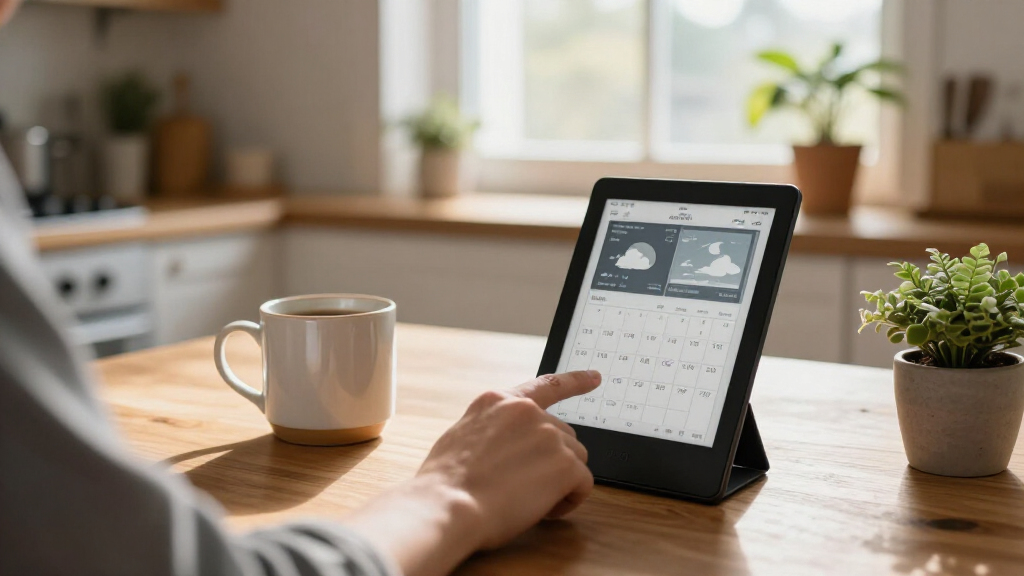
This is the only product in the lineup built around information instead of art. Rather than displaying photos like the SwitchBot AI Art Frame or KoKonna, it consolidates indoor/outdoor conditions, forecasts, air quality, and a synced family calendar for up to five people onto a 7.5-inch glare-free screen — closer in spirit to the Seeed Studio reTerminal E1002’s dashboard role, but aimed at households rather than tinkerers. The built-in front light separates it from most e-ink frames here, keeping it legible in dim hallways. Calendar support spans Google, iCloud, and Outlook with up to 30 events per person per day, and the single C battery is rated for a full year. Two caveats shape the buying decision: smart home control through the shortcut buttons and remote anomaly alerts both require a separate SwitchBot Hub, and Wi-Fi is limited to 2.4 GHz networks, which trips up some newer mesh setups.
Pros:- Combines weather, environmental readings, and a multi-person family calendar in one glanceable screen
- Front-lit e-ink display stays readable in dim rooms, unlike most frames here
- Broad calendar support including Google, iCloud, and Outlook
- Up to 365 days of battery life from a single C battery, wall-mountable or tabletop
Cons:- Remote alerts and smart home control require purchasing a separate SwitchBot Hub
- 2.4 GHz-only Wi-Fi can cause setup friction on modern mesh networks
Best for: Busy households that want weather, air quality, and a shared calendar visible at a glance in a hallway or kitchen
Not ideal for: Buyers without other SwitchBot devices — the Hub dependency and ecosystem lock-in add cost and complexity for smart home control
- Display:7.5-inch E-Ink
- Connectivity:2.4 GHz Wi-Fi, Bluetooth Low Energy
- Power Source:1 C battery (included)
- Battery Life:Up to 365 days
- Calendar Support:Google, iCloud, Outlook, and other major calendars
- Family Members:Up to 5 (30 events per person per day)
- Placement:Wall-mounted or tabletop
- Smart Home Control:2 shortcut buttons; Hub required for device control
Our verdict“This pick makes the most sense for families who want a shared command center rather than art, especially those already in the SwitchBot ecosystem.”
Seeed Studio reTerminal E1002 7.3-Inch Color E Ink Smart Display
The E1002 occupies a different niche than every consumer frame in this roundup: it’s a programmable smart display, not a finished product. Out of the box it runs no-code dashboards through SenseCraft HMI, but its real appeal is native support for Home Assistant and ESPHome, plus GPIO, I²C, SPI, and Grove expansion that the SwitchBot Home Dashboard deliberately walls off. The 800 × 480 Spectra 6 color screen stays crisp in direct sunlight while sipping power — a genuine advantage over the similarly sized KoKonna for outdoor or bright-window placements. The honest catch is battery math: the three-month rating applies only to deep-sleep mode at a six-hour refresh interval, so anyone pushing frequent updates or custom firmware will recharge far more often. Compared with its 13.3-inch sibling, the E1004, this model favors desk-scale projects and lower cost over signage-sized impact.
Pros:- Native Home Assistant and ESPHome support with no-code SenseCraft option for quicker setups
- GPIO, I²C, SPI, and Grove expansion enables custom sensor and automation projects
- Color e-ink remains readable in bright light and draws almost no power holding a static image
- Two-year warranty and bundled stand, cable, and screwdriver for immediate deployment
Cons:- Three-month battery life only applies to deep-sleep mode with a six-hour refresh interval
- Requires technical setup and configuration to reach its full potential
Best for: Home Assistant enthusiasts and makers who want a hackable e-ink dashboard with sensor expansion options
Not ideal for: Non-technical buyers wanting a plug-and-play frame or calendar — this rewards tinkering and expects some configuration
- Display:7.3-inch E Ink Spectra 6
- Resolution:800 × 480
- Battery:2000mAh
- Battery Life:Up to 3 months in deep-sleep at 6-hour refresh
- Connectivity:Wi-Fi; Home Assistant, ESPHome compatible
- Expansion:GPIO, I²C, SPI, Grove
- Included Accessories:Screwdriver, stand, USB Type-C cable
- Warranty:2 years
Our verdict“Choose this if you live in Home Assistant or want an expandable e-ink project screen; skip it if you just want something that works out of the box.”
How We Picked
I compared these nine products by the job each one is designed to do: signage, household information, digital art, or DIY display projects. I weighed screen size and color against everyday usability, the apparent role of the software or hardware, installation needs, and how much flexibility a buyer gets after setup. Since these products serve different settings, I did not rank them as if they were interchangeable screens.
The order favors products with a clear, useful role and a strong fit for that role. Samsung leads for large signage, while the SwitchBot dashboard ranks highly for a defined home use. The art frames follow according to their display focus and size, and the developer-oriented Seeed Studio and GrowCube options appeal more to buyers willing to configure a project. Product details provided for this comparison do not establish long-term reliability or hands-on performance, so I avoid treating those as proven.
| e-ink smart display | Battery Life |
|---|---|
| Samsung 32" EMDX Series Color | Up to 199 days (standby) |
| Seeed Studio reTerminal E1004 | — |
| SMARTWIZ+ Art 7.3-Inch Full-Co | — |
| GrowCube CrowPanel ESP32-S3 E- | — |
| Paper Portrait Wireless E-Ink | — |
| SwitchBot AI Art Frame 13.3" E | Up to 2 years (1 refresh/week) |
| KoKonna AI E Ink Digital Pictu | Up to 3 years (low refresh frequency) |
| SwitchBot E-Ink Home Dashboard | Up to 365 days |
| Seeed Studio reTerminal E1002 | Up to 3 months in deep-sleep at 6-hour refresh |
Factors to Consider When Choosing Best E-ink Smart Displays
Before choosing a display, decide what it needs to show and who will update it. E-ink products can look similar in a list while serving very different routines, from public signage to family planning and rotating art.
Start With the Job, Not the Screen
Write down what the screen should show on an ordinary day: a calendar, a photo, a rotating artwork collection, or business information. A frame that is convenient for art may not provide the tools needed for a shared household dashboard. A signage display can be far larger than a home needs and may call for mounting and content management beyond a simple picture-frame setup. Buyers often overvalue screen size before deciding where the display will live. Match the product’s core role to a recurring task, so the screen remains useful after the novelty wears off. If you need several unrelated jobs, check that the software supports them before choosing a larger screen.
Choose Screen Size for Viewing Distance
Consider where a person will stand or sit when reading the display. A compact panel can work beside a desk or on a shelf, while a shared room or public setting may call for a larger format. Larger screens take more wall or counter space and can make placement and mounting a bigger part of the purchase decision. Measure the intended location and view it from the farthest point where someone will need to read it. Also check whether the listed diagonal translates into a useful layout for your content; a large screen can still feel cramped if the interface wastes space. Buy for legibility at the actual viewing distance rather than choosing the largest model by default.
Treat Color as a Content Choice
Color matters most when the content depends on recognizable artwork, photos, or visual distinctions. For schedules and simple information, layout and readability may matter more than a broad color range. E-ink color displays can present images differently from phones or conventional monitors, so do not assume that a colorful product name guarantees a particular look. Check sample images from the manufacturer and, where possible, confirm what content formats the display accepts. Think about whether you will show illustrations, photographs, charts, or mostly text. That choice can help you avoid paying for color features that do little for your use.
Check the Content Update Routine
A display is only as convenient as the process for changing what appears on it. Find out whether updates come from a phone app, a web dashboard, local files, a connected service, or custom code. A set-and-forget art frame has a different maintenance pattern from a family calendar that needs updates throughout the week. Confirm who can edit content and whether the product fits the devices or accounts your household already uses. For DIY screens, include setup and ongoing configuration in your estimate of effort. A slightly smaller display with a dependable update path may fit daily life better than a larger screen that is awkward to manage.
Price the Whole Setup, Not Just the Panel
Before committing, account for the stand or mount, power access, wireless coverage, and any software or service requirements. A lightweight art frame may be easy to place, while a large signage screen can require a planned installation. Check whether the display is intended to run from a battery or stay connected to power, and how that affects placement. Buyers can overlook these practical details when comparing headline screen sizes. Also verify what comes in the box and whether the display needs a separate controller or computer. The total setup should suit the room and the person responsible for keeping content current.
Pay More Only for a Need You Can Name
A larger screen can improve visibility, but it will not automatically make the software easier to use or the content more relevant. Extra flexibility is useful when you plan to customize layouts, connect data sources, or build a project around the display. For a straightforward art frame, those capabilities may add setup work without improving the daily experience. Before moving up to a premium or developer-oriented model, list the specific task the added capability will solve. Beginners often benefit from a focused product with a clear purpose, while makers may prefer hardware they can adapt. Let your planned use, rather than a feature checklist, set the level of complexity.
Frequently Asked Questions
Which of these displays makes the most sense for a family calendar?
The SwitchBot E-Ink Home Dashboard is the most directly aligned with a household calendar and weather use. Before choosing it, check whether its calendar workflow supports the accounts and sharing habits your family already uses. An art frame can show a schedule only if its software and content options suit that job, so do not assume every display can function as a dashboard. Consider who will update events and whether the information needs to change often. If several family members rely on the screen, ease of updates matters as much as its appearance.
Should I choose the 13.3-inch Seeed Studio display or the 7.3-inch model?
Choose based on where the display will sit and how much content needs to be visible at once. The E1004 at 13.3 inches gives more room for larger layouts, while the E1002 at 7.3 inches is better suited to a smaller footprint. A bigger screen can help when people read it from farther away, but it also takes more space. Review the intended mounting or tabletop position and compare it with the content you plan to show. If you expect to build your own setup, also check each model’s documentation and software support before deciding.
Can an e-ink art frame replace a regular digital photo frame?
It can suit someone who values an e-ink presentation and wants a frame focused on artwork or photos, but it may not match every feature of a conventional digital frame. Compare supported image formats, how images are transferred, and whether the frame can rotate content on your preferred schedule. Check the manufacturer’s sample images to judge whether its color presentation fits the photos or art you want to display. Also confirm its power and wireless requirements for the planned location. If frequent changes and broad media support are priorities, verify those details before treating any art frame as a direct replacement.
Is the GrowCube CrowPanel a good first e-ink display?
The GrowCube CrowPanel is a better fit for buyers who want a DIY project than for someone seeking a ready-to-use picture frame or family dashboard. Its appeal is the possibility of configuring a display for a specific project, which comes with a greater need to check setup instructions and software compatibility. Beginners who want minimal setup may find a purpose-built product such as the SwitchBot dashboard easier to match to a routine. Before buying CrowPanel, confirm what programming or hardware knowledge its intended use requires. If experimenting is part of the goal, that extra work may be a benefit rather than a drawback.
When is the large Samsung signage display worth choosing over a smaller model?
The Samsung 32-inch EMDX makes the most sense when content must be seen across a larger room or in a public-facing setting. Its format is much larger than the art frames and compact Seeed Studio displays, so it calls for more space and a suitable installation plan. For a desk, hallway, or small home display, a smaller product is likely easier to place. Check how the signage content will be created, scheduled, and maintained before choosing a large screen. The added scale is useful only when the viewing distance and audience call for it.
Conclusion
For large-format signage, I recommend the Samsung 32-inch EMDX as the best overall match in this lineup. The Seeed Studio reTerminal E1002 is my best value pick for buyers who want a smaller smart display footprint, while the Seeed Studio E1004 suits those who need more screen area. For a premium art-focused choice, consider the SwitchBot AI Art Frame; for beginners who want a defined household use, the SwitchBot Home Dashboard is the clearest starting point. Choose GrowCube CrowPanel for a DIY project, or compare Paper Portrait, SMARTWIZ+, and KoKonna when a dedicated art or photo frame is your priority. The right pick is the one whose content workflow and size fit the place you plan to use it.
Fall Picks
fall essentials
As an affiliate, we earn on qualifying purchases.