
Portable external hard drives remain the cheapest way to carry terabytes of files, backups, and game libraries wherever you go — but the category splits sharply between budget spinner drives and faster solid-state options. My best overall pick is the WD 4TB Elements Portable, which pairs a proven drive mechanism with a low per-terabyte price and reliable cross-platform formatting. For sheer capacity per dollar, the 8TB Portable HDD is unmatched in this lineup, while the SanDisk 2TB Extreme Portable SSD is the clear choice if speed and drop resistance matter more than raw space. The main tradeoff you’ll face: spinning drives give you massive storage for under $100 but move files slowly and hate being dropped, while SSDs are fast and rugged but cost several times more per terabyte. Read on for the full breakdown of all 15 models.
Complete the kit



Key Takeaways
- WD’s Elements lineup (2TB, 4TB, 5TB, 6TB) dominated the mid-range, offering the best price-per-terabyte from a major brand with consistent formatting and no bundled software bloat.
- Every 500GB model in the roundup — Maxone, UnionSine, and the two unbranded options — is a poor value at near $1-per-GB; doubling your budget to 1TB or 4TB cuts the cost per gigabyte by more than half.
- The SanDisk 2TB Extreme Portable SSD was the only solid-state drive in the lineup, and it outpaced every spinning drive by roughly five to ten times in real-world transfer speed — the lone pick for anyone editing video or moving large files daily.
- YOTUO‘s two 1TB entries stood out for connectivity: the USB-C model worked directly with smartphones, and the hub version added card readers, making them the most versatile budget picks for travel creators.
- Seagate‘s 4TB Portable edged out its own 2TB and 1TB siblings on value, showing that within a single product family, capacity choice matters as much as brand choice.




| portable external hard drife | Capacity | Compatibility | Interface |
|---|---|---|---|
| Seagate 2TB Portable Hard Driv | — | Windows and Mac | — |
| Seagate Portable 4TB External | — | PC, Mac, Xbox, PlayStation | USB 3.0 |
| Maxone 500GB Ultra Slim Portab | 500GB | Windows 7/8/10 | — |
| WD 4TB Elements Portable Exter | 4TB | Windows, Mac (reformat required) | USB 3.2 Gen 1 (USB 3.0) |
| UnionSine 500GB Ultra Slim Por | 500GB | — | USB 3.0 |
| 8TB External Hard Drive Portab | 8TB | PC, Mac, laptops, PS4, Xbox One, USB TVs | USB 3.0, Micro-USB |
| 500 GB External Hard Drive | 500 GB | Windows, Mac, PS4, Xbox One/360, Linux | USB 3.0 |
| YOTUO 1TB External Hard Drive | 1TB | Windows, Mac, Linux, PS4, PS5, Xbox One, Xbox Series X/S | USB 3.0 & USB-C |
| SanDisk 2TB Extreme Portable S | 2TB | — | — |
| WD 6TB Elements Portable Exter | 6TB | Windows, Mac | USB 3.2 Gen 1 / USB 3.0 |
| 500GB External Hard Drive | 500 GB | — | USB 3.0 / USB 2.0 |
| YOTUO 1TB External Hard Drive | 1 TB | Windows, Mac OS, Linux, Android, iOS (iPhone 15+) | — |
| Western Digital 5TB Elements P | 5 TB | Windows and Mac | USB 3.0 / USB 2.0 (USB 3.2 Gen 1) |
| Western Digital 2TB Elements P | 2 TB | Desktop, laptop, gaming console | USB 3.0 |
| Seagate Portable 1TB External | 1 TB | PC, Mac, PlayStation, Xbox | USB 3.0 |
More Details on Our Top Picks
Seagate 2TB Portable Hard Drive USB 3.0
This 2TB Seagate is the simplest entry point in the entire lineup: plug it in, drag files, done. Compared with the Seagate Portable 4TB, it costs less up front while sacrificing half the capacity — a fair trade for someone who doesn’t yet know how much storage they actually need. It also edges out budget rivals like the Western Digital 2TB Elements by skipping any bundled software entirely, which keeps first backups friction-free. The catch is that USB 3.0 is the ceiling here, so anyone copying large video libraries will feel the wait, and the 18-inch cable is short for desktop setups. Still, for a first external drive, this pick makes the most sense for buyers who value simplicity over specs.
Pros:- True plug-and-play with zero software installation
- 2TB is generous capacity for the price
- Works with both Windows and Mac out of the box
- Light enough to live in a laptop bag
Cons:- USB 3.0 only — no USB-C option for modern laptops
- 18-inch cable is restrictive for desktop use
Best for: Students and first-time buyers who want straightforward, no-software backups of documents and photos
Not ideal for: Video editors or photographers moving terabytes of footage — the 2TB ceiling and USB 3.0 speeds will bottleneck quickly
- Storage Capacity:2TB
- Connection:USB 3.0
- Compatibility:Windows and Mac
- Setup:Plug-and-play, no software required
- Cable Length:18 inches
- Power:USB bus-powered
Our verdict“Buy this if you want the least complicated way to start backing up a computer; skip it if you already know you need 4TB or more.”
Seagate Portable 4TB External Hard Drive HDD – USB 3.0
What separates this 4TB Seagate from the WD 4TB Elements is console support: it’s explicitly built to work with Xbox and PlayStation, which makes it a natural fit for gamers watching modern titles devour internal storage. Four terabytes holds roughly a dozen large AAA games, and plug-and-play recognition means no formatting headaches on console. Compared with the smaller Seagate 2TB Portable, doubling capacity for a modest price bump is the smarter long-term play if games are the priority. The tradeoffs are real, though: it ships with no backup software, and its chassis is chunkier than slim rivals like the Maxone 500GB, so it feels less pocketable and more bag-bound.
Pros:- Confirmed compatibility with Xbox and PlayStation
- 4TB fits a large game library plus saves
- No software or formatting hurdles on console
- Drag-and-drop file management between devices
Cons:- No bundled backup software for PC users
- Bulkier than slim 2.5-inch rivals
- HDD transfer speeds lag behind SSD options like the SanDisk Extreme
Best for: Console gamers who need to offload a growing game library from Xbox or PlayStation internal storage
Not ideal for: Owners of the newest consoles who want to run current-gen games directly from the drive — HDD speeds can’t match internal SSD requirements
- Storage Capacity:4TB
- Interface:USB 3.0
- Compatibility:PC, Mac, Xbox, PlayStation
- Setup:Plug-and-play
- Included Cable:18-inch USB 3.0
- Power:USB bus-powered
Our verdict“The most sensible pick for gamers who need容量 capacity and console compatibility rather than raw speed.”
Maxone 500GB Ultra Slim Portable External Hard Drive HDD USB 3.0
At just 0.4 inches thick with an all-aluminum shell, the Maxone is the most pocket-friendly drive in this batch, and the metal construction doubles as heat dissipation during long transfers. Set against the UnionSine 500GB, its closest rival on size, the Maxone feels sturdier in hand, though the UnionSine counters with a longer three-year warranty. Compared with the Seagate 2TB, you’re trading 1.5TB of space for a chassis that genuinely disappears into a jacket pocket — the right swap for anyone who carries a drive daily rather than archiving with it. Windows-only compatibility is the sticking point: Mac users should look elsewhere, and 500GB fills up fast if photos or video are involved. It bus-powers over USB, so no wall adapter clutter.
Pros:- Genuinely ultra-slim 0.4-inch profile
- All-metal aluminum body aids durability and cooling
- Fast 5 Gbit/s USB 3.0 transfers for its class
- Lightweight enough for everyday carry
Cons:- 500GB capacity is tight for media-heavy users
- No Mac compatibility listed
- No bundled backup software
Best for: Commuters and students who carry a drive daily and want document and photo backups in a pocket-sized, durable shell
Not ideal for: Mac users or anyone storing video projects — Windows-only support and 500GB will both become obstacles quickly
- Capacity:500GB
- Design:Ultra slim, all-aluminum
- Thickness:0.4 inch
- Connectivity:USB 3.0 (up to 5 Gbit/s)
- Compatibility:Windows 7/8/10
- Power:USB bus-powered
Our verdict“The right choice when portability itself is the priority and 500GB covers your actual file needs.”
WD 4TB Elements Portable External Hard Drive for Windows and Mac
This WD Elements lands at the top of the roundup because it balances the three things most buyers actually care about: big capacity, a trusted brand, and cross-platform simplicity. Against the Seagate Portable 4TB, it trades console marketing for a slightly more refined enclosure and WD’s reputation for reliability, though both share the same speed ceiling. Versus the WD 6TB Elements, the 4TB is cheaper and lighter — the 6TB only makes sense for serious archive hoarders. It connects via USB 3.2 Gen 1, which delivers the same real-world throughput as USB 3.0 drives here, so don’t pay extra for the label elsewhere. The honest drawbacks: no backup software in the box, Mac users must reformat before first use, and it still can’t touch an SSD like the SanDisk 2TB Extreme for speed.
Pros:- 4TB capacity in a compact, lightweight chassis
- Trusted WD reliability track record
- USB 3.2 Gen 1 keeps transfers brisk for an HDD
- Plug-and-play on Windows, easily reformatted for Mac
Cons:- No bundled backup software
- Requires reformatting for Mac use
- Requires a USB port for power — no external adapter option
Best for: General users — families, freelancers, office workers — who want dependable 4TB backup storage without fuss
Not ideal for: Anyone regularly moving huge files on deadline; HDD speeds mean an SSD is worth the premium
- Capacity:4TB
- Interface:USB 3.2 Gen 1 (USB 3.0)
- Compatibility:Windows, Mac (reformat required)
- Design:Portable, lightweight 2.5-inch
- Setup:Plug-and-play on Windows
- Power:USB bus-powered
Our verdict“If you want one drive that gets storage right for most people at a fair price, this is the one to buy.”
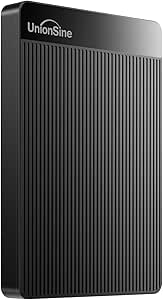
UnionSine 500GB Ultra Slim Portable External Hard Drive HDD-USB 3.0
The UnionSine earns its spot as the value play: real measured speeds of 125MB/s read and 103MB/s write, a striped heat-dissipating casing, quiet operation, and a three-year warranty — coverage neither the Maxone nor either Seagate in this lineup matches. Device flexibility is its quiet strength, working with laptops, desktops, televisions, and gaming consoles, which makes it a handy jack-of-all-trades for secondary backups. The 5400 RPM spindle keeps costs down but means it trails SSD alternatives like the SanDisk 2TB Extreme by a wide margin on responsiveness. Capacity is the other compromise: like the Maxone 500GB, it’s built for documents, photos, and selective media rather than full system archives. For a cheap second copy of irreplaceable files, this model covers the basics better than its price suggests.
Pros:- Three-year manufacturer warranty — best coverage in this batch
- Documented 125MB/s read and 103MB/s write speeds
- Works with laptops, consoles, TVs, and desktops
- Quiet operation with heat-dissipating striped design
Cons:- 500GB fills quickly with video or game files
- 5400 RPM spindle limits responsiveness versus SSDs
- Needs a USB 3.0 port for best performance
Best for: Budget-conscious buyers wanting an inexpensive second backup drive for documents, photos, and light media
Not ideal for: Capacity-focused users or anyone with a large media library — 500TB-class alternatives or the 4TB drives suit them better
- Capacity:500GB
- Interface:USB 3.0
- Form Factor:2.5 inches
- Read Speed:125 MB/s
- Write Speed:103 MB/s
- Spindle Speed:5400 RPM
- Compatible Devices:Desktop, laptop, gaming console, TV
- Warranty:Three-year manufacturer’s warranty
Our verdict“A smart cheap insurance policy for your most important files, as long as 500GB matches the size of what you’re protecting.”
8TB External Hard Drive Portable HDD, USB 3.0 for PC and Mac Storage
This is the capacity champion of the entire lineup, and no other drive here comes close — the next largest option is the WD 6TB Elements, which costs you 2TB of headroom for similar money-per-gigabyte math. For anyone archiving years of photos, video projects, or a sprawling media library, that extra space is the difference between one drive and a second purchase a year later. Compared with budget 500GB slim drives in this guide, this model trades ultra-thin portability for serious storage muscle; the ABS injection-molded case is sturdy but noticeably chunkier. The USB 3.0 interface with USB 2.0 backward compatibility means it works on aging laptops, just slower. The real gap is software: unlike the SanDisk Extreme Portable SSD, there’s no encryption or bundled backup utility, so you’re on your own for protecting what’s on it.
Pros:- 8TB is the largest capacity in this roundup by a wide margin
- USB 3.0 speeds with USB 2.0 backward compatibility for older machines
- Durable ABS injection-molded case
- Works with consoles, TVs, and both PC and Mac
Cons:- No bundled backup software or hardware encryption
- Larger and heavier than slim 500GB and 1TB competitors
Best for: Media hoarders and content creators who need to archive large photo and video libraries on a single drive
Not ideal for: Anyone carrying sensitive work files — the absence of encryption or backup software makes it a weak choice for security-conscious buyers
- Capacity:8TB
- Interface:USB 3.0, Micro-USB
- Backward Compatibility:USB 2.0
- Compatibility:PC, Mac, laptops, PS4, Xbox One, USB TVs
- Durability:ABS injection-molded case
- Use Case:Photos, videos, music, document backup
Our verdict“If sheer storage per dollar is the priority and security features aren’t, this is the most drive you can buy in this guide.”
500 GB External Hard Drive, Portable USB 3.0 Slim HDD for Windows, Mac, PS4, Xbox One/360
Not everyone needs terabytes, and this drive makes that case well. At 0.35 lbs with read speeds of 110–133MB/s, it keeps pace with pricier 1TB options like the YOTUO 1TB while costing far less and slipping into a jacket pocket. This pick makes the most sense for a first-time buyer — a student backing up coursework or a console gamer offloading older titles — where 500GB genuinely covers the need. The tradeoffs are real, though: capacity is half the YOTUO’s, Mac users must reformat before it works, and unlike the SanDisk Extreme SSD, it can’t run modern games directly, so current-gen console owners will only use it for archives. Compared with the similar Maxone and UnionSine 500GB slim drives elsewhere in this guide, its inclusion of a quick start guide and cable gives it an edge for true beginners.
Pros:- Very low cost of entry for a first external drive
- Lightweight 0.35 lb slim design
- Measured read speeds of 110–133MB/s
- Includes quick start guide and USB cable
Cons:- 500GB fills quickly for video or game storage
- Requires reformatting for Mac use
- Cannot run current-gen games directly from the drive
Best for: Students and casual users who want an inexpensive, pocketable first backup drive for documents and media
Not ideal for: Current-gen console gamers or anyone with a large media library — 500GB fills up fast and can’t run modern games
- Capacity:500 GB
- Interface:USB 3.0
- Read Speed:110–133MB/s
- Write Speed:103MB/s
- Weight:0.35 lbs
- Compatibility:Windows, Mac, PS4, Xbox One/360, Linux
Our verdict“A sensible, low-risk first drive for light storage needs — just don’t expect it to hold a growing game or video library.”
YOTUO 1TB External Hard Drive, Portable Storage Expansion HDD, USB 3.0 & USB-C
This is the balanced middle pick of the roundup: double the storage of the 500GB slim drive, a fraction of the 8TB model’s bulk, and a shock-absorbing silicone sleeve that neither the 500GB budget drive nor the WD Elements drives offer. That sleeve matters if the drive lives in a backpack next to textbooks and cables. Another differentiator is the dual USB 3.0 and USB-C connectivity, letting it plug into modern smartphones and laptops directly — a convenience most HDDs in this guide skip. Transfer speeds up to 5Gbps match the rest of the field’s USB 3.0 drives, so you’re not paying a speed penalty for the extra durability. The compromise: 1TB sits awkwardly in the middle — too small for serious archiving, more than light users need — and it can’t store or run PS5 or Xbox Series X/S games natively.
Pros:- Shock-absorbing silicone sleeve for real-world drop protection
- Both USB 3.0 and USB-C connectors for phones and laptops
- Works across PS4/PS5 and Xbox consoles plus computers
- Lightweight at 0.16 kg
Cons:- 1TB capacity is a compromise — larger libraries will outgrow it
- Cannot run or store PS5/Xbox Series X/S games directly
Best for: Students and hybrid workers who shuttle a drive between laptop, phone, and console and want drop protection
Not ideal for: Owners of PS5 or Xbox Series X/S who want to expand their current-gen game storage — the drive can’t hold those titles
- Capacity:1TB
- Interface:USB 3.0 & USB-C
- Transfer Speed:Up to 5Gbps
- Protection:Shock-absorbing silicone sleeve
- Weight:0.16 kg
- Compatibility:Windows, Mac, Linux, PS4, PS5, Xbox One, Xbox Series X/S
Our verdict“The best all-rounder for people whose storage needs span devices rather than demanding raw capacity or speed.”
SanDisk 2TB Extreme Portable SSD
Everything else in this roundup is a spinning hard drive; this is the one true SSD, and the gap shows. With reads up to 1050MB/s and writes up to 1000MB/s, it’s roughly eight to ten times faster than the 8TB HDD or the 500GB slim drive — enough to edit video directly off the drive rather than copying files first. It’s also the only pick here with 256-bit AES hardware encryption, a carabiner loop, IP65 water and dust resistance, and 3-meter drop protection, making it the clear choice for travelers and field professionals. The tradeoffs are equally clear: SSDs cost far more per terabyte, so at 2TB you get a quarter of the 8TB drive’s capacity for considerably more money, and hitting those peak speeds requires a USB 3.2 Gen 2 port — plug it into an older machine and it slows to HDD-like rates.
Pros:- NVMe-class speeds up to 1050MB/s read and 1000MB/s write
- Rugged IP65 water/dust resistance with 3-meter drop protection
- Hardware 256-bit AES encryption with password protection
- Pocket-size design with carabiner loop
Cons:- Much higher cost per terabyte than every HDD in this guide
- Requires a USB 3.2 Gen 2 port to reach advertised speeds
Best for: Photographers, videographers, and frequent travelers who need fast, encrypted, rugged storage on the move
Not ideal for: Budget-conscious buyers maximizing capacity per dollar — the 8TB HDD delivers four times the storage for less
- Capacity:2TB
- Read Speed:Up to 1050MB/s
- Write Speed:Up to 1000MB/s
- Encryption:256-bit AES hardware encryption with password protection
- Drop Protection:Up to 3 meters
- Water/Dust Resistance:IP65
- Operating Temperature:-20°C to 85°C
Our verdict“Worth the premium only if speed, security, and durability genuinely matter to your workflow — everyone else should buy capacity instead.”
WD 6TB Elements Portable External Hard Drive for Windows and Mac
When the data matters more than the price tag, brand reliability counts, and Western Digital’s track record is why this model edges out the lesser-known 8TB generic HDD despite offering less storage. Plug-and-play setup on both Windows and Mac is genuinely frictionless — no drivers, no reformatting for Windows users, unlike the 500GB slim drive that needs Mac formatting out of the box. The USB 3.2 Gen 1 interface delivers the same practical speeds as every other HDD here, so the selling point is trust and simplicity, not raw performance. Its weaknesses mirror the budget 8TB pick: no bundled backup software despite WD offering it on other lines, and it’s powered over USB with a bulkier chassis than the 1TB YOTUO. Compared with the WD 4TB Elements elsewhere in this guide, the extra 2TB is worth it for anyone with a growing archive.
Pros:- 6TB capacity from a brand with a long reliability history
- True plug-and-play on Windows and Mac without reformatting (Windows)
- USB 3.2 Gen 1 transfer speeds
- Simple setup with no drivers required
Cons:- No included backup software
- Bulkier and less travel-friendly than slim competitors
Best for: Home users who want a dependable, no-fuss 6TB backup drive from an established manufacturer
Not ideal for: Travelers and commuters — the bulkier design and bus-powered draw make it less pocket-friendly than slim 500GB or 1TB drives
- Capacity:6TB
- Interface:USB 3.2 Gen 1 / USB 3.0
- Plug and Play:Yes
- Compatibility:Windows, Mac
- Power:USB bus-powered
- Use Case:Photos, videos, music, documents
Our verdict“The safest pick for large household backups when you’d rather pay for a proven brand than squeeze out two extra terabytes.”
500GB External Hard Drive, USB 3.0 and USB-C Storage Expansion Mobile HDD
Among the budget 500GB options, this drive stands out for one reason the Maxone 500GB Ultra Slim and UnionSine 500GB can’t match: a reinforced silicone casing that absorbs the bumps of daily travel. If this drive lives in a backpack next to textbooks and chargers, that extra protection translates into fewer anxiety-inducing drops. The USB 3.0 and USB-C support gives it broader device coverage than older budget drives limited to Type-A ports. The tradeoff is capacity — at 500GB, it holds maybe a dozen large games or a modest photo archive, and it cannot run PS5 or Xbox Series X|S titles directly, so console buyers should treat it as archive storage only. Compared with the WD 2TB Elements, you give up four times the space but gain drop resistance at a lower price.
Pros:- Impact-resistant silicone casing survives travel abuse better than plastic rivals
- Dual USB 3.0/USB-C support covers newer laptops and older desktops
- Featherweight 0.3 lb build slips into any pocket or sleeve
- Works across gaming, work, and everyday backup tasks
Cons:- 500GB fills up fast for media-heavy users
- Cannot run PS5 or Xbox Series X|S games directly
- No USB-C cable or adapter confirmed in the box
Best for: Students and commuters with modest storage needs who toss their drive into bags daily
Not ideal for: Gamers wanting to play current-gen console titles directly from the drive, or anyone with a large media library that 500GB can’t hold
- Capacity:500 GB
- Interface:USB 3.0 / USB 2.0
- Transfer Rate:5 Gbps
- Rotational Speed:7200 RPM
- Form Factor:2.5 inches
- Enclosure:Plastic with silicone shell
- Weight:0.3 lbs
Our verdict“Buy this if you need cheap, drop-tolerant storage for documents and older games — skip it if your library is measured in terabytes.”
YOTUO 1TB External Hard Drive with Multiport Hub and Card Reader
Most drives in this roundup do one job; this one does three. The built-in SD and TF card reader plus a multi-port hub means photographers and content creators can offload camera cards and connect peripherals through a single device — something the Seagate Portable 1TB, its closest capacity rival, simply cannot do. Compatibility stretches from Windows and Linux to Android phones and iPhone 15 and later, which makes it a genuine travel companion for mixed-device users. The compromises are real, though: everything happens over a direct cable connection with no wireless option, Apple support requires USB-C, and the 1TB ceiling is shared with cheaper single-purpose drives. If you don’t need the hub features, the standard YOTUO 1TB or the Seagate will cost less for the same raw storage.
Pros:- Combines external storage, USB hub, and SD/TF card reader in one device
- Works across Windows, Mac, Linux, Android, and USB-C iPhones
- Eliminates the need to carry separate adapters and card readers
Cons:- iPhone support limited to USB-C models (iPhone 15 and later)
- Wired only — no wireless connectivity
- 1TB cap may be tight for video-heavy workflows
Best for: Traveling photographers and creators who want storage, a card reader, and a hub in one pocket-sized device
Not ideal for: Buyers who just need bulk storage — the hub features add cost that goes unused if you only plug into a desktop
- Capacity:1 TB
- Interfaces:USB-C, USB 3.2, USB 2.0, SD slot, TF slot
- Compatibility:Windows, Mac OS, Linux, Android, iOS (iPhone 15+)
- Design:Compact and lightweight
Our verdict“This is the pick when consolidation matters more than raw capacity — one device replaces three in your bag.”
Western Digital 5TB Elements Portable External Hard Drive
When the job is backing up everything you own, few portable drives match the price-per-terabyte of this 5TB Elements. It sits below the WD 6TB Elements in capacity but typically at a friendlier price, and it doubles the storage of the Seagate Portable 4TB rival class’s smaller siblings. The USB 3.2 Gen 1 connection handles large backup jobs without all-day waits, and Windows/Mac compatibility covers the two most common households. Be realistic about speed, though — real-world reads land around 50 MB/s in sustained use, so this is a patient archivist, not a scratch disk for video editing. Compared with the SanDisk 2TB Extreme SSD, you get 2.5x the space for less money, but a fraction of the speed. It’s also a plain drive: no hub, no card reader, no extras.
Pros:- 5TB of space swallows entire photo and video archives
- Better value per terabyte than smaller portable drives
- Works out of the box with Windows and Mac
- Bus-powered 2.5-inch design needs no wall adapter
Cons:- Slow sustained read speeds around 50 MB/s
- No extra features — pure storage only
- Questionable listed enclosure material raises durability uncertainty
Best for: Households and professionals who need one drive to hold full system backups and years of photos
Not ideal for: Anyone working directly off the drive — editing video or loading games from it will feel sluggish
- Capacity:5 TB
- Interface:USB 3.0 / USB 2.0 (USB 3.2 Gen 1)
- Form Factor:2.5 inches
- Read Speed:~50 MB/s
- Compatibility:Windows and Mac
- Color:Black
Our verdict“The value king for set-it-and-forget-it backups, as long as you don’t need fast random access.”
Western Digital 2TB Elements Portable External Hard Drive
This 2TB Elements lands in the sweet spot between the smaller Seagate Portable 1TB and the pricier 4TB drives elsewhere in this roundup: enough room for a serious game library without paying for capacity you won’t fill. Its plug-and-play setup on PlayStation and Xbox makes it the low-friction choice for console owners archiving titles, and USB 3.2 Gen 1 keeps installs and transfers moving. Unlike the WD 5TB Elements, which is purely a backup tool, this model’s console compatibility is called out front and center. Two honest drawbacks temper the recommendation: the 5400 RPM spindle trails the 7200 RPM Seagate for load times, and the plastic enclosure offers none of the drop protection the silicone-clad 500GB rugged drive provides. Treat it gently and it rewards you with dependable, no-nonsense storage.
Pros:- 2TB balances capacity and price for game libraries
- Plug-and-play with Windows, Mac, and gaming consoles
- USB 3.2 Gen 1 delivers quick installs and transfers
- Trusted WD reliability track record
Cons:- 5400 RPM rotational speed lags 7200 RPM competitors
- Plastic enclosure feels less durable than rugged alternatives
- Listed form factor suggests possible external power requirement
Best for: Console gamers who want extra game storage without paying 4TB-drive prices
Not ideal for: Speed-sensitive users — the 5400 RPM drive trails faster rivals for load times and large file work
- Capacity:2 TB
- Interface:USB 3.0
- Transfer Rate:5 Gbps
- Rotational Speed:5400 RPM
- Enclosure:Plastic
- Compatibility:Desktop, laptop, gaming console
Our verdict“The sensible middle-ground console drive — more room than a 1TB unit, cheaper than a 4TB, with modest speed compromises.”
Seagate Portable 1TB External Hard Drive HDD – USB 3.0 for PC, Mac, PlayStation, & Xbox
For a first external drive, simplicity beats specs, and this Seagate nails simplicity. Plug-and-play on PC, PlayStation, and Xbox means no software, no formatting hurdles for Windows users, and a 7200 RPM spindle that outpaces the WD 2TB Elements’ 5400 RPM for snappier game loads. The 1-year rescue service adds a safety net that budget brands like Maxone and UnionSine don’t typically offer, which matters when the drive holds your only copy of family photos. Mac users face one annoyance: reformatting is required before the drive works with macOS. Against the YOTUO 1TB with hub features, this Seagate trades versatility for brand support and speed — a fair swap for buyers who just want storage that works. At 190 grams, it disappears into a laptop bag without a second thought.
Pros:- True plug-and-play across PC, PlayStation, and Xbox
- 7200 RPM drive loads games faster than 5400 RPM rivals
- Includes 1-year rescue data recovery service
- Light 190 g build is genuinely pocketable
Cons:- Requires reformatting for Mac use
- 1TB capacity limits long-term media storage
- No USB-C connection out of the box
Best for: First-time buyers and console owners who want trusted-brand storage that works the moment it’s plugged in
Not ideal for: Mac users unwilling to reformat, or media collectors who will outgrow 1TB within a year
- Capacity:1 TB
- Interface:USB 3.0
- Rotational Speed:7200 RPM
- Read Speed:120 MB/s
- Compatibility:PC, Mac, PlayStation, Xbox
- Weight:190 g
- Dimensions:4.61 x 3.15 x 0.58 inches
Our verdict“The easiest entry point into external storage — buy it if you value zero-setup reliability over maximum capacity.”
How We Picked
I ranked these 15 drives on four buyer-facing criteria. Value per terabyte came first, because the entire reason to buy a portable hard drive instead of an SSD is cheap capacity — anything charging premium prices for spinning-platter speeds had to justify it. Real-world transfer performance came second: USB 3.0 spinning drives cluster between 100 and 140 MB/s, so models that consistently hit the higher end of that range, or offer USB-C convenience, ranked above laggards. Reliability and brand backing mattered third, since a portable drive that fails in a backpack defeats its purpose — WD and Seagate’s track records, warranty length, and included backup tools counted here.
Finally, I weighed versatility: whether a drive works out of the box with Windows, Mac, consoles, and phones, and whether it includes anything extra like hubs or card readers. The ranking favors drives that solve a specific buyer problem well rather than jack-of-all-trade compromises. That’s why a niche pick like the YOTUO hub drive earns a spot despite modest specs, and why every 500GB budget model sits in the lower half regardless of price.
Factors to Consider When Choosing Portable External Hard Drives
Before picking a specific model, it helps to understand what actually separates a good portable hard drive purchase from a regrettable one. These are the factors that shaped my ranking — and the ones most buyers get wrong.Price Per Terabyte Beats Sticker Price
The single most common mistake in this category is buying small. A 500GB drive often costs 60–70% of what a 2TB drive costs, which means you’re paying nearly triple per gigabyte for the privilege of less storage. Spinning portable drives hit their value sweet spot between 2TB and 5TB; below that, you’re subsidizing the enclosure and cable, and above 8TB you start paying premiums for density. A useful rule: calculate the price divided by capacity before comparing any two drives. If a smaller model isn’t at least proportionally cheaper, skip it. Storage needs also grow faster than buyers expect — game libraries, phone backups, and video files all expand quickly, and buying 50% more capacity than you currently need usually costs very little extra.
HDD vs. SSD: Know What You’re Actually Buying
Every drive in this roundup except the SanDisk Extreme is a traditional spinning hard drive, which means transfer speeds of roughly 100–140 MB/s, moving parts, and sensitivity to drops. An SSD moves the same files five to ten times faster, survives falls, and fits in a pocket — but costs roughly four times more per terabyte. The right choice depends on your workflow: if you’re backing up documents once a week, the speed difference is irrelevant and an HDD saves real money. If you’re editing video from the drive or shuttling large projects between machines daily, an SSD pays for itself in saved time. A common mistake is buying an SSD for passive backup duty, where its advantages go entirely unused.
Connectivity: USB-C Is Worth a Small Premium
Most budget drives ship with USB 3.0 (Type-A) only, which works with nearly every computer but requires an adapter or special cable for modern laptops, tablets, and phones. Drives with native USB-C — like the YOTUO 1TB or the SanDisk SSD — connect directly to smartphones and new MacBooks without dongles. Before buying, check what ports your actual devices have today, not what you plan to buy next year. Also note that a USB-C port on a spinning drive doesn’t make it faster; it only improves convenience. The adapter question sounds trivial until you’re traveling and can’t back up your phone because the cable doesn’t fit.
Console Compatibility Has Formatting Catch-Alls
Several drives here advertise PlayStation and Xbox support, but the fine print matters. Both consoles require specific file systems — exFAT or FAT32 for media playback, and a console-internal format for storing games — and reformatting a drive erases everything on it. Practically, any USB 3.0 drive over 250GB works with a PS4, PS5, Xbox One, or Xbox Series console for game storage, so don’t pay extra for a “gaming” label. What does matter is capacity: modern games run 50–150GB each, so a 500GB drive holds maybe four or five titles. Console players should treat 2TB as the realistic floor and 4TB as comfortable, which is why the larger Seagate and WD models rank higher for that use case.
Power Draw and Bus Power Limits
All portable drives in this class draw power from the USB port itself — no wall adapter — but not all do it equally well. Higher-capacity spinning drives (5TB and up) pull more current, and older laptops, USB hubs, or front-panel ports sometimes can’t supply enough, causing disconnections or clicking noises. If you plan to use an 8TB portable drive with an aging laptop, budget for a powered hub. SSDs and smaller drives draw far less power and rarely have this problem, which is another reason they suit travel use. This is an issue almost never mentioned on product pages, yet it’s the most frequent cause of “my drive keeps disconnecting” complaints.
Backup Software and Warranty Reality Check
WD includes backup utilities and Seagate offers its Dashboard/toolkit software, which adds genuine convenience for set-and-forget backups — but no bundled software replaces a real backup strategy. A portable drive is one copy, not a backup; if it lives in the same bag as your laptop, the same theft or coffee spill takes out both. Check warranty length too: WD and Seagate typically cover two years, while budget brands like Maxone, UnionSine, and YOTUO often offer three at lower claimed quality. Whatever you buy, plan to replace a portable spinning drive within four to five years of regular travel use — they are consumables, not lifetime purchases, and pricing your expectations accordingly makes failures an inconvenience rather than a disaster.
Frequently Asked Questions
Is a 500GB portable hard drive worth buying in 2026?
For most buyers, no — and the pricing in this roundup shows why. The Maxone and UnionSine 500GB models cost nearly as much as the Seagate 2TB drive, which means you’re paying roughly triple per gigabyte for a quarter of the space. A 500GB drive only makes sense in narrow cases: you need an ultra-slim drive for occasional document transport, you’re giving one to a student or relative for simple use, or you want a cheap scratch drive for a console without caring how many games fit. Even then, spending $10–20 more for 1TB or 2TB buys years of headroom. The 500GB tier exists mainly to hit impulse-buy price points, and it succeeds at that rather than at being good value.
Can I use one of these drives with both a Windows PC and a Mac?
Yes, but almost none of them work with both out of the box. Drives ship formatted either NTFS (readable but not writable on Mac) or sometimes exFAT (works on both). The fix is simple: reformat the drive to exFAT using your computer’s disk utility, which takes about a minute and makes it fully read-write on Windows, macOS, and most game consoles. The catch is that reformatting erases the drive, so do it before loading any files. Mac users should also confirm the drive doesn’t rely on Windows-only backup software, since utilities bundled with WD and Seagate drives have macOS versions but the generic budget brands often don’t. For mixed-platform households, exFAT-formatted drives from any brand behave identically, so don’t pay extra for cross-platform claims.
Why is the SanDisk SSD so much more expensive than the 8TB drive — which should I buy?
They solve different problems, and the price gap reflects physics rather than marketing. The 8TB spinning drive gives enormous cheap capacity but transfers at around 130 MB/s, takes roughly a minute per 8GB of data, and can be ruined by one drop. The SanDisk SSD holds a quarter of the data at several times the price but copies files five to ten times faster and shrugs off drops, vibration, and travel abuse. Buy the 8TB if you’re archiving photos, backing up multiple computers, or storing a media library that rarely moves. Buy the SSD if you actively work from the drive — video editing, large project files, frequent travel between machines. Buying the SSD for cold storage wastes its strengths; buying the spinner as a daily work drive will test your patience.
Will a portable hard drive actually run games on PS5 or Xbox Series X/S?
Yes and no, depending on what you mean by “run.” Both consoles let you store and play PS4 and Xbox One games directly from an external drive, and any USB 3.0 model here handles that fine. But native PS5 and Xbox Series games can only be stored on an external drive — to actually play them, the console copies them back to its internal storage, which can take longer than re-downloading. This is a deliberate speed requirement from the console makers, and no spinning drive meets it. So for a PS4 or older-game library, the Seagate 4TB or WD drives are excellent; for current-gen titles, an external drive is a parking garage, not a garage with an engine. Plan capacities accordingly.
Do I need to worry about the reliability of budget brands like YOTUO, UnionSine, and Maxone?
Somewhat, but not for the reason most people assume. The mechanisms inside most budget portable drives are often the same commodity 2.5-inch disks the big brands use, so outright failure rates aren’t dramatically different. The real differences are quality control, warranty support, and firmware polish — a WD or Seagate drive comes with responsive RMA service and consistent behavior across units, while budget brands can vary batch to batch and make warranty claims difficult. My practical advice: budget drives are fine for secondary or transport storage where a copy of your data exists elsewhere, but keep your only backup on a major-brand drive. Also check the actual capacity when a budget drive arrives, since mislabeled or refurbished-inside units occasionally appear in this tier from third-party sellers.
Conclusion
Match the drive to the job and this list sorts itself quickly. Best overall goes to the WD 4TB Elements — it balances price, capacity, brand reliability, and plug-and-play simplicity better than anything else here. Best value is the Seagate Portable 4TB, which matches the WD at a similar price with broader console support, while the 8TB Portable HDD is the capacity king for archivists and multi-machine backups. Best premium pick is the SanDisk 2TB Extreme Portable SSD, the only option worth considering if speed and durability drive your decision.
Best for beginners is the Seagate Portable 1TB — cheap, simple, and forgiving if you make formatting mistakes while learning. For specific needs: the YOTUO USB-C 1TB suits phone-first users and travel creators, the YOTUO hub version handles photographers who need card readers on the road, and the WD 5TB and 6TB Elements fill the gap for game libraries too big for 4TB. Whatever you choose, remember the pattern that ran through this entire comparison: in portable hard drives, buying too little capacity is the mistake buyers regret most, so round up when in doubt.