Choosing the best flight sim yoke for a home cockpit involves balancing realism, usability, and budget. The Honeycomb Alpha LITE stands out for its compact design and ease of use, making it ideal for beginners. For a more immersive experience, the Thrustmaster TCA Boeing Edition offers highly realistic controls suited for serious sim pilots. Meanwhile, the VelocityOne Flight System excels in versatility, supporting multiple platforms with comprehensive control options. The main tradeoffs often come down to complexity versus accessibility and price versus realism. Keep reading to explore which yoke best matches your flight sim goals.
Key Takeaways
- The top choices balance realism, build quality, and ease of use, with premium models offering more authentic controls.
- Compatibility across platforms varies; some yokes are PC-only, while others support consoles like Xbox.
- Programmable controls and additional features like rudder pedals significantly enhance immersion but can add to complexity and cost.
- Compact and beginner-friendly options like Honeycomb Alpha LITE are perfect for those starting out, but may lack advanced features.
- Price ranges widely, so understanding your priority—whether realism, versatility, or budget—helps narrow the options.




More Details on Our Top Picks
Honeycomb Alpha LITE – compact yoke for flight simulation, 180 rotation, programmable buttons, sturdy steel shaft, clear design perfect for sim beginners, plug & fly with MSFS 2024
The Honeycomb Alpha LITE stands out as an excellent starter yoke due to its straightforward design and focus on core controls. Compared with the Turtle Beach VelocityOne, it offers a more simplified, less modular experience, making it ideal for newcomers who want to avoid complex setup but still crave realism. Its 180° yoke rotation and programmable buttons ensure precise control, though it lacks some of the advanced customization features found in higher-end models. The steel shaft provides solid durability, and its plug-and-play compatibility with MSFS 2024 makes setup quick and hassle-free. However, its limited button count and absence of rudder or throttle controls mean it’s less suited for those seeking a full cockpit experience. This pick makes the most sense for beginners or casual flight sim enthusiasts who prioritize simplicity without sacrificing authentic feel.
Pros:- Compact and lightweight design for easy setup and storage
- High-quality materials ensure durability for beginners
- Seamless plug & fly compatibility with MSFS 2024
Cons:- Limited to basic controls; no rudder or throttle included
- Fewer programmable buttons compared to premium models
Best for: Flight sim beginners and casual users who want a reliable, easy-to-use yoke without extra complexity.
Not ideal for: Serious cockpit builders or experienced pilots who need extensive programmability and full control options.
- Rotation Range:180°
- Programmable Buttons:4
- Material:Steel shaft
- Compatibility:MSFS 2024, PC
- Size:Compact
- Connectivity:USB
Bottom line: A straightforward, durable choice for newcomers to flight simulation who want essential controls in a compact form.
Logitech G Pro Flight Yoke System + Pro Flight Rudder Pedals Bundle
The Logitech G Pro Flight Yoke System combined with the Rudder Pedals creates a versatile, immersive cockpit experience, especially suitable for those who want a comprehensive setup. Compared to the Honeycomb Alpha LITE, this bundle offers more programmable controls (at least 54), including rudder pedals for realistic directional control, making it ideal for pilots aiming for a full simulation environment. The sturdy build and adjustable footrests enhance comfort and durability, though it’s bulkier and requires more space. Its extensive button layout and dedicated rudder pedals provide precise aircraft handling, but it’s less portable and more complex for beginners. This system is perfect for enthusiasts upgrading from basic setups or aspiring pilots who want a more authentic experience without breaking the bank.
Pros:- Extensive programmable controls for detailed aircraft management
- Includes adjustable rudder pedals for realistic steering
- Durable construction with ergonomic design
Cons:- Larger footprint may require significant space
- More complex setup can be overwhelming for beginners
Best for: Intermediate to advanced flight sim enthusiasts looking for a full control setup with rudder pedals.
Not ideal for: Casual users or those with limited space who prefer a simple, compact yoke without pedals.
- Controls:54 programmable buttons
- Pedals:Self-centering rudder pedals
- Connectivity:USB
- Material:Plastic and metal
- Compatibility:PC, Xbox
- Size:Moderate
Bottom line: An ideal bundle for users seeking comprehensive, realistic flight controls with full aircraft management capabilities.
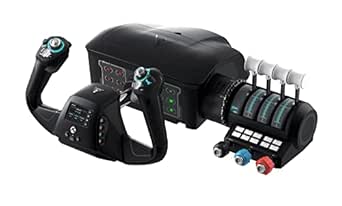
Turtle Beach VelocityOne Flight Universal Control System – Xbox Series X & S, Xbox One & Windows 10 & 11 PCs with Yoke Handle, Throttle Quadrant, Trim Wheel & Rudder Controls
The VelocityOne Flight System by Turtle Beach offers a comprehensive, all-in-one solution that integrates yoke, throttle, trim wheel, and rudder controls into a single robust unit. Compared with the Thrustmaster TCA Boeing Edition, the VelocityOne boasts a full-color flight management display and customizable status indicators, making it an ideal choice for those who want to learn and adapt quickly. Its modular throttle quadrant and 180° yoke handle deliver excellent realism, while its dedicated pitch trim wheel enhances fine control. Though it’s feature-rich, its size and cost may be prohibitive for casual users or those with limited space. Its seamless integration with Xbox and PC makes it perfect for serious sim pilots aiming for a near-authentic cockpit within a compact, organized package.
Pros:- All-in-one design with integrated throttle, trim, and rudder controls
- Full-color flight management display for system learning
- Authentic 180° yoke with hall effect sensor for smooth operation
Cons:- Relatively high price point
- Size may be less suitable for limited space setups
Best for: Dedicated flight sim enthusiasts and aspiring pilots wanting a full, integrated cockpit system with advanced features.
Not ideal for: Casual players or those with small setups who prefer simple, lightweight controllers.
- Yoke Rotation:180°
- Display:Full color flight management
- Controls:12 axes, 18 buttons
- Connectivity:USB
- Material:Plastic, metal
- Compatibility:Xbox, PC
Bottom line: A premium, feature-packed system that brings a high degree of realism and integration for dedicated flight simmers.
Thrustmaster TCA Yoke PACK Boeing Edition – Yoke & Quadrant Bundle for Xbox Series X|S & PC – Realistic Flight Simulator Controls
The Thrustmaster TCA Yoke Pack Boeing Edition excels for those who want to replicate the feel of flying a Boeing 787, thanks to its 1:1 scale yoke and dedicated quadrant with authentic controls. Compared to the Turtle Beach VelocityOne, this setup offers more detailed control axes and buttons, ideal for enthusiasts who desire a highly realistic experience. Its metal internal structure and pendular motion provide durability and smooth responsiveness, although it lacks some integrated features like a flight management display. The bundle’s focus on realism makes it perfect for serious sim pilots and Boeing fans, but it may be more complex and less suitable for casual users or those seeking a more compact setup. This is the best choice for those prioritizing authenticity and detailed control for specific aircraft types.
Pros:- Authentic Boeing 787 yoke with 1:1 scale replica
- Heavy-duty metal internal structure for durability
- Pendular mechanism for realistic motion
Cons:- No integrated flight management display
- Bulkier and more complex to install
Best for: Serious enthusiasts and Boeing aircraft fans looking for a highly realistic, detailed cockpit replica.
Not ideal for: Beginners or casual users who prefer plug-and-play simplicity or smaller setups.
- Yoke Size:1:1 scale
- Motion:Pendular
- Axes:Multiple
- Buttons:35
- Material:Metal and plastic
- Compatibility:Xbox, PC
Bottom line: Ideal for aviation enthusiasts seeking a highly authentic Boeing cockpit experience with detailed controls.
Logitech G Pro Flight Rudder Pedals
The Logitech G Pro Flight Rudder Pedals are a must-have for anyone wanting realistic ground control, with self-centering and adjustable tension features that cater to different aircraft types. In comparison to the Honeycomb Alpha LITE, which lacks rudder pedals, these provide a much-needed control surface for realistic taxi and landing procedures. The pedals’ differential toe brakes allow for precise steering and stopping, essential for complex ground maneuvers. Their durable build and adjustable tension make them suitable for long-term use, although the size and requirement for extra space might be a challenge for smaller setups. These pedals are perfect for users who want to enhance their cockpit with authentic ground handling, especially if their current setup lacks rudder controls.
Pros:- Smooth, accurate self-centering action
- Adjustable tension for different aircraft types
- Differential toe brakes for realistic steering
Cons:- Requires additional space for installation
- Limited to rudder and toe brakes; no additional controls
Best for: Pilots seeking precise, realistic ground handling and rudder control for their flight sims.
Not ideal for: Casual players or those with very limited space who do not require detailed ground controls.
- Rudder Axis:9-bit
- Toe Brake Axis:7-bit
- Dimensions:31x41x17 cm
- Weight:2.3 kg
- Connectivity:USB 2.0
- Adjustability:Tension dial
Bottom line: A highly effective set of pedals that significantly improve ground handling realism in flight sims.
Logitech G PRO Flight Yoke System, Professional Simulation Yoke and Throttle Quadrant, 3 Modes, 75 Programmable Controls, Configurable Knobs, Steel Shaft, USB, PC – Black
This Logitech G PRO Flight Yoke System stands out for its highly realistic feel, with a durable steel shaft and smooth control, making it ideal for serious flight sim enthusiasts. Compared to the Honeycomb Alpha, which offers a more traditional cockpit feel, this system provides a broader range of programmable controls—75 in total—that cater to detailed cockpit setups. The modular design and adjustable knobs help build muscle memory efficiently, but its size and complexity may be overwhelming for beginners. The included throttle quadrant enhances immersion, yet the setup can require some patience, especially with software calibration. Overall, this pick makes the most sense for users who want authentic control and extensive customization in their home cockpit.
Pros:- Highly realistic feel with steel shaft and smooth operation
- 75 programmable controls for extensive customization
- Adjustable knobs and modular design enhance muscle memory
Cons:- Size and complexity may be intimidating for beginners
- Requires software setup and calibration for optimal use
Best for: Dedicated flight sim pilots who seek professional-grade controls and extensive programmability.
Not ideal for: Casual users or space-constrained setups, as its size and complexity may be excessive.
- Compatible Devices:Windows
- Controller Type:Yoke, Throttle
- Connectivity:USB
- Additional Features:75 programmable controls, Steel shaft, Multi-mode, Adjustable knobs
- Item Weight:Approximately 8 pounds
- Item Dimensions:19 x 9 x 9 inches
- Package Quantity:1
- Warranty:2 years
Bottom line: Best suited for serious flight enthusiasts who want a comprehensive, realistic home cockpit experience.
Honeycomb Alpha Flight Controls Yoke & Switch Panel — Flight Simulator Yoke w/ 180° Rotation, Steel Shaft, Ignition Switch, Fully-Equipped Handles, Dual Mounting — Compatible w/PC & Mac
The Honeycomb Alpha Flight Controls Yoke excels in delivering an authentic flying experience, thanks to its 180° rotation and high-quality steel shaft, making it a favorite for aviation purists. Unlike the Logitech G PRO system, which offers extensive programmability, the Alpha focuses on realistic feel and durability, with robust handles and a well-designed switch panel that adds to immersion. Its dual mounting options—clamps or micro-suction pads—allow flexible installation, but the build and complexity might be less accessible for complete beginners. The integrated switch panel with LED backlighting enhances night-flight operations, yet the lack of extensive programmable controls limits customization compared to some other setups. Overall, this yoke makes the most sense for dedicated sim pilots prioritizing realism over feature count.
Pros:- Authentic 180° rotation with smooth, self-centering mechanism
- Durable steel shaft and high-quality handles
- Integrated switch panel with LED lighting for night flights
Cons:- Limited programmable controls compared to the Logitech system
- More expensive and less feature-rich for the price
Best for: Aviation enthusiasts wanting a durable, realistic yoke with integrated controls for immersive flights.
Not ideal for: Casual users or those seeking highly customizable controls or larger control arrays.
- Compatible Devices:PC, Mac
- Controller Type:Yoke, Switch Panel
- Connectivity:USB
- Additional Features:180° rotation, Steel shaft, LED backlit switch panel
- Item Weight:Approximately 4.5 pounds
- Item Dimensions:14 x 11 x 9 inches
- Package Quantity:1
- Warranty:2 years
Bottom line: Ideal for users who value realistic feel and durability over extensive control customization.
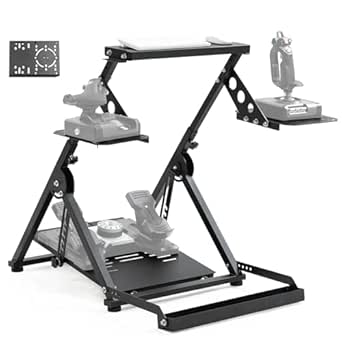
Marada Universal Flight Racing Simulator Stand, Three Axis Adjustable, And Hold Mouse and Keyboard, Fit for Thrustmaster, for Logitech, for Honeycomb, the Flight Sim Cockpit Electronic Device Not Included
The Marada simulator stand offers impressive adjustability and modular design, making it especially appealing for users with multiple hardware components. Compared with the Honeycomb Alpha yoke, which is dedicated to flying, this stand is more versatile, supporting a wide range of flight and racing hardware like Thrustmaster T300 and Logitech G29. Its three-axis adjustability and large footprint provide ergonomic comfort and space for custom setups, but its size and assembly complexity could be a challenge for those with limited space or assembly experience. The sturdy build and multiple mounting options mean it adapts well to different equipment, though it does not include any controls itself. This pick makes sense for hobbyists who want a flexible, multi-device support stand to build a comprehensive home cockpit or racing rig.
Pros:- Highly adjustable with multi-axis support
- Compatible with a wide range of hardware brands and models
- Modular design allows for custom configurations
Cons:- Large footprint may not suit small spaces
- Requires assembly and some technical setup
Best for: Enthusiasts seeking a customizable, multi-platform simulator stand for both flight and racing setups.
Not ideal for: Space-constrained environments or users wanting ready-to-use control systems without assembly.
- Compatible Devices:Thrustmaster, Logitech G, Honeycomb, Winwing, VPC
- Controller Type:Flight and Racing Sim Stand
- Connectivity:Manual
- Additional Features:Adjustable three-axis, modular, supports mouse and keyboard
- Item Dimensions:34.6 x 41.3 x 27.9 inches
- Item Weight:Approximately 35 pounds
- Package Quantity:1
- Warranty:3 months + online support
Bottom line: Perfect for builders who want a flexible, multi-device platform for both flight and racing simulators.
Logitech G USB G Pro Flight Multi Panel
The Logitech G Pro Flight Multi Panel adds essential cockpit controls with its switch and LED display, making it a valuable addition to any home cockpit. It excels in providing dedicated autopilot and system controls, complementing yokes like the Logitech G PRO or Honeycomb Alpha. Compared to the Honeycomb switch panel, this multi-panel offers more detailed control options and a more compact footprint, but it’s limited primarily to autopilot functions and won’t replace a full control array. Its plug-and-play nature and compatibility with Windows make it accessible, yet its focus on specific functions means it’s best used as part of a broader setup. For those wanting cockpit realism with dedicated controls, this panel is a highly useful component.
Pros:- Dedicated switch controls for autopilot and systems
- Compact and easy to mount onto existing setups
- LED display enhances night operation
Cons:- Limited to specific functions, not a full control system
- Requires compatible yoke for full cockpit experience
Best for: Pilots seeking detailed cockpit controls in a compact, easy-to-integrate form factor.
Not ideal for: Users looking for full control systems or comprehensive control arrays beyond autopilot functions.
- Compatible Devices:Windows
- Controller Type:Switch Panel
- Connectivity:USB
- Additional Features:LED display, multiple switches
- Item Dimensions:8 x 4 x 2 inches
- Item Weight:1.2 pounds
- Package Quantity:1
- Warranty:N/A
Bottom line: Ideal for cockpit enthusiasts who want precise autopilot control without a large footprint.
Marada Universal Flight Racing Simulator Stand, Three Axis Adjustable, And Hold Mouse and Keyboard, Fit for Thrustmaster, for Logitech, for Honeycomb, the Flight Sim Cockpit Electronic Device Not Included
This Marada simulator stand offers excellent flexibility, with three-axis adjustability and compatibility with a wide array of flight and racing hardware. It’s especially suited for users who want to build a multi-purpose cockpit, as it supports popular brands like Thrustmaster T300, Logitech G29, and Honeycomb devices. Its modular, fully adjustable design allows for ergonomic positioning and space for keyboard and mouse, making it a practical choice for hobbyists with diverse hardware. The large size and assembly requirements could be drawbacks for small spaces or less experienced users, but the sturdy construction and multi-device support make it a compelling choice for serious sim builders. It’s an excellent foundation for a custom home cockpit, whether for flight or racing.
Pros:- Highly adjustable with multi-axis support
- Compatible with a broad range of hardware brands
- Supports custom mounting and ergonomic setup
Cons:- Large footprint may be unsuitable for small rooms
- Assembly can be complex for novice users
Best for: Enthusiasts building a flexible, multi-device cockpit for both flight and racing simulations.
Not ideal for: Limited space environments or those wanting ready-to-use, pre-assembled solutions.
- Compatible Devices:Thrustmaster, Logitech G, Honeycomb, Winwing
- Controller Type:Adjustable simulator stand
- Connectivity:Manual
- Additional Features:Three-axis adjustability, supports keyboard/mouse
- Item Dimensions:30 x 24 x 36 inches
- Item Weight:Approximately 40 pounds
- Package Quantity:1
- Warranty:3 months + online support
Bottom line: Best for hardware enthusiasts who want a customizable, multi-purpose stand for diverse sim setups.
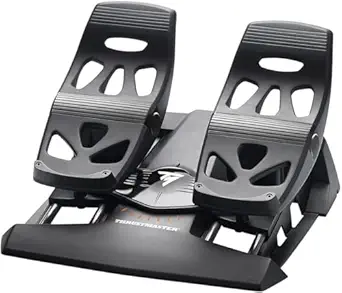
Thrustmaster TFRP Flight Rudder Pedals – Realistic Flight Simulator Controls with Sliding Rail System for Smooth Precision – Compatible with PS5, Xbox Series X|S & PC
This set of rudder pedals stands out for its balance of realism and affordability, making it an excellent choice for those who want a significant upgrade without breaking the bank. Unlike the more complex Turtle Beach VelocityOne, the TFRP offers a straightforward, plug-and-play experience that still delivers authentic foot controls. The S.M.A.R.T sliding rail system ensures smooth, frictionless movement, translating into precise maneuvers that enhance immersion, especially during taxiing and landings. While the pedals are large and stable, their size might be cumbersome for smaller setups or users with limited space. Compatibility across PC, PS5, and Xbox Series X|S broadens its appeal, and the adjustable resistance provides a customizable feel. However, it lacks some advanced features like programmable buttons or extensive customization found in premium options. For flight sim enthusiasts seeking realistic, responsive rudder controls that work across multiple platforms, this model offers a compelling mix of quality and value.
Pros:- Smooth, frictionless sliding rail system for precise input
- Compatible with PC, PS5, and Xbox Series X|S for versatile use
- Includes adjustable resistance for personalized feel
Cons:- Size and footprint may be too large for compact setups
- Lacks advanced features like programmable buttons or customizable profiles
Best for: Serious flight sim enthusiasts who want authentic rudder control without investing in a full cockpit setup.
Not ideal for: Casual gamers or beginners who prefer simple controls or have limited space for large pedals.
- Compatibility:PC, Playstation 5, Xbox Series X|S
- Control Type:Flight pedals with self-centering rudder
- Sliding System:S.M.A.R.T advanced rail track with 4 aluminum rails
- Size:Large pedals with adjustable resistance
- Connectivity:USB
- Weight:4.9 pounds
- Power Source:Cable-powered via USB
- Additional Features:Differential brake pedals, removable heel rests
Bottom line: This pick is perfect for dedicated flight sim users seeking highly realistic rudder controls with broad platform compatibility.
Anman Foldable Flight Simulation Cockpit 3.0 with Fixed Slot Fit for Logitech/Thrustmaster/Hotas Warthog/Fanatec,Electronics Adjustable Fight Sim Mount Pedals, Steering Wheel Not Included
This foldable flight simulation cockpit is designed for multi-purpose use, supporting both flight and racing setups, making it ideal for users with limited space or those who want a flexible, all-in-one solution. Compared with dedicated pedals like the Thrustmaster TFRP, the Anman cockpit focuses on modularity, allowing you to mount a range of accessories including pedals, steering wheels, and shifters. Its sturdy X-shape design with double triangle mechanics provides excellent stability during intense sessions, although the overall bulk might still be too heavy and cumbersome for portability. The wide panels and pre-drilled holes support a variety of devices, from Logitech G29 to Thrustmaster T16000, ensuring high compatibility. Quick assembly and space-saving foldability are major perks, especially for users with limited room. However, its primary focus on mounting and support means it lacks the tactile feedback and detailed control found in dedicated pedal sets. This makes it a strong choice for sim racers or multi-simulator users who need a durable, adaptable cockpit that saves space.
Pros:- Supports a wide range of accessories and devices
- Heavy-duty build with excellent stability
- Foldable design for space-saving storage
Cons:- Bulk and weight may hinder portability
- Lacks tactile feedback and precise control of dedicated pedals
Best for: Racing and flight sim enthusiasts who need a versatile, space-saving cockpit compatible with various accessories.
Not ideal for: Purists seeking highly realistic pedal feedback or dedicated rudder control, as this is more about mounting options than tactile pedal feel.
- Compatibility:Logitech G29, Thrustmaster T16000, Hotas Warthog, Fanatec
- Design:Foldable X-shape with double triangle mechanics
- Material:Heavy-duty steel and reinforced panels
- Adjustment:Electronics adjustable mounting
- Size:Supports full-size equipment; foldable for storage
- Weight:Heavy; specific weight not listed
- Assembly:Approx. 80% pre-installed, quick setup
- Additional Features:Multiple mounting slots, space-efficient design
Bottom line: This cockpit excels for users who want a durable, adaptable setup that fits into tight spaces and supports multiple controllers.
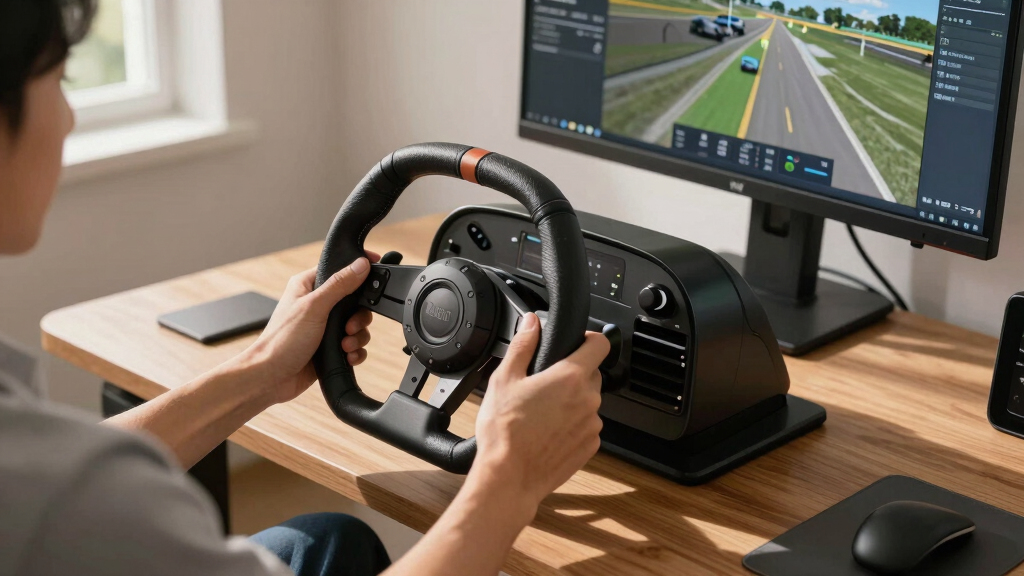
How We Picked
Products were evaluated based on their build quality, realism, usability, compatibility, and value. Priority was given to how well each yoke simulates real aircraft controls, as well as ease of integration into a home cockpit setup. We also considered the variety of features offered, such as programmable buttons, platform support, and additional peripherals like rudder pedals. Price-to-performance ratios helped differentiate options for budget-conscious buyers versus premium enthusiasts. The ranking reflects a combination of these factors, emphasizing what offers the best overall experience for home cockpit builders at different levels of investment.Factors to Consider When Choosing Best Flight Sim Yokes For Home Cockpits
When selecting the best flight sim yoke for your home cockpit, consider several factors that impact usability, realism, and future expandability. Your choice should match your experience level, the platforms you use, and how much you want to invest in your setup. Understanding these key considerations helps avoid common pitfalls like overspending on features you don’t need or buying incompatible gear.Platform Compatibility
Ensure the yoke you select works with your primary gaming system, whether PC, Xbox, or Mac. Some models are universal, while others are limited to specific platforms. Compatibility issues can lead to frustration, especially if you plan to use additional peripherals like pedals or throttle quadrants. Confirming platform support before purchase is crucial to creating a seamless experience.
Realism and Build Quality
The feel and durability of the yoke significantly affect immersion. Look for sturdy materials like steel shafts and high-quality grips. Realistic rotation ranges (e.g., 180° or more) and authentic control layouts contribute to a more convincing flight experience. Cheaper models may sacrifice feel and durability, so weigh the importance of realism against your budget.
Control and Customization Features
Programmable buttons, switches, and trim wheels add to the immersion, especially when integrated into a full cockpit setup. Think about whether you want a simple yoke or one that supports extensive customization. Keep in mind that more advanced features often come with a steeper learning curve and higher price, so consider your comfort level with complex controls.
Expandability and Compatibility with Accessories
If you plan to add pedals, throttle quadrants, or other peripherals later, choose a yoke that is compatible with these accessories. Modular systems or those with standard mounting options tend to offer greater flexibility. Investing in a setup that can grow with your skills helps justify a higher initial spend and saves money long-term.
Budget and Value
Define your budget upfront, but also consider the value you get for that investment. Cheaper options may be suitable for casual flying, but they often lack realism and durability. Premium models deliver closer-to-realistic controls and better longevity, which is worth it if you’re serious about simming. Balance your financial limits with desired features to find the best fit.
Frequently Asked Questions
Can I use a flight yoke with my existing pedals and throttle quadrant?
Most flight yokes are designed to be compatible with standard mounting solutions and peripherals like pedals and throttle quadrants. However, it’s essential to verify that the yoke supports standard mounting holes and connection types. Many premium models include multiple mounting options and are compatible with popular accessories, making it easier to build a cohesive cockpit. Always check product specifications for compatibility details before purchasing.
Is a more expensive yoke worth it for a beginner?
Higher-priced yokes tend to offer better build quality, more authentic control feel, and additional features that can enhance learning and immersion. However, for beginners, a more affordable model can still provide a satisfying experience without overwhelming complexity. It’s often better to start with a mid-range option and upgrade as your skills and commitment grow, rather than investing heavily upfront.
How important is the rotation range of a flight yoke?
The rotation range influences how realistic the controls feel, especially for certain aircraft types. Most general aviation aircraft use around 90°-180°, so a yoke with at least 180° rotation can better mimic real handling. For commercial jets or more advanced simulation, a wider range may be beneficial. Choose a yoke with a rotation that aligns with the aircraft you plan to simulate most often.
Are there universal yokes suitable for both PC and consoles?
Yes, some yokes are designed to support multiple platforms, including PC, Xbox, and Mac. These universal models typically connect via USB and include firmware that ensures compatibility across systems. If you want flexibility across different consoles and PC, look for models explicitly marketed as cross-platform compatible to avoid connection issues.
What additional accessories should I consider for a complete cockpit setup?
Beyond the yoke, rudder pedals, throttle quadrants, and switch panels are key components for a realistic experience. Pedals improve directional control, while throttle quadrants allow for precise engine management. Switch panels and trim wheels add depth to your simulation, making the cockpit more authentic. Planning your setup with these accessories in mind ensures a cohesive and immersive flight experience.
Conclusion
For those starting out or seeking a straightforward, reliable option, the Honeycomb Alpha LITE offers great value with its sturdy build and ease of use. Serious sim enthusiasts or dedicated cockpit builders will find the Thrustmaster TCA Boeing Edition provides immersive realism, making it the best premium choice. If you want versatility across platforms, the VelocityOne Flight System stands out as the ideal all-in-one solution. Budget-conscious buyers should consider the Logitech G Pro Flight Yoke, which balances features and affordability. Overall, your ideal pick depends on your experience level, platform, and how deep you want to go into flight simulation.