
When searching for the best business laptops with OLED displays, the focus often centers on vibrant visuals and portable power. The ASUS Vivobook S16 AI stands out as the top overall choice for its compelling balance of performance and display quality, while the HP OmniBook 14 offers a compelling mix of efficiency and vivid visuals for mobile professionals. Meanwhile, the MSI Prestige A16 raises the bar with its UHD+ OLED and robust specs for demanding tasks. However, choosing the right OLED business laptop involves weighing tradeoffs between screen quality, processing power, battery life, and price. Keep reading for a detailed comparison that helps you find the best fit.
Key Takeaways
- The top-performing models all feature 120Hz OLED screens with high brightness and 100% DCI-P3 coverage, ensuring vibrant visuals for professional use.
- Performance varies significantly, with premium options offering high-core CPUs and ample RAM, suitable for intensive tasks like content creation and multitasking.
- Battery life tends to be shorter on OLED models due to their high-resolution, bright screens, making portability and charging considerations critical.
- Build quality and portability differ, with some models prioritizing slim profiles and lightweight designs for on-the-go professionals.
- Pricing varies widely; premium models with UHD+ OLED screens command higher prices, so balancing budget with performance is key.


More Details on Our Top Picks
ASUS Vivobook S16 AI PC Laptop 16″ 2.8k OLED 120Hz (600nits, 100% DCI-P3) Intel 16-core Ultra 9 285H 32GB DDR5 2TB SSD Backlit for Designer Creator Business Professional Win11Pro ICP Hub
This ASUS Vivobook S16 stands out for its combination of a stunning 16″ 2.8k OLED display with a 120Hz refresh rate, making it ideal for creators and professionals who need crisp visuals on the go. Compared to the Lenovo Slim 7i Aura, it offers a lighter build at just over 3.3 lbs, while delivering the same high-quality display. Its Intel 16-core Ultra 9 processor paired with 32GB DDR5 RAM makes multitasking seamless, suitable for demanding tasks like video editing or complex design work. The 2TB SSD provides ample storage and fast access to large files, though the port selection could be more diverse for certain workflows. The battery life of around 9 hours balances performance and portability, but the price is higher than some competitors. This model is best for power users who require portability without sacrificing display quality.
Pros:- Stunning 16″ 2.8k OLED display with 120Hz refresh rate
- Powerful Intel 16-core Ultra 9 processor with 32GB DDR5 RAM
- Lightweight design at just 3.31 lbs for portability
Cons:- Limited port diversity; only two Thunderbolt 4 ports and USB-A options
- Higher price point may be prohibitive for some buyers
Best for: Creative professionals and business users needing a powerful, portable OLED laptop with extensive connectivity.
Not ideal for: Budget-conscious buyers who prioritize affordability over high-end specs, as this model commands a premium price.
- Display Size:16 inches
- Resolution:2880 x 1800 pixels
- Refresh Rate:120Hz
- Processor:Intel 16-core Ultra 9 285H
- RAM:32GB DDR5
- Storage:2TB SSD
- Weight:3.31 lbs
Bottom line: This laptop makes the most sense for professionals who need a high-performance, portable OLED display with robust processing capabilities.
ASUS Vivobook S16 AI PC Laptop | 16″ 2.8k OLED 120Hz | Intel Core Ultra 9 285H | 32GB RAM 1TB SSD | RGB Backlit for Creator Designer Business Professional Win11 w/DLCA Accessory
This ASUS Vivobook S16 offers an impressive 16″ 2.8k OLED display with 120Hz refresh rate, rivaling the ASUS Ultra 9 but at a slightly lower price point. Its AMD 10-core Ryzen AI 9 365 processor combined with 32GB RAM makes it ideal for multitasking and creative workflows, providing excellent performance for video editing and design. The 1TB SSD strikes a balance between speed and storage, though it’s smaller than the 2TB options found in other models like the ASUS Ultra 9. Its port selection is versatile, including multiple USB-C and HDMI ports, surpassing some competitors in connectivity. The battery life of about 9 hours supports long work sessions, but the slightly lower resolution than the 600-nit models might be a compromise for some users. This pick is perfect for users seeking a high-quality OLED display with good performance at a more accessible price.
Pros:- Vivid 16″ 2.8k OLED display with 120Hz refresh rate
- AMD Ryzen AI 9 365 processor with 32GB RAM
- Multiple versatile ports including Thunderbolt 4 and HDMI
Cons:- Smaller 1TB SSD compared to 2TB options
- Display brightness capped at 600 nits, slightly lower than premium models
Best for: Creative professionals and business users who want a powerful, well-connected OLED laptop at a competitive price.
Not ideal for: Power users requiring maximum storage or the highest brightness levels, as the 1TB SSD and 600-nit display may be limiting.
- Display Size:16 inches
- Resolution:2880 x 1800 pixels
- Refresh Rate:120Hz
- Processor:AMD Ryzen AI 9 365
- RAM:32GB
- Storage:1TB SSD
- Weight:3.31 lbs
Bottom line: This laptop offers a superb balance of display quality, performance, and connectivity for demanding users on a budget.
HP OmniBook 5 14 inch Next Gen AI PC, OLED Display, Snapdragon X Plus X1P-42-100, 16 GB RAM, 1 TB SSD, Qualcomm Adreno GPU, Windows 11 Home, Glacier Silver, 14-he0099nr
The HP OmniBook 5 is designed for mobility, boasting a 14″ 2K OLED display with vivid colors and a remarkable 34-hour battery life, making it perfect for on-the-go professionals. Its Snapdragon X Plus processor with AI tools ensures responsive performance, even with multitasking, while the Qualcomm Adreno GPU enhances graphics for media consumption and light creative work. The 1TB SSD provides fast storage, and the slim, lightweight design at just over 2.8 pounds makes it highly portable. Compared to the ASUS models, its focus on battery longevity may mean slightly lower raw processing power, but it excels in all-day usability. The lack of a touchscreen might be a drawback for some creators relying on pen input. This is the ideal choice for users prioritizing battery life and portability over raw power.
Pros:- Outstanding 34-hour battery life
- Vivid 2K OLED display with rich colors
- Lightweight at just 2.8 lbs for easy portability
Cons:- No touchscreen or pen support for creative tasks
- Lower refresh rate (60Hz) compared to gaming or high-end creative laptops
Best for: Business travelers and mobile workers needing a lightweight, long-lasting OLED laptop with AI-driven responsiveness.
Not ideal for: Creative professionals needing high refresh rates or touch capabilities for sketching or detailed editing, as it lacks a touchscreen and has a 60Hz refresh rate.
- Display Size:14 inches
- Resolution:1920 x 1200 pixels
- Refresh Rate:60Hz
- Processor:Snapdragon X Plus
- RAM:16GB
- Storage:1TB SSD
- Weight:2.8 lbs
Bottom line: This model is best for users who need all-day battery life and excellent display quality without sacrificing portability.
ASUS Vivobook S16 AI Laptop 16″ 3.2k OLED 120Hz (600nits, 100% DCI-P3) AMD 10-core Ryzen AI 9 365 (Up to 50 Tops) 32GB RAM 1TB SSD for Creator Designer Business Professional Win11 ICP Hub
This ASUS Vivobook S16 with a stunning 16″ 3.2k OLED display at 120Hz offers exceptional clarity and color precision, making it ideal for high-resolution design and multimedia work. Its AMD Ryzen AI 9 365 processor with 32GB RAM ensures smooth multitasking and demanding creative tasks, rivaling the Intel Ultra 9 but with a focus on visual fidelity. The 1TB SSD supports large project files and fast workflows. Its connectivity options include multiple USB-C ports, HDMI, and a versatile port selection, surpassing some competitors in flexibility. The display’s 600-nit brightness and 100% DCI-P3 coverage make it suitable for professional editing environments, though its battery life of around 8-9 hours is slightly less than other models focused on portability. This laptop is perfect for creators who demand high-resolution visuals and strong performance.
Pros:- Stunning 16″ 3.2k OLED display with 120Hz refresh rate
- AMD Ryzen AI 9 365 with 32GB RAM for demanding multitasking
- Excellent port selection including multiple USB-C and HDMI
Cons:- Battery life is slightly shorter at about 8-9 hours
- Premium price may be a barrier for some
Best for: Creative professionals and designers who need a high-resolution OLED display with robust processing power.
Not ideal for: Casual users or those prioritizing battery life and portability over raw visual fidelity and high refresh rates.
- Display Size:16 inches
- Resolution:3200 x 2000 pixels
- Refresh Rate:120Hz
- Processor:AMD Ryzen AI 9 365
- RAM:32GB
- Storage:1TB SSD
- Weight:3.31 lbs
Bottom line: This laptop excels for professionals needing a high-resolution, color-accurate OLED display combined with powerful AMD processing.
Lenovo Slim 7i Aura Edition – 2025 – Copilot+ PC – Core Ultra 7 Processor 256V – 14″ WUXGA OLED Display – 16 GB Memory – 1 TB Storage – Luna Grey
The Lenovo Slim 7i Aura Edition is crafted for on-the-move professionals, featuring a 14″ WUXGA OLED display with true-to-life colors and a 60Hz refresh rate, ideal for long workdays. Its Intel Core Ultra 7 processor coupled with 16GB RAM offers a balance of performance and efficiency, perfect for productivity and light creative tasks. The 1TB SSD ensures quick access to files, and the display’s DisplayHDR True Black 500 delivers excellent contrast and color depth, rivaling higher-end models. Its lightweight unibody design, weighing just 2.82 lbs, makes it an excellent choice for travelers, and the battery life of 17 hours supports extended work sessions. The inclusion of AI-powered apps and eco-friendly materials adds value beyond specs, though the display refresh rate at 60Hz might be limiting for gaming or high-frame-rate media editing. This is ideal for users prioritizing portability, battery life, and high-quality visuals for daily productivity.
Pros:- Lightweight and durable aluminum chassis at 2.82 lbs
- Vivid OLED display with true-to-life colors and HDR support
- Exceptional 17-hour battery life for all-day use
Cons:- 60Hz refresh rate may be limiting for gaming or high-frame-rate media editing
- OLED panel, while vibrant, might have limited brightness compared to premium models
Best for: Mobile professionals and creators seeking a sleek, lightweight OLED laptop with long battery life and smart features.
Not ideal for: High-end gamers or creative professionals needing higher refresh rates or pen input for detailed editing or drawing.
- Display Size:14 inches
- Resolution:WUXGA 1920 x 1200 pixels
- Refresh Rate:60Hz
- Processor:Core Ultra 7
- RAM:16GB
- Storage:1TB SSD
- Weight:2.82 lbs
Bottom line: This model is perfect for on-the-go professionals who want a portable, vibrant OLED display with long-lasting battery life and smart features.
ASUS Zenbook A14 Laptop 14″ WUXGA OLED (100% DCI-P3, 600nits HDR) Qualcomm 8-core Snapdragon X Plus (Up to 45 Tops) 16GB DDR5 512GB SSD for Creator Business Professional Win11 ICP Hub
This model stands out for combining impressive OLED display quality with a lightweight, ultra-portable design, making it ideal for on-the-go professionals who need vibrant visuals without sacrificing mobility. Compared with the ASUS Zenbook Duo, it offers similar OLED clarity but is significantly lighter and more focused on portability, though it does trade off a secondary screen. The Snapdragon processor provides good power efficiency and decent performance, but it falls short of the raw power found in Intel or AMD alternatives like the Acer Swift 16 for intensive tasks. Its 16GB DDR5 RAM and 512GB SSD suit most creator workflows, and the 600-nit HDR display with 100% DCI-P3 coverage delivers stunning visuals, especially for media professionals. However, the limited ports and reliance on USB-C hubs could be a drawback for those with extensive peripheral needs. This pick makes the most sense for mobile business users who prioritize display quality and weight, willing to compromise on expandability.
Pros:- Ultra-lightweight at 2.4 lbs for portable convenience
- Vivid 600nits HDR OLED with 100% DCI-P3 coverage
- Fast DDR5 RAM and SSD for smooth multitasking
Cons:- Limited port selection may require additional hubs
- Processor performance lags behind high-end Intel/AMD chips for intensive tasks
Best for: Frequent travelers and remote professionals who need a lightweight, high-quality OLED display with solid performance.
Not ideal for: Power users requiring extensive port options or dedicated GPU performance for demanding creative work.
- Display Size:14 inches
- Resolution:1920 x 1200
- Display Type:OLED
- Processor:Qualcomm Snapdragon X Plus
- RAM:16GB DDR5
- Storage:512GB SSD
- Weight:2.4 lbs
Bottom line: Ideal for mobile professionals seeking a vibrant OLED display in a compact, lightweight package, with some tradeoffs in expandability.
acer Swift 16 AI Laptop 16″ 3k OLED 120Hz Touch (100% DCI-P3) Intel 8-core Ultra 7 256V (Up to 47 Tops) 16GB RAM 1TB SSD Backlit Fingerprint for Designer Business Work Win11Pro ICP Hub
This Acer Swift 16 offers an excellent 3K OLED display with a high 120Hz refresh rate, perfect for creative professionals who need crisp visuals and smooth motion. Compared with the ASUS Zenbook A14, it provides a larger 16-inch screen with a higher resolution, making it better suited for detailed design work, though it is noticeably heavier at 3.37 lbs. Its Intel 8-core Ultra 7 processor delivers more robust performance for demanding tasks than the Snapdragon chip, but it may run hotter and consume more battery life. The 16GB DDR4 RAM and 1TB SSD support extensive workflows, and the touch-enabled OLED enhances media editing and viewing experiences. The 120Hz refresh rate ensures fluid animations, but the limited port options could be restrictive for users with multiple peripherals. This makes it ideal for creative users prioritizing visual fidelity and performance, who don’t mind the extra weight.
Pros:- Stunning 3K OLED display with 120Hz refresh rate
- Large 16-inch screen ideal for detailed work
- Powerful Intel 8-core processor
Cons:- Heavier and less portable at over 3.3 lbs
- Limited port options for extensive peripherals
Best for: Creative professionals and designers needing a high-resolution OLED display with fast refresh rate and high performance.
Not ideal for: Travelers or mobile users who require a lighter device or extensive port flexibility.
- Display Size:16 inches
- Resolution:2880 x 1800
- Display Type:OLED
- Processor:Intel Ultra 7 256V
- RAM:16GB DDR4
- Storage:1TB SSD
- Weight:3.37 lbs
Bottom line: Best suited for creatives who need a high-res OLED display with excellent performance, accepting some weight and port limitations.
msi Prestige A16 AI+ (2025) 16” UHD+ OLED Business Laptop: AMD Ryzen 9-365, Radeon Graphics, 32GB LPDDR5x, 1TB NVMe SSD, Type-C, WiFi 7, Win 11 Home: Urban Silver A3HMG-207US
This MSI Prestige A16 AI+ packs a 16-inch UHD+ OLED display with 4K resolution and deep blacks, making it ideal for high-end multimedia and AI-driven workflows. Compared with the ASUS Zenbook A14, it offers a larger, more detailed screen with superior resolution, but its 4.19 lbs weight and bulkier chassis reduce portability. The AMD Ryzen 9-365 processor provides robust multitasking and AI capabilities, though it may have driver stability issues as noted by user complaints, which could hinder consistent productivity. Its 32GB LPDDR5x RAM and 1TB SSD support intensive applications, and WiFi 7 ensures fast wireless connectivity. However, the weight and potential driver instability make it less suitable for frequent travel. This is best for users who prioritize raw performance and cutting-edge display technology over mobility and driver stability.
Pros:- Stunning 4K UHD+ OLED display with deep blacks
- Powerful AMD Ryzen 9 processor with AI capabilities
- Large 32GB RAM supports demanding multitasking
Cons:- Relatively heavy and bulky for portable use
- User reports of driver instability may affect reliability
Best for: High-performance business users and AI developers needing a 4K OLED with powerful AMD processing.
Not ideal for: On-the-move professionals who require a lightweight, trouble-free device for daily travel.
- Display Size:16 inches
- Resolution:3840 x 2400
- Display Type:UHD+ OLED
- Processor:AMD Ryzen 9-365
- RAM:32GB LPDDR5x
- Storage:1TB NVMe SSD
- Weight:4.19 lbs
Bottom line: Best for those who need top-tier visual fidelity and processing power, but it’s less suited for frequent travelers due to weight and stability concerns.
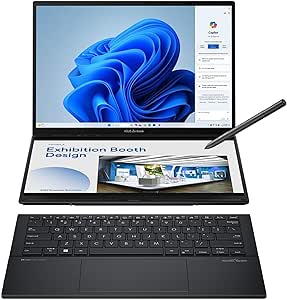
ASUS Zenbook Duo Laptop, Dual 14” OLED 3K 120Hz Touch Display, Evo, Intel Core Ultra 9 285H, Intel Arc Graphics, 32GB RAM, 1TB SSD, Windows 11, UX8406CA-PS99T
This Zenbook Duo excels in multitasking with dual 14-inch OLED touch displays offering a combined workspace in a portable form factor, making it ideal for creators and professionals who need multiple screens on the go. Compared to the ASUS Zenbook A14, it provides a dual-screen setup and higher resolution but is heavier at 3.64 lbs. The Intel Core Ultra 9 285H processor and Intel Arc graphics deliver strong performance for productivity and light creative tasks, though driver issues have been noted by some users, impacting stability. Its 32GB RAM and 1TB SSD support heavy multitasking and content creation, and the 3K OLED screens with 120Hz refresh rate offer vibrant, smooth visuals. The detachable keyboard and built-in kickstand add versatility, but the device’s weight and potential driver issues could be limiting for some. It’s best for mobile multitaskers who prioritize display flexibility.
Pros:- Dual 14” OLED touchscreens with 3K resolution
- Versatile detachable keyboard and kickstand
- Powerful 32GB RAM and 1TB SSD for multitasking
Cons:- Heavier than single-screen models at 3.64 lbs
- Potential driver stability issues affecting reliability
Best for: Creative professionals and multitaskers seeking a flexible dual-screen OLED experience in a portable package.
Not ideal for: Travelers needing a lightweight, single-screen device or those concerned about driver stability.
- Display Size:14 inches (dual)
- Resolution:2880 x 1800
- Display Type:OLED
- Processor:Intel Core Ultra 9 285H
- RAM:32GB LPDDR5x
- Storage:1TB SSD
- Weight:3.64 lbs
Bottom line: Perfect for professionals who need multiple high-quality OLED screens in a portable, flexible setup, with some concerns about weight and stability.
msi Prestige A16 AI+ (2025) 16” UHD+ OLED Business Laptop: AMD Ryzen 9-365, Radeon Graphics, 32GB LPDDR5x, 1TB NVMe SSD, Type-C, WiFi 7, Win 11 Home: Urban Silver A3HMG-207US
This MSI Prestige A16 offers a stunning 16-inch UHD+ OLED display with 4K resolution, making it ideal for business users who demand high visual fidelity alongside robust processing power. Compared to the ASUS Zenbook Duo, it provides a larger, higher-resolution display suited for detailed visuals, but its 4.19 lbs weight and larger chassis reduce portability for frequent travel. The AMD Ryzen 9-365 processor with Radeon graphics is capable of handling intensive AI and multitasking workloads, but user reports highlight driver stability issues, which could impact productivity. Its 32GB LPDDR5x RAM and 1TB SSD support heavy workloads, and WiFi 7 ensures fast connectivity, though the device’s weight and stability concerns make it less ideal for on-the-move use. Best for those prioritizing top-tier visual quality and processing power, accepting some stability and mobility compromises.
Pros:- Breathtaking 4K UHD+ OLED display with deep blacks
- Powerful AMD Ryzen 9 CPU with AI capabilities
- Large 32GB RAM supports demanding multitasking
Cons:- Relatively heavy for portable use at over 4 lbs
- Driver instability affecting reliability
Best for: Business users and AI developers needing a 4K OLED display with high processing performance.
Not ideal for: Frequent travelers or users who need a lightweight, highly stable device for daily mobility.
- Display Size:16 inches
- Resolution:3840 x 2400
- Display Type:UHD+ OLED
- Processor:AMD Ryzen 9-365
- RAM:32GB LPDDR5x
- Storage:1TB NVMe SSD
- Weight:4.19 lbs
Bottom line: Best for users who need exceptional display quality and processing power, with some tradeoffs in weight and driver stability.
How We Picked
Our evaluation focused on key factors that matter most to business users seeking OLED displays. Performance was assessed through CPU and RAM configurations suitable for multitasking and demanding apps. Display quality was prioritized with criteria like brightness, color accuracy, and refresh rate—essential for creative professionals. Build quality, battery life, and portability were also considered, reflecting real-world usage. To rank these models, we balanced these technical specs against price, aiming to identify options that deliver the best value without compromising core business needs.Factors to Consider When Choosing Best Business Laptops With Oled Displays
Choosing the best business laptop with an OLED display involves more than just screen quality. Buyers should consider performance, portability, battery life, and build quality to match their specific needs. Understanding these factors helps prevent overpaying for features you don’t need or missing out on critical performance aspects that impact daily work. Here are key considerations to guide your decision.Performance Power for Business Tasks
Look for CPUs with at least 6 cores and 16GB of RAM if your work involves multitasking, content creation, or running demanding applications. OLED screens make a noticeable difference in creative fields, but they can drain battery faster. Balancing high performance with efficient power consumption is essential for on-the-go productivity.
Display Brightness and Color Accuracy
High brightness levels (600 nits or more) and 100% DCI-P3 coverage ensure vibrant visuals, critical for creative professionals and those who work with color-sensitive tasks. Be cautious of models with lower brightness or color coverage, which can diminish the benefits of OLED technology and cause eye strain over long periods.
Portability and Build Quality
If mobility is a priority, choose lighter, slimmer models with durable build materials. OLED screens are often found on premium ultrabooks, but some tradeoffs in weight and thickness occur. Consider your typical daily carry needs against the physical size and weight of the device.
Battery Life and Power Management
OLED displays are power-hungry, often reducing battery longevity compared to LCDs. When selecting a laptop, review real-world battery life figures aligned with your usage patterns. Features like fast charging and power-saving modes can mitigate some drawbacks, making OLED more practical for mobile work.
Price and Long-Term Value
Premium OLED laptops come at a higher price, but they can offer superior color accuracy and better build quality. Lower-priced options may sacrifice some display quality or performance. Evaluate whether the investment aligns with your professional needs or if a mid-range model provides enough quality at a better value.
Frequently Asked Questions
Does an OLED display significantly improve productivity for business tasks?
Yes, OLED displays enhance readability, reduce eye strain, and deliver more vibrant visuals, which can improve focus and reduce fatigue during long work sessions. For creative professionals, the superior color accuracy and contrast can also make tasks like graphic design and photo editing more precise. However, for basic office work, the difference may be less noticeable, so consider your specific needs before prioritizing OLED.
Will OLED screens drain my laptop’s battery faster?
Typically, yes. OLED screens consume more power when displaying bright or colorful content because each pixel emits its own light. This often results in shorter battery life compared to LCDs, especially with high-brightness settings. Choosing models with efficient power management and lower screen brightness can help mitigate this issue for everyday use.
Are OLED displays more fragile or prone to damage?
OLED screens are generally comparable in durability to high-quality LCDs, but they can be more susceptible to burn-in if static images are left on the screen for extended periods. Most modern OLED laptops incorporate safeguards to prevent burn-in, but it’s still wise to avoid static UI elements when possible for long-term display health.
Is the investment in an OLED laptop worth it for business use?
For professionals who value display quality—such as designers, video editors, or those working extensively with color—the investment often pays off through improved accuracy and visual comfort. For typical business tasks, the benefits are less pronounced, and budget-friendly alternatives might suffice. Weigh the premium cost against your specific work requirements.
How do I choose between OLED and high-quality IPS displays?
OLED offers superior contrast ratios, deeper blacks, and richer colors, making it ideal for media creation and consumption. IPS displays can be brighter and often provide longer battery life, which is advantageous for all-day portability. Your choice should depend on whether display quality or battery longevity is more critical for your daily use.
Conclusion
For those seeking the best overall balance of performance and display quality, the ASUS Vivobook S16 AI stands out as a versatile choice. Budget-conscious buyers or those new to OLED technology might prefer the ASUS Zenbook A14 for its value. Professionals prioritizing top-tier visuals and power should consider the MSI Prestige A16 or the HP OmniBook 14. Lastly, users who need a portable, premium device with excellent display capabilities may find the Lenovo Slim 7i Aura or ASUS Zenbook Duo best suited to their workflow. Your ideal pick depends on your specific work style, budget, and priorities.