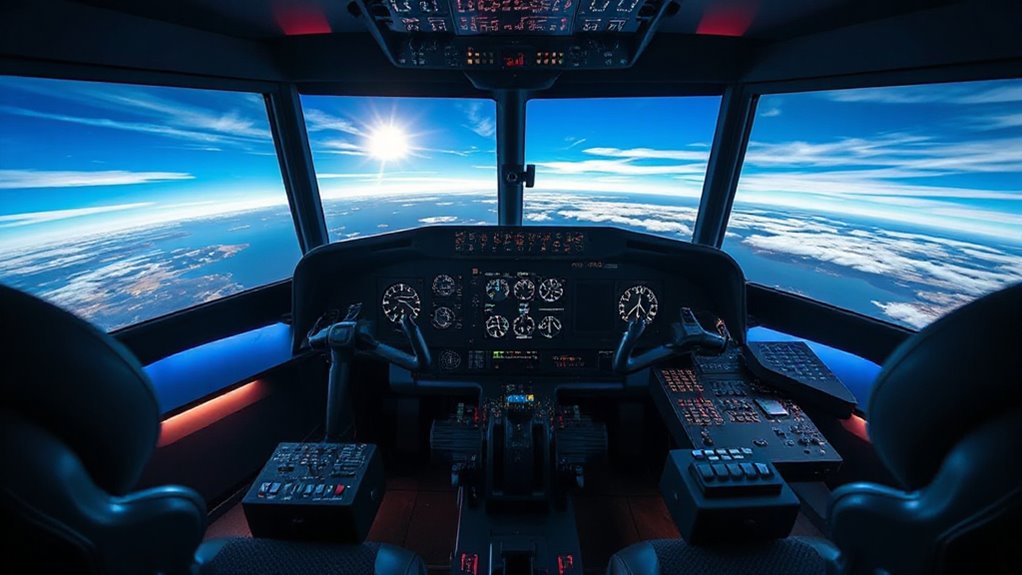

Choosing the right hotas setup for flight sims can dramatically enhance your flying experience, but it’s a balance between realism, budget, and ease of use. The Thrustmaster HOTAS Warthog stands out as the best overall for serious sim pilots, thanks to its durability and authentic feel. For newcomers, the Logitech G Saitek X52 Pro offers a more affordable, user-friendly experience. Meanwhile, the Turtle Beach VelocityOne provides a sleek, all-in-one solution for those seeking simplicity and compatibility across platforms. These options highlight the common tradeoffs: high-end realism vs. affordability, complexity vs. accessibility. Continue reading for a detailed breakdown that helps you find the perfect fit for your flight sim needs.
Complete the kit



Key Takeaways
- Top-tier realism and build quality are concentrated in the Thrustmaster HOTAS Warthog, but it comes with a high price tag.
- Compatibility across platforms varies, with some models supporting only PC, others working with Xbox or PS5, impacting buyer flexibility.
- Price ranges from budget-friendly options like the Thrustmaster T-Flight Hotas X to premium systems like the Logitech G X56, catering to different budgets.
- Ease of setup and user experience differ significantly, with simpler models suitable for beginners and complex systems preferred by experienced pilots.
- Additional features like rudder pedals and switch panels add realism but also increase cost and complexity.
| Thrustmaster HOTAS Warthog A10 Replica Flight Stick & Throttle Set – PC |  | Best Overall for Serious Flight Sim Enthusiasts | Compatibility: PC | Control Type: Flight Stick & Throttle | Material: Metal | VIEW ON AMAZON | See Our Full Breakdown |
| Thrustmaster T-Flight Hotas One Flight Stick & Throttle – Xbox & PC |  | Best for Versatile Console and PC Play | Compatibility: Xbox Series X|S, Windows PC | Design: Detachable throttle, ergonomic joystick | Features: Adjustable resistance, programmable buttons, responsive trigger | VIEW ON AMAZON | See Our Full Breakdown |
| Logitech G Saitek X52 Pro Flight Control System – Black/Silver |  | Best for Customizable, Mid-Range Control | System requirements: Windows 10, 8.1, 7; 2 USB 2.0 ports; internet for software | Handle adjustment: 5 positions | Grip: Soft-touch, contoured | VIEW ON AMAZON | See Our Full Breakdown |
| Thrustmaster T-Flight Full Kit HOTAS with Rudder Pedals – Xbox & PC |  | Best for Complete Console and PC Setup | Includes: Throttle, stick, rudder pedals | Number of programmable buttons: 14 | Axes: 5 | VIEW ON AMAZON | See Our Full Breakdown |
| Thrustmaster T-Flight Hotas X USB Flight Sim Stick & Throttle – PC |  | Best for Entry-Level PC Flight Sim Enthusiasts | Number of action buttons: 12 | Number of axes: 5 | Detachable throttle: Yes | VIEW ON AMAZON | See Our Full Breakdown |
| Thrustmaster T-Flight Hotas One MSFS 2024 Collector Edition – Xbox & PC |  | Best Overall for Xbox and Entry-Level PC Flight Sim Enthusiasts | Compatibility: Xbox Series X|S and PC | Axes: 5 including Z-axis rudder | Action Buttons: 14 | VIEW ON AMAZON | See Our Full Breakdown |
| Thrustmaster T16000M FCS Flight Pack (Compatible with PC) |  | Best Value for Advanced PC Flight Sim Enthusiasts | Compatible Devices: PC | Controller Type: Flight Stick | Connectivity Technology: USB | VIEW ON AMAZON | See Our Full Breakdown |
| Logitech G X52 Flight Control System |  | Best for Enthusiasts Wanting Extensive Programmability and Realism | Sensor Type: Magnetic, non-contact | LCD Display: Multifunction with programmable commands | Rudder Control: 3D Twist with Rudder Lock | VIEW ON AMAZON | See Our Full Breakdown |
| Turtle Beach VelocityOne Flightdeck Universal HOTAS Simulation System – PC | 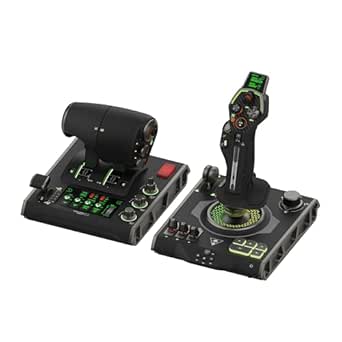 | Best Premium for Serious Flight Enthusiasts and Multi-Title Compatibility | Compatibility: Windows 10 & 11 | Number of programmable buttons: 139 | Axes: 15 | VIEW ON AMAZON | See Our Full Breakdown |
| Thrustmaster T16000M FCS HOTAS (Compatible with PC) |  | Best for Precision and Versatility in PC Flight Sims | Compatibility: PC via USB | Sensors: Hall effect magnetic | Number of action buttons: 16 | VIEW ON AMAZON | See Our Full Breakdown |
| Logitech G X56 H.O.T.A.S Throttle and Joystick Flight Simulator Controller |  | Best Overall for Customization and Immersive Control | Control Surface Options: All control surfaces required for flight simulation | Programmable Controls: 189 | Lighting: RGB backlighting | VIEW ON AMAZON | See Our Full Breakdown |
| Thrustmaster T.Flight Hotas 5 Microsoft Flight Simulator Edition – PS5 & PC |  | Best for Console Compatibility and Simplicity | Compatibility: PS5, PS4, PC | Control axes: 5 | Action buttons: 14 | VIEW ON AMAZON | See Our Full Breakdown |
| Logitech G X56 H.O.T.A.S Throttle and Joystick Flight Simulator Game Controller + Pro Flight Rudder Pedals Bundle |  | Best Complete Bundle for Realistic, Immersive Flight Experience | Control surfaces: All control surface options for performance customization | Mini Analog Stick: Control pitch, roll, yaw, and weapons | RGB Backlighting: Yes, customizable colors | VIEW ON AMAZON | See Our Full Breakdown |
| hotas setups for flight sim | Compatibility |
|---|---|
| Thrustmaster HOTAS Warthog A10 | PC |
| Thrustmaster T-Flight Hotas On | Xbox Series X|S, Windows PC |
| Logitech G Saitek X52 Pro Flig | — |
| Thrustmaster T-Flight Full Kit | — |
| Thrustmaster T-Flight Hotas X | PC |
| Thrustmaster T-Flight Hotas On | Xbox Series X|S and PC |
| Thrustmaster T16000M FCS Fligh | — |
| Logitech G X52 Flight Control | — |
| Turtle Beach VelocityOne Fligh | Windows 10 & 11 |
| Thrustmaster T16000M FCS HOTAS | PC via USB |
| Logitech G X56 H.O.T.A.S Throt | — |
| Thrustmaster T.Flight Hotas 5 | PS5, PS4, PC |
| Logitech G X56 H.O.T.A.S Throt | — |
More Details on Our Top Picks
Thrustmaster HOTAS Warthog A10 Replica Flight Stick & Throttle Set – PC
This model stands out for its exceptional realism and build quality, closely mimicking the controls of the A-10C aircraft with a durable metal construction and a high-fidelity replica design. Its precision Hall Effect sensors deliver ultra-smooth, accurate control, making it a favorite for dedicated flight simmers who demand authentic feel. Compared with the Logitech X52 Pro, the Warthog offers a more immersive experience but at a significantly higher price and with a more complex setup. The extensive 55 programmable buttons and dual throttles provide unmatched customization for those who want a deep, cockpit-like experience. However, this complexity and weight mean it’s less suitable for casual users or those with limited space. It’s an ideal choice for professionals or enthusiasts willing to invest time and money into a top-tier setup.
Pros:- Highly realistic military-grade replica with durable metal construction
- Precision Hall Effect sensors ensure smooth and accurate control
- Extensive programmable buttons for deep customization
- Dual throttles for precise engine management
Cons:- High price may be prohibitive for casual users
- Complex setup and configuration required for optimal use
- Heavy and large, may take up significant desk space
Best for: Hardcore flight simulation enthusiasts and professionals seeking maximum realism and customizability
Not ideal for: Casual players or those new to flight sims who prefer a plug-and-play, lightweight option
- Compatibility:PC
- Control Type:Flight Stick & Throttle
- Material:Metal
- Number of Programmable Buttons:55
- Additional Controls:8-way POV hat, switches, toggles
Our verdict“This setup is perfect for serious flight sim fans who prioritize authenticity over simplicity.”
Thrustmaster T-Flight Hotas One Flight Stick & Throttle – Xbox & PC
Compared to the Warthog, the Thrustmaster T-Flight Hotas One offers a more accessible and flexible setup suitable for both casual and moderate enthusiasts. Its ergonomic, detachable throttle and adjustable resistance provide a comfortable and responsive feel, making it a solid choice for those who want a realistic experience without the steep learning curve. Unlike the Warthog, it’s compatible with Xbox Series X|S, expanding its versatility beyond PC alone. However, the need for additional rudder pedals, which are sold separately, can add to the cost and complexity for those seeking a fully immersive cockpit. It’s well-suited for players who value a balance of realism and ease of use, especially on consoles.
Pros:- Realistic flight control with adjustable resistance and programmable buttons
- Detachable throttle for versatile setup options
- Compatible with both PC and Xbox consoles for broad gaming flexibility
- Suitable for a variety of aircraft types and flight simulation experiences
Cons:- Requires additional rudder pedals for full control experience
- May be complex for complete beginners unfamiliar with flight sims
- Limited number of programmable buttons compared to high-end sets
Best for: Intermediate flight sim players who want flexible compatibility across PC and Xbox with a manageable setup
Not ideal for: Dedicated professionals or hardcore simmers seeking ultra-realistic, all-in-one controls
- Compatibility:Xbox Series X|S, Windows PC
- Design:Detachable throttle, ergonomic joystick
- Features:Adjustable resistance, programmable buttons, responsive trigger
- Expandability:Compatible with Thrustmaster TFRP rudder pedals
Our verdict“A flexible, console-compatible HOTAS that balances realism with ease of use for intermediate players.”
Logitech G Saitek X52 Pro Flight Control System – Black/Silver
The X52 Pro offers a step up from basic controllers with its illuminated controls and LCD display, making it easier to manage complex setups. Its customizable controls and progressive throttle with resistance adjustment enable precise handling, especially compared to simpler models like the Thrustmaster T-Flight Hotas X. The soft-touch grip and adjustable handle add comfort during extended sessions. However, it requires multiple USB ports and software installation, which might be cumbersome for some users, and its bulkier design could be less ideal for tight desk spaces. This set is well-suited for gamers who want more control options without the investment of a high-end, full-metal setup.
Pros:- Customizable controls for different games
- Illuminated buttons and LCD display enhance usability
- Comfortable soft-touch grip with adjustable handle
- Progressive throttle with resistance adjustment
Cons:- Requires multiple USB ports and software setup
- Design may be bulky for small desks
- No wireless or wireless-like connectivity
Best for: Intermediate users seeking customizable controls and a more feature-rich setup without the high price of premium models
Not ideal for: Casual players or those with limited desk space who prefer a minimalist setup
- System requirements:Windows 10, 8.1, 7; 2 USB 2.0 ports; internet for software
- Handle adjustment:5 positions
- Grip:Soft-touch, contoured
- Illumination:Yes
Our verdict“A solid mid-range choice for flight sim enthusiasts who want customization and a feature-rich experience.”
Thrustmaster T-Flight Full Kit HOTAS with Rudder Pedals – Xbox & PC
This full kit provides a comprehensive flight experience with full HOTAS controls plus rudder pedals, making it a step up from the T-Flight Hotas One. Its dedicated Xbox buttons and programmable controls mirror more advanced setups, while the inclusion of rudder pedals enhances realism significantly, especially compared to simpler controls like the Hotas X. The ergonomic pedals offer comfort during long sessions, but the full setup requires considerable space, and the button layout can feel crowded for some users. This kit makes the most sense for players who want a true cockpit feel on both Xbox and PC without needing to piece together separate components.
Pros:- Immersive HOTAS controls with full throttle and stick
- Includes ergonomic rudder pedals for precise steering
- Dedicated Xbox buttons for seamless console integration
- Highly versatile controls suitable for various aircraft
Cons:- Requires significant space for full setup
- Button layout may feel crowded during intense sessions
- More expensive than simpler controllers
Best for: Avid flight sim players wanting a full, immersive setup on Xbox or PC with rudder pedals included
Not ideal for: Casual gamers or those with limited space who prefer a simpler or more compact control system
- Includes:Throttle, stick, rudder pedals
- Number of programmable buttons:14
- Axes:5
- Trigger:Rapid fire
Our verdict“Ideal for dedicated flight sim fans seeking a complete, immersive cockpit experience on Xbox or PC.”
Thrustmaster T-Flight Hotas X USB Flight Sim Stick & Throttle – PC
The T-Flight Hotas X is a reliable, budget-friendly option making it suitable for newcomers or casual players. Its ergonomic design and fully programmable controls, including 12 action buttons and 5 axes, allow for decent customization. The detachable throttle offers some flexibility, and the preset profiles enable quick setup for immediate gameplay. Compared to the more advanced X52 Pro, this model sacrifices some precision and features but remains accessible for users just starting out. Its simplicity and affordability come with a tradeoff in control depth and potential comfort during extended flights. This pick works best for those trying to get into flight sims without a steep investment.
Pros:- Ergonomic design for comfortable long sessions
- Fully programmable controls for personalized setup
- Detachable throttle for flexible placement
- Plug-and-play with preset profiles for quick start
Cons:- Limited to PC compatibility only
- Requires initial configuration for advanced profiles
- Less precise than high-end setups like the Warthog
Best for: Beginners or casual players new to flight sims who want an affordable, easy-to-use setup
Not ideal for: Experienced simmers or professionals seeking high-precision controls and extensive customization
- Number of action buttons:12
- Number of axes:5
- Detachable throttle:Yes
- Adjustable resistance:Yes
- Compatibility:PC
- Programmable controls:Yes
- Profiles memory:Yes
Our verdict“A straightforward, affordable HOTAS ideal for newcomers or casual flight sim players on PC.”
Thrustmaster T-Flight Hotas One MSFS 2024 Collector Edition – Xbox & PC
This officially licensed setup excels for those seeking a versatile, ready-to-fly HOTAS option compatible with Xbox Series X|S and PC. Its high-precision controls, including multiple axes, a detachable throttle, and dual rudder system, make it a solid choice for flight simers aiming for realism without needing extensive customization. Compared to the Thrustmaster T16000M FCS Flight Pack, it offers a more streamlined experience, but it requires separate rudder pedals for full immersion, adding to the overall cost. The detachable throttle enhances versatility, yet the complexity of all controls may challenge beginners. For Xbox users or newcomers who want a reliable, official controller, this model strikes a good balance between affordability and functionality.
Pros:- Officially licensed for Microsoft Flight Simulator 2024
- High-precision controls with multiple axes and buttons
- Detachable throttle for flexible setups
Cons:- Requires separate purchase of rudder pedals for full realism
- May be complex for beginners to master all controls
Best for: Beginners and Xbox owners who want an official, easy-to-expand HOTAS for Microsoft Flight Simulator 2024
Not ideal for: Advanced flight simers seeking extensive customization or full cockpit setups, as it lacks built-in programmability and integrated rudder pedals
- Compatibility:Xbox Series X|S and PC
- Axes:5 including Z-axis rudder
- Action Buttons:14
- Trigger:Rapid trigger
- Rudder System:Dual rudder
- Detachable Throttle:Yes
- Expandable:Yes, with rudder pedals
Our verdict“Ideal for Xbox users and newcomers seeking a reliable, expandable HOTAS solution that balances ease of use with realism.”
Thrustmaster T16000M FCS Flight Pack (Compatible with PC)
The T16000M FCS Flight Pack offers a comprehensive control set for dedicated PC flight simmers. Its ambidextrous design and 16 programmable buttons deliver high responsiveness, rivaling more expensive setups like the Turtle Beach VelocityOne Flightdeck. While it provides excellent precision through Hall effect sensors, it doesn’t include a throttle of its own, making it less suitable for those seeking a fully integrated HOTAS. Its large footprint and weight could be a drawback for limited space or portability. For budget-conscious users wanting a high-quality, versatile system without the premium price, this pack balances features with affordability well.
Pros:- High-precision Hall effect sensors for accurate control
- Ambidextrous design with customizable controls
- 16 programmable buttons for complex maneuvers
Cons:- Requires additional throttle for complete HOTAS experience
- Large size may demand significant desk space
Best for: PC flight simmers who want a high-precision, customizable setup without the cost of premium systems
Not ideal for: Casual players or those with limited space, as its large size and need for additional components may be cumbersome
- Compatible Devices:PC
- Controller Type:Flight Stick
- Connectivity Technology:USB
- Additional Features:Ergonomic, customizable profiles
- Button Quantity:16
- Hardware Platform:PC
Our verdict“This pack offers excellent value for experienced PC flight simmers who want precision and customization at a reasonable price.”
Logitech G X52 Flight Control System
The Logitech G X52 is a strong choice for experienced flight simers craving detailed customization. Its magnetic sensors guarantee smooth, accurate control, and with 282 programmable commands across three modes, it surpasses most basic HOTAS in flexibility. The multifunction LCD allows quick access to settings, but the complex setup process may challenge newcomers. Compared to the Thrustmaster T-Flight Hotas One MSFS 2024 Collector Edition, it offers far more customization but at a higher price and a steeper learning curve. This system suits dedicated flight enthusiasts who prioritize control depth and are willing to invest time in setup.
Pros:- Magnetic sensors deliver high accuracy
- Extensive programmability with 282 commands
- Ergonomic grip and multifunction LCD display
Cons:- Complex setup process can intimidate newcomers
- Higher price point may deter casual users
Best for: Experienced flight simers seeking maximum control customization and realism
Not ideal for: Casual players or beginners who prefer plug-and-play solutions due to its complex initial setup
- Sensor Type:Magnetic, non-contact
- LCD Display:Multifunction with programmable commands
- Rudder Control:3D Twist with Rudder Lock
- Programmable Commands:282
- Grip System:5-position ergonomic grip
Our verdict“Best suited for dedicated flight simers wanting in-depth control and extensive customization, despite the initial complexity.”
Turtle Beach VelocityOne Flightdeck Universal HOTAS Simulation System – PC
The VelocityOne Flightdeck redefines premium HOTAS with its extensive control array, including a 139-button layout, dual throttle levers, and a touch screen display. Its modular stick with hall-effect sensors rivals the precision of high-end systems like the Thrustmaster Warthog, but with added versatility through a full-color display and OLED head-up. The sophisticated customization via the Flight Hangar app makes it ideal for dedicated simmers who fly across multiple titles. Its size and complexity, however, could be overwhelming for casual users or those with limited space. This system makes sense for users demanding the best in build quality, features, and multi-platform support.
Pros:- Highly customizable with 139 programmable buttons
- Immersive touch screen and OLED head-up display
- Premium build quality with hall-effect sensors
Cons:- Complex setup may be daunting for beginners
- Premium price limits accessibility for casual users
Best for: Serious flight sim enthusiasts who want a high-end, multi-application HOTAS with extensive customization
Not ideal for: Casual players or those with tight desk space, due to its large footprint and advanced setup requirements
- Compatibility:Windows 10 & 11
- Number of programmable buttons:139
- Axes:15
- Display:Touch screen and OLED Head Up Display
- Throttle controls:Dual with haptic detents
Our verdict“The VelocityOne Flightdeck is best suited for dedicated simmers seeking a versatile, feature-rich, high-performance HOTAS system.”
Thrustmaster T16000M FCS HOTAS (Compatible with PC)
The T16000M FCS HOTAS stands out for its Hall effect magnetic sensors, providing precise control ideal for experienced PC flight simers. Its compact design packs 16 programmable buttons and 4 axes, including twist rudder, making it a versatile choice for those who want a responsive, reliable system without the bulk of larger setups like the Turtle Beach VelocityOne. However, it’s limited to PC use, and its setup can be a challenge for newcomers. Compared with the Thrustmaster T16000M FCS Flight Pack, it offers a more straightforward stick but requires a separate throttle for full HOTAS capabilities. This pick is perfect for advanced PC players prioritizing accuracy and compactness.
Pros:- Hall effect magnetic sensors for high accuracy
- Multiple programmable buttons and switches
- Compact, space-efficient design
Cons:- Limited to PC compatibility
- Requires additional throttle for a complete HOTAS system
Best for: Experienced PC flight simers who need a precise, space-saving HOTAS with multiple controls
Not ideal for: Casual players or those seeking a plug-and-play all-in-one setup, due to its need for additional components and setup complexity
- Compatibility:PC via USB
- Sensors:Hall effect magnetic
- Number of action buttons:16
- Axes:4
- Additional controls:8-way POV hat, switches, slider
Our verdict“Ideal for advanced PC users who desire precise, space-conscious controls with extensive programmability.”
Logitech G X56 H.O.T.A.S Throttle and Joystick Flight Simulator Controller
This model stands out for its extensive customization options, with 189 programmable controls and RGB lighting that enhance both functionality and aesthetics. Compared with the Logitech G X52 Pro, the X56 offers more control surfaces and a more adjustable spring system, making it ideal for serious flight sim enthusiasts who want tailored control. Its hall-effect sensors ensure precision, while the multiple spring options allow for a more realistic feel. However, its complexity and need for multiple USB ports might be overwhelming for beginners or casual players. The premium price also places it out of reach for those looking for a straightforward setup. This pick makes the most sense for experienced flight simmers seeking maximum control and customization.
Pros:- Highly customizable with 189 programmable controls
- RGB lighting adds to immersive aesthetics
- Precise control via hall-effect sensors and adjustable springs
- Suitable for VR and advanced flight setups
Cons:- Requires multiple USB ports and specific system compatibility
- Complex setup may intimidate beginners
- Premium price point
Best for: Dedicated flight sim enthusiasts who want advanced customization and immersive VR support
Not ideal for: Casual players or newcomers who prefer simple plug-and-play setups and minimal configuration
- Control Surface Options:All control surfaces required for flight simulation
- Programmable Controls:189
- Lighting:RGB backlighting
- Connectivity:2x USB
- Sensors:16-bit aileron and elevator with hall-effect sensors
- Spring Options:4 spring options for stick force adjustment
- Throttle:Twin throttles with friction adjuster and throttle lock
Our verdict“This is the best choice for experienced users seeking maximum control and customization, despite its complexity and cost.”
Thrustmaster T.Flight Hotas 5 Microsoft Flight Simulator Edition – PS5 & PC
This joystick excels in providing a familiar, straightforward experience tailored for Microsoft Flight Simulator fans on PS5 and PC. Its 16-bit control axes and 14 action buttons deliver precise control, while the detachable throttle adds flexibility, especially compared to the all-in-one design of the Logitech G X56. The dual rudder system offers versatile control, making it a solid choice for players who want realism without overwhelming complexity. Still, the lack of advanced programmability and the need to purchase separate rudder pedals can be limiting for those seeking a fully customizable setup. While the control axes are sufficient for most, it may not satisfy veteran flight simmers looking for extensive control options. This model fits best for console players or newcomers who want reliable, precise control without a steep learning curve.
Pros:- Official Microsoft Flight Simulator license ensures compatibility
- Detachable throttle for flexible setup
- Dual rudder system provides versatile control
- Adjustable resistance for tailored feel
Cons:- Requires separate purchase of rudder pedals for full control
- Limited programmability compared to more advanced models
- Complex controls may challenge complete beginners
Best for: Console players and beginners who want a reliable, easy-to-use HOTAS for Microsoft Flight Simulator
Not ideal for: Advanced flight enthusiasts seeking extensive programmability and additional control accessories like rudder pedals included
- Compatibility:PS5, PS4, PC
- Control axes:5
- Action buttons:14
- Trigger:Rapid-fire
- Detachable throttle:Yes
- Rudder system:Dual (joystick Z-axis and tilting lever)
- Adjustable resistance:Yes
Our verdict“This is the best option for console users and newcomers seeking dependable, precise control with straightforward setup.”
Logitech G X56 H.O.T.A.S Throttle and Joystick Flight Simulator Game Controller + Pro Flight Rudder Pedals Bundle
This bundle delivers a comprehensive flight simulation setup, combining the Logitech G X56 joystick and throttle with self-centering rudder pedals that feature adjustable tension and differential toe brakes. Compared to standalone controllers like the Thrustmaster T.Flight Hotas 5, this bundle offers a more integrated control experience, ideal for users who want a full cockpit feel. The extensive customization options and high-quality components support a wide range of flying styles, including VR compatibility. However, the setup’s complexity and the high price tag may deter casual users or those with limited space. The included rudder pedals and controls do require a dedicated area for installation, which might not be feasible for all. This bundle is best suited for dedicated enthusiasts eager for a full, realistic flight simulation experience.
Pros:- Includes both joystick, throttle, and rudder pedals for complete control
- Highly customizable controls and RGB lighting for aesthetics
- Supports VR for immersive experiences
- Self-centering rudder pedals with adjustable tension and differential toe brakes
Cons:- Complex setup requiring space and time for installation
- Premium price makes it less accessible for casual users
- Requires familiarity with flight sim hardware for optimal use
Best for: Aviators and flight sim fans seeking an all-in-one, immersive setup with pedals and full control options
Not ideal for: Beginners or casual players who prefer quick, simple plug-and-play solutions due to setup complexity and cost
- Control surfaces:All control surface options for performance customization
- Mini Analog Stick:Control pitch, roll, yaw, and weapons
- RGB Backlighting:Yes, customizable colors
- VR Compatibility:Yes
- Rudder Pedals:Self-centering with adjustable tension
- Toe Brakes:Differential for full control
Our verdict“This bundle offers a full, realistic flight control environment, perfect for dedicated enthusiasts willing to invest time and money.”
How We Picked
The products in this roundup were evaluated based on performance, build quality, compatibility, ease of use, and value for money. Priority was given to how well each setup simulates real aircraft controls, as well as the durability and quality of materials used. We also considered versatility—whether the system supports multiple platforms—and user experience, including setup complexity and customization options. The ranking reflects a balance between premium features and accessible entry points, ensuring options suit various skill levels and budgets.| hotas setups for flight sim | Compatibility |
|---|---|
| Thrustmaster HOTAS Warthog A10 | PC |
| Thrustmaster T-Flight Hotas On | Xbox Series X|S, Windows PC |
| Logitech G Saitek X52 Pro Flig | — |
| Thrustmaster T-Flight Full Kit | — |
| Thrustmaster T-Flight Hotas X | PC |
| Thrustmaster T-Flight Hotas On | Xbox Series X|S and PC |
| Thrustmaster T16000M FCS Fligh | — |
| Logitech G X52 Flight Control | — |
| Turtle Beach VelocityOne Fligh | Windows 10 & 11 |
| Thrustmaster T16000M FCS HOTAS | PC via USB |
| Logitech G X56 H.O.T.A.S Throt | — |
| Thrustmaster T.Flight Hotas 5 | PS5, PS4, PC |
| Logitech G X56 H.O.T.A.S Throt | — |
Factors to Consider When Choosing Hotas Setups For Flight Sims
When selecting a hotas setup for flight sims, it’s important to consider several factors beyond just the price or brand. The level of realism you desire will influence whether you need a high-fidelity system or a more straightforward controller. Compatibility with your gaming platform can be a decisive factor, especially if you switch between PC, Xbox, or PlayStation. Ease of setup and customization options also matter, particularly for those new to flight sims or those who like to fine-tune controls. Lastly, think about your budget—more expensive systems often include features that enhance immersion but may be overkill for casual players. Understanding these broader considerations helps avoid common pitfalls like overspending on features you won’t use or buying a system incompatible with your setup.Performance and Realism
The primary reason for choosing a hotas setup is to improve realism during flight. Higher-end models feature more precise control sticks, force feedback, and physical switches that mimic real aircraft controls. Cheaper options may skimp on accuracy or responsiveness, which can reduce immersion and even frustrate experienced pilots. Consider whether you need a system that replicates every switch and knob or if a simplified control set suffices. Remember, the most authentic experience often requires a corresponding budget—lower-cost systems typically trade off some fidelity for affordability.
Compatibility and Platform Support
Not all hotas setups work across every platform. Some are designed exclusively for PC, while others support Xbox or PlayStation, sometimes with separate versions. Verify compatibility before purchasing, especially if you plan to switch between systems or upgrade in the future. A system that supports multiple platforms may offer better long-term value but could also be more complex to set up and calibrate. Reading user reviews can help clarify real-world compatibility issues beyond official specifications.
Ease of Use and Customization
Ease of setup and user-friendly interfaces are vital, especially for beginners. Some systems come with software that allows extensive customization, including remapping buttons, adjusting force feedback, and creating profiles for different aircraft. Others may have limited options or require complex calibration procedures. For casual players or those new to flight sims, a system with straightforward setup and intuitive controls will reduce frustration and enhance enjoyment. Advanced users should look for systems that allow deep customization and firmware updates.
Build Quality and Durability
Flight control systems undergo frequent use and sometimes rough handling, especially during extended gaming sessions. Premium models use high-quality materials like metal and reinforced plastics, ensuring longevity and consistent performance over time. Cheaper options may feature lighter, plastic components that wear out quickly or feel less realistic. Investing in a durable system can save money in the long run, but it’s important to balance this with budget constraints and the level of realism needed.
Additional Features and Accessories
Features like rudder pedals, throttle quadrants, and switch panels can significantly boost immersion. Many high-end systems include these or support modular add-ons. However, adding these extras increases overall cost and complexity. For casual players or those with limited space, a simpler setup might be preferable. Conversely, dedicated sim pilots aiming for realism should prioritize systems that support these accessories, even if it means a higher initial investment.
Frequently Asked Questions
Is a more expensive hotas setup worth it for casual flight sim players?
For casual players, spending on a high-end hotas setup might provide diminishing returns. Budget-friendly models often deliver sufficient control and responsiveness for enjoyable gameplay without the hefty price tag. High-end systems excel in realism and durability but are more suitable for dedicated sim enthusiasts or those who want a fully immersive experience. If you only fly occasionally or are new to flight sims, a mid-range or entry-level setup can be a more practical choice, offering good performance at a more accessible price.
Do I need a separate rudder pedal system with my hotas?
While not strictly necessary, adding rudder pedals greatly enhances control fidelity and realism, especially for complex aircraft and multiplayer scenarios. Most premium hotas setups either include rudder pedals or support third-party options. If you’re serious about flight sims, investing in pedals can significantly improve your experience and accuracy. However, for casual or beginner pilots, many find that joystick and throttle controls alone are sufficient to enjoy most aspects of flight simulation.
Can I use a hotas setup for VR flight sims?
Yes, many hotas setups work well with VR flight sims, but compatibility depends on the system and software. Ensure the control system supports your VR platform and can be calibrated within the simulation software. Larger, more complex systems might require additional space and mounting options to fit comfortably in a VR environment. Keep in mind that some users prefer simpler controls for VR to avoid clutter and maximize immersion, so consider your physical setup and comfort when choosing a hotas for VR.
How important is force feedback in a hotas system?
Force feedback enhances realism by providing tactile responses that mimic aircraft control forces, making flying feel more authentic. It can help with muscle memory and situational awareness, especially during intense maneuvers. However, systems with force feedback tend to be more expensive and complex. If you’re a casual player or on a tight budget, a system without force feedback can still deliver a good experience; if realism is a priority, investing in a force feedback model is worth considering.
Should I prioritize a system with more buttons and switches?
More buttons and switches allow for quicker access to controls like weapons, navigation, and communication, adding depth to the simulation. This is especially important for advanced users flying complex aircraft or engaging in multiplayer combat. However, a cluttered control panel can become overwhelming for beginners. A balance between sufficient controls and simplicity is key—look for a system that offers the essential buttons you need, with room to expand as your skills grow.
Conclusion
For newcomers or casual pilots, the Thrustmaster T-Flight Hotas X offers a straightforward, affordable entry into flight sims. Dedicated enthusiasts seeking the most realistic experience should consider the Thrustmaster HOTAS Warthog for its superior build and fidelity. Those wanting a versatile, premium system that supports multiple platforms and includes extensive controls will find the Logitech G X56 to be a compelling choice. Budget-conscious buyers should prioritize systems that balance features and affordability, while advanced users can justify investing in systems with full customization and modular add-ons. Your ideal setup depends on how deeply you want to immerse yourself in flight simulation—choose accordingly.