Desktop speakers with subwoofer setups split into two camps: compact USB-powered kits that trade raw power for desk-friendly convenience, and wall-powered 2.1 systems that deliver room-filling bass but demand more space and cable management. My top pick overall is the Klipsch ProMedia 2.1 THX, which pairs genuinely detailed satellites with a subwoofer that digs deeper than anything else at this scale, while the Logitech Z623 stands out for sheer wattage and the Creative Pebble Plus wins on plug-and-play simplicity for tight desks. The main tradeoff you will face is between convenience and power — USB systems cannot move enough air for serious bass, so the question is really how much low end your space and budget allow. Continue reading for the full breakdown, including value picks, Bluetooth options, and RGB-equipped models.

Get the latest gadgets delivered free with Prime
- Fast, free delivery on millions of items
- Prime Video, Amazon Music and more included
- Member-only deals all year
Complete the kit



Key Takeaways
- USB-powered systems like the Creative Pebble Plus physically cannot match the low-end output of wall-powered 2.1 kits; choose based on how much bass your space genuinely needs, not wattage claims on the box.
- THX certification (Klipsch ProMedia 2.1, Logitech Z625) reliably signals better dynamics and cleaner volume than similarly priced non-certified rivals — it is the single best quality shortcut in this category.
- Logitech‘s lineup covers three distinct buyers: Z313 for budget simplicity, Z625 for optical/THX connectivity, and Z407 for wireless Bluetooth plus a rotating dial remote.
- Nylavee and Bluedee models pack surprisingly strong sound and features (Bluetooth 5.4, RGB) into budget boxes, but build quality and warranty support lag the established brands.
- Peak power ratings are almost meaningless across brands — Cyber Acoustics’ lower-rated kits compete with higher-numbered rivals, so compare wattage only within a single manufacturer’s range.
| Creative Pebble Plus 2.1 USB-Powered Desktop Speakers with Subwoofer, Black |  | Best Compact USB Pick | Configuration: 2.1 with external subwoofer | Mid-range drivers: 2-inch | Subwoofer: 4-inch down-firing, ported | VIEW ON AMAZON | See Our Full Breakdown |
| Cyber Acoustics CA-3610 2.1 Multimedia Speaker System with Subwoofer |  | Best for Bass and Wired Versatility | Channels: 2.1 | Power: 30W RMS; 62W peak | Satellite drivers: Dual 2-inch titanium drivers per satellite | VIEW ON AMAZON | See Our Full Breakdown |
| Nylavee 2.1 Computer Speakers with Subwoofer and Bluetooth 5.4 |  | Best for Wireless Beginners | System: 2.1-channel | Subwoofer driver: 5.25 inches | Power: 30W RMS; 60W peak | VIEW ON AMAZON | See Our Full Breakdown |
| Nylavee 2.1 Computer Speakers with Subwoofer, Bluetooth 5.4 and RGB Lighting |  | Best for RGB Desk Setups | Audio system: 2.1-channel stereo | Peak output: 60W | Subwoofer: 6.7 inches | VIEW ON AMAZON | See Our Full Breakdown |
| Klipsch ProMedia 2.1 THX Certified Computer Speaker System, Black |  | Best Premium Wired Pick | Configuration: 2.1-channel | Certification: THX Certified | Peak power: 200 watts | VIEW ON AMAZON | See Our Full Breakdown |
| Logitech Z623 400 Watt 2.1 Home Speaker System – Black |  | Best Raw Power | Peak Power: 400 Watts | RMS Power: 200 Watts | Subwoofer Power: 130 Watts | VIEW ON AMAZON | See Our Full Breakdown |
| Logitech Z625 THX Certified 2.1 Speaker System with Optical Input |  | Best for Console and TV Connectivity | Power Output: 200 Watts RMS / 400 Watts Peak | Configuration: 2.1 speaker system | Certification: THX Certified | VIEW ON AMAZON | See Our Full Breakdown |
| Logitech Z313 2.1 Multimedia Speaker System with Subwoofer | 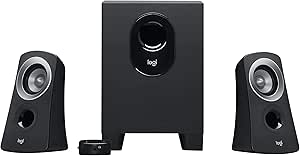 | Best Budget Entry Point | Configuration: 2.1-channel | RMS Output: 25 watts | Subwoofer: Compact wired subwoofer | VIEW ON AMAZON | See Our Full Breakdown |
| Klipsch ProMedia Lumina 2.1 Computer Speaker System with Subwoofer and RGB Lighting |  | Best Feature-Rich Gaming Aesthetic | Inputs: USB-C, AUX, Bluetooth 5.3 | Woofer Diameter: 6.5 inches | Maximum Output Power: 10 watts | VIEW ON AMAZON | See Our Full Breakdown |
| Logitech Z407 Bluetooth Computer Speakers with Subwoofer and Wireless Control |  | Best Wireless Convenience | RMS Power: 40W (80W peak) | Subwoofer Power: 20W | Connectivity: Bluetooth, micro USB, 3.5 mm input | VIEW ON AMAZON | See Our Full Breakdown |
| Bluedee 2.1 Computer Speakers with Subwoofer, 80W Peak Power |  | Best Connectivity | Peak Power: 80W | Audio Channels: 2.1 | Connectivity: Bluetooth 5.4, USB-A, USB-C, 3.5mm AUX | VIEW ON AMAZON | See Our Full Breakdown |
| Cyber Acoustics CA-3090 2.1 Speaker System with Subwoofer |  | Best Budget Entry Point | System Type: 2.1 stereo speakers | Peak Power: 18W | RMS Power: 9W | VIEW ON AMAZON | See Our Full Breakdown |
| Logitech Z533 2.1 Multimedia Speaker System with Subwoofer |  | Best for Raw Power per Dollar | Peak Power: 120 watts | RMS Power: 60 watts | Drivers: 2.25-inch (5.7 cm) full-range | VIEW ON AMAZON | See Our Full Breakdown |
| Cyber Acoustics CA-3810 2.1 Speaker System with Subwoofer |  | Best Mid-Range All-Rounder | Peak Power: 80 watts | RMS Power: 40 watts | Subwoofer: 5.25-inch ported | VIEW ON AMAZON | See Our Full Breakdown |
| desktop speakers with subwoofer | Subwoofer | Controls |
|---|---|---|
| Creative Pebble Plus 2.1 USB-P | 4-inch down-firing, ported | — |
| Cyber Acoustics CA-3610 2.1 Mu | 5.25 inches | — |
| Nylavee 2.1 Computer Speakers | — | Side knob for power, mode, and volume |
| Nylavee 2.1 Computer Speakers | 6.7 inches | Touch controls for power, volume, and modes |
| Klipsch ProMedia 2.1 THX Certi | 6.5-inch side-firing, ported | — |
| Logitech Z623 400 Watt 2.1 Hom | — | — |
| Logitech Z625 THX Certified 2. | — | Power, volume, bass, headphone and aux jacks on right satellite |
| Logitech Z313 2.1 Multimedia S | Compact wired subwoofer | — |
| Klipsch ProMedia Lumina 2.1 Co | — | — |
| Logitech Z407 Bluetooth Comput | — | — |
| Bluedee 2.1 Computer Speakers | — | Touch control knob |
| Cyber Acoustics CA-3090 2.1 Sp | 4-inch side-firing, ported polycarbonate driver | Volume/power on control pod; bass on subwoofer |
| Logitech Z533 2.1 Multimedia S | Front-facing | Wired control pod with headphone jack and extra 3.5mm input |
| Cyber Acoustics CA-3810 2.1 Sp | 5.25-inch ported | Control pod with volume and bass |
More Details on Our Top Picks
Creative Pebble Plus 2.1 USB-Powered Desktop Speakers with Subwoofer, Black
The Creative Pebble Plus suits a desk where easy setup and a separate bass unit matter more than high output. Its USB power and 3.5 mm AUX input keep connections simple, while the 45-degree angled drivers are aimed toward a seated listener. Compared with the larger Cyber Acoustics CA-3610, its 4-inch subwoofer and up to 8W RMS in High Gain Mode are a more modest fit for room-filling playback, but take a less ambitious approach for desktop listening. High Gain Mode requires a 5V 2A USB adapter that is not included, so check your power setup before choosing it. The AUX-only audio connection also rules out wireless playback. I’d rank it for compact, straightforward desktop use rather than bass-heavy gaming or filling a shared room.
Pros:- Separate 4-inch down-firing subwoofer adds bass beyond a two-speaker setup
- USB power simplifies the power connection
- Angled drivers are designed to direct sound toward the listener
- Front-mounted volume controls are easy to reach
Cons:- 5V 2A adapter for High Gain Mode is not included
- 3.5 mm AUX is the only listed audio connection
- Up to 8W RMS is modest beside larger systems such as the Cyber Acoustics CA-3610
Best for: Desktop listeners who want a compact 2.1 setup powered by USB and already have a 3.5 mm audio output
Not ideal for: Listeners seeking wireless connections, stronger output for a large room, or a complete high-gain power setup in the box
- Configuration:2.1 with external subwoofer
- Mid-range drivers:2-inch
- Subwoofer:4-inch down-firing, ported
- Driver angle:45 degrees
- Power:Up to 8W RMS in High Gain Mode
- Power source:USB
- Audio input:3.5 mm AUX
- High Gain power requirement:5V 2A USB adapter, not included
Our verdict“Choose the Creative Pebble Plus for a simple, compact USB-powered desktop system; look elsewhere if wireless playback or more output matters most.”
Cyber Acoustics CA-3610 2.1 Multimedia Speaker System with Subwoofer
The Cyber Acoustics CA-3610 is the more substantial wired choice for a desk used for games, music, and video. Its 30W RMS output and 5.25-inch subwoofer give it more headroom on paper than the Creative Pebble Plus, whose compact 4-inch subwoofer and up to 8W RMS are aimed at more restrained desktop listening. A control pod with separate volume and bass adjustments makes it easier to tune the low end without reaching behind the subwoofer, and the headphone jack supports private listening. That versatility comes with a cable-bound setup: there is no Bluetooth, and devices need a 3.5 mm connection. The listed signal-to-noise ratio is 80 dB, a relevant specification for listeners comparing audio systems. I’d place this above the Creative for wired output and control, while the Nylavee models suit buyers who want Bluetooth.
Pros:- 30W RMS output and a 5.25-inch subwoofer provide a larger-scale setup than compact USB options
- Control pod adjusts volume and bass
- 3.5 mm input supports computers, consoles, tablets, and phones with compatible outputs
- Headphone jack allows private listening
Cons:- Wired 3.5 mm connection limits placement and wireless use
- Requires the included 120V AC power adapter
- Not water resistant
Best for: PC and console users who want a wired system with accessible bass adjustment and a headphone jack
Not ideal for: Buyers who want Bluetooth playback, a cordless desk setup, or speakers for a damp space
- Channels:2.1
- Power:30W RMS; 62W peak
- Satellite drivers:Dual 2-inch titanium drivers per satellite
- Subwoofer:5.25 inches
- Input:3.5 mm auxiliary
- Control pod:Volume and bass adjustment
- Output:Stereo; headphone jack
- Signal-to-noise ratio:80 dB
- Included power adapter:120V AC
Our verdict“Pick the CA-3610 if you want stronger wired desktop sound with a headphone jack and separate bass control.”
Nylavee 2.1 Computer Speakers with Subwoofer and Bluetooth 5.4
For a buyer who wants fewer setup steps and the option to stream wirelessly, the Nylavee 2.1 with Bluetooth 5.4 is the most flexible entry in this group. It pairs Bluetooth with a 3.5 mm AUX input, so a desktop can stay wired while a phone connects without swapping cables. Its 30W RMS output and 5.25-inch subwoofer are a more substantial proposition than the Creative Pebble Plus, which favors USB power and a smaller 4-inch subwoofer. A side knob handles power, mode, and volume, keeping basic controls straightforward. The system still needs an external power adapter and has no built-in battery, so Bluetooth does not make it portable. Compared with the RGB Nylavee model, this version keeps the feature set simpler and the listed subwoofer smaller; choose the other if lighting and USB input are priorities.
Pros:- Bluetooth 5.4 and 3.5 mm AUX offer wireless and wired playback
- Separate 5.25-inch subwoofer provides a dedicated source of bass
- 30W RMS output is specified
- Side knob combines power, mode, and volume controls
Cons:- External power adapter is required
- No built-in battery for portable listening
- Does not list USB audio input or lighting features offered by the RGB Nylavee model
Best for: First-time desktop speaker buyers who want Bluetooth for a phone plus AUX for a computer
Not ideal for: People seeking a portable battery-powered speaker or RGB lighting and USB connectivity
- System:2.1-channel
- Subwoofer driver:5.25 inches
- Power:30W RMS; 60W peak
- Wireless connection:Bluetooth 5.4
- Wired connection:3.5 mm AUX
- Controls:Side knob for power, mode, and volume
- Power source:External adapter; no built-in battery
- Compatible devices:Desktops, laptops, MacBook, iMac, Xbox, PS5
Our verdict“Choose this Nylavee if simple Bluetooth and AUX switching matter more than portability or RGB features.”
Nylavee 2.1 Computer Speakers with Subwoofer, Bluetooth 5.4 and RGB Lighting
The RGB version of Nylavee’s 2.1 system is for buyers who want desk lighting and several ways to connect alongside a dedicated subwoofer. Its USB, AUX, and Bluetooth 5.4 inputs cover more connection types than the Bluetooth-and-AUX Nylavee model, while eight lighting modes and four brightness levels let the speakers fit a gaming setup. The listed 6.7-inch subwoofer is larger than that model’s 5.25-inch unit, though both list up to 60W peak output and neither is battery-powered. Touch controls keep the front-facing operation simple, but the external adapter means the system still needs a fixed power connection. Its dimensions are 8.6 x 13.3 x 7.6 inches, so it may claim noticeable desk or floor space. This is the visual-feature pick, not the compact alternative to the Creative Pebble Plus.
Pros:- USB, AUX, and Bluetooth 5.4 provide three connection options
- Dedicated 6.7-inch subwoofer
- Eight RGB modes and four brightness levels allow lighting adjustment
- Touch controls operate power, volume, and modes
Cons:- External power adapter is required
- Listed dimensions may take up noticeable space
- Not waterproof
Best for: PC gamers and desk-setup builders who want RGB lighting, Bluetooth, and multiple input options
Not ideal for: People with limited desk or floor space, or buyers who want USB-powered speakers without an external adapter
- Audio system:2.1-channel stereo
- Peak output:60W
- Subwoofer:6.7 inches
- Connectivity:USB, AUX, Bluetooth 5.4
- Lighting:8 RGB modes; 4 brightness levels
- Controls:Touch controls for power, volume, and modes
- Dimensions:8.6 x 13.3 x 7.6 inches
- Power source:Corded electric with external adapter
- Waterproofing:Not waterproof
Our verdict“Choose the RGB Nylavee for a feature-rich gaming desk where lighting and connection choice justify its larger footprint.”
Klipsch ProMedia 2.1 THX Certified Computer Speaker System, Black
The Klipsch ProMedia 2.1 is the performance-focused wired option here, with THX certification, horn technology, and a 6.5-inch side-firing subwoofer. Its stated 200W peak power and maximum in-room sound level of 110 dB set it apart from compact desktop models such as the Creative Pebble Plus, which lists up to 8W RMS in High Gain Mode. A control pod provides main volume and subwoofer gain adjustment, useful for balancing bass against the satellites. This system is better suited to listeners who can give both the satellites and subwoofer room to sit; its subwoofer measures 9.5 x 9.8 x 10.2 inches. Unlike the Nylavee Bluetooth models, it relies on a wired 3.5 mm input, with no wireless connection listed. I’d rank it for buyers prioritizing output and dedicated bass control over desk space and wireless convenience.
Pros:- THX Certified system with Klipsch MicroTractrix horn technology
- 6.5-inch side-firing, ported subwoofer
- Control pod adjusts main volume and subwoofer gain
- Listed peak power of 200 watts and maximum in-room level of 110 dB
Cons:- 3.5 mm input is wired, with no wireless connection listed
- Subwoofer and satellites need substantial placement space
- Peak power figure is not directly comparable to the RMS ratings listed for some alternatives
Best for: PC, TV, and console users who want a higher-output wired system for gaming, films, and music
Not ideal for: Small-desk users or anyone who needs Bluetooth and wants to avoid a sizable subwoofer
- Configuration:2.1-channel
- Certification:THX Certified
- Peak power:200 watts
- Maximum sound level:110 dB in room
- Satellite drivers:3-inch midrange drivers
- Subwoofer:6.5-inch side-firing, ported
- Input:3.5 mm
- Satellite dimensions:8.5 x 4.2 x 5.67 inches
- Subwoofer dimensions:9.5 x 9.8 x 10.2 inches
Our verdict“Choose the ProMedia 2.1 if you want a powerful wired 2.1 system and have space for its subwoofer and satellites.”
Logitech Z623 400 Watt 2.1 Home Speaker System – Black
If sheer output is what separates a good desktop setup from a great one, the Logitech Z623 is the muscle car of this lineup. With 400 watts peak power and a dedicated 130W subwoofer, it can fill rooms that would swallow the Z313 or the Z407 whole — and its THX certification gives it a tuning pedigree most budget 2.1 kits can’t claim. The ability to keep three sources connected at once (RCA plus 3.5mm) means a desk with a PC, console, and TV won’t need constant cable swapping. The tradeoff is old-school design: no Bluetooth, no optical input, and a subwoofer that demands real floorspace. Compared with the newer Z625, the Z623 trades digital connectivity for raw analog simplicity.
Pros:- THX-certified sound with 400W peak / 200W RMS output that easily fills large rooms
- Powerful dedicated 130W subwoofer for deep, room-shaking bass
- Three simultaneous inputs let you switch between PC, console, and TV without replugging
- Works with nearly anything that has RCA or 3.5mm output
Cons:- No Bluetooth or any wireless connectivity
- Large 12-inch subwoofer takes up serious desk or floor space
- Lacks the optical input found on the newer Z625
Best for: Buyers who want maximum volume and bass for movies and gaming in a larger room, and who don’t care about wireless audio
Not ideal for: Minimalist desk setups or anyone wanting Bluetooth streaming — this system is wired-only and physically imposing
- Peak Power:400 Watts
- RMS Power:200 Watts
- Subwoofer Power:130 Watts
- Configuration:2.1 speaker system
- Certification:THX-certified
- Inputs:RCA, 3.5mm (3 devices simultaneously)
- Woofer Diameter:12 inches
- Warranty:Limited
Our verdict“The Z623 makes sense for buyers who prioritize loud, certified 2.1 sound over modern convenience features.”
Logitech Z625 THX Certified 2.1 Speaker System with Optical Input
The Logitech Z625 is essentially the Z623 brought up to date, and its killer feature is the optical input. That single addition makes it the natural pick for anyone pairing a desktop setup with a PS5, Xbox, or a TV that only outputs digital audio — something the Z623, the Z407, and the Z313 simply can’t do. Power output matches the Z623 at 200W RMS, so bass depth and volume are equally commanding, and putting the volume, bass, and headphone jack on the right satellite is a small ergonomic win the Z623 doesn’t offer. The compromise is the same as its sibling: it’s a 2.1 system, so there’s no surround sound, and the wired satellites restrict placement flexibility compared with the Bluetooth-friendly Z407.
Pros:- Optical input enables direct digital connection to consoles and TVs
- THX-certified 200W RMS output with thunderous bass on par with the Z623
- Controls and headphone jack conveniently placed on the right satellite speaker
- Three simultaneous inputs reduce cable swapping between devices
Cons:- 2.1 configuration offers no surround sound capability
- Wired satellites limit where you can position them
- No Bluetooth connectivity
Best for: Gamers and media watchers who need to connect a console or TV via optical alongside a PC
Not ideal for: Anyone hoping for wireless streaming or true surround sound — this is a wired stereo-plus-sub system only
- Power Output:200 Watts RMS / 400 Watts Peak
- Configuration:2.1 speaker system
- Certification:THX Certified
- Inputs:Optical, 3.5mm, RCA
- Simultaneous Connections:Up to 3 devices
- Controls:Power, volume, bass, headphone and aux jacks on right satellite
Our verdict“The Z625 is the pick when a console or TV is part of your desk setup and optical audio matters more than wireless convenience.”
Logitech Z313 2.1 Multimedia Speaker System with Subwoofer
Not everyone needs to shake the walls, and the Logitech Z313 exists for that buyer. At 25 watts RMS, it’s a fraction of the Z623’s output, but that’s the point: this is a compact, plug-and-play upgrade over built-in monitor speakers that adds a real subwoofer without dominating a small desk. The control pod is its most underrated feature — volume and headphone access sit at your fingertips, something even the pricier Z623 buries on the sub itself. Compared with USB-powered options like the Creative Pebble Plus, the Z313’s self-powered sub gives it noticeably more low-end weight. The tradeoffs are real, though: it tops out quickly at high volume, and connectivity is basic wired-only with no Bluetooth or digital inputs.
Pros:- Genuine 2.1 setup with a compact subwoofer at an accessible price
- Handy wired control pod with volume and headphone jack
- Simple plug-and-play setup with no software needed
- Small footprint suits cramped desks
Cons:- Only 25 watts RMS — limited volume and bass depth
- No Bluetooth or digital inputs
- Subwoofer lacks the punch of larger systems like the Z623 or Z625
Best for: Students and office workers who want a simple, affordable 2.1 upgrade from tinny built-in speakers
Not ideal for: Bass lovers or anyone filling a large room — 25 watts RMS runs out of headroom fast
- Configuration:2.1-channel
- RMS Output:25 watts
- Subwoofer:Compact wired subwoofer
- Control:Wired control pod with headphone jack
- Color:Black
Our verdict“The Z313 is the sensible low-cost entry into 2.1 desktop sound for users who value simplicity over power.”
Klipsch ProMedia Lumina 2.1 Computer Speaker System with Subwoofer and RGB Lighting
The Klipsch ProMedia Lumina takes a very different philosophy from the Logitech entries on this list. Instead of brute wattage, it leans on connectivity and customization: USB-C, AUX, and Bluetooth 5.3 are all onboard, and a companion app handles EQ, modes, and the RGB lighting that ties into a gaming battlestation. The low-profile 6.5-inch subwoofer with adjustable gain slides under most desks where the Z623’s 12-inch cabinet would never fit. The catch is output — a listed 10 watts maximum means it plays in a different league than the Z625 or even the Z407, prioritizing clean near-field sound over raw volume. Compared with its sibling Klipsch ProMedia 2.1, the Lumina trades some acoustic muscle for modern wiring and lighting flair.
Pros:- Triple connectivity with USB-C, AUX, and Bluetooth 5.3
- App-based EQ, lighting, and mode customization
- Low-profile 6.5-inch subwoofer with adjustable gain fits under desks
- RGB lighting syncs with gaming setups
Cons:- Low maximum output power limits volume and bass impact
- App dependence means fewer physical controls
- Higher feature count than pure-audio alternatives at this power level
Best for: PC gamers who want RGB-matched, app-controlled desktop audio with modern USB-C and Bluetooth connectivity
Not ideal for: Listeners who want loud, room-filling sound — the low output power can’t match THX-certified systems like the Z625
- Inputs:USB-C, AUX, Bluetooth 5.3
- Woofer Diameter:6.5 inches
- Maximum Output Power:10 watts
- Lighting:Customizable RGB
- Control Method:Companion app
- Dimensions (D × W × H):6.5 × 4 × 9.75 inches
- Weight:13.1 pounds
- Compatible Devices:Computer, gaming console, laptop
Our verdict“The Lumina is the pick for style-conscious desktop gamers who value connectivity and lighting over raw loudness.”
Logitech Z407 Bluetooth Computer Speakers with Subwoofer and Wireless Control
For buyers who want cable clutter gone, the Logitech Z407 is the most flexible option in this batch. Its Bluetooth connectivity handles up to three paired devices alongside micro USB and 3.5mm, and the wireless control dial — usable from up to 30 meters away — handles volume, bass, and playback without touching your keyboard. At 40W RMS with a 20W subwoofer, it sits comfortably between the underpowered Z313 and the thunderous Z623, delivering clear low-end for a typical bedroom or office without overwhelming the space. The clever vertical or horizontal satellite orientation lets the speakers adapt to odd desk layouts, something no other Logitech here offers. Just don’t expect THX-certified bass depth; the 20W sub is polite rather than seismic.
Pros:- Bluetooth plus micro USB and 3.5mm support up to three devices
- Wireless dial controls volume, bass, and playback from up to 30 m away
- Satellites mount vertically or horizontally to fit any desk layout
- 40W RMS output balances loudness and clarity for typical rooms
Cons:- Subwoofer lacks the depth of higher-wattage systems like the Z623
- No digital or optical input
- Reliance on the dial means losing it disables core controls
Best for: Home-office users who stream from multiple devices and want wireless control from across the room
Not ideal for: Bass enthusiasts and home-theater users — the 20W sub can’t match the Z623 or Z625’s low-end authority
- RMS Power:40W (80W peak)
- Subwoofer Power:20W
- Connectivity:Bluetooth, micro USB, 3.5 mm input
- Max Connected Devices:3
- Wireless Control Range:30 m line of sight
- Speaker Positioning:Vertical or horizontal
- Color:Graphite gray
Our verdict“The Z407 suits multitaskers who prize wireless flexibility and tidy desks over maximum bass power.”
Bluedee 2.1 Computer Speakers with Subwoofer, 80W Peak Power
This Bluedee system stands out for connection flexibility that almost nothing else in this lineup matches. With Bluetooth 5.4, USB-A, USB-C, and 3.5mm AUX, it handles a laptop, a phone, and a console without cable swapping — a clear advantage over the Logitech Z533, which is analog-only. The DSP tuning keeps the subwoofer’s low end from bleeding into the satellites, which cheaper 2.1 sets often struggle with. The all-in-one control knob is genuinely convenient compared with the Cyber Acoustics CA-3090’s separate wired pod and sub-mounted bass dial. The tradeoffs: the plastic enclosure feels budget-grade next to the Klipsch ProMedia options, and the wired subwoofer plus lighting hardware adds desk clutter. It’s a modern multitasker’s pick, not an audiophile’s.
Pros:- Four input options including Bluetooth 5.4 and USB-C for effortless device switching
- DSP tuning keeps bass punchy without muddying the satellite channels
- Single knob controls volume, playback, and lighting instead of scattered adjustments
- Plug-and-play setup with no drivers needed
Cons:- Plastic enclosure feels less premium than wood-cabinet rivals
- Wired subwoofer and cables add desk clutter
- RGB styling may clash with a professional workspace
Best for: Multi-device users who switch between a PC, phone, and tablet and want Bluetooth plus wired inputs in one system
Not ideal for: Buyers prioritizing build quality and refined sound — the plastic cabinets and aggressive RGB aesthetic won’t satisfy them
- Peak Power:80W
- Audio Channels:2.1
- Connectivity:Bluetooth 5.4, USB-A, USB-C, 3.5mm AUX
- Bluetooth Range:10 meters
- Signal-to-Noise Ratio:80 dB
- Speaker Size:5.08 cm
- Enclosure Material:Plastic
- Controls:Touch control knob
Our verdict“This is the pick if you juggle multiple devices and want Bluetooth, USB-C, and AUX in one affordable 2.1 package.”
Cyber Acoustics CA-3090 2.1 Speaker System with Subwoofer
The CA-3090 earns its place as the lowest-commitment way into real 2.1 sound. It delivers an actual subwoofer — a 4-inch side-firing, ported driver — where most similarly priced desktop sets are just amplified stereo pairs. Naturally, output is modest: at 18W peak and 9W RMS, it can’t compete with the Cyber Acoustics CA-3810‘s 80W peak or the Logitech Z533‘s 120W, so it’s strictly a nearfield, at-the-desk experience rather than room-filling audio. The separate bass dial on the subwoofer is a thoughtful touch, letting you tame the low end without reaching behind anything, though the wired volume pod is one more thing on the desk. The 110V adapter also limits international use. For a first desk setup or a spare room, it’s a sensible floor for 2.1 audio.
Pros:- Genuine dedicated subwoofer at an entry-level price point
- Separate bass control on the subwoofer for dialing in low end
- Compact flat-panel satellites fit cramped desks
- Simple setup with included AC adapter
Cons:- Only 18W peak / 9W RMS — quiet compared to rivals like the Z533
- Wired control pod adds clutter and another cable to manage
- 110V-only power adapter limits use outside North America
Best for: Students or first-time builders who want genuine subwoofer bass at a desk without spending much
Not ideal for: Anyone wanting loud, room-filling sound for movies or parties — the 9W RMS output runs out of headroom quickly
- System Type:2.1 stereo speakers
- Peak Power:18W
- RMS Power:9W
- Subwoofer:4-inch side-firing, ported polycarbonate driver
- Satellite Drivers:2 inches
- Controls:Volume/power on control pod; bass on subwoofer
- Power:110V AC adapter
- Warranty:1 year
Our verdict“A bare-minimum 2.1 setup that gets you real bass on a desk, as long as your expectations stay nearfield and modest.”
Logitech Z533 2.1 Multimedia Speaker System with Subwoofer
With 120W peak and 60W RMS, the Z533 sits in a sweet spot between the modest Cyber Acoustics CA-3090 and the pricier, THX-certified Logitech Z625. The 2.25-inch drivers and front-facing subwoofer produce a fuller, more balanced sound than the smaller Cyber Acoustics systems, with enough headroom to fill a room rather than just a desk zone. The wired control pod is one of the better ones here — power, volume, bass, a headphone jack, and an extra 3.5mm input all in one place, which beats fumbling behind a subwoofer. The obvious gap: no Bluetooth. Compared with the Bluedee’s wireless plus USB-C flexibility, the Z533 is strictly an analog system, so phone users will need a cable or dongle. It’s the classic choice: more wattage, fewer modern conveniences.
Pros:- 120W peak / 60W RMS output easily fills a small room
- Control pod consolidates power, volume, bass, headphone jack, and an extra input
- Both 3.5mm and RCA inputs accept nearly any audio source
- Front-firing subwoofer produces strong, directional bass
Cons:- No Bluetooth or USB connectivity
- Wired design constrains satellite and subwoofer placement
- Bass control only via the pod, with no EQ flexibility
Best for: Desktop users who want loud, balanced 2.1 sound for movies, music, and gaming and don’t need wireless
Not ideal for: Wireless-first households — with no Bluetooth, phones and tablets always require a physical connection
- Peak Power:120 watts
- RMS Power:60 watts
- Drivers:2.25-inch (5.7 cm) full-range
- Subwoofer:Front-facing
- Inputs:3.5mm, RCA
- Audio Output Mode:Stereo
- Controls:Wired control pod with headphone jack and extra 3.5mm input
Our verdict“The Z533 trades wireless convenience for serious analog power — ideal if your sources live on the desk and volume matters.”
Cyber Acoustics CA-3810 2.1 Speaker System with Subwoofer
The CA-3810 splits the difference in Cyber Acoustics’ lineup: its 80W peak / 40W RMS and 5.25-inch ported subwoofer are a major step up from the CA-3090’s 4-inch driver, producing bass with real weight while still costing far less than a Klipsch ProMedia. The control pod with volume and bass plus a headphone jack mirrors the convenience of the Logitech Z533‘s pod, though connectivity here is 3.5mm-only — no RCA, no Bluetooth, so it’s less versatile than the Bluedee or Z533 for source switching. At 10 pounds with an AC power requirement, it’s a permanent desk fixture rather than something you shuttle around. Still, for a computer, console, or tablet connected by cable, it delivers the most balanced power-to-price proposition among the analog-only options here.
Pros:- 5.25-inch ported subwoofer produces substantial bass for the price tier
- Control pod handles volume and bass adjustments within easy reach
- Headphone jack and aux input support private listening and quick device swaps
- Works with computers, consoles, tablets, and smartphones
Cons:- Only one 3.5mm input — no Bluetooth, USB, or RCA options
- Requires AC power and weighs 10 pounds, limiting placement flexibility
- 110V input voltage restricts international use
Best for: Value-focused buyers who want noticeably fuller bass than entry-level sets without paying premium-brand prices
Not ideal for: Wireless or multi-input users — the single 3.5mm input means no Bluetooth, no USB, and constant cable swapping
- Peak Power:80 watts
- RMS Power:40 watts
- Subwoofer:5.25-inch ported
- Satellite Drivers:Dual 2-inch drivers
- Connectivity:3.5mm aux input
- Controls:Control pod with volume and bass
- Dimensions:7.7 x 13.9 x 11.4 inches
- Weight:10 pounds
- Warranty:1 year
Our verdict“A well-balanced middleweight for cable-connected desks that want bigger bass than budget sets without the premium price.”

How We Picked
My ranking logic starts with one question: does the subwoofer actually earn its floor space? Many budget 2.1 kits ship with a passive sub that produces a vague thump rather than defined low end, so I weighted systems with powered, ported subs and proven driver designs more heavily. From there, I evaluated each system on connectivity flexibility (USB-only versus 3.5mm, optical, and Bluetooth), volume and clarity at realistic desk-listening levels, and cable length and control placement — a subwoofer under a desk means short satellite cables and poorly positioned volume pods become daily irritations.
I also factored in brand support and longevity. Logitech, Klipsch, and Cyber Acoustics have track records of multi-year reliability and spare-part availability, while newer entrants like Nylavee and Bluedee compete on features but carry more risk. Finally, I ranked within tiers rather than pretending a USB-powered kit belongs in the same conversation as a 400-watt THX system — the ordering reflects which system delivers the best experience for the desk, budget, and listening habits it targets.
Factors to Consider When Choosing Desktop Speakers With Subwoofer
Before you pick a specific system, it helps to understand what actually separates a satisfying 2.1 desktop setup from a disappointing one. These are the factors that shaped my rankings, and the mistakes buyers make most often.USB Power Versus Wall Power: The Real Divide
This is the single biggest fork in the road, and most buyers underestimate it. USB-powered systems draw their entire power budget from a computer port, which caps total output at a few watts — the sub can only buzz, not thump. Wall-powered systems have a dedicated AC supply, which is why even modestly priced kits like the Cyber Acoustics CA-3090 outgun every USB option on low end. If you watch movies, play games with explosions, or listen to bass-heavy music, wall power is non-negotiable. USB makes sense only when desk space, outlet access, or portability is the priority. Decide this first, and half of your shortlist eliminates itself.
Connectivity: Match Inputs to Your Devices
The gap between a cheap and mid-range 2.1 system is often just input flexibility. A basic 3.5mm-only kit locks you into your computer’s analog output, while systems with optical input (like the Logitech Z625) deliver cleaner signal from TVs and consoles, and Bluetooth (Nylavee, Z407) lets you stream from a phone without touching cables. Think through every device you will connect — a console gamer buying a 3.5mm-only system will immediately need workarounds. Also check headphone jack placement on the control pod; a jack on the subwoofer under your desk is a daily annoyance that no spec sheet warns you about.
Satellite Size and Desk Real Estate
Buyers fixate on the subwoofer and forget that the satellites live on the desk, flanking the monitor. Klipsch ProMedia satellites are large enough to crowd a small desk with a monitor arm, while Pebble-style satellites barely register. Measure your desk width before buying, including the footprint of the volume pod or wired remote if there is one. Also consider cable routing: most systems have fixed satellite cables, so check the length against your intended sub placement. A sub that must sit two meters away with one-meter cables is a return waiting to happen.
Wattage Claims and How to Read Them
Wattage is the most abused number in this category. Manufacturers mix peak, RMS, and total system power freely, so an 80W peak claim can mean less real output than a 30W RMS rating. Compare specs only within the same brand, where the measurement method is consistent, and treat cross-brand wattage comparisons as meaningless. What matters more is certification and driver size — THX-certified systems (Klipsch ProMedia, Logitech Z625) have passed defined performance benchmarks, which is worth more than any inflated number. When in doubt, subwoofer driver diameter and cabinet volume predict bass better than wattage on the box.
When to Pay More (and When Not To)
The honest tiers: under the price of a budget kit, you get functional sound with a modest sub; in the mid-range, you gain real bass extension, better tweeters, and optical or Bluetooth options; at the premium tier (Klipsch Lumina, ProMedia 2.1), you gain refined detail and sustained clean volume that cheaper systems cannot fake. Pay up if you listen daily, keep the volume high, or care about music fidelity. Skip the premium tier if the speakers are for occasional video calls and background music — a Cyber Acoustics or Z313 kit covers that completely. A common mistake is buying power you will never use at desk distances; three feet from your ears, moderate systems sound louder than their specs suggest.
RGB, Remotes, and Features You Will Actually Touch
Daily-use features beat spec-sheet features. A wireless control dial like the Logitech Z407’s gets handled constantly and genuinely improves the experience; RGB lighting gets noticed for a week and then forgotten. Wired volume pods vary hugely — placement on the satellite, on the sub, or on a desktop pod changes convenience dramatically. Bluetooth is worth having if you also use your speakers with a phone or tablet, but skip paying extra for it if the system will only ever touch your PC. Decide which features you will physically interact with every day, and weight those over one-time setup conveniences.
Frequently Asked Questions
Do USB-powered 2.1 systems have a real subwoofer?
They have a subwoofer cabinet, but physics limits what USB power can do. A USB port supplies a few watts, so the sub in systems like the Creative Pebble Plus is tuned to add warmth and body rather than genuine bass you feel. Compared with wall-powered kits, USB subs roll off early and distort when pushed. That said, at typical desk-listening distances, a USB system’s modest sub still adds noticeably more low end than plain stereo pebble speakers. Choose USB for convenience and quiet-room listening, not for movie-night bass.
Is the Logitech Z623 or Z625 the better buy?
The difference comes down to connectivity and certification. The Z625 is THX certified and adds an optical input, which matters if you connect a TV, console, or any device with digital audio out — optical avoids the electrical noise that analog cables sometimes pick up. The Z623 delivers nearly identical sound with more raw wattage on paper but skips optical and THX. If everything you own connects via 3.5mm, the Z623 saves money with no practical loss. If consoles or a TV are in the picture, the Z625’s optical input justifies the premium on its own.
Where should I place the subwoofer on or under my desk?
Floor placement under the desk is standard and works well, as long as the sub is not directly against a wall corner, which booms and muddies the bass. Leave a few inches of clearance and point the port away from the wall if it has one. Check cable length before buying — most budget kits have permanently attached satellite cables under two meters, which constrains placement. Avoid setting an unisolated sub directly on a hollow wooden desk, as it will resonate and rattle. Finally, keep the sub away from the PC tower to minimize vibration into hard drives and case panels.
Are budget brands like Nylavee and Bluedee reliable compared to Logitech and Klipsch?
Sound-for-money, the budget brands punch above their weight — the Nylavee and Bluedee kits reviewed here deliver Bluetooth 5.4, RGB, and surprisingly capable subs for less than established-brand equivalents. The tradeoff is long-term confidence: Logitech, Klipsch, and Cyber Acoustics have longer warranty reputations, better documentation, and easier replacement pathways. Newer brands also vary more unit-to-unit, so quality control is less consistent. If the system is your daily driver and you plan to keep it for years, the established brands carry less risk. For a secondary desk, dorm, or budget build, the newcomers are a reasonable gamble on features.
Can I connect these 2.1 systems to a TV or game console?
Yes, but input selection decides how well. Any system with a 3.5mm input works with a TV’s headphone jack, though volume control becomes awkward if the pod sits at your desk. Systems with optical input, like the Logitech Z625, connect cleanly to consoles and modern TVs and usually handle the volume themselves. Bluetooth models (Z407, Nylavee) pair wirelessly with smart TVs but add slight latency, which can desync dialogue in games — test before committing. The cleanest console setup is optical into a THX-certified system; the most compromised is a long analog cable across the room.
Conclusion
For best overall, the Klipsch ProMedia 2.1 THX remains the benchmark — its subwoofer extends deeper and its satellites resolve more detail than anything else here, making it the pick for listeners who use their desk system every day. The Logitech Z625 is the best premium alternative if optical input and console connectivity matter more than absolute fidelity. For best value, the Cyber Acoustics CA-3090 and Logitech Z313 deliver honest, satisfying 2.1 sound at prices that leave money for everything else on your desk.
Beginners and minimalists should start with the Creative Pebble Plus — one USB cable, no power brick, instant setup, and enough low end for casual listening. For specific needs: choose the Logitech Z407 for Bluetooth streaming and its wireless dial remote, the Nylavee RGB or Klipsch Lumina if lighting is part of your setup aesthetic, and the Logitech Z623 when raw volume for a larger room is the goal. Match the pick to your desk size, your devices, and how loudly you actually listen — in this category, the right system is the one whose tradeoffs you never notice.