
Finding a reliable budget 4K monitor in 2026 means balancing affordability with performance. The ASUS VP327Q stands out as the best overall choice thanks to its solid color accuracy and eye-care features. Meanwhile, the LG 27UP650K-W offers a crisp IPS panel at a lower price, making it ideal for everyday use. For gaming, the Acer Nitro 27” brings a higher refresh rate and fast response times, though it sacrifices some color precision. Buyers often face tradeoffs between price, refresh rate, and color quality. Continue reading for a detailed breakdown to help you pick the right monitor for your needs.

Get the latest gadgets delivered free — and shop member deals
- Fast, free delivery on millions of items
- Access to Prime Big Deal Days deals on October 6–7
- Prime Video, Amazon Music and more included
Complete the kit



Key Takeaways
- The best overall budget 4K monitor balances color accuracy, eye comfort, and affordability, with the ASUS VP327Q leading the pack.
- For general daily use, IPS panels like LG 27UP650K-W provide vibrant visuals at a lower cost, making them versatile choices.
- Gaming monitors such as the Acer Nitro 27” demonstrate that higher refresh rates can be affordable, but may compromise color fidelity.
- Size matters: 27-inch monitors are a sweet spot for most users, but 32-inch models offer more immersion at slightly higher prices.
- Connectivity options and build quality vary, so check for enough ports and VESA compatibility if future upgrades are planned.
| ASUS 31.5” 4K HDR Eye Care Monitor (VP327Q) |  | Best Overall for Versatile Use and Eye Comfort | Display Size: 31.5 inches | Resolution: 3840 x 2160 (4K UHD) | Color Gamut: 99% sRGB | VIEW ON AMAZON | See Our Full Breakdown |
| LG 27UP650K-W 27-inch 4K UHD IPS Computer Monitor |  | Best Value for Vivid Image Quality and Ergonomics | Display Size: 27 inches | Resolution: 3840 x 2160 (4K UHD) | Panel Type: IPS | VIEW ON AMAZON | See Our Full Breakdown |
| Dell 27 Plus 4K Monitor – S2725QS |  | Best for Smooth Multimedia and Color Accuracy at High Refresh | Display Size: 27 inches | Resolution: 3840 x 2160 (4K UHD) | Refresh Rate: 120Hz | VIEW ON AMAZON | See Our Full Breakdown |
| Gawfolk 28 inch UHD 4K IPS Computer Monitor, 3840×2560, 3:2 Aspect Ratio | 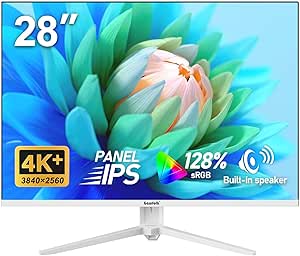 | Best for Productivity and Vertical Space | Display Size: 28 inches | Resolution: 3840×2560 | Aspect Ratio: 3:2 | VIEW ON AMAZON | See Our Full Breakdown |
| Sceptre 32-inch 4K UHD Monitor with Built-in Speakers |  | Best Budget Large Screen with Basic Features | Screen Size: 32 inches | Resolution: 3840 x 2160 (4K UHD) | DisplayPort: 2 | VIEW ON AMAZON | See Our Full Breakdown |
| ASUS 27” 4K Eye Care Monitor (VY27UQ) |  | Best Overall for Eye Comfort and Color Accuracy | Display Size: 27 inches | Resolution: 3840 x 2160 (4K UHD) | Panel Type: IPS | VIEW ON AMAZON | See Our Full Breakdown |
| Sceptre Prime 4K IPS 27″ UHD Monitor with Built-in Speakers |  | Best for Versatile Everyday Use and Vivid Colors | Resolution: 3840 x 2160 (4K UHD) | Size: 27 inches | Refresh Rate: 70+Hz | VIEW ON AMAZON | See Our Full Breakdown |
| CRUA 27-Inch Gaming Monitor, 144Hz 4K UHD IPS |  | Best for Gaming and Ergonomic Flexibility | Size: 27 inches | Resolution: 3840 x 2160 (4K UHD) | Refresh Rate: 144Hz | VIEW ON AMAZON | See Our Full Breakdown |
| Gawfolk 32 Inch 4K UHD Monitor, PC Display with HDR10 |  | Best for Large Screen Entertainment and Basic Work | Resolution: 3840 x 2160 (4K UHD) | Size: 32 inches | Contrast Ratio: 4000:1 | VIEW ON AMAZON | See Our Full Breakdown |
| Gawfolk 27 Inch 4K IPS Monitor, UHD 3840 x 2160p |  | Best for Versatile Home and Office Use | Size: 27 inches | Resolution: 3840 x 2160 (4K UHD) | Refresh Rate: 60Hz | VIEW ON AMAZON | See Our Full Breakdown |
| Acer Nitro 27” 4K UHD Gaming IPS Monitor with AMD FreeSync, 72Hz Refresh Rate, 0.5ms Response Time |  | Best for Gaming and High-Resolution Work | Screen Size: 27 inches | Resolution: 3840 x 2160 UHD | Panel Type: IPS | VIEW ON AMAZON | See Our Full Breakdown |
| Dell 27 Plus 4K USB-C Monitor – S2725QC |  | Best for Versatile Work and Entertainment | Display Size: 27 inches | Resolution: 3840 x 2160 (4K) | Refresh Rate: 120Hz | VIEW ON AMAZON | See Our Full Breakdown |
| 32-Inch 4K UHD IPS Monitor with HDMI and DisplayPort, 60Hz, FreeSync, HDR10, Blue Light Filter, Flicker-Free, Slim Bezel, VESA Compatible |  | Best for Productivity and Casual Use | Size: 32 inches | Resolution: 3840 x 2160 UHD | Refresh Rate: 60Hz | VIEW ON AMAZON | See Our Full Breakdown |
| LG 27US500-W Ultrafine Monitor 27-Inch 4K UHD HDR10 IPS Borderless Design |  | Best for Creative Professionals and General Use | Size: 27 inches | Resolution: 3840 x 2160 UHD | Contrast Ratio: 1000:1 | VIEW ON AMAZON | See Our Full Breakdown |
| budget 4k monitor | Resolution | Panel Type | Refresh Rate | HDR |
|---|---|---|---|---|
| ASUS 31.5” 4K HDR Eye Care Mon | 3840 x 2160 (4K UHD) | IPS | — | HDR-10 |
| LG 27UP650K-W 27-inch 4K UHD I | 3840 x 2160 (4K UHD) | IPS | 60Hz | DisplayHDR 400 |
| Dell 27 Plus 4K Monitor | 3840 x 2160 (4K UHD) | IPS | 120Hz | Ready |
| Gawfolk 28 inch UHD 4K IPS Com | 3840×2560 | IPS | 60Hz | — |
| Sceptre 32-inch 4K UHD Monitor | 3840 x 2160 (4K UHD) | — | 70Hz | — |
| ASUS 27” 4K Eye Care Monitor | 3840 x 2160 (4K UHD) | IPS | — | HDR10 |
| Sceptre Prime 4K IPS 27" UHD M | 3840 x 2160 (4K UHD) | IPS | 70+Hz | — |
| CRUA 27-Inch Gaming Monitor | 3840 x 2160 (4K UHD) | IPS | 144Hz | — |
| Gawfolk 32 Inch 4K UHD Monitor | 3840 x 2160 (4K UHD) | — | — | HDR10 |
| Gawfolk 27 Inch 4K IPS Monitor | 3840 x 2160 (4K UHD) | IPS | 60Hz | — |
| Acer Nitro 27” 4K UHD Gaming I | 3840 x 2160 UHD | IPS | Up to 72Hz at 4K | HDR10 |
| Dell 27 Plus 4K USB-C Monitor | 3840 x 2160 (4K) | — | 120Hz | — |
| 32-Inch 4K UHD IPS Monitor wit | 3840 x 2160 UHD | IPS | 60Hz | HDR10 |
| LG 27US500-W Ultrafine Monitor | 3840 x 2160 UHD | — | — | HDR10 |
More Details on Our Top Picks
ASUS 31.5” 4K HDR Eye Care Monitor (VP327Q)
This ASUS monitor stands out as the most well-rounded option, combining a large 31.5-inch display with vibrant 4K resolution and eye care features like flicker-free technology and blue light filters. Its IPS panel ensures consistent color accuracy across wide viewing angles, making it suitable for multitasking, content creation, and casual gaming. Compared with smaller or less feature-rich models, the VP327Q offers a more immersive experience, though its size can be a drawback for limited desk space, and its price might be higher than some competitors. The adaptive sync supports smoother gameplay, but it lacks a dedicated USB hub, which could be inconvenient for users needing multiple peripherals. Overall, this pick is ideal for users who prioritize versatility, eye comfort, and detailed visuals in a single large screen, willing to accept its bulk and potentially higher cost.
Pros:- Vivid 4K resolution with accurate, vibrant colors
- Eye care technology reduces eye strain during long periods
- Wide viewing angles facilitate sharing and collaboration
Cons:- Bulky design may not fit small desks comfortably
- No dedicated USB hub or extensive ports
Best for: Content creators, multitaskers, and gamers who want a large, eye-friendly 4K monitor with adaptive sync and wide angles.
Not ideal for: Users with small desks or limited space, or those seeking a budget-friendly, compact 4K monitor without size or feature compromises.
- Display Size:31.5 inches
- Resolution:3840 x 2160 (4K UHD)
- Color Gamut:99% sRGB
- HDR:HDR-10
- Panel Type:IPS
- Viewing Angles:178°
Our verdict“This large, feature-rich monitor suits those who want a versatile 4K display with eye comfort, despite its size and higher price.”
LG 27UP650K-W 27-inch 4K UHD IPS Computer Monitor
The LG 27UP650K-W is a compelling choice for users wanting sharp 4K visuals with flexible ergonomics. Its 27-inch IPS panel delivers broad color coverage (95% DCI-P3) and HDR 400 support, offering a richer image than basic models like the Sceptre 32-inch. The adjustable stand allows tilting, height adjustment, and pivoting, making it comfortable for long work sessions. However, its 60Hz refresh rate isn’t suitable for fast-paced gaming, and response times of 5ms may be insufficient for competitive gamers. It lacks built-in speakers, so multimedia experiences require external audio. Compared to larger or higher-refresh options like the Dell S2725QS, this monitor emphasizes ergonomic versatility and color accuracy at a more affordable price, but it sacrifices high refresh rates and additional ports.
Pros:- Vivid 4K image quality with broad color coverage
- Adjustable stand for ergonomic comfort
- Supports HDR 400 for better contrast and brightness
Cons:- Limited to 60Hz refresh rate, unsuitable for competitive gaming
- Response time of 5ms may cause motion blur in fast scenes
Best for: Office workers, digital artists, and multitaskers who prioritize color accuracy and ergonomic comfort at an accessible price.
Not ideal for: Competitive gamers or users seeking high refresh rates for fast-paced gaming or high-end multimedia editing.
- Display Size:27 inches
- Resolution:3840 x 2160 (4K UHD)
- Panel Type:IPS
- Refresh Rate:60Hz
- HDR:DisplayHDR 400
- Stand Adjustments:Tilt, Height, Pivot
Our verdict“This monitor offers excellent color and ergonomic flexibility for professional and casual use, with limitations for gaming enthusiasts.”
Dell 27 Plus 4K Monitor – S2725QS
The Dell S2725QS combines a 27-inch 4K IPS display with a 120Hz refresh rate and AMD FreeSync Premium, making it stand out for smooth visuals during gaming and video editing. Its 99% sRGB coverage ensures vibrant, accurate colors, ideal for creative tasks. The sleek ash white design and ultra-thin bezels appeal to aesthetic preferences, and the addition of integrated speakers adds convenience. Compared with standard 60Hz models like the LG 27UP650K-W, this monitor offers a notable upgrade in motion clarity, but details on stand flexibility are limited, and its price may be higher for budget-conscious buyers. It’s best suited to those who want a versatile display capable of handling both work and casual gaming with improved fluidity.
Pros:- Vivid 4K visuals with 99% sRGB coverage
- 120Hz refresh rate provides smoother motion
- Integrated speakers for space-saving audio
Cons:- Limited stand adjustability details
- Potentially higher cost than 60Hz monitors
Best for: Creative professionals and casual gamers who want a 4K display with high refresh rates and good color fidelity.
Not ideal for: Users requiring extensive adjustability or those on a strict budget, as its higher price may not justify basic needs.
- Display Size:27 inches
- Resolution:3840 x 2160 (4K UHD)
- Refresh Rate:120Hz
- Panel Type:IPS
- Color Coverage:99% sRGB
- HDR:Ready
Our verdict“This monitor appeals to users seeking a balance of color accuracy and smoother visuals for multimedia and light gaming, with some stand limitations.”
Gawfolk 28 inch UHD 4K IPS Computer Monitor, 3840×2560, 3:2 Aspect Ratio
The Gawfolk 28-inch monitor distinguishes itself with a 3:2 aspect ratio and high-resolution 3840×2560 display, offering more vertical workspace than traditional 16:9 screens. Its 128% sRGB coverage ensures vivid colors, and the IPS panel maintains consistent viewing angles. It includes eye-care tech like flicker-free and blue light filters, plus multiple input ports and VESA compatibility for flexible setups. Compared to standard 4K models like the LG 27UP650K-W, it emphasizes productivity with increased vertical space, but its HDMI refresh rate maxes out at around 50Hz, limiting its gaming potential. Also, the lack of stand adjustability could be an issue for ergonomic customization. This monitor suits professionals who need ample vertical workspace and color accuracy, rather than gaming or fast-paced media.
Pros:- High-resolution 4K display with vivid colors
- Unique 3:2 aspect ratio boosts productivity
- Multiple input options and VESA mount support
Cons:- Limited refresh rate around 50Hz, unsuitable for gaming
- No stand height adjustment or ergonomic features
Best for: Professional users, writers, and designers seeking increased vertical real estate and vivid visuals.
Not ideal for: Gamers or users needing high refresh rates for fast motion, or those wanting extensive ergonomic adjustments.
- Display Size:28 inches
- Resolution:3840×2560
- Aspect Ratio:3:2
- Panel Type:IPS
- Color Gamut:128% sRGB
- Refresh Rate:60Hz
Our verdict“This monitor excels for productivity and color fidelity but falls short in fast motion handling and ergonomic flexibility.”
Sceptre 32-inch 4K UHD Monitor with Built-in Speakers
The Sceptre 32-inch monitor delivers a sizable 4K UHD display with vibrant colors and decent contrast, making it a practical option for casual use and multimedia. Its built-in speakers help save desk space, and a 70Hz refresh rate offers smoother visuals than standard 60Hz models like the LG 27UP650K-W. However, the refresh rate isn’t ideal for high-end gaming, and it lacks detailed ergonomic features or extensive port options. Compared to higher-end models like the Dell S2725QS, it prioritizes affordability and size over advanced features. This monitor makes sense for users who want a large, color-rich display at a lower cost but don’t need fast refresh rates or extensive customization.
Pros:- Large 32-inch display with vibrant 4K resolution
- Built-in speakers save space and add convenience
- Multiple input options including HDMI and DisplayPort
Cons:- Limited to 70Hz refresh rate, not suitable for high-end gaming
- Lacks ergonomic or height adjustment features
Best for: Home users and casual media consumers seeking a large 4K screen with built-in speakers on a budget.
Not ideal for: Fast-paced gamers or those needing adjustable stands and high refresh rates for competitive gaming.
- Screen Size:32 inches
- Resolution:3840 x 2160 (4K UHD)
- DisplayPort:2
- HDMI:2
- Refresh Rate:70Hz
- Color Coverage:99% sRGB
Our verdict“This large-screen monitor offers good value for casual use, with size and sound at the expense of gaming performance and ergonomics.”
ASUS 27” 4K Eye Care Monitor (VY27UQ)
This ASUS model stands out for combining a sharp 4K resolution with advanced Eye Care Plus technology, making it ideal for long work or creative sessions. Its wide 178° IPS panel supports HDR10, delivering vibrant visuals, especially compared to the Gawfolk 32-inch VA screen, which offers deeper blacks but less color vibrancy. While it lacks built-in speakers and USB-C, the focus on eye health and color accuracy makes it a strong choice for professionals who value visual quality over simple connectivity. The 3-year warranty adds peace of mind, though the higher price reflects its premium features.
Pros:- High-resolution 4K display with wide viewing angles
- Supports HDR10 for better picture quality
- Eye Care Plus technology reduces eye strain
Cons:- No built-in speakers or USB-C port
- Potentially higher cost due to advanced features
Best for: Creative professionals or office workers who prioritize eye comfort and color fidelity during extended use
Not ideal for: Gamers or users seeking integrated audio or USB-C, as these features are missing
- Display Size:27 inches
- Resolution:3840 x 2160 (4K UHD)
- Panel Type:IPS
- Viewing Angle:178°
- HDR:HDR10
- Features:Blue Light Filter, Flicker Free, Eye Care Plus, DisplayWidget
- Warranty:3 years
Our verdict“This monitor is best suited for users who need accurate color and eye comfort during long hours of work or creative tasks.”
Sceptre Prime 4K IPS 27″ UHD Monitor with Built-in Speakers
This Sceptre model offers a 27-inch 4K IPS display with a refresh rate above typical office monitors, reaching over 70Hz, making it suitable for light gaming and multimedia. Its wide color coverage (100% sRGB) ensures vibrant images, comparable to the Gawfolk 32-inch VA monitor, but with a clearer and more responsive display, especially in fast-paced content. The built-in speakers add convenience, though they won’t satisfy audiophiles or those seeking high-quality audio. Its absence of ergonomic adjustments limits comfort during extended use, but overall, it balances affordability with feature set.
Pros:- Vivid 4K display with wide color gamut
- Supports refresh rates over 70Hz for smoother visuals
- Built-in speakers for easy multimedia playback
Cons:- Limited ergonomic adjustments
- No USB-C or extensive connectivity options
Best for: Home users or casual content creators who want vibrant visuals and occasional gaming without extra cost for dedicated audio or extensive adjustments
Not ideal for: Professional graphic designers or gamers requiring high refresh rates and extensive ergonomic options
- Resolution:3840 x 2160 (4K UHD)
- Size:27 inches
- Refresh Rate:70+Hz
- Panel Type:IPS
- Color Coverage:100% sRGB
- Built-in Speakers:Yes
Our verdict“Ideal for users seeking a vibrant 4K display with multimedia features at an accessible price point.”
CRUA 27-Inch Gaming Monitor, 144Hz 4K UHD IPS
The CRUA monitor targets gamers and content creators with its 144Hz refresh rate, making it stand out among budget 4K options like the Gawfolk 27-inch, which maxes out at 60Hz. Its full ergonomic suite—including height, pivot, tilt, and rotate adjustments—delivers comfort during long sessions, especially when paired with its wall-mount capability. While the display boasts vivid colors with 120% sRGB and supports AMD FreeSync, the built-in speakers are basic, and detailed HDR support isn’t specified, which might disappoint multimedia enthusiasts. The price might be higher than simpler 4K screens, but the gaming features justify the premium for many.
Pros:- High 144Hz refresh rate ideal for gaming
- Full ergonomic adjustments for personalized comfort
- Supports wall mounting and vibrant color accuracy
Cons:- Built-in speakers are basic and not audiophile quality
- Lack of detailed HDR support may limit multimedia experience
Best for: Gamers or streamers who want a high-refresh-rate 4K monitor with ergonomic options for long gaming or editing marathons
Not ideal for: Users seeking premium audio or HDR content, as these features are limited or unspecified
- Size:27 inches
- Resolution:3840 x 2160 (4K UHD)
- Refresh Rate:144Hz
- Panel Type:IPS
- Color Coverage:120% sRGB
- Features:Height, Pivot, Tilt, Rotate adjustments; AMD FreeSync
Our verdict“This monitor is perfect for gamers needing smooth visuals and ergonomic flexibility on a budget.”
Gawfolk 32 Inch 4K UHD Monitor, PC Display with HDR10
The Gawfolk 32-inch VA panel offers larger screen real estate with deep blacks and high contrast ratios, making it suitable for multimedia consumption and general office tasks. Its 60Hz refresh rate isn’t suited for high-speed gaming but suffices for typical productivity or streaming. Compared to smaller 4K monitors like the ASUS VY27UQ, its size boosts immersion but at the expense of responsiveness and potentially insufficient brightness in bright environments. The adjustable stand improves ergonomics, but the limited tilt range might not fit all setups. It’s a solid choice for those prioritizing size and contrast over refresh rate or HDR features.
Pros:- Large 32-inch display with vibrant colors
- Deep blacks and high contrast for multimedia
- VESA compatible with adjustable stand
Cons:- Limited to 60Hz, not suitable for gaming
- Brightness may be insufficient in very bright settings
Best for: Users needing a large display for entertainment, video editing, or everyday work in a bright environment
Not ideal for: Competitive gamers or professionals requiring high refresh rates and precise color management
- Resolution:3840 x 2160 (4K UHD)
- Size:32 inches
- Contrast Ratio:4000:1
- HDR:HDR10
- Brightness:230 cd/m²
- VESA Compatibility:Yes
Our verdict“This monitor suits those looking for a large, contrast-rich screen for casual use and multimedia viewing.”
Gawfolk 27 Inch 4K IPS Monitor, UHD 3840 x 2160p
This Gawfolk 27-inch IPS monitor emphasizes connectivity and eye-friendly features, making it a practical choice for office, home, or educational applications. Its multiple HDMI and DisplayPort options surpass the single input of many budget monitors like the ASUS VY27UQ, offering more flexibility for various devices. The inclusion of flicker-free tech and low blue light enhances comfort for prolonged use. However, restricted to 60Hz, it’s less suitable for gaming or fast-paced content. Its VESA compatibility allows flexible mounting, but it lacks built-in speakers, which might be inconvenient for multimedia users.
Pros:- Multiple connectivity options including HDMI and DisplayPort
- Flicker-Free and Low Blue Light technology
- VESA compatible with wall mounting
Cons:- Limited to 60Hz refresh rate
- No built-in speakers
Best for: Students, remote workers, or educators who need reliable connectivity and eye comfort for extended periods
Not ideal for: High-performance gamers or multimedia creators requiring high refresh rates or HDR support
- Size:27 inches
- Resolution:3840 x 2160 (4K UHD)
- Refresh Rate:60Hz
- Panel Type:IPS
- Contrast Ratio:3000:1
- Features:Flicker-Free, Low Blue Light
Our verdict“This monitor offers versatile connectivity and eye comfort for daily productivity and multimedia tasks.”
Acer Nitro 27” 4K UHD Gaming IPS Monitor with AMD FreeSync, 72Hz Refresh Rate, 0.5ms Response Time
The Acer Nitro VG270K stands out for combining a sharp 4K UHD IPS display with a quick response time of 0.5ms, making it a solid choice for gamers who want crisp visuals without sacrificing speed. Compared to the LG 27US500-W, it offers a higher refresh rate at 4K (72Hz vs. 60Hz), though it doesn’t reach the high-end gaming refresh rates of 120Hz found in some models. Its HDR10 support and DCI-P3 95% color gamut deliver vibrant images perfect for multimedia editing or immersive games, but the limited 72Hz refresh at 4K may disappoint serious competitive gamers. The zero-frame design helps create seamless multi-monitor setups, yet it lacks built-in speakers, requiring external audio. For those prioritizing speed and resolution in gaming or creative workflows, this model balances performance and affordability, with the main tradeoff being its refresh rate ceiling at 4K.
Pros:- Exceptional 0.5ms response time enhances fast-paced gameplay
- Vivid HDR10 support with DCI-P3 95% for accurate colors
- Seamless design ideal for multi-monitor setups
Cons:- Limited to 72Hz at 4K, which may fall short for high-refresh-rate gaming
- No built-in speakers, requiring external audio solutions
Best for: Gamers who want a budget-friendly 4K monitor with fast response times and vibrant visuals
Not ideal for: High-end esports players needing 144Hz or higher at 4K for competitive gaming
- Screen Size:27 inches
- Resolution:3840 x 2160 UHD
- Panel Type:IPS
- Refresh Rate:Up to 72Hz at 4K
- Response Time:Up to 0.5ms
- HDR:HDR10
Our verdict“This monitor is best suited for budget-conscious gamers and creators who value speed and color clarity over high refresh rates.”
Dell 27 Plus 4K USB-C Monitor – S2725QC
The Dell S2725QC makes a compelling case for users seeking a versatile 4K display with smooth visuals, thanks to its 120Hz refresh rate and AMD FreeSync Premium. This makes it stand out against models like the LG 27US500-W, which only offers 60Hz at 4K. Its 99% sRGB coverage ensures color accuracy, perfect for creative professionals or detailed media consumption. The inclusion of a single USB-C cable that handles power and data simplifies desk setup, appealing to those with limited space. However, the review of its built-in speakers is limited, and the stand lacks detailed ergonomic adjustments, which could be a drawback for prolonged use. If you need a monitor that balances crisp visuals with smooth motion and modern connectivity, this Dell provides a strong mix, though its higher price might be a concern for budget shoppers.
Pros:- 120Hz refresh rate delivers smooth motion for gaming and video editing
- USB-C connectivity reduces cable clutter with power delivery
- Accurate colors with 99% sRGB coverage
Cons:- Limited info on the quality of built-in speakers
- Stand lacks adjustable height or swivel features, potentially less ergonomic
Best for: Creative professionals and casual gamers who want a sleek, smooth 4K experience with modern connectivity
Not ideal for: Users seeking extensive ergonomic adjustments or dedicated high-end audio features
- Display Size:27 inches
- Resolution:3840 x 2160 (4K)
- Refresh Rate:120Hz
- Response Time:4ms
- Color Gamut:99% sRGB
- Connectivity:USB-C, HDMI, USB
Our verdict“This monitor suits users wanting a high-refresh, versatile 4K display with modern connectivity in a sleek design.”
32-Inch 4K UHD IPS Monitor with HDMI and DisplayPort, 60Hz, FreeSync, HDR10, Blue Light Filter, Flicker-Free, Slim Bezel, VESA Compatible
The Gawfolk 32-Inch 4K UHD IPS Monitor is designed for users prioritizing screen real estate and visual clarity at an accessible price. Its large 32-inch size makes it ideal for multitasking, content creation, or casual gaming, especially compared to smaller 27-inch models like the LG 27US500-W. While the 60Hz refresh rate isn’t suited for competitive gaming, the HDR10 support and full sRGB coverage make it a capable choice for color-sensitive tasks. The eye care features—blue light filter and flicker-free technology—are a plus for long work sessions. However, the monitor requires a VESA mount for ergonomic adjustments, which could be a barrier for users preferring an included stand. If your priority is a spacious display with decent color accuracy for everyday use, this model provides excellent value, but it’s not optimized for fast-paced gaming.
Pros:- Large 32-inch display enhances multitasking and media viewing
- Color accuracy with 100% sRGB and HDR10 support
- Eye care features reduce strain during prolonged use
Cons:- Limited to 60Hz, not ideal for fast-paced gaming
- Requires VESA mount for ergonomic positioning
Best for: Productivity-focused users and casual gamers who want a large, affordable 4K display
Not ideal for: Competitive gamers requiring high refresh rates or users needing ergonomic stand adjustments out of the box
- Size:32 inches
- Resolution:3840 x 2160 UHD
- Refresh Rate:60Hz
- Panel Type:IPS
- Color Coverage:100% sRGB
- HDR:HDR10
Our verdict“This monitor offers a spacious, color-accurate display perfect for productivity and casual use, with the tradeoff of a lower refresh rate.”
LG 27US500-W Ultrafine Monitor 27-Inch 4K UHD HDR10 IPS Borderless Design
The LG 27US500-W offers a sleek, borderless 27-inch 4K IPS display with HDR10 support, making it ideal for creative work and everyday tasks. Its 90% DCI-P3 coverage and high contrast ratio deliver vibrant, accurate colors, rivaling more expensive professional monitors. The ergonomic stand with tilt adjustment ensures comfortable viewing angles, a feature often missing in budget models like the Acer Nitro. However, the absence of detailed specifications for built-in speakers and limited connectivity options might be a downside for users seeking a fully integrated multimedia solution. Its price is somewhat higher compared to basic models, but the premium build and color performance justify the premium for creative or general use. If vivid visuals and ergonomic flexibility matter most, this LG is a well-rounded choice.
Pros:- Vivid 4K display with high contrast and color accuracy
- Supports HDR10 for rich visual quality
- Borderless design enhances immersive viewing experience
Cons:- Limited built-in speakers, no audio details provided
- Higher price point compared to more basic 4K monitors
Best for: Creative professionals and general users seeking vibrant visuals with ergonomic comfort
Not ideal for: High-refresh-rate gamers or those needing extensive connectivity options without additional adapters
- Size:27 inches
- Resolution:3840 x 2160 UHD
- Contrast Ratio:1000:1
- Color Gamut:90% DCI-P3
- HDR:HDR10
- Stand:Ergonomic tilt
Our verdict“This monitor is ideal for users wanting vibrant, color-accurate visuals with ergonomic comfort for creative and daily tasks.”

How We Picked
I evaluated these monitors based on a combination of key factors that matter most to budget-conscious buyers. Performance aspects like color accuracy, refresh rate, and response time were prioritized, especially considering their impact on daily use and gaming. Build quality, connectivity options, and eye-care features also influenced the rankings, as durability and usability are important for long-term value. Cost was a critical factor, but I balanced it against features to identify monitors that deliver the best bang for the buck. Monitors are ordered from most to least suitable overall, considering their versatility, value, and specific strengths for different user needs.Factors to Consider When Choosing Budget 4k Monitors
When choosing a budget 4K monitor, it’s essential to consider multiple factors that impact your overall experience. Price is important, but not at the expense of key features that match your primary use—whether for work, gaming, or general browsing. Understanding these factors can help you avoid common pitfalls like overspending on unnecessary features or sacrificing essential specs for a lower price. A well-chosen monitor enhances productivity or entertainment without breaking the bank.Display Quality and Color Accuracy
While budget monitors may not have professional-grade color calibration, look for IPS panels that offer better color consistency and viewing angles. This is especially important if you plan to do color-sensitive work or enjoy media. Avoid TN panels unless gaming is your main concern, as they often have poorer color reproduction. Keep in mind that some budget options still include features like HDR, but don’t expect high-end HDR performance at this price point.
Refresh Rate and Response Time
Higher refresh rates (above 60Hz) are beneficial for gaming, providing smoother motion. Budget gaming monitors often include 75Hz or 120Hz, but at a cost to color accuracy and brightness. If gaming is a priority, consider a monitor with a higher refresh rate, but be aware of the tradeoff with image quality. For general use, a standard 60Hz will suffice and typically helps keep costs down.
Size and Resolution Balance
Most budget 4K monitors hover around 27 inches, which offers a good balance of desktop space and affordability. Larger sizes, like 32 inches, can improve immersion but tend to cost more or reduce pixel density if not true 4K. Make sure your workspace can accommodate the size comfortably and consider whether you prefer a more compact monitor or a larger display for multitasking.
Connectivity and Compatibility
Check for multiple HDMI ports, DisplayPort, USB-C, and VESA support to future-proof your setup. Budget monitors sometimes skimp on ports, limiting your flexibility. Also, confirm compatibility with your devices, especially if you plan to connect laptops or gaming consoles. VESA mount support can be a valuable feature for ergonomic setups or wall mounting.
Build Quality and Eye-Care Features
While affordability often limits premium materials, look for sturdy stands and reliable construction. Eye-care features such as flicker-free technology and blue light filters help reduce fatigue during long sessions. These features can significantly improve comfort, making a modest investment in a monitor with these options worthwhile.
Frequently Asked Questions
Can I use a budget 4K monitor for professional photo editing?
Yes, some budget 4K monitors with IPS panels and decent color accuracy can handle photo editing tasks, but they might lack the precise calibration and wide color gamut of higher-end models. If your work requires strict color fidelity, consider calibrating the monitor or investing in a slightly higher-priced model with better factory calibration. For casual editing and general use, most budget options will suffice, especially if paired with calibration tools.
Is a 60Hz refresh rate enough for gaming on a 4K monitor?
For casual gaming, 60Hz can be acceptable, but it doesn’t deliver the smoothness seen at higher refresh rates. If you’re into fast-paced titles, a monitor with 75Hz or higher provides a more fluid experience. Keep in mind that higher refresh rates tend to increase costs, but some budget options now include 75Hz or even 120Hz, striking a better balance between price and performance.
Should I prioritize size or resolution when choosing a budget 4K monitor?
Both matter, but resolution is generally more important for clarity and workspace. A 27-inch 4K monitor offers sharp images and enough screen real estate for multitasking. Larger sizes like 32 inches can improve immersion but may also drive up the price or reduce pixel density if not true 4K. Consider your desk space and how you plan to use the monitor to find the right balance.
Are budget 4K monitors good for dual monitor setups?
Most budget 4K monitors are suitable for dual setups if they have VESA compatibility and enough ports. Be mindful of bezel size, as thicker bezels can disrupt the visual flow. Matching monitor sizes and specifications can help create a seamless experience. Budget models may lack advanced calibration or uniformity, but for productivity, they generally work well when configured properly.
What features should I avoid sacrificing on a budget 4K monitor?
Prioritize good panel quality and eye-care features over extras like built-in speakers or high refresh rates unless gaming is your focus. Avoid monitors with TN panels unless gaming performance is critical, as they compromise color and viewing angles. Also, ensure the monitor has sufficient connectivity options and VESA support, which add to long-term flexibility and usability.
Conclusion
For general daily use and office work, the LG 27UP650K-W offers a balanced mix of affordability and quality. Gamers who want a budget-friendly option with higher refresh rates should consider the Acer Nitro 27”. If your priority is a versatile all-rounder with excellent color and eye-care features, the ASUS VP327Q is the best overall pick. Beginners or those on a tight budget will find models like the LG or Sceptre options to be more than enough. For users with specific needs, such as creative professionals or gamers, investing slightly more can unlock better performance without breaking the bank.
As an affiliate, we earn on qualifying purchases.Fall Picks
fall essentials