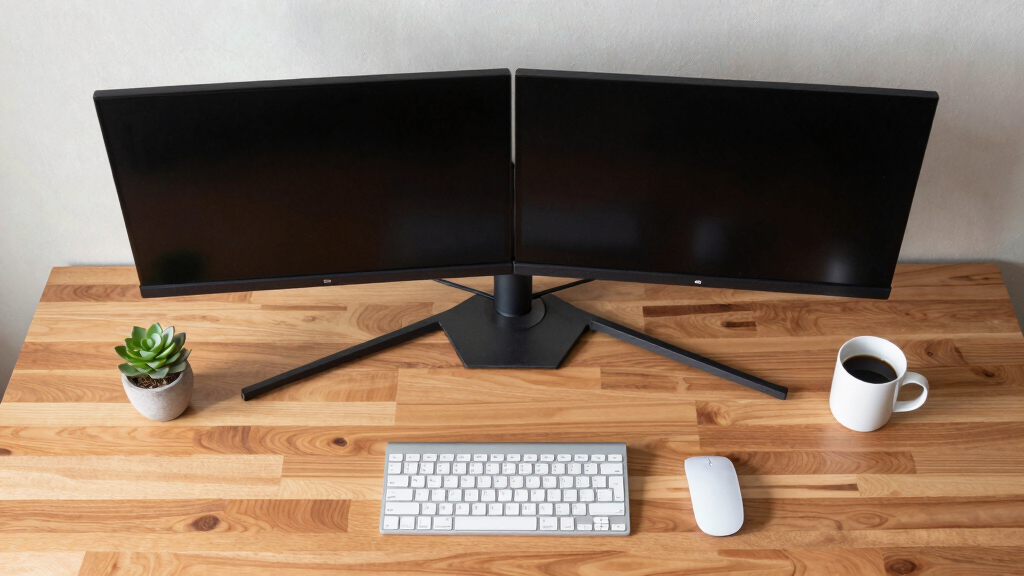

Finding the best motorized monitor stands for dual displays can significantly boost your workspace flexibility and ergonomics. The top pick, Mount-It! Electric Standing Desk Converter, stands out for its seamless height adjustment and large surface area, ideal for those needing versatile positioning. HUANUO FlowLift Dual Monitor Stand offers full adjustability with a sleek design, perfect for users who prioritize aesthetics and easy setup. However, many options trade off between height range, stability, and price, making it important to weigh your specific workspace needs. Keep reading for an in-depth comparison to find the best fit for your setup.

Get the latest gadgets delivered free with Prime
- Fast, free delivery on millions of items
- Prime Video, Amazon Music and more included
- Member-only deals all year
Complete the kit

Key Takeaways
- The most versatile stands combine motorized height adjustment with full articulation for ergonomic flexibility.
- Build quality and stability are critical, especially for larger monitors or heavier setups—cheaper models often compromise here.
- Additional features like USB ports or keyboard trays can enhance functionality but may add to the cost and complexity.
- Price varies widely, with premium options offering smoother operation and higher durability, while budget models focus on essential features.
- Installation complexity differs; some stands are ready to use out of the box, while others require more setup time and tools.
| ErGear Dual Monitor Stand – Heavy Duty Adjustable Desk Mount for 2 Screens up to 32 Inches |  | Best Overall for Heavy-Duty Dual Monitors with Full Adjustability | Monitor Size Range: 13-32 inches | Weight Capacity per Arm: 17.6 lbs | VESA Compatibility: 75x75mm, 100x100mm | VIEW LATEST PRICE | See Our Full Breakdown |
| HUANUO FlowLift Dual Monitor Stand, Fully Adjustable Desk Mount for 13–32″ Screens |  | Best for Ergonomic Flexibility and Customer Satisfaction | Monitor Size Compatibility: 13–32 inches | Weight Capacity (per arm): 4.4 to 19.8 lbs | VESA Compatibility: 75x75mm / 100x100mm | VIEW LATEST PRICE | See Our Full Breakdown |
| ErGear Dual Monitor Arm for 13–32″ Screens, Fully Adjustable VESA Mount |  | Best for Easy Setup and Flexible Adjustments on Wooden Desks | Supported Screen Size: 13–32 inches | Max Load: 19.8 lbs | VESA Compatibility: 75x75mm, 100x100mm | VIEW LATEST PRICE | See Our Full Breakdown |
| HUANUO Dual Monitor Stand for 13″-40″ Screens, Height Adjustable VESA Mount with USB Ports, Clamp/Grommet Base |  | Best for Heavy, Large Monitors with Integrated USB Charging | Monitor Size Range: 13″-40″ | Weight Capacity: 26.4 lbs | VESA Compatibility: 75x75mm, 100x100mm | VIEW LATEST PRICE | See Our Full Breakdown |
| Mount-It! 48.5″ Electric Standing Desk Converter for Dual Monitors, Black |  | Best for Standing Desk Conversion and Large Workspace | Surface Width: 48.5 inches | Height Range: 6 – 19.25 inches | Keyboard Tray Width: 35.5 inches | VIEW LATEST PRICE | See Our Full Breakdown |
| VIVO Dual Monitor Stand with Fully Adjustable Mechanical Arms |  | Best Overall Dual Motorized Monitor Stand for Flexibility and Compatibility | Brand: VIVO | Model: STAND-V002O | Screen Size Compatibility: 17-32 inches | VIEW LATEST PRICE | See Our Full Breakdown |
| Mount-It! Electric Standing Desk Converter with Dual Monitor Arms |  | Best for Standing Desk Users Who Need Motorized Height Adjustment | Max Monitor Size: 32 inches | Desktop Size: 35.4 x 23 inches | Height Range: 6.3 to 19.3 inches | VIEW LATEST PRICE | See Our Full Breakdown |
| Mount-It! Dual Monitor Arm Desk Mount Sit-Stand Workstation |  | Best for Ergonomic Flexibility with Built-in USB Ports | Monitor Size Support: 17–27 inches | Weight Capacity: 13.2 lbs per monitor | Height Adjustment Range: 23.1–42.9 inches | VIEW LATEST PRICE | See Our Full Breakdown |
| VIVO Premium Aluminum Full Motion Dual Monitor Desk Mount |  | Best for Large and Ultrawide Monitors with Full Motion Flexibility | Supports Monitors: Up to 40 inches | Max Weight per Arm: 26.4 lbs (flat), 24.2 lbs (curved) | VESA Compatibility: 75x75mm, 100x100mm | VIEW LATEST PRICE | See Our Full Breakdown |
| motorized monitor stands for dual display | VESA Compatibility | Weight Capacity |
|---|---|---|
| ErGear Dual Monitor Stand | 75x75mm, 100x100mm | — |
| HUANUO FlowLift Dual Monitor S | 75x75mm / 100x100mm | — |
| ErGear Dual Monitor Arm for 13 | 75x75mm, 100x100mm | — |
| HUANUO Dual Monitor Stand for | 75x75mm, 100x100mm | 26.4 lbs |
| Mount-It! 48.5" Electric Stand | — | 33 lbs |
| VIVO Dual Monitor Stand with F | — | 4.4 to 19.8 lbs per monitor |
| Mount-It! Electric Standing De | — | 33 lbs |
| Mount-It! Dual Monitor Arm Des | — | 13.2 lbs per monitor |
| VIVO Premium Aluminum Full Mot | 75x75mm, 100x100mm | — |
More Details on Our Top Picks
ErGear Dual Monitor Stand – Heavy Duty Adjustable Desk Mount for 2 Screens up to 32 Inches
This ErGear model stands out for supporting two large monitors up to 32 inches and 17.6 lbs each, making it ideal for demanding professional setups. Compared to the HUANUO HNDS7, it offers a slightly shorter arm extension but excels in versatility with full 360° rotation, tilt, and swivel. Its dual mounting options—C-clamp and grommet—provide flexible installation on compatible desks, although it’s less suited for desks with beams or panels underneath. The robust build and full ergonomic adjustment make it a top pick for those needing a reliable, heavy-duty mount. However, it requires monitors with VESA mounting holes and is best on solid wooden surfaces.
Pros:- Supports two large monitors up to 32 inches and 17.6 lbs each
- Full range of ergonomic adjustments including swivel, tilt, and rotation
- Two installation options (C-clamp and grommet) for flexible mounting
- Integrated cable management for a tidy workspace
Cons:- Requires monitors with VESA mounting holes, limiting compatibility
- Less suitable for desks with beams or panels underneath
Best for: Professionals with large, heavy monitors seeking maximum adjustability and desk space savings
Not ideal for: Users with desks that have beams or uneven surfaces, or monitors without VESA mounts
- Monitor Size Range:13-32 inches
- Weight Capacity per Arm:17.6 lbs
- VESA Compatibility:75x75mm, 100x100mm
- Arm Span:31.22 inches
- Bar Height:16 inches
- Adjustment:±90° swivel, ±45° tilt, 360° rotation
Our verdict“This stand is best suited for users who need heavy-duty support and maximum flexibility on a compatible wooden desk.”
HUANUO FlowLift Dual Monitor Stand, Fully Adjustable Desk Mount for 13–32″ Screens
The HUANUO FlowLift excels with full-motion adjustment, supporting two monitors from 13 to 32 inches with up to 15.75 inches of height adjustment, making it perfect for users prioritizing ergonomic flexibility. Compared with the ErGear stand, it offers a more extensive height raise but slightly less arm span. Its highly rated design underscores its reliability. The dual C-clamp or grommet mounting options provide stable attachment to wooden desks, though it’s incompatible with desks that lack sufficient thickness or have cross beams. This model is a strong choice for office workers who need quick, precise positioning and tidy cable management, but it’s less suited for glass or plastic desks.
Pros:- Full-motion adjustment for optimal ergonomic positioning
- Supports dual monitors up to 32 inches with high weight capacity
- Stable dual C-clamp or grommet mounting options
- Built-in cable management for a clutter-free desk
Cons:- Limited to wooden desks with specific thickness
- Requires monitors with VESA mounting holes
Best for: Office workers or gamers needing precise ergonomic adjustments on wooden desks
Not ideal for: Users with non-wooden desks or those with cross beams underneath, as it requires specific mounting conditions
- Monitor Size Compatibility:13–32 inches
- Weight Capacity (per arm):4.4 to 19.8 lbs
- VESA Compatibility:75x75mm / 100x100mm
- Max Height Raise:15.75 inches
- Tilt Range:+85°/-50°
- Mounting Options:C-Clamp or Grommet
Our verdict“This model offers exceptional flexibility and stability for users with compatible desks seeking ergonomic perfection.”
ErGear Dual Monitor Arm for 13–32″ Screens, Fully Adjustable VESA Mount
The ErGear dual arm combines support for monitors up to 32 inches and 19.8 lbs with tool-free, straightforward installation. It’s ideal for users who want quick setup and reliable movement, with tilt, swivel, and 360° rotation available. Unlike the HUANUO models, it offers slightly less maximum height adjustment but compensates with easier installation. Its support for a wide range of monitor sizes and weights makes it a versatile choice for home offices and creative setups. However, it’s best used on sturdy wooden desks, as compatibility with desks featuring crossbeams or uneven surfaces is limited. The cable management system helps maintain a clean workspace, although verifying VESA compatibility and weight limits before purchase is recommended.
Pros:- Supports a wide range of monitor sizes and weights
- Easy, tool-free installation with multiple mounting options
- Flexible adjustments for ergonomic positioning
- Effective cable management
Cons:- Limited maximum height adjustment compared to other models
- Requires verification of VESA pattern and weight capacity
Best for: Creative professionals or home office users seeking quick, flexible dual monitor support
Not ideal for: Users with desks that have beams underneath or non-wooden surfaces lacking proper mounting support
- Supported Screen Size:13–32 inches
- Max Load:19.8 lbs
- VESA Compatibility:75x75mm, 100x100mm
- Tilt Range:+80°/-50°
- Swivel:±90°
- Rotation:360°
- Height Adjustment:up to 17.5 inches
Our verdict“This arm is perfect for users who value quick setup and versatile positioning on compatible wooden desks.”
HUANUO Dual Monitor Stand for 13″-40″ Screens, Height Adjustable VESA Mount with USB Ports, Clamp/Grommet Base
This HUANUO stand offers the highest weight capacity, supporting two monitors up to 40 inches and 26.4 lbs each, making it perfect for heavy, ultrawide setups. Its aluminum construction and dual C-clamp design ensure stability, especially for larger monitors, unlike lighter plastic options. The inclusion of built-in USB ports adds valuable functionality for charging devices or connecting peripherals. Its full motion adjustment—swivel, tilt, and rotation—provides excellent ergonomic flexibility. However, its heavier weight and complex setup, especially with grommet mounting, may be a barrier for some users. It’s best suited for users who need robust support for large, heavy monitors and enjoy integrated device charging, but it’s less ideal for lighter, smaller setups or simpler desks.
Pros:- Supports very large and heavy monitors up to 40 inches and 26.4 lbs
- Built-in USB ports for device charging and connectivity
- Sturdy aluminum construction with dual C-clamp support
- Full motion flexibility including swivel, tilt, and rotation
Cons:- Grommet mounting requires a specific desk hole diameter
- Heavier and more complex to install than basic mounts
Best for: Designers or professionals with large, heavy monitors needing maximum support and USB charging capability
Not ideal for: Users with lightweight monitors or desks lacking the specific grommet hole diameter or thickness
- Monitor Size Range:13″-40″
- Weight Capacity:26.4 lbs
- VESA Compatibility:75x75mm, 100x100mm
- Max Arm Height:21.1 inches
- Max Arm Extension:25.59 inches
- USB Ports:2
Our verdict“This stand is ideal for users with large, heavy monitors who need maximum stability and integrated USB charging features.”
Mount-It! 48.5″ Electric Standing Desk Converter for Dual Monitors, Black
This electric desk converter transforms any existing desk into an ergonomic standing station, with a broad 48.5-inch surface capable of holding dual 27-inch monitors and additional accessories. Its motorized height adjustment from 6 to 19.25 inches provides smooth, effortless transitions, making it ideal for users who switch between sitting and standing frequently. Compared to the dual monitor mounts, it offers a much larger surface area and added versatility with a full-size keyboard tray and built-in USB port. The heavy steel construction ensures stability, but its weight of 20 kg can make repositioning cumbersome. Limited to 33 lbs weight capacity, it might not support the heaviest setups without risk of wobbling, especially if the load is unevenly distributed. It’s best for those who want a versatile, sit-stand solution with ample space, but not for extremely heavy monitors or frequent repositioning.
Pros:- Electric, smooth height adjustment for effortless sit-stand transition
- Extra-wide surface accommodates dual monitors and accessories
- Built-in USB charging port and device slot
- Supports a wide height range for ergonomic comfort
Cons:- Heavy weight (20 kg) makes repositioning difficult
- Limited to 33 lbs weight capacity, unsuitable for very heavy setups
Best for: Users seeking a full-height adjustable standing desk with ample surface for dual monitors and accessories
Not ideal for: Those needing a compact or lightweight solution, or with very heavy monitor setups exceeding 33 lbs
- Surface Width:48.5 inches
- Height Range:6 – 19.25 inches
- Keyboard Tray Width:35.5 inches
- Weight Capacity:33 lbs
- Item Weight:20 kg
- USB Ports:Yes
Our verdict“This converter is best for users prioritizing ergonomic standing work with large surface space and moderate monitor weight capacity.”
VIVO Dual Monitor Stand with Fully Adjustable Mechanical Arms
This VIVO model stands out for its expansive support for 17-32 inch monitors, making it highly versatile compared to smaller mounts like the Mount-It! Dual Monitor Arm with USB Ports, which caps at 27 inches. Its toolless spring counterbalance adjustment offers smooth, customizable positioning, crucial for users who frequently change their setups. While it provides full articulation—tilt, swivel, and rotation—its arms extend past the desk edge, requiring ample clearance, which could be a challenge on tighter desks. The heavy-duty clamp and grommet options add stability, but compatibility depends on desk thickness. Overall, this mount suits users seeking broad monitor compatibility and effortless adjustments, though those with limited desk space might find it less ideal.
Pros:- Supports a wide range of 17-32 inch monitors with up to 19.8 lbs capacity per arm
- Toolless, spring-assisted adjustment for smooth repositioning
- Full articulation including tilt, swivel, and 360° rotation
Cons:- The arms extend past the desk edge, requiring additional clearance
- Mounting options may not fit all desk thicknesses or styles
Best for: Professionals in creative or technical fields who need to switch monitor orientations often and have spacious desks
Not ideal for: Users with small or cluttered desks, as the arms may extend beyond the workspace and require clearance
- Brand:VIVO
- Model:STAND-V002O
- Screen Size Compatibility:17-32 inches
- Weight Capacity:4.4 to 19.8 lbs per monitor
- VESA Patterns:75x75mm, 100x100mm
- Mounting Options:C-clamp, grommet mount
Our verdict“This stand is ideal for users who prioritize broad monitor compatibility and full movement flexibility in a spacious workspace.”
Mount-It! Electric Standing Desk Converter with Dual Monitor Arms
Compared with the VIVO stand, the Mount-It! Electric Converter offers a larger work surface and integrated dual monitor arms, making it a compelling choice for those who want an all-in-one solution. Its motorized height adjustment from 6.3 to 19.3 inches simplifies transitioning between sitting and standing, which is a significant advantage over manual height setups like the VIVO. However, the maximum weight capacity of 33 lbs may limit heavier monitor configurations, and the assembly process can be time-consuming. Its sleek black finish and built-in USB charging add convenience, but the size and weight—59 pounds—may be cumbersome for some users. This option makes sense for office workers seeking ergonomic flexibility combined with ample workspace.
Pros:- Motorized height adjustment from 6.3″ to 19.3″ for effortless transitions
- Supports dual monitors up to 32 inches each
- Large desktop surface with USB charging and device channel
Cons:- Heavyweight design may be difficult to reposition or move
- Assembly can be lengthy and complex
- Limited color options restrict aesthetic matching
Best for: Office professionals who need a spacious, adjustable workstation with dual monitors and standing capabilities
Not ideal for: Users with limited space or those preferring fixed-height setups, due to its size and weight
- Max Monitor Size:32 inches
- Desktop Size:35.4 x 23 inches
- Height Range:6.3 to 19.3 inches
- Weight Capacity:33 lbs
- Item Dimensions:32.75 x 35.4 x 19.3 inches
- Material:Engineered Wood, Alloy Steel
Our verdict“This converter suits users seeking a spacious, motorized standing desk with dual monitor support in a professional setting.”
Mount-It! Dual Monitor Arm Desk Mount Sit-Stand Workstation
Compared to the VIVO, this Mount-It! work station offers more adjustable height and tilt options, supporting monitors from 17 to 27 inches, but with a lower weight capacity of 13.2 lbs per arm. Its cable management and foldable keyboard tray make it well-suited for compact, ergonomic setups, especially for users who want a space-saving, sit-stand solution. Its limited monitor size support makes it less suitable for larger or ultrawide screens, but for those on a budget or with smaller monitors, it offers excellent adjustability and features.
Pros:- Supports height, tilt, swivel, and rotation for ergonomic comfort
- Includes USB 3.0 ports for device connectivity
- Foldable keyboard tray helps save space
Cons:- Moderate customer ratings indicate potential stability issues
- Limited to 27-inch monitors and 13.2 lbs per arm
- Assembly may be complex for some users
Best for: Home office users with 17-27 inch monitors who prioritize ergonomic adjustments and space efficiency
Not ideal for: Users needing support for larger monitors or ultrawides, as it maxes out at 27 inches and 13.2 lbs per arm
- Monitor Size Support:17–27 inches
- Weight Capacity:13.2 lbs per monitor
- Height Adjustment Range:23.1–42.9 inches
- Cable Management:Yes
- Material:Steel
Our verdict“This mount is ideal for users seeking flexible ergonomic adjustments within a compact workspace with smaller monitors.”
VIVO Premium Aluminum Full Motion Dual Monitor Desk Mount
Compared with the VIVO STAND-V002O, this premium model supports much larger screens—up to 40 inches—making it the go-to choice for ultrawide and large monitors. Its aluminum construction enhances durability and adds a sleek aesthetic, ideal for high-end setups. Full motion capabilities—including tilt, swivel, and 180° rotation—offer extensive flexibility, especially useful for creative professionals who need precise positioning. While its support for large monitors is a major advantage, it also makes the mount heavier, which might be problematic on delicate or lightweight desks. The cable management and USB ports add convenience, but the more complex installation process and higher price point warrant consideration. Overall, this stand is best for users with large, heavy, or ultrawide displays seeking maximum adjustability and durability.
Pros:- Supports monitors up to 40 inches and 26.4 lbs per arm
- Full tilt, swivel, and rotation for precise positioning
- Durable aluminum construction with integrated cable management and USB ports
Cons:- Heavier weight may challenge lighter desks
- Installation can be more complex compared to simpler models
- Higher price point might be prohibitive for some buyers
Best for: Designers, video editors, or professionals with large or ultrawide monitors needing maximum motion and stability
Not ideal for: Users with smaller monitors or those on tight budgets, due to its size, weight, and cost
- Supports Monitors:Up to 40 inches
- Max Weight per Arm:26.4 lbs (flat), 24.2 lbs (curved)
- VESA Compatibility:75x75mm, 100x100mm
- Tilt Range:-90° to +90°
- Mounting Thickness:0.4 to 2 inches
- USB Ports:2 x 3.0
Our verdict“This mount is perfect for users with large or ultrawide monitors who need maximum motion flexibility and robust build quality.”
How We Picked
The products featured in this roundup were selected based on a combination of performance, durability, usability, and overall value. We prioritized stands that support dual monitors with motorized height adjustment, ensuring smooth and stable movement. Ease of installation, build quality, and additional features like USB ports or cable management also influenced rankings. To provide a comprehensive view, we included options across different price points and use cases, from basic functionality to premium features. The ranking reflects how well each stand balances these factors for diverse user needs.Factors to Consider When Choosing Best Motorized Monitor Stands For Dual Displays
Choosing the right motorized monitor stand for dual displays involves considering several key factors that affect usability, durability, and overall value. Understanding these considerations can help avoid common pitfalls, such as sacrificing stability for price or missing out on essential features. The following sections highlight the most important aspects to keep in mind when making your decision.Motorized Height Range and Smoothness
Look for stands with a sufficient height range to accommodate your ergonomic needs, whether sitting or standing. Smooth, quiet motor operation is equally important to prevent disruptions in your workflow. Some models offer programmable height presets, which can save time and effort during daily adjustments. Be wary of stands with jerky or noisy motors, as these can diminish the overall user experience and durability over time.
Stability and Build Quality
Dual monitors, especially larger or heavier ones, demand a stable base and robust construction. Cheaper stands often cut corners on materials, risking wobble or even tipping. Premium models typically use stronger materials like aluminum and reinforced joints, providing better long-term stability. Always check weight capacity and user reviews to gauge real-world stability, especially if your setup is on a busy desk or involves frequent adjustments.
Screen Compatibility and Flexibility
Ensure the stand supports your monitor sizes and VESA mount compatibility. Some models are adjustable to fit screens from 13 to 32 inches, while others handle larger sizes up to 40 inches. Flexibility in arm articulation—like tilt, swivel, and rotation—can improve ergonomics, but might increase cost or complexity. Confirm that the stand allows for easy installation and repositioning without requiring tools or extensive effort.
Additional Features and Connectivity
Features such as built-in USB hubs, cable management, or keyboard trays can enhance your workspace’s organization and convenience. However, these extras often come at a higher price and may complicate setup. Decide which features add real value for your workflow, and be cautious of models that include many bells and whistles at the expense of core stability and performance.
Price and Long-Term Value
Motorized stands span a wide price spectrum, reflecting differences in quality, features, and durability. Investing in a higher-quality model typically yields better longevity and smoother operation, especially important for frequent adjustments. Conversely, budget options may suffice for light use but could lack stability or motor reliability over time. Weigh initial costs against expected lifespan and feature needs to find the best long-term value.
Frequently Asked Questions
Can I upgrade a non-motorized monitor stand to motorized?
Transforming a manual stand into a motorized one isn’t straightforward, as it involves integrating motors, power supplies, and control systems. Most stands are designed specifically around their motorized components, making an upgrade impractical and costly. If motorized adjustment is a priority, choosing a dedicated stand with integrated motors from the start is usually more reliable and safer.
What weight capacity should I look for in a dual monitor stand?
It’s important to select a stand that can comfortably support the combined weight of your monitors, with some margin for safety. Most dual stands support between 15 to 30 pounds per monitor, but always verify the specific capacity listed by the manufacturer. Overloading a stand can compromise stability and motor function, so exceeding recommended weights should be avoided.
Are motorized monitor stands suitable for small desks?
Yes, but with some caveats. Motorized stands tend to be bulkier and require additional space for operation. If your desk has limited room, consider models with compact footprints and adjustable arm configurations. Also, check the stand’s clearance to ensure it won’t obstruct other workspace elements or cause ergonomic issues.
How noisy are motorized monitor stands during operation?
Most modern motorized stands operate quietly, with noise levels comparable to a soft hum or gentle motor sound. However, cheaper or older models might produce noticeable noise, which can be distracting in quiet environments. Reading user reviews for noise levels can help you find a model that maintains a peaceful workspace.
What is the typical lifespan of a motorized monitor stand?
The lifespan varies based on build quality and usage, but premium models with high-quality motors often last several years with regular use. Cheaper options might wear out sooner due to lower-grade components or less durable materials. Proper maintenance, such as avoiding overloading and ensuring clean mechanisms, can extend the longevity of your stand.
Conclusion
For most users prioritizing overall performance and ease of use, the Mount-It! Electric Standing Desk Converter stands out as the best overall choice, offering smooth height adjustments and sturdy construction. Those seeking the best value without sacrificing essential features should consider the HUANUO FlowLift Dual Monitor Stand, which balances affordability and functionality. For buyers willing to invest in premium features and long-term durability, the VIVO Premium Aluminum Full Motion Dual Monitor Desk Mount offers advanced articulation and build quality. Beginners or those with limited space might find the ErGear Dual Monitor Stand easier to install and more straightforward to operate. Tailoring your choice to your specific workspace needs and budget will ensure a comfortable and productive dual-monitor setup.Black Friday Picks

Kindle Paperwhite (16 GB) – 7 Glare-Free Display, Black
As an affiliate, we earn on qualifying purchases.