
For gamers seeking the ultimate immersive experience, ultrawide monitors with 240Hz refresh rates combine expansive screens with smooth, responsive gameplay. The LG 34GX900A-B stands out as the best overall pick thanks to its OLED technology and premium features. The Samsung Odyssey G9 offers an ultra-wide curved panel with exceptional HDR, ideal for cinematic gaming. Meanwhile, the MSI MPG 341CQPX provides a high-performance OLED option at a slightly lower price point. Each of these choices balances performance, build quality, and cost differently, creating tradeoffs between image quality, responsiveness, and value. Continue reading for a detailed comparison of these top ultrawide gaming monitors to find your perfect match.
Key Takeaways
- OLED panels, like those on LG and MSI, deliver superior contrast and color accuracy, making them ideal for immersive visuals.
- Curved screens, especially the 1000R and 1800R options, enhance gaming immersion but may not suit desk setups with limited space.
- High refresh rates of 240Hz are consistent across these models, but response times and adaptive sync technologies vary, impacting motion clarity.
- HDR performance differs significantly; VESA DisplayHDR 400 versus HDR 1000 impacts brightness and color vibrancy, influencing visual quality.
- Build features like adjustable stands and connectivity options (HDMI 2.1, USB-C) can be decisive depending on your setup and future-proofing needs.



More Details on Our Top Picks
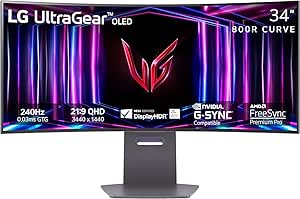
LG 34GX900A-B 34-Inch Ultragear WQHD (3440 x 1440) OLED Curved Gaming Monitor, 240Hz, 0.03ms, NVIDIA G-Sync, VESA DisplayHDR True Black 400, HDMI 2.1, DisplayPort, USB Type-C PD 65W, Black
This LG Ultragear OLED stands out for its incredible contrast ratio, vivid colors, and ultra-fast response times, making it a prime choice for gamers who want both speed and stunning visuals. Compared with the Alienware QD-OLED, it offers a slightly steeper 800R curve that envelops your view, enhancing immersion. However, it lacks the higher peak brightness of some competitors, which can be noticeable in very bright rooms. The OLED technology reduces ghosting and motion blur effectively, but the risk of burn-in makes it less ideal for prolonged static images. Its connectivity options, including HDMI 2.1 and USB-C PD 65W, support next-gen consoles and high-end PCs seamlessly. This monitor makes the most sense for gamers prioritizing cinematic quality alongside high refresh rates, but not for users worried about OLED burn-in over long daily use.
Pros:- Exceptional contrast ratio and deep blacks
- Vivid, accurate colors with 98.5% DCI-P3 coverage
- Ultra-fast 0.03ms response time and 240Hz refresh rate
Cons:- Potential burn-in risk with static images over long periods
- Lower peak brightness (up to 1300 nits), less effective in bright environments
Best for: Gamers who seek top-tier picture quality with ultra-fast response times for competitive play or cinematic experiences.
Not ideal for: Users who keep static images for extended periods or have bright lighting conditions that diminish OLED contrast benefits.
- Display Size:34 inches
- Resolution:3440 x 1440
- Refresh Rate:240Hz
- Response Time:0.03ms
- Contrast Ratio:1.5M:1
- Connectivity:HDMI 2.1, DisplayPort, USB-C PD 65W
- HDR:DisplayHDR True Black 400
- Panel Technology:OLED
Bottom line: Ideal for gamers and multimedia enthusiasts wanting top-tier visuals and speed, but less suited for static or all-day static use.
The Alienware AW3425DW excels with its stunning QD-OLED panel that combines vibrant color accuracy with deep blacks and very low response times, making it perfect for gamers who want both immersive visuals and speed. Its 1800R curvature enhances peripheral vision, comparable to the LG but with a slightly less aggressive curve for more comfortable viewing. While it offers excellent peak brightness and HDR performance, its lower brightness ceiling (around 1000 nits) can be noticeable compared to some rivals in very bright rooms. The 0.03ms response time and compatibility with AMD FreeSync Premium Pro and G-Sync deliver buttery-smooth motion, ideal for fast-paced gaming. However, the OLED technology still carries a burn-in risk for static HUD elements over long-term use. This monitor is best for color-sensitive gaming and media creation, not for static display environments.
Pros:- Vivid, accurate colors with 99.3% DCI-P3 coverage
- Deep blacks and high contrast with displayHDR TrueBlack 400
- Fast 0.03ms response time and 240Hz refresh rate
Cons:- Potential OLED burn-in with static images over time
- Peak brightness limited to about 1000 nits, less effective in very bright environments
Best for: Gamers and content creators who prioritize accurate color reproduction and fast response in an ultrawide format.
Not ideal for: Users concerned about potential OLED burn-in or who need maximum brightness for bright room use.
- Display Size:34.2 inches
- Resolution:3440 x 1440
- Refresh Rate:240Hz
- Response Time:0.03ms
- Contrast Ratio:Infinite
- HDR:DisplayHDR TrueBlack 400
- Panel Technology:QD-OLED
- Connectivity:HDMI, DisplayPort, USB-C
Bottom line: Best suited for gamers and creators demanding top-notch color fidelity and speed, but not for static content over long periods.
The Samsung Odyssey G9 offers an immense 49-inch dual QHD curved display that wraps around your field of vision, providing unmatched immersion for gaming and multitasking. Its 1000R curvature matches the natural shape of the human eye, creating a more comfortable viewing experience during extended sessions, unlike the LG or Alienware’s slightly less aggressive curves. The 1ms(GtG) response time and 240Hz refresh rate make it an excellent choice for high-speed gaming, while the 1000 nit peak brightness and HDR1000 support deliver vibrant, cinematic visuals. The monitor’s vast screen real estate allows for multitasking or ultra-wide gaming with multiple windows or split screens. Downsides include its size, which requires ample desk space, and potential for higher power consumption. This is ideal for users who want the ultimate ultrawide setup for both gaming and productivity, but not for those with limited space.
Pros:- Massive 49-inch dual QHD display for extensive workspace
- 1800R curvature for natural viewing comfort
- Peak 1000 nits brightness and HDR1000 support
Cons:- Requires significant desk space
- Higher power usage and cost
- Potential for more complex cable management
Best for: Streamers, multitaskers, and gamers seeking an expansive ultrawide experience with superior immersion.
Not ideal for: People with small desks or who prefer a more traditional monitor footprint.
- Display Size:49 inches
- Resolution:5120 x 1440
- Refresh Rate:240Hz
- Response Time:1ms(GtG)
- Contrast Ratio:1,000,000:1
- HDR:DisplayHDR 1000
- Panel Technology:VA OLED
- Connectivity:HDMI, DisplayPort, USB
Bottom line: Best for users craving a panoramic, immersive environment for gaming and multitasking, with space to spare.
Samsung 49″ Odyssey G93SC Series Curved Gaming Monitor, QD-OLED, 240Hz, 0.03ms, DQHD, G-Sync Compatible, FreeSync Premium Pro, Adjustable Stand
This Samsung G93SC series QD-OLED monitor combines stunning visual quality with ultra-fast performance, making it ideal for gamers who want vibrant, true-to-life colors and rapid responsiveness. Its 1800R curvature enhances immersion, similar to the Alienware but with a more modern metallic design. The 0.03ms response time and 240Hz refresh rate ensure smooth, blur-free gameplay, while the QD-OLED technology provides richer colors and deeper blacks than traditional OLEDs. Peak brightness reaches approximately 1000 nits, and HDR10+ support adds cinematic quality. It also offers multiple input options, including HDMI 2.1 and DisplayPort, with auto source switching for minimal lag. A potential downside is the OLED burn-in risk if static images are displayed for long periods. Best for players seeking vivid visuals and speed, but less so for static display setups.
Pros:- Rich, accurate colors with 99% DCI-P3
- Fast 0.03ms response and 240Hz refresh
- Brightness up to 1000 nits with HDR10+
Cons:- OLED burn-in potential with static images
- Requires ample desk space due to size
Best for: Gamers needing a high-performance ultrawide with exceptional color vibrancy and responsiveness.
Not ideal for: Long-term static content users concerned about OLED burn-in or those with space constraints.
- Display Size:49 inches
- Resolution:5120 x 1440
- Refresh Rate:240Hz
- Response Time:0.03ms
- Peak Brightness:1000 nits
- HDR:HDR10+
- Panel Technology:QD-OLED
- Connectivity:HDMI 2.1, DisplayPort
Bottom line: Best for gamers demanding vibrant visuals and ultra-fast response in a large curved format, with attention to static content risks.
LG 34G630A-B 34-Inch Ultragear WQHD (3440 x 1440) Curved Gaming Monitor, 240Hz, 1ms, FreeSync Premium, DisplayHDR 400, Built-in Speaker, HDMI, DisplayPort, USB Type-C, Tilt/Height/Swivel Stand, Black
The LG 34G630A-B offers excellent value with its fast 240Hz refresh rate and 1ms response time, providing smooth gameplay at a more accessible price point. Its 34-inch curved screen with a 21:9 aspect ratio is ideal for immersive gaming and multitasking, comparable to higher-end models like the LG OLED but with a more budget-friendly panel. While it supports FreeSync Premium and DisplayHDR 400, its peak brightness and color accuracy are less impressive than OLED or QD-OLED counterparts, making it less suitable for professional color work or very bright environments. The built-in speakers add convenience, but their audio quality is basic. This monitor makes the most sense for gamers on a budget seeking fast response and ultrawide immersion, but not for those demanding top-tier HDR or color fidelity.
Pros:- Fast 240Hz refresh rate and 1ms response time
- Affordable price for ultrawide gaming
- Built-in speakers and versatile connectivity
Cons:- Lower peak brightness (HDR400), less vivid in bright settings
- Color accuracy and contrast not as high as OLED/QD-OLED
Best for: Budget-conscious gamers wanting fast, ultrawide performance without sacrificing speed or immersion.
Not ideal for: Color professionals or users in very bright rooms who need high peak brightness and color accuracy.
- Display Size:34 inches
- Resolution:3440 x 1440
- Refresh Rate:240Hz
- Response Time:1ms
- HDR:DisplayHDR 400
- Panel Technology:VA
- Connectivity:HDMI, DisplayPort, USB-C
- Aspect Ratio:21:9
Bottom line: Great for gamers on a budget who want speed and immersion, but not for professional color work or bright lighting conditions.
SANSUI 34 Inch 240Hz Ultrawide Curved Gaming Monitor UWQHD 3440×1440, 21:9 2K Curved Monitor 1500R,HDR400,Fast VA, PIP/PBP,AI Crosshair,AIPQ(Visual Enhance),MPRT 1ms,HDMI2.1 * 2,DP1.4 * 2
This Sansui monitor stands out for offering a surprisingly high level of performance at a fraction of the cost of premium models like the LG 34GS95QE. It boasts a 240Hz refresh rate, a rapid 1ms response, and HDR400 support, making it a solid choice for fast-paced gaming. Compared to more expensive OLED options, its VA panel may not deliver the same perfect blacks, but it compensates with vibrant colors and a high contrast ratio that still impresses. The inclusion of features like PIP/PBP and AI visual enhancements adds versatility, though the build quality and color accuracy are less refined than pricier competitors. Its biggest tradeoff involves the lower peak brightness and the absence of built-in speakers, which might matter to some users. This pick makes the most sense for gamers seeking a large ultrawide at an affordable price without sacrificing core gaming performance.
Pros:- Affordable price point with high refresh rate and response time
- Large 34-inch ultrawide screen enhances immersion
- Supports HDR400 and adaptive sync technologies
Cons:- VA panel offers less accurate colors compared to OLED or IPS
- Lacks built-in speakers and has moderate peak brightness
Best for: Budget gamers who want a large, fast ultrawide with decent image quality.
Not ideal for: Enthusiasts who prioritize color accuracy, deep blacks, or built-in audio in their gaming setups.
- Display Size:34 inches
- Resolution:3440×1440
- Refresh Rate:240Hz
- Response Time:1ms
- HDR:HDR400
- Ports:HDMI2.1 x 2, DP1.4 x 2
Bottom line: This monitor delivers excellent value for gamers wanting a large, fast ultrawide without breaking the bank.
LG 34GS95QE 34-inch Ultragear OLED Curved Gaming Monitor WQHD 1440p 800R 240Hz 0.03ms AMD FreeSync Premium Pro NVIDIA G-Sync HDMI 2.1 DisplayPort Tilt/Height/Swivel Stand Black
This LG Ultragear OLED stands out with its stunning 34-inch curved OLED display, boasting a 240Hz refresh rate and an ultra-quick 0.03ms response time. The true black levels and vibrant colors, thanks to the OLED panel, surpass the performance of the IPS and VA panels found in most competitors like the MSI MPG 341CQPX. Its G-SYNC and FreeSync Premium Pro support ensure tear-free gameplay, making it ideal for competitive gamers who demand smooth visuals alongside rich contrast. However, the high cost and potential risk of burn-in are important considerations. Unlike the MSI model, which offers a more versatile but less refined panel, LG’s OLED delivers unparalleled picture quality but may require more careful usage. This monitor makes the most sense for enthusiasts who prioritize stunning visuals and silky-smooth performance above all else.
Pros:- Exceptional contrast ratio with perfect blacks
- Ultra-fast 0.03ms response time enhances fast motion clarity
- Supports both G-SYNC and FreeSync Premium Pro
Cons:- Premium price point limits accessibility for many
- Potential burn-in risk with prolonged static images
Best for: High-end gamers and content creators seeking superior contrast, color, and responsiveness.
Not ideal for: Budget-conscious users or those concerned about OLED burn-in and long-term durability.
- Display Size:34 inches
- Resolution:3440×1440
- Refresh Rate:240Hz
- Response Time:0.03ms
- HDR:DisplayHDR True Black 400
- Ports:HDMI 2.1, DisplayPort
Bottom line: This OLED monitor offers unmatched visual quality and smooth gameplay for premium gaming setups.
msi MPG 341CQPX QD-OLED 34-inch Curved OLED Gaming Monitor, 3440 x 1440 (UWQHD), 0.03ms Response time, 240Hz, True Black HDR 400, HDMI, DP Port, USB Type C, Tilt, Height Adjustable
The MSI MPG 341CQPX QD-OLED exemplifies the future of gaming monitors with its QD-OLED panel, combining vibrant colors with incredible contrast. Its 240Hz refresh rate and 0.03ms response time rival the best in the market, including the LG OLED. The inclusion of USB Type C and height adjustment adds to its versatility, making it suitable for both gaming and productivity. Its advanced OLED Care 2.0 mitigates burn-in risks, addressing one of the main concerns with OLED displays. Compared to the LG, MSI’s offering provides a similar high-performance panel with a slightly more flexible stand and additional connectivity options. The main tradeoff involves the higher price, but if you want a high-end OLED with features tailored for gaming and work, this monitor is hard to beat. It makes the most sense for users seeking top-tier OLED tech in a well-rounded package.
Pros:- Exceptional contrast and vibrant color reproduction
- Fast 240Hz refresh rate with 0.03ms response time
- Includes USB-C and height-adjustable stand for added flexibility
Cons:- Higher cost compared to non-OLED models
- Price premium might be a barrier for some users
Best for: Power users who want a premium OLED with extra features and flexible ergonomics.
Not ideal for: Entry-level gamers or users with strict budgets due to its premium price.
- Display Size:34 inches
- Resolution:3440×1440
- Refresh Rate:240Hz
- Response Time:0.03ms
- HDR:True Black HDR 400
- Ports:HDMI, DisplayPort, USB-C
Bottom line: This monitor provides a perfect blend of premium OLED visuals and versatile features for demanding users.
How We Picked
The monitors in this roundup were selected based on their ability to deliver true 240Hz refresh rates in ultrawide formats, emphasizing performance and responsiveness. We prioritized models with fast response times (1ms to 0.03ms) and adaptive sync compatibility (G-Sync, FreeSync) to minimize motion blur and tearing. Build quality, feature sets like HDR support, connectivity options, and ergonomic adjustments also played key roles. Devices were ranked considering overall value for gamers, balancing price against performance, and focusing on those offering consistent high refresh rates without compromises in image quality or usability.Factors to Consider When Choosing Best Ultrawide Gaming Monitors 240hz
Choosing the best ultrawide gaming monitor at 240Hz involves more than just the specs. You need to consider how the panel technology impacts image quality, how the curve enhances immersion, and whether the features match your gaming and workspace setup. Understanding these factors helps avoid common pitfalls like overpaying for unnecessary features or selecting a monitor that doesn’t perform well in your typical use case.Panel Technology and Visual Quality
OLED panels like those on MSI and LG offer superior contrast ratios, deeper blacks, and more vibrant colors, enhancing the immersion in fast-paced games. However, OLEDs can be more expensive and susceptible to burn-in over time. VA panels with HDR support can still deliver excellent contrast but may lack the vividness and uniformity of OLEDs. Consider your priority—visual quality versus budget—when selecting panel technology.
Screen Curvature and Size
Ultrawide monitors typically feature curves ranging from 800R to 1000R, designed to match natural viewing angles and improve immersion. Larger screens (like 49 inches) provide a more expansive view, but require ample desk space and can lead to head movement fatigue. Smaller or less aggressive curves may suit more compact setups or users who prefer less distortion.
HDR and Color Accuracy
High dynamic range (HDR) enhances contrast and color depth, making games look more lifelike. Monitors with HDR 1000 clearly outperform those with HDR 400 in brightness and color vibrancy, but they also come with a higher price. If visual fidelity is a priority, investing in a higher HDR standard pays off, especially for cinematic or story-driven titles.
Connectivity and Ergonomics
Modern gaming monitors should offer HDMI 2.1 and USB-C ports to ensure compatibility with new consoles and PCs. Adjustable stands for height, tilt, and swivel improve comfort during long gaming sessions. Overlooking these details might lead to discomfort or the need for additional accessories, impacting overall usability.
Price and Long-Term Value
Premium OLED models come with higher costs but offer unmatched visual quality and responsiveness. More affordable VA or IPS options may be sufficient for casual gamers or those on a budget. Evaluate whether the extra investment aligns with your gaming habits and whether the features included justify the price difference.
Frequently Asked Questions
Is a 240Hz ultrawide monitor worth it for casual gaming?
For casual gaming, a 240Hz ultrawide monitor might be more than you need, as many titles run smoothly at lower refresh rates. However, if you value ultra-smooth visuals and plan to upgrade your hardware, investing in a high refresh rate monitor can future-proof your setup. The benefits become more apparent in fast-paced FPS or competitive titles, where responsiveness can influence gameplay.
Do OLED ultrawide monitors have issues with burn-in?
While OLED panels deliver stunning contrast and color, they can be prone to burn-in if static images are displayed for extended periods. Modern OLED monitors incorporate various techniques to mitigate this risk, but it remains a concern for users who leave static UIs or HUDs onscreen for long stretches. Rotating content and enabling screen savers can help prolong panel life.
How important is HDR performance in ultrawide gaming monitors?
HDR significantly enhances visual quality by expanding contrast and color range, making games look more vibrant and realistic. For ultrawide monitors, high HDR standards like HDR 1000 are especially impactful because they maximize the large screen’s potential for immersive lighting effects. If visual fidelity is a priority, choosing a monitor with a high HDR rating makes a noticeable difference.
Should I prioritize response time or refresh rate?
Both response time and refresh rate are vital for smooth gameplay, but response time affects motion clarity and ghosting, while refresh rate impacts overall fluidity. For fast-paced gaming, a response time of 1ms combined with 240Hz refresh rate offers the best experience. If your focus is competitive gaming, balancing these two factors is key, and sacrificing one for the other often leads to subpar performance.
Are ultrawide monitors compatible with all gaming consoles?
Most modern gaming consoles support ultrawide resolutions via HDMI 2.1 or similar standards, but compatibility can vary. Some consoles may crop the image or display black bars on the sides, especially if the monitor’s resolution exceeds the console’s capabilities. Checking the console’s specifications and the monitor’s supported resolutions ensures you get the intended experience without surprises.