
For most homes, I’d start with the TP-Link Archer AX73: its Wi-Fi 6 class and higher capacity make it a stronger all-around choice than the basic Wi-Fi 5 routers here. The eero 7 stands out for a simpler mesh setup and support for faster internet plans, while the TP-Link Archer AX21 is a more restrained Wi-Fi 6 option for everyday use. The main tradeoffs are between current wireless standards, coverage, ease of setup, and whether your devices and internet plan can use the extra capability. A newer standard is not automatically a better fit if your home is small or your devices are older. Read on for how all 15 routers differ and which type of buyer each suits best.

Get the latest gadgets delivered free with Prime
- Fast, free delivery on millions of items
- Prime Video, Amazon Music and more included
- Member-only deals all year
Complete the kit



Key Takeaways
- The Archer AX73 is the strongest general-purpose pick in this lineup for shoppers seeking a capable Wi-Fi 6 router without moving to Wi-Fi 7.
- Wi-Fi 7 choices split by purpose: eero 7 emphasizes mesh simplicity and supports plans up to 2.5 Gbps, while the Archer BE230 and BE400 are conventional dual-band router options.
- The AX21 and AX3000 make more sense for many Wi-Fi 6 households than basic Wi-Fi 5 models, particularly when several devices are active at once.
- Wi-Fi 5 routers remain the simpler, lower-demand choices, but their older standard makes them less compelling for buyers planning a long upgrade cycle.
- The GL.iNet Opal is a travel specialist, not a home-network substitute; its compact format serves a different need from mesh and full-size routers.
| eero 6 mesh Wi‑Fi router – Supports internet plans up to 900 Mbps, coverage up to 1,500 sq ft., connects 75+ devices (1-pack) |  | Best for Simple Smart Homes | Wi-Fi standard: Wi-Fi 6, dual-band | Maximum speed: Up to 900 Mbps | Coverage: Up to 1,500 sq. ft. (22-ft radius) | VIEW LATEST PRICE | See Our Full Breakdown |
| TP-Link AX3000 Dual-Band Wi-Fi 6 Gigabit Router | 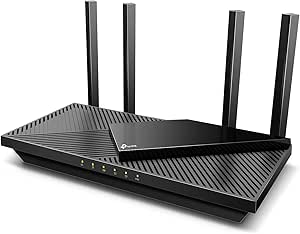 | Best for Fast Dual-Band Wi-Fi 6 | Wi-Fi generation: Wi-Fi 6 | Frequency bands: Dual-band, 2.4 GHz and 5 GHz | Maximum combined data rate: Up to 2,976 Mbps | VIEW LATEST PRICE | See Our Full Breakdown |
| TP-Link Archer A54 AC1200 Dual-Band Wi-Fi Router | 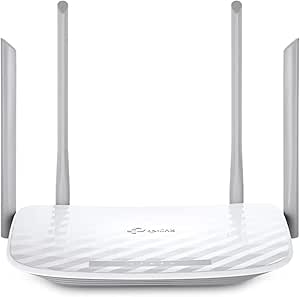 | Best for Basic, Smaller Homes | Wi-Fi generation: Wi-Fi 5 (802.11a/b/g/n/ac) | Frequency bands: Dual-band, 2.4 GHz and 5 GHz | Maximum Wi-Fi speed: Up to 1,200 Mbps | VIEW LATEST PRICE | See Our Full Breakdown |
| TP-Link Archer AX21 AX1800 Dual-Band Wi-Fi 6 Router |  | Best Value Wi-Fi 6 Pick | Wi-Fi generation: Wi-Fi 6 (802.11ax) | Frequency bands: Dual-band, 2.4 GHz and 5 GHz | Combined bandwidth: Up to 1.8 Gbps | VIEW LATEST PRICE | See Our Full Breakdown |
| TP-Link Archer A8 AC1900 Dual-Band Wi-Fi 5 Router |  | Best for Gigabit Wired Connections on a Budget | Wi-Fi generation: Wi-Fi 5 | Frequency bands: Dual-band, 2.4 GHz and 5 GHz | Maximum wireless data rate: Up to 1,900 Mbps | VIEW LATEST PRICE | See Our Full Breakdown |
| GL.iNet GL-SFT1200 Opal AC1200 Dual-Band Travel Router | 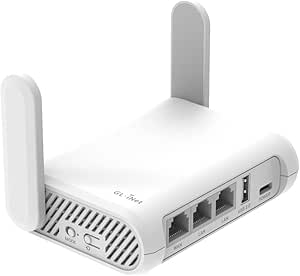 | Best for Travel | Wi-Fi standard: Wi-Fi 5 (802.11a/b/g/n/ac) | Bands: Dual-band, 2.4 GHz and 5 GHz | Maximum wireless data rate: 1200 Mbps (300 Mbps at 2.4 GHz + 867 Mbps at 5 GHz) | VIEW LATEST PRICE | See Our Full Breakdown |
| TP-Link Archer BE230 Dual-Band Wi-Fi 7 Router (BE3600) |  | Best Wi-Fi 7 Value | Wi-Fi generation: Wi-Fi 7 | Frequency bands: Dual-band, 2.4 GHz and 5 GHz; no 6 GHz | Maximum data rate: 3.6 Gbps | VIEW LATEST PRICE | See Our Full Breakdown |
| TP-Link Archer AX73 AX5400 WiFi 6 Router |  | Best for High-Traffic Wi-Fi 6 Homes | Wi-Fi standard: Wi-Fi 6 (802.11ax) | Bands: Dual-band, 2.4 GHz and 5 GHz | Maximum speed: Up to 5400 Mbps | VIEW LATEST PRICE | See Our Full Breakdown |
| NETGEAR Nighthawk RS90 Dual-Band WiFi 7 Router |  | Best for Straightforward Wi-Fi 7 Setup | Wi-Fi generation: Wi-Fi 7 | Frequency bands: Dual-band, 2.4 GHz and 5 GHz | Maximum data transfer rate: 3.6 Gbps | VIEW LATEST PRICE | See Our Full Breakdown |
| NETGEAR Nighthawk R6700AX WiFi 6 Dual-Band Router |  | Best for Smaller Homes | Wi-Fi generation: Wi-Fi 6 (802.11ax) | Frequency bands: Dual-band, 2.4 GHz and 5 GHz | Maximum data transfer rate: 1.8 Gbps | VIEW LATEST PRICE | See Our Full Breakdown |
| TP-Link AC1200 Gigabit Dual Band WiFi Router (Archer A6) |  | Best Budget Wired-Device Pick | Wi-Fi standard: Wi-Fi 5 (802.11ac) | Wireless bands: Dual-band, 2.4 GHz and 5 GHz | Maximum listed data rate: Up to 1,167 Mbps | VIEW LATEST PRICE | See Our Full Breakdown |
| eero 7 dual-band mesh Wi-Fi 7 router (newest model) – Supports internet plans up to 2.5 Gbps, Coverage up to 2,000 sq ft., 1-pack |  | Best Smart-Home Wi-Fi 7 Starter | Wi-Fi standard: Wi-Fi 7 (IEEE 802.11a/b/g/n/ac/ax/be) | Wireless bands: Dual-band, 2.4 GHz and 5 GHz | Coverage: Up to 2,000 sq. ft. | VIEW LATEST PRICE | See Our Full Breakdown |
| TP-Link Archer AXE75 AXE5400 Tri-Band Wi-Fi 6E Router |  | Best for a Dedicated 6 GHz Band | Wi-Fi generation: Wi-Fi 6E | Wireless bands: 2.4 GHz, 5 GHz, and 6 GHz | Maximum combined data rate: Up to 5,400 Mbps | VIEW LATEST PRICE | See Our Full Breakdown |
| TP-Link Smart WiFi 6 Dual Band Router 4 Gigabit LAN Ports |  | Best Entry-Level Wi-Fi 6 Pick | Wi-Fi generation: Wi-Fi 6 (802.11ax) | Wireless bands: Dual-band, 2.4 GHz and 5 GHz | Maximum listed data rate: Up to 1,500 Mbps | VIEW LATEST PRICE | See Our Full Breakdown |
| TP-Link Archer BE400 BE6500 Dual-Band Wi-Fi 7 Router |  | Best Wi-Fi 7 Upgrade for Wired Homes | Wi-Fi standard: Wi-Fi 7 | Wireless bands: Dual-band, 2.4 GHz and 5 GHz | Maximum advertised wireless speed: Up to 6,452 Mbps | VIEW LATEST PRICE | See Our Full Breakdown |
| Black Friday wireless router | Antennas | Coverage | Wi-Fi generation |
|---|---|---|---|
| eero 6 mesh Wi‑Fi router | — | Up to 1,500 sq. ft. (22-ft radius) | — |
| TP-Link AX3000 Dual-Band Wi-Fi | 4 fixed external antennas | — | Wi-Fi 6 |
| TP-Link Archer A54 AC1200 Dual | 4 fixed external antennas | Up to 1,000 sq. ft. | Wi-Fi 5 (802.11a/b/g/n/ac) |
| TP-Link Archer AX21 AX1800 Dua | 4 fixed high-gain antennas | — | Wi-Fi 6 (802.11ax) |
| TP-Link Archer A8 AC1900 Dual- | — | Up to 1,200 sq. ft. | Wi-Fi 5 |
| GL.iNet GL-SFT1200 Opal AC1200 | 2 retractable antennas | — | — |
| TP-Link Archer BE230 Dual-Band | 4 fixed internal antennas | Up to 2,000 sq. ft. | Wi-Fi 7 |
| TP-Link Archer AX73 AX5400 WiF | 6 fixed antennas with beamforming | Up to 2,000 sq. ft. | — |
| NETGEAR Nighthawk RS90 Dual-Ba | — | Up to 2,000 sq. ft. | Wi-Fi 7 |
| NETGEAR Nighthawk R6700AX WiFi | 2 internal | Up to 1,500 sq. ft. | Wi-Fi 6 (802.11ax) |
| TP-Link AC1200 Gigabit Dual Ba | 4 fixed external antennas | — | — |
| eero 7 dual-band mesh Wi-Fi 7 | — | Up to 2,000 sq. ft. | — |
| TP-Link Archer AXE75 AXE5400 T | 8 fixed antennas | — | Wi-Fi 6E |
| TP-Link Smart WiFi 6 Dual Band | 4 fixed antennas | — | Wi-Fi 6 (802.11ax) |
| TP-Link Archer BE400 BE6500 Du | 6 | Up to 2,400 sq. ft. | — |
More Details on Our Top Picks
eero 6 mesh Wi‑Fi router – Supports internet plans up to 900 Mbps, coverage up to 1,500 sq ft., connects 75+ devices (1-pack)
For a Black Friday router shortlist, the eero 6 is the easiest pick for buyers who value simple setup and connected-home support over extensive wired ports. It covers up to 1,500 sq. ft., supports 75+ devices, and includes a Zigbee hub, which can reduce the need for a separate smart-home bridge. Compared with the TP-Link Archer AX21, it adds app-led management and smart-home connectivity, while the AX21 offers more conventional router features such as VPN server support. The eero’s two gigabit ports are limiting if you need several wired connections, and its stated coverage comes from a single unit, so larger or awkwardly shaped homes may need additional nodes. I’d choose it for a household seeking low-fuss Wi-Fi 6, not for buyers who want detailed network controls or lots of Ethernet.
Pros:- Wi-Fi 6 coverage rated for up to 1,500 sq. ft.
- Supports more than 75 connected devices.
- Built-in Zigbee hub supports compatible smart-home devices.
- App-guided setup and automatic software updates simplify upkeep.
Cons:- Only two auto-sensing gigabit Ethernet ports.
- Coverage and speed depend on home layout, interference, and internet service.
- Does not offer the VPN server support listed for the TP-Link Archer AX21.
Best for: Households with many smart-home devices that want app-guided setup and coverage for a home up to 1,500 sq. ft.
Not ideal for: Buyers who need several wired connections, extensive router controls, or a single router for a large or difficult-to-cover home.
- Wi-Fi standard:Wi-Fi 6, dual-band
- Maximum speed:Up to 900 Mbps
- Coverage:Up to 1,500 sq. ft. (22-ft radius)
- Supported devices:75+
- Ethernet ports:2 auto-sensing gigabit WAN/LAN ports
- Processor and memory:1.2 GHz quad-core processor; 512 MB RAM
- Smart-home connectivity:Zigbee, Thread, Bluetooth Low Energy 5.0, Works with Alexa
- Security:WPA3, WPA2, TLS v1.2+, VPN passthrough, IPv6, NAT, UPnP
Our verdict“Choose the eero 6 for straightforward Wi-Fi 6 and smart-home connectivity, but pick the Archer AX21 if VPN server support and conventional router controls matter more.”
TP-Link AX3000 Dual-Band Wi-Fi 6 Gigabit Router
The AX3000 earns its place for buyers who want a strong dual-band Wi-Fi 6 feature set without moving to a more complex mesh system. Its listed 2,402 Mbps 5 GHz rate, OFDMA, and beamforming are geared toward busy homes with several active devices, while four external antennas help distribute coverage. Compared with the TP-Link Archer AX21, this model has a higher listed 5 GHz rate and includes both VPN server and client support; the AX21 remains a simpler alternative if those extra capabilities are not needed. The headline combined rate is theoretical, not a promise of real-world internet speed, and most providers require a separate modem. HomeShield also has a split feature set, with some advanced services requiring a premium plan. I’d favor it for a feature-conscious home, not someone seeking an all-in-one modem-router.
Pros:- Wi-Fi 6 with a listed 2,402 Mbps 5 GHz rate and 574 Mbps 2.4 GHz rate.
- OFDMA and beamforming support multiple-device traffic and signal direction.
- Includes VPN server and client support.
- Five ports and HomeShield features add flexibility for home networking.
Cons:- A separate modem is required for most internet providers.
- Some advanced HomeShield security services require a premium service.
- Listed wireless rates do not represent guaranteed internet speeds.
Best for: Households with multiple Wi-Fi 6 devices that want gigabit Ethernet, VPN options, and network management features.
Not ideal for: Buyers seeking a modem-router combination or those who want every advanced HomeShield feature without a separate premium service.
- Wi-Fi generation:Wi-Fi 6
- Frequency bands:Dual-band, 2.4 GHz and 5 GHz
- Maximum combined data rate:Up to 2,976 Mbps
- Band speeds:Up to 2,402 Mbps on 5 GHz; 574 Mbps on 2.4 GHz
- Ports:5 total; gigabit LAN bandwidth
- Antennas:4 fixed external antennas
- Memory:512 MB RAM
- Security and management:WPA2-Enterprise, WPA2-PSK, WPA3; HomeShield; VPN server and client support
Our verdict“Pick the AX3000 for a feature-rich Wi-Fi 6 router with VPN support, while the Archer AX21 is a more straightforward alternative with a lower listed wireless rate.”
TP-Link Archer A54 AC1200 Dual-Band Wi-Fi Router
The Archer A54 is the budget-minded choice in this group for a smaller home with modest bandwidth needs. Its Wi-Fi 5 connection and coverage rating of up to 1,000 sq. ft. suit basic browsing, streaming, and everyday device use, while WPA3, guest Wi-Fi, and Access Point mode add useful flexibility. Compared with the TP-Link Archer A8, it has a lower listed wireless rate and much slower Fast Ethernet LAN ports, so it is less suitable for fast wired devices or a high-speed internet plan. EasyMesh compatibility may help extend a compatible setup, but it does not turn this into a higher-performance Wi-Fi 6 router. A separate modem is required for most providers. I’d choose it only when simple needs and an existing modem matter more than speed headroom.
Pros:- Four external antennas and beamforming support coverage rated up to 1,000 sq. ft.
- Includes WPA3, guest Wi-Fi, and parental controls.
- Access Point mode and EasyMesh compatibility provide setup flexibility.
- Can be managed through the TP-Link Tether app.
Cons:- Wi-Fi 5 is an older generation than the Wi-Fi 6 Archer AX21 and AX3000.
- Fast Ethernet LAN ports are limited to 10/100 Mbps.
- Requires a separate modem for most internet providers.
Best for: Small-home households with an existing modem, basic internet use, and no need for gigabit wired connections.
Not ideal for: People with gigabit internet, frequent large downloads, or wired PCs and consoles that need more than Fast Ethernet speeds.
- Wi-Fi generation:Wi-Fi 5 (802.11a/b/g/n/ac)
- Frequency bands:Dual-band, 2.4 GHz and 5 GHz
- Maximum Wi-Fi speed:Up to 1,200 Mbps
- Band speeds:Up to 867 Mbps on 5 GHz; 300 Mbps on 2.4 GHz
- Coverage:Up to 1,000 sq. ft.
- Antennas:4 fixed external antennas
- Ports:5 total; 4 Fast Ethernet LAN ports
- Features:WPA3, Access Point mode, EasyMesh compatibility, guest Wi-Fi, parental controls
Our verdict“Choose the Archer A54 for basic wireless needs in a smaller home, but the Archer A8 is a better fit if you need gigabit wired ports and more wireless capacity.”
TP-Link Archer AX21 AX1800 Dual-Band Wi-Fi 6 Router
The Archer AX21 is my value-focused Wi-Fi 6 pick for buyers who want modern device handling without paying for a long list of extras. Its OFDMA support helps coordinate traffic across multiple devices, and four high-gain antennas with beamforming aim to improve signal reach. Unlike the TP-Link Archer A54, it has Wi-Fi 6 and gigabit LAN ports, making it a better match for faster home connections and newer phones or laptops. The AX3000 offers a higher listed wireless rate and VPN client support, but the AX21 keeps the feature set more restrained while still providing OpenVPN and PPTP server support. It remains a dual-band router without 6 GHz, and a separate modem is needed. I’d pick it for a balanced home network, not for someone chasing the highest throughput in this roundup.
Pros:- Wi-Fi 6 and OFDMA support multiple connected devices.
- Four high-gain antennas and beamforming help extend wireless coverage.
- Gigabit LAN bandwidth supports faster wired connections than the Archer A54.
- Supports OpenVPN and PPTP VPN servers.
Cons:- A separate modem is required for internet service.
- Dual-band design does not include a 6 GHz band.
- Wireless performance varies with distance, obstacles, and network conditions.
Best for: Households upgrading from an older router that want Wi-Fi 6, gigabit wired connections, and VPN server support.
Not ideal for: Buyers who need 6 GHz Wi-Fi, tri-band capacity, or a modem built into the router.
- Wi-Fi generation:Wi-Fi 6 (802.11ax)
- Frequency bands:Dual-band, 2.4 GHz and 5 GHz
- Combined bandwidth:Up to 1.8 Gbps
- Band speeds:Up to 1,200 Mbps on 5 GHz; 574 Mbps on 2.4 GHz
- Antennas:4 fixed high-gain antennas
- Ports:5; LAN bandwidth up to 10/100/1000 Mbps
- VPN server support:OpenVPN and PPTP
- Security:WPA/WPA2, WPA/WPA2-Enterprise (802.1x), WPA3
Our verdict“Choose the Archer AX21 for a practical Wi-Fi 6 upgrade with gigabit ports and VPN server support, rather than the faster-rated AX3000 if you do not need its extra capacity.”
TP-Link Archer A8 AC1900 Dual-Band Wi-Fi 5 Router
The Archer A8 is the better fit than the Archer A54 for homes that rely on wired devices or want more Wi-Fi 5 capacity without moving to Wi-Fi 6. It pairs a listed 1,900 Mbps wireless rate with four gigabit LAN ports, so desktops, televisions, or consoles can connect without the 100 Mbps ceiling found on the A54. MU-MIMO and beamforming support wireless traffic, and OneMesh compatibility offers an extender path for suitable setups. Compared with the TP-Link Archer AX21, though, the A8 lacks Wi-Fi 6 and VPN support, making it a less forward-looking choice for a home adding newer devices. It also has no USB port and needs a separate modem. I’d select it when gigabit Ethernet matters more than newer wireless standards or advanced network tools.
Pros:- Four gigabit LAN ports and one gigabit WAN port support fast wired connections.
- Listed dual-band wireless rate reaches up to 1,900 Mbps.
- MU-MIMO, beamforming, and OneMesh compatibility support flexible home coverage.
- Tether app, guest Wi-Fi, and parental controls support straightforward management.
Cons:- Wi-Fi 5 is older than the Wi-Fi 6 Archer AX21 and AX3000.
- Does not support VPN and has no USB port.
- Requires a separate modem for internet service.
Best for: Households with several wired devices that want gigabit LAN ports and straightforward Wi-Fi 5 coverage.
Not ideal for: Buyers who want Wi-Fi 6, VPN support, a USB port, or a router with a built-in modem.
- Wi-Fi generation:Wi-Fi 5
- Frequency bands:Dual-band, 2.4 GHz and 5 GHz
- Maximum wireless data rate:Up to 1,900 Mbps
- Band speeds:Up to 600 Mbps on 2.4 GHz; 1,300 Mbps on 5 GHz
- Coverage:Up to 1,200 sq. ft.
- Ports:4 gigabit LAN ports and 1 gigabit WAN port
- Wireless features:MU-MIMO, beamforming, OneMesh compatibility
- Management:TP-Link Tether app; guest Wi-Fi and parental controls
Our verdict“Choose the Archer A8 if gigabit wired ports are your priority, but pick the Archer AX21 for Wi-Fi 6 and VPN server support.”
GL.iNet GL-SFT1200 Opal AC1200 Dual-Band Travel Router
The GL.iNet GL-SFT1200 Opal fills a different need from the home routers here: it is a compact way to create a private Wi-Fi network while traveling, rather than a high-capacity hub for a household. At 145 g, with retractable antennas and a 5 V power requirement, it is easier to pack than the larger TP-Link Archer AX73. Its OpenVPN and WireGuard support can help protect traffic when routing through public Wi-Fi, while three Gigabit ports give wired devices a connection option that many travel routers lack. The tradeoff is Wi-Fi 5 and a 1200 Mbps maximum rate, well below the Wi-Fi 6 and Wi-Fi 7 home models. Its physical toggle also needs configuration in the admin panel, and time-limited hotel Wi-Fi may require reconnecting.
Pros:- Lightweight 145 g design with retractable antennas for packing
- OpenVPN and WireGuard support for a configurable VPN connection
- Two Gigabit LAN ports and one Gigabit WAN port
- Can convert public Wi-Fi into a private network
Cons:- Wi-Fi 5 and a 1200 Mbps maximum rate trail the newer Wi-Fi 6 and Wi-Fi 7 options
- The physical toggle switch requires setup in the admin panel before it does anything
- Public Wi-Fi sessions with time limits may require reconnecting the router
Best for: Frequent travelers who want to route public Wi-Fi through a private network and connect a few wired devices.
Not ideal for: Households seeking a high-speed main router for many devices or large areas; its Wi-Fi 5 capacity and travel-focused design are a poorer fit.
- Wi-Fi standard:Wi-Fi 5 (802.11a/b/g/n/ac)
- Bands:Dual-band, 2.4 GHz and 5 GHz
- Maximum wireless data rate:1200 Mbps (300 Mbps at 2.4 GHz + 867 Mbps at 5 GHz)
- Ports:2 Gigabit LAN, 1 Gigabit WAN
- VPN protocols:OpenVPN and WireGuard
- Operating system:OpenWrt
- Antennas:2 retractable antennas
- Weight:145 g
Our verdict“Choose the Opal for portable VPN-friendly networking, not as a substitute for a faster home router like the Archer AX73.”
TP-Link Archer BE230 Dual-Band Wi-Fi 7 Router (BE3600)
The TP-Link Archer BE230 is the practical entry point to Wi-Fi 7 in this group: it adds Multi-Link Operation, Multi-RU, and 4K-QAM without stepping up to the tri-band Wi-Fi 6E approach of the Archer AXE75. Its two 2.5 Gbps ports are a useful distinction from the Archer AX73, whose Ethernet ports are limited to Gigabit, especially if a fast internet plan or multi-gig wired device is part of the setup. EasyMesh support also leaves room to expand coverage with compatible equipment. The compromise is its dual-band design with no 6 GHz band, so it lacks one of Wi-Fi 6E’s frequency options. It also requires a separate modem, and its stated coverage and device capacity depend on home layout and network conditions.
Pros:- Wi-Fi 7 features include Multi-Link Operation, Multi-RU, and 4K-QAM
- Two 2.5 Gbps ports support multi-gig wired connections
- EasyMesh compatibility allows compatible network expansion
- Tether app, parental controls, and voice-control support
Cons:- No 6 GHz band, unlike tri-band Wi-Fi 6E options such as the Archer AXE75
- Requires a separate modem for internet service
- Four fixed internal antennas cannot be repositioned
Best for: Households upgrading to Wi-Fi 7 that want multi-gig wired ports, app management, and the option to expand coverage with EasyMesh.
Not ideal for: Buyers who specifically want 6 GHz Wi-Fi or a modem-router combination; this model is dual-band and requires a separate modem.
- Wi-Fi generation:Wi-Fi 7
- Frequency bands:Dual-band, 2.4 GHz and 5 GHz; no 6 GHz
- Maximum data rate:3.6 Gbps
- Processor:2.0 GHz quad-core
- Ports:1 × 2.5 Gbps WAN/LAN, 1 × 2.5 Gbps LAN, 3 × 1 Gbps LAN
- Antennas:4 fixed internal antennas
- Coverage:Up to 2,000 sq. ft.
- Mesh compatibility:EasyMesh
Our verdict“Pick the Archer BE230 if Wi-Fi 7 and 2.5 Gbps ports matter more to you than 6 GHz coverage or a built-in modem.”
TP-Link Archer AX73 AX5400 WiFi 6 Router
For buyers who want strong Wi-Fi 6 performance without moving to Wi-Fi 7, the TP-Link Archer AX73 makes a compelling case through its 5400 Mbps claimed rate, 4×4 MU-MIMO, and OFDMA. Those features are aimed at keeping multiple devices active during streaming, gaming, and other demanding tasks. Its six antennas and beamforming target coverage up to 2,000 sq. ft., while the USB 3.0 port adds a way to share media or storage across the network. Compared with the newer Archer BE230, the AX73 has no Wi-Fi 7 features or 2.5 Gbps ports; its Ethernet connections are Gigabit. In return, it offers a higher stated Wi-Fi 6 rate than the simpler Nighthawk R6700AX. It is also relatively bulky and still needs a separate modem.
Pros:- Wi-Fi 6 with a claimed maximum rate of 5400 Mbps
- 4×4 MU-MIMO and OFDMA support simultaneous device activity
- Six fixed antennas with beamforming and stated coverage up to 2,000 sq. ft.
- USB 3.0 port supports media sharing and private storage
Cons:- Gigabit Ethernet ports do not provide the 2.5 Gbps wired connections found on the Archer BE230
- Requires a separate modem
- Large rectangular body can be awkward in tight spaces
Best for: Busy households with a Wi-Fi 6-compatible mix of streaming, gaming, and connected devices that want broad coverage and USB media sharing.
Not ideal for: Buyers prioritizing Wi-Fi 7 or multi-gig Ethernet, or those with little space for a large router.
- Wi-Fi standard:Wi-Fi 6 (802.11ax)
- Bands:Dual-band, 2.4 GHz and 5 GHz
- Maximum speed:Up to 5400 Mbps
- Antennas:6 fixed antennas with beamforming
- Coverage:Up to 2,000 sq. ft.
- Ports:1 × USB 3.0, 5 Ethernet ports (10/100/1000 Mbps)
- Wireless technologies:4T4R, HE160, MU-MIMO, OFDMA
- Security:TP-Link HomeShield, WPA2/WPA3, parental controls
Our verdict“Choose the Archer AX73 for feature-rich Wi-Fi 6 and USB sharing, but favor the Archer BE230 if Wi-Fi 7 and multi-gig ports are priorities.”
NETGEAR Nighthawk RS90 Dual-Band WiFi 7 Router
The NETGEAR Nighthawk RS90 brings Wi-Fi 7 to buyers who want a standalone router managed through an app, with a stated maximum rate of 3.6 Gbps and coverage up to 2,000 sq. ft. Its one 2.5G port and three Gigabit ports give it useful wired flexibility, while support for up to 50 devices suits a connected household better than the smaller Nighthawk R6700AX, which is specified for up to 20. Compared with TP-Link’s Archer BE230, the RS90 has the same dual-band limitation and lacks the listed EasyMesh and parental-control features; the BE230 is the stronger fit for buyers seeking those tools. The RS90’s fixed antennas and dual-band layout keep the setup simple, but walls and floors can limit coverage, and larger multi-story homes may need mesh equipment.
Pros:- Wi-Fi 7 with a claimed maximum data rate of 3.6 Gbps
- One 2.5G Ethernet port plus three Gigabit ports
- Specified support for up to 50 devices
- Nighthawk app provides setup and network management
Cons:- Requires a separate modem or gateway with an Ethernet port
- Dual-band design has no 6 GHz support
- Large or multi-story homes may need a mesh system to extend coverage
Best for: Households moving to Wi-Fi 7 that want app-based management, one 2.5G port, and capacity for many connected devices.
Not ideal for: Buyers who need built-in mesh expansion features, 6 GHz Wi-Fi, or reliable coverage across a large multi-story home from one router.
- Wi-Fi generation:Wi-Fi 7
- Frequency bands:Dual-band, 2.4 GHz and 5 GHz
- Maximum data transfer rate:3.6 Gbps
- Coverage:Up to 2,000 sq. ft.
- Supported devices:Up to 50
- Ethernet ports:1 × 2.5G, 3 × Gigabit
- Antennas and processor:4 fixed antennas; quad-core 2.0 GHz
- Security:WPA2, WPA3
Our verdict“Choose the RS90 for app-managed Wi-Fi 7 and multi-gig connectivity, but compare the Archer BE230 if mesh compatibility and parental controls matter more.”
NETGEAR Nighthawk R6700AX WiFi 6 Dual-Band Router
The NETGEAR Nighthawk R6700AX is the most restrained home-router pick in this group: its Wi-Fi 6 rate of up to 1.8 Gbps, stated coverage of 1,500 sq. ft., and limit of 20 connected devices suit an apartment or modest home better than the higher-capacity Archer AX73. Four Gigabit LAN ports also make it straightforward to wire a desktop, console, or other fixed devices. App or browser setup, WPA3, automatic firmware updates, and a guest network cover useful everyday needs without the Archer AX73’s larger coverage target or USB media-sharing feature. That restraint is also the tradeoff: the R6700AX is not designed for a busy household or broader coverage, and it has only two internal antennas. It needs a separate modem, and ongoing NETGEAR Armor protection requires a separate subscription after its 30-day trial.
Pros:- Wi-Fi 6 with a claimed maximum data rate of 1.8 Gbps
- Four Gigabit LAN ports plus one Gigabit WAN port
- WPA3, automatic firmware updates, and a guest network
- Setup through the Nighthawk app or a web browser
Cons:- Coverage is specified for up to 1,500 sq. ft. and capacity for up to 20 devices
- Requires a separate modem or gateway with an Ethernet port
- Ongoing NETGEAR Armor protection requires a separate subscription after the 30-day trial
Best for: Apartment residents and small-house households with up to 20 connected devices who want Wi-Fi 6 and several wired connections.
Not ideal for: Large households, homes larger than its stated coverage area, or buyers who want higher capacity and USB storage features like those on the Archer AX73.
- Wi-Fi generation:Wi-Fi 6 (802.11ax)
- Frequency bands:Dual-band, 2.4 GHz and 5 GHz
- Maximum data transfer rate:1.8 Gbps
- Coverage:Up to 1,500 sq. ft.
- Maximum connected devices:Up to 20
- Ethernet ports:4 × 1 Gigabit LAN, 1 × 1 Gigabit WAN
- Antennas:2 internal
- Security:WPA2, WPA3, automatic firmware updates, guest network
Our verdict“Pick the R6700AX for Wi-Fi 6 and wired connections in a smaller home, but step up to the Archer AX73 for greater stated capacity and coverage.”
TP-Link AC1200 Gigabit Dual Band WiFi Router (Archer A6)
For a Black Friday router shortlist, I’d put the Archer A6 forward for buyers who need reliable basics and several wired connections, rather than the newest wireless standard. Its four Gigabit LAN ports suit a TV, console, or desktop that benefits from a direct connection, while four external antennas and beamforming help direct Wi-Fi around the home. Compared with the Archer AX10, it lacks Wi-Fi 6 features that help busy networks handle many devices, so it makes more sense for a modest household than a crowded one. The A6 does add WPA3 security, access point mode, and OneMesh extender compatibility. Its main tradeoff is older Wi-Fi 5 performance: the listed 5 GHz rate is up to 867 Mbps, and actual results depend on the home and internet service.
Pros:- Four Gigabit LAN ports make it easy to wire common home devices.
- Four external antennas and beamforming help direct wireless coverage.
- WPA3 security, guest mode, and parental controls are included.
- OneMesh and access point modes offer useful network expansion options.
Cons:- Wi-Fi 5 is older than the Wi-Fi 6 Archer AX10 and newer picks in this roundup.
- The listed 5 GHz rate is up to 867 Mbps, limiting its appeal for faster plans.
- A modem is required for most internet service providers.
Best for: Budget-conscious households with a few wired devices, moderate broadband, and everyday streaming or browsing needs.
Not ideal for: Homes with many simultaneously active devices or buyers seeking Wi-Fi 6 or Wi-Fi 7 capacity.
- Wi-Fi standard:Wi-Fi 5 (802.11ac)
- Wireless bands:Dual-band, 2.4 GHz and 5 GHz
- Maximum listed data rate:Up to 1,167 Mbps
- 2.4 GHz rate:Up to 300 Mbps
- 5 GHz rate:Up to 867 Mbps
- Ethernet ports:4 Gigabit LAN ports
- Antennas:4 fixed external antennas
- Security:WPA3
Our verdict“Choose the Archer A6 for an affordable, wired-friendly home network, but pick the Archer AX10 if you want Wi-Fi 6 device-handling features.”
eero 7 dual-band mesh Wi-Fi 7 router (newest model) – Supports internet plans up to 2.5 Gbps, Coverage up to 2,000 sq ft., 1-pack
The eero 7 makes the most sense for buyers who want a modern router that can also serve as a smart-home hub. Its Wi-Fi 7 support, two 2.5 GbE ports, and stated coverage of up to 2,000 square feet give a single unit room to serve a fast connection and wired backhaul. The built-in Matter, Thread, Zigbee, and Bluetooth LE support can also reduce the number of separate hubs needed for compatible devices. Compared with the TP-Link Archer BE400, the eero’s appeal is its integrated smart-home platform and mesh-focused software, while the BE400 offers more Ethernet ports and broader stated coverage. This one-unit eero is still a starting point for larger homes, and it has only two Ethernet ports. Buyers should also be comfortable managing key features through eero’s app-based ecosystem.
Pros:- Wi-Fi 7 support and two 2.5 GbE ports suit newer fast internet plans.
- Built-in Matter, Thread, Zigbee, and Bluetooth LE support can consolidate smart-home hardware.
- TrueMesh software includes TrueRoam and TrueChannel connection optimization.
- Stated capacity exceeds 120 devices.
Cons:- One unit is rated for coverage up to 2,000 square feet, so larger homes may need additional nodes.
- Only two Ethernet ports are provided.
- The router needs external backup power to keep working during an outage.
Best for: Smart-home households seeking a compact Wi-Fi 7 router with built-in Matter, Thread, or Zigbee coordination and room to add mesh nodes.
Not ideal for: Buyers who need several wired connections, broad single-router coverage, or a router that operates during power outages without backup power.
- Wi-Fi standard:Wi-Fi 7 (IEEE 802.11a/b/g/n/ac/ax/be)
- Wireless bands:Dual-band, 2.4 GHz and 5 GHz
- Coverage:Up to 2,000 sq. ft.
- Device capacity:Over 120 devices
- Ethernet ports:2 auto-sensing 2.5 GbE ports
- Memory:1 GB RAM
- Security:WPA3 and WPA2
- Smart-home compatibility:Matter, Thread, Zigbee controller, Bluetooth LE 5.0, and Alexa
Our verdict“Pick the eero 7 if smart-home integration and easy mesh expansion matter more than having many wired ports.”
TP-Link Archer AXE75 AXE5400 Tri-Band Wi-Fi 6E Router
I’d choose the Archer AXE75 when the draw is a third wireless band, especially for a home with compatible 6 GHz devices and competing demands on 2.4 GHz and 5 GHz. Its tri-band Wi-Fi 6E layout adds a 6 GHz option that can give supported devices another lane, while VPN client and server support add flexibility for remote access and privacy setups. Compared with the Archer AX10, it offers more bands and substantially higher combined listed throughput; compared with the Wi-Fi 7 Archer BE400, it is an older wireless generation. The 6 GHz benefit depends on device compatibility and signal reach, so it is not a blanket coverage upgrade. Its listed Ethernet bandwidth is Gigabit, which may also constrain buyers with internet service faster than 1 Gbps.
Pros:- Tri-band Wi-Fi 6E adds a dedicated 6 GHz band for compatible devices.
- Up to 5,400 Mbps combined listed data rate across three bands.
- VPN client and server support adds network configuration flexibility.
- EasyMesh compatibility allows expansion with compatible devices.
Cons:- The 6 GHz band is useful only for compatible devices and may not suit every coverage layout.
- Listed LAN port bandwidth is 1,000 Mbps, limiting multi-gigabit wired throughput.
- A modem is required for most internet service providers.
Best for: Households with Wi-Fi 6E-capable phones, laptops, or other devices that want a separate 6 GHz band and built-in VPN options.
Not ideal for: Buyers whose devices do not support 6 GHz or who need multi-gigabit wired networking.
- Wi-Fi generation:Wi-Fi 6E
- Wireless bands:2.4 GHz, 5 GHz, and 6 GHz
- Maximum combined data rate:Up to 5,400 Mbps
- Band data rates:2.4 GHz: 574 Mbps; 5 GHz: 2,402 Mbps; 6 GHz: 2,402 Mbps
- Processor:1.0 GHz dual-core
- Memory:512 MB
- Antennas:8 fixed antennas
- VPN support:OpenVPN, PPTP, and L2TP client and server
Our verdict“Choose the Archer AXE75 for a compatible-device-heavy home that can use 6 GHz, not for multi-gigabit wired networking.”
TP-Link Smart WiFi 6 Dual Band Router 4 Gigabit LAN Ports
The Archer AX10 is a practical step up from the Wi-Fi 5 Archer A6 for households adding newer phones, laptops, and smart devices. Its Wi-Fi 6 features, including OFDMA and MU-MIMO, are intended to share network capacity more efficiently when several devices are active; four Gigabit LAN ports also keep wired essentials connected. Compared with the Archer AXE75, the AX10 costs no wireless complexity in a home that does not need a 6 GHz band, but it is dual-band and has a much lower listed combined rate. The four antennas and beamforming support home coverage, while OneMesh compatibility offers an expansion path. This is an entry-level Wi-Fi 6 choice, not a multi-gig router: the listed Ethernet ports are Gigabit, and most providers require a separate modem.
Pros:- Wi-Fi 6 with OFDMA and MU-MIMO supports more efficient handling of multiple connected devices.
- Four Gigabit LAN ports support wired TVs, consoles, computers, and other devices.
- Four antennas with beamforming help focus wireless coverage.
- OneMesh compatibility provides an option to expand coverage with a compatible extender.
Cons:- Dual-band design lacks the 6 GHz band found on the Archer AXE75.
- Gigabit Ethernet ports do not support multi-gigabit wired connections.
- A modem is required for most internet service providers.
Best for: Households moving from an older Wi-Fi 5 router that want Wi-Fi 6 device handling and four wired Gigabit connections.
Not ideal for: Users with multi-gigabit internet plans, Wi-Fi 6E devices seeking 6 GHz, or homes needing a mesh system out of the box.
- Wi-Fi generation:Wi-Fi 6 (802.11ax)
- Wireless bands:Dual-band, 2.4 GHz and 5 GHz
- Maximum listed data rate:Up to 1,500 Mbps
- 2.4 GHz rate:Up to 300 Mbps
- 5 GHz rate:Up to 1,201 Mbps
- Ethernet ports:4 Gigabit LAN ports
- Antennas:4 fixed antennas
- Processor:900 MHz dual-core
Our verdict“Pick the Archer AX10 for affordable Wi-Fi 6 basics and wired connections, but step up to the AXE75 if your devices can use 6 GHz.”
TP-Link Archer BE400 BE6500 Dual-Band Wi-Fi 7 Router
The Archer BE400 is the strongest fit here for buyers who want Wi-Fi 7 and several fast wired connections in a conventional router. Its two 2.5 Gbps Ethernet ports—one WAN/LAN and one LAN—give it an advantage over the eero 7 when connecting multi-gig internet service or a compatible wired device, and it adds three more Gigabit LAN ports. The listing also states coverage up to 2,400 square feet and support for up to 90 devices. Compared with the tri-band Archer AXE75, the BE400 offers newer Wi-Fi 7 features but only two wireless bands, so it does not add a separate 6 GHz band. It requires a modem, and its EasyMesh compatibility does not extend to TP-Link Deco systems. Advertised wireless rates are theoretical, not a promise of real-world speeds.
Pros:- Wi-Fi 7 support includes Multi-Link Operation, Multi-RUs, and 4K-QAM.
- Two 2.5 Gbps Ethernet ports support faster wired links than Gigabit-only routers.
- Three additional Gigabit LAN ports provide connections for household devices.
- HomeShield, WPA3, VPN support, and EasyMesh compatibility add useful network options.
Cons:- Dual-band design does not include a 6 GHz band like the Archer AXE75.
- Not compatible with TP-Link Deco mesh systems.
- Requires a separate modem for most internet service providers.
Best for: Households upgrading to Wi-Fi 7 that need multi-gigabit Ethernet for a fast internet connection, NAS, or wired workstation.
Not ideal for: Buyers who want a 6 GHz band, already use Deco mesh equipment, or expect advertised wireless rates in everyday use.
- Wi-Fi standard:Wi-Fi 7
- Wireless bands:Dual-band, 2.4 GHz and 5 GHz
- Maximum advertised wireless speed:Up to 6,452 Mbps
- Coverage:Up to 2,400 sq. ft.
- Maximum device capacity:Up to 90 devices
- Ethernet ports:1 x 2.5 Gbps WAN/LAN, 1 x 2.5 Gbps LAN, 3 x 1 Gbps LAN
- Antennas:6
- Mesh compatibility:EasyMesh-compatible; not compatible with Deco mesh systems
- Security and network features:HomeShield, WPA3, VPN client and server support
Our verdict“Choose the Archer BE400 for Wi-Fi 7 and multi-gigabit wired flexibility, but choose the AXE75 if a dedicated 6 GHz band matters more.”
How We Picked
I ranked these routers by how well their stated capabilities match common buyer needs: everyday home use, busier households, larger or mesh-ready spaces, travel, and future device upgrades. I weighed wireless generation, band configuration, stated speed or plan support, coverage details where provided, and the practical difference between a standalone router and a mesh system. I also considered setup expectations and whether a product’s extra capability is likely to matter to a typical household.
The ranking favors versatility and a clear fit over the newest label alone. The Archer AX73 leads as a well-rounded Wi-Fi 6 choice, while the eero 7 earns a distinct place for mesh convenience and faster plan support. More basic Wi-Fi 5 models rank lower for shoppers seeking longevity, but can still fit modest needs; the travel router is ranked for its specialist role rather than treated as a direct home-router competitor. Product names and specifications were compared as supplied, and I do not assume unlisted features or measured performance.
| Black Friday wireless router | Coverage | Wi-Fi generation |
|---|---|---|
| eero 6 mesh Wi‑Fi router | Up to 1,500 sq. ft. (22-ft radius) | — |
| TP-Link AX3000 Dual-Band Wi-Fi | — | Wi-Fi 6 |
| TP-Link Archer A54 AC1200 Dual | Up to 1,000 sq. ft. | Wi-Fi 5 (802.11a/b/g/n/ac) |
| TP-Link Archer AX21 AX1800 Dua | — | Wi-Fi 6 (802.11ax) |
| TP-Link Archer A8 AC1900 Dual- | Up to 1,200 sq. ft. | Wi-Fi 5 |
| GL.iNet GL-SFT1200 Opal AC1200 | — | — |
| TP-Link Archer BE230 Dual-Band | Up to 2,000 sq. ft. | Wi-Fi 7 |
| TP-Link Archer AX73 AX5400 WiF | Up to 2,000 sq. ft. | — |
| NETGEAR Nighthawk RS90 Dual-Ba | Up to 2,000 sq. ft. | Wi-Fi 7 |
| NETGEAR Nighthawk R6700AX WiFi | Up to 1,500 sq. ft. | Wi-Fi 6 (802.11ax) |
| TP-Link AC1200 Gigabit Dual Ba | — | — |
| eero 7 dual-band mesh Wi-Fi 7 | Up to 2,000 sq. ft. | — |
| TP-Link Archer AXE75 AXE5400 T | — | Wi-Fi 6E |
| TP-Link Smart WiFi 6 Dual Band | — | Wi-Fi 6 (802.11ax) |
| TP-Link Archer BE400 BE6500 Du | Up to 2,400 sq. ft. | — |
Factors to Consider When Choosing Black Friday Wireless Routers
Black Friday router shopping can make a new standard seem like the obvious choice, but a good match depends on your home, devices, and internet service. I’d use these broader checks to avoid paying for capability you cannot use—or choosing a router that is already a poor fit for your next upgrade.
Match the Router to Your Internet Plan
Start with the speed tier you actually pay for, then check whether the router’s stated capability is relevant to that service. A router described for faster plans cannot make a slower internet connection deliver more speed, though it may leave room for a later service upgrade. Check the internet port specifications on the product page, since wireless class labels do not tell you everything about wired internet capacity. Also separate a router’s theoretical wireless rating from the speed a device will receive in a real room. If your current plan is modest, a capable Wi-Fi 6 model may be a more sensible balance than paying for Wi-Fi 7. Save the newest standard for a plan and household likely to benefit from it.
Choose Wi-Fi 6 or Wi-Fi 7 by Device Mix
Wireless generation matters most when your devices can use it and your network has enough simultaneous activity to benefit. Newer routers can be a better long-term fit, but older phones, laptops, and smart-home products do not gain new wireless capabilities just because the router supports them. Before choosing Wi-Fi 7, check which devices you expect to replace and how long you plan to keep the router. A mixed household may get a more practical improvement from a capable Wi-Fi 6 router than from a premium standard used by only one device. Do not use a router’s combined class number as a direct promise of speed to one client. For many shoppers, device compatibility and plan speed matter more than having the newest badge.
Decide Whether One Router Can Cover Your Home
Coverage depends on floor plan, wall materials, router placement, and interference, so square-footage claims are best treated as guidance rather than a guarantee. A single router placed in a central, open location may outperform the same unit tucked into a cabinet or corner. If you have persistent dead zones, a mesh system such as the eero options may suit your home better than replacing one standalone router with a faster one. Mesh can add convenience, but it also means choosing a system designed to work across multiple nodes and planning where those nodes will sit. Avoid buying a high-speed router solely to solve a signal problem caused by distance or thick walls. First identify where coverage fails and whether a second access point or mesh node is the real fix.
Count Bands and Wired Connections Against Your Needs
Dual-band routers are a sensible fit for many homes, while a tri-band model can provide another wireless band for compatible devices and busy networks. That extra band does not automatically improve every connection; its benefit depends on device support, network traffic, and how the router manages clients. Wired ports also matter if you connect a desktop, console, television, or network storage device. Check the number and speed of ports against the equipment you want to attach, rather than assuming every gigabit-class name describes the port layout. A router with more wireless capacity may still be inconvenient if it leaves too few wired connections. Make a quick list of wired devices before comparing models.
Treat Black Friday as a Chance to Compare Fit, Not Just Labels
Seasonal shopping can encourage rushed decisions based on a new model name or a headline speed figure. Compare the exact model number and hardware generation, since similar product names can refer to different capabilities. Read the manufacturer’s specifications for security updates, parental controls, app requirements, and any subscription-dependent tools before choosing. A router is often kept for years, so update support and straightforward administration may matter more than a short-lived speed advantage. If you rent your internet equipment or use a gateway supplied by your provider, check whether it can work in bridge mode or whether you need a separate router setup. The best purchase is the one that fits your network plan and household—not simply the one with the most advanced label.
Frequently Asked Questions
Should I choose Wi-Fi 7 over Wi-Fi 6 if I am buying during Black Friday?
I’d choose Wi-Fi 7 when you have, or expect soon to have, compatible devices and an internet plan that can make use of the added capability. In this lineup, eero 7 also brings mesh-oriented simplicity and stated support for plans up to 2.5 Gbps, while the Archer BE230 and BE400 are Wi-Fi 7 router alternatives. Wi-Fi 6 remains a sensible choice if most of your devices are older or your plan does not call for a newer router. A new standard alone does not fix weak coverage or a slow provider connection. Compare the full model specifications and your likely upgrade timeline before paying for a feature your devices may not use.
Is a mesh router a better choice than a standalone router for a large home?
Mesh is often a better fit when one router cannot reach rooms at the far end of the home, especially across multiple floors or obstructive walls. A standalone model such as the Archer AX73 may suit a home where one centrally placed unit can cover the main living area. The eero 6 and eero 7 are the mesh-oriented options in this list, but the coverage figures supplied apply to their listed one-packs and should not be treated as a guarantee for every layout. Before buying, mark the rooms with weak signal and consider where additional mesh nodes could be placed. If only one corner has a problem, repositioning the current router may be enough.
Can an older Wi-Fi 5 router still be a sensible Black Friday purchase?
Yes, if your needs are modest, your internet plan is not especially demanding, and you do not expect to keep the router through several device upgrades. The Archer A8, Archer A54, and Archer A6 are Wi-Fi 5 choices in this group, so they are less future-oriented than the Wi-Fi 6 and Wi-Fi 7 models. An older standard can still handle basic browsing and connected devices, but the right fit depends on your household’s activity and service speed. Check the exact specifications rather than assuming every AC1200 or AC1900 label means the same port or feature set. For a router you intend to keep for years, I would lean toward Wi-Fi 6 instead.
Will replacing my router improve internet speed in every room?
No. A new router can improve wireless performance when the current router is outdated or overloaded, but it cannot raise the speed delivered by your internet provider. Distance, walls, interference, device capability, and router placement all affect the connection in each room. If speed drops only in distant areas, a mesh system or better placement may help more than choosing a router with a higher class number. Test a wired connection near the router to distinguish a provider or service issue from a Wi-Fi coverage issue. That simple check can prevent an unnecessary upgrade.
Is the GL.iNet Opal suitable as my main home router?
The Opal is presented as a compact travel router, so I would choose it for portability and travel use rather than as the default replacement for a full-size home router. Its role differs from the Archer models and eero mesh options, which are aimed at home-network coverage and everyday household use. A travel router can be useful when you need a small device for a temporary connection, but check its exact capabilities against your home plan and number of connected devices. If your priority is stable coverage across several rooms, a home-focused router or mesh setup is a better starting point. Match the purchase to where you will use it most often.
Conclusion
For best overall, I’d choose the TP-Link Archer AX73 for a capable Wi-Fi 6 home network without requiring a jump to Wi-Fi 7. For best value, the Archer AX21 is the more restrained Wi-Fi 6 pick for everyday households, while the eero 7 is my choice for best premium and mesh-friendly option when simple coverage expansion and faster plan support matter. Beginners who want a straightforward path to mesh should look at the eero 6; shoppers who prefer a conventional router can start with a basic model matched to their plan. For specific needs, choose the GL.iNet Opal for travel, the Archer AXE75 if you want tri-band Wi-Fi 6E, or a Wi-Fi 7 Archer if compatible devices and a suitable plan justify the step up. I would skip paying for newer standards when your devices and service cannot use them, and prioritize coverage or mesh instead if dead zones are the main problem.