Ergonomic laptop stands solve one specific problem: raising your screen to eye level so you stop hunching over your desk. My top overall pick is the Nulaxy 360° Rotating Ergonomic Laptop Stand, because it combines a genuinely useful swivel base with a dual-foldable design that travels well. For buyers on a budget, the Amazon Basics Adjustable Riser delivers the core height and ventilation benefits at a fraction of the price, while the Lamicall Aluminum Stand is the sturdiest option if your laptop rarely leaves the desk. The main tradeoff in this category is simple: highly adjustable and rotating models tend to wobble, while rock-solid fixed-height stands limit your positioning options. Read on for the full breakdown of all 15 stands and which one fits your setup.
Complete the kit



Key Takeaways
- Rotating bases (amazon.com/dp/B0H6M4M946?tag=barriermagz-20&ascsubtag=dc-673944″ target=”_blank” rel=”nofollow sponsored noopener”>Nulaxy, Tounee, Uncaged, LOXP 360°) add real value for shared desks and client presentations, but every swivel model in this lineup traded away some rigidity compared with fixed risers like the Lamicall.
- The Nulaxy 360° won best overall because it’s the only stand that balanced rotation, dual-foldable portability, and a stable platform for 10-16 inch laptops without an obvious weakness.
- Three of the four LOXP entries overlap heavily; the wrist-support aluminum model is the one worth buying, while the airflow and 360° versions are only better for narrow use cases.
- The Lifelong 20-inch riser reaches heights no other stand here can match, making it the only realistic pick for very tall users or standing-desk conversions — but it’s the least portable option by far.
- Acrylic looks (JCZT) cost you cooling and durability; aluminum and ventilated metal consistently outperformed solid or clear designs for heat management and long-term build quality.
| Laptop Stand for Desk (360° Rotating), Aluminum Laptop Riser for 10-16 Inch Laptops | 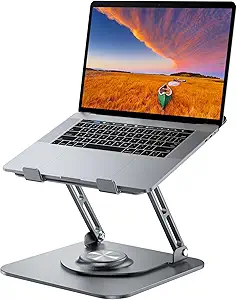 | Best Overall | Material: Aluminum alloy | Supports Laptops: 10-16 inches | Max Load: 11 lbs | VIEW LATEST PRICE | See Our Full Breakdown |
| Laptop Stand for Desk, Adjustable and Foldable Metal Riser |  | Best Value | Support Weight: 17.6 lbs (8 kg) | Material: ABS, Aluminum, Silicone | Supported Devices: Laptops 10-15.6 inches, tablets, books | VIEW LATEST PRICE | See Our Full Breakdown |
| JCZT Clear Acrylic Laptop Stand for Desk, Laptop Riser with Wrist Rest |  | Best for Style-Focused Desks | Material: Clear acrylic | Height: 2.7 inches (fixed) | Compatibility: Laptops up to 17 inches | VIEW LATEST PRICE | See Our Full Breakdown |
| Nulaxy 360° Rotating Ergonomic Laptop Stand for Desk, Dual Foldable Design |  | Best for Heavy Laptops | Load Capacity: 22 lbs | Rotation: 360° | Adjustability: Height and angle adjustable | VIEW LATEST PRICE | See Our Full Breakdown |
| Amazon Basics Sturdy and Portable Ergonomic Laptop Stand for Desk, Height Adjustable Riser with Ventilated Cooling, Foldable, Fits all Laptops up to 15.6 Inch, Silver |  | Best for Travel | Material: Lightweight, rust-resistant aluminum | Height Adjustment: Up to 7 inches | Supported Devices: Laptops and tablets 10-15.6 inches | VIEW LATEST PRICE | See Our Full Breakdown |
| LOXP Laptop Stand for Desk, Aluminum Laptop Riser Holder with Wrist Support |  | Best for Typing Comfort | Material: Anodized aluminum alloy | Height Lift: 2.6 inches (fixed) | Compatibility: Laptops 9.3–17.3 inches | VIEW LATEST PRICE | See Our Full Breakdown |
| Adjustable Laptop Stand for Desk, Metal Laptop Riser Holder |  | Best Value Adjustable | Material: Metal with ventilation holes | Load Capacity: 17.6 lbs (8 kg) | Compatibility: Laptops 10–15.6 inches | VIEW LATEST PRICE | See Our Full Breakdown |
| Lifelong Aluminum Adjustable Laptop Stand, 20″ Riser, Grey | 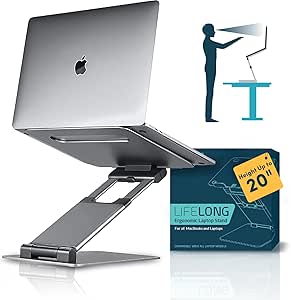 | Best for Standing Desk Converts | Material: Aluminum | Maximum Height: 20 inches | Arm Extension: 13 inches | VIEW LATEST PRICE | See Our Full Breakdown |
| LOXP Adjustable Laptop Stand for Desk, Portable Airflow Laptop Riser Holder |  | Best Budget Travel Pick | Material: Sturdy metal with non-slip pads | Max Load: 15.4 lbs (7 kg) | Supported Laptop Size: 10–15.6 inches | VIEW LATEST PRICE | See Our Full Breakdown |
| Lamicall Aluminum Laptop Stand for Desk for MacBook Air Pro Neo 10-17.3” |  | Best Overall | Material: Aluminum alloy | Compatibility: Laptops 10–17.3 inches (MacBook, Surface, Dell XPS, HP, ASUS, Acer, Chromebook, Alienware) | Dimensions: 12 x 10 x 2 inches | VIEW LATEST PRICE | See Our Full Breakdown |
| Besign LS03 Aluminum Laptop Stand, Ergonomic Detachable Computer Stand for 10-15.6″ Laptops, Silver |  | Best Simple Fixed-Height Pick | Compatibility: 10-15.6 inch laptops | Material: Aluminum alloy | Max Support Weight: 8.8 lbs (4 kg) | VIEW LATEST PRICE | See Our Full Breakdown |
| Tounee Telescopic Laptop Stand with 360° Swivel Base, Height Adjustable, Portable Riser for 10-17″ Laptops – Gray |  | Best for Sit-Stand Desks | Height Range: 2.1″ to 21″ | Max Support Weight: 22 lbs | Rotation: 360° | VIEW LATEST PRICE | See Our Full Breakdown |
| Uncaged Ergonomics Swivel Laptop Stand for Desk, 360 Riser, Arctic Silver |  | Best for Screen Sharing | Dimensions: 10.56 x 8.25 x 7.5 inches | Material: Metal | Compatible Devices: Laptops, MacBook, iPad (up to 15.6″) | VIEW LATEST PRICE | See Our Full Breakdown |
| LOXP Adjustable Laptop Stand with 360° Rotating Base |  | Best Road-Ready Rotator | Material: Fiber metal | Supported Laptop Size: 10-16 inches | Dimensions: 12.21 x 12.61 x 2.76 inches | VIEW LATEST PRICE | See Our Full Breakdown |
| Nulaxy Ergonomic Adjustable Laptop Stand for Desk, Dual Foldable Computer Riser with Heat-Vent |  | Best Value All-Rounder | Compatibility: 10-16 inch laptops | Material: Metal with silicone pads | Weight Capacity: Up to 22 lbs | VIEW LATEST PRICE | See Our Full Breakdown |
| ergonomic laptop stand | Material | Compatibility |
|---|---|---|
| Laptop Stand for Desk | Aluminum alloy | — |
| Laptop Stand for Desk | ABS, Aluminum, Silicone | — |
| JCZT Clear Acrylic Laptop Stan | Clear acrylic | Laptops up to 17 inches |
| Nulaxy 360° Rotating Ergonomic | Not specified by manufacturer | — |
| Amazon Basics Sturdy and Porta | Lightweight, rust-resistant aluminum | — |
| LOXP Laptop Stand for Desk | Anodized aluminum alloy | Laptops 9.3–17.3 inches |
| Adjustable Laptop Stand for De | Metal with ventilation holes | Laptops 10–15.6 inches |
| Lifelong Aluminum Adjustable L | Aluminum | Laptops 10–17 inches |
| LOXP Adjustable Laptop Stand f | Sturdy metal with non-slip pads | MacBook, Dell XPS, HP, ASUS, Lenovo, Acer, Chromebook, Surface |
| Lamicall Aluminum Laptop Stand | Aluminum alloy | Laptops 10–17.3 inches (MacBook, Surface, Dell XPS, HP, ASUS, Acer, Chromebook, Alienware) |
| Besign LS03 Aluminum Laptop St | Aluminum alloy | 10-15.6 inch laptops |
| Tounee Telescopic Laptop Stand | Aluminum alloy | 10-17 inch laptops |
| Uncaged Ergonomics Swivel Lapt | Metal | — |
| LOXP Adjustable Laptop Stand w | Fiber metal | — |
| Nulaxy Ergonomic Adjustable La | Metal with silicone pads | 10-16 inch laptops |
More Details on Our Top Picks
Laptop Stand for Desk (360° Rotating), Aluminum Laptop Riser for 10-16 Inch Laptops
This stand earns the top spot because it balances the three things that actually matter in ergonomic positioning: height range, stability, and screen-sharing flexibility. The aluminum build gives it a heavier, planted base than the Amazon Basics stand, which matters if you type directly on a raised laptop and don’t want wobble. The 360° rotation sets it apart from fixed risers like the JCZT acrylic stand, letting you spin the screen toward a colleague without repositioning the whole unit. The open-frame design also doubles as passive cooling, an outcome gamers and video editors will notice during long sessions. The tradeoff is footprint — at 9.45 inches square it eats more desk space than slimmer competitors, and its 11 lbs load limit means 17-inch gaming rigs are off the table.
Pros:- Adjustable height up to 11.81 inches for genuine eye-level positioning
- 360° rotation makes screen sharing effortless
- Heavy, stable aluminum base resists tipping while typing
- Folds flat for travel despite the sturdy frame
Cons:- 9.45 x 9.45 inch footprint is bulky on shallow or cluttered desks
- 11 lbs load capacity excludes larger laptops
Best for: Hybrid workers and shared desks who want maximum adjustability plus swivel for collaboration
Not ideal for: Owners of 17-inch or heavy gaming laptops — the 16-inch, 11 lbs ceiling excludes larger machines
- Material:Aluminum alloy
- Supports Laptops:10-16 inches
- Max Load:11 lbs
- Adjustable Height:Up to 11.81 inches
- Rotation:360°
- Folded Dimensions:9.45 x 9.45 x 1.25 inches
Our verdict“The most well-rounded pick for anyone who wants serious height adjustment and swivel without giving up stability.”
Laptop Stand for Desk, Adjustable and Foldable Metal Riser
For shoppers who want most of the adjustability at a lower price, this is the pick that makes the most sense. Its 17.6 lbs weight rating actually beats the higher-positioned 360° rotating aluminum riser in raw load capacity, so heavier 15-inch machines sit securely without flex. The ventilated metal deck keeps thermals in check during long work sessions, and the fold-flat design matches the portability of the Amazon Basics stand. Compared with the JCZT acrylic riser, you gain real height and angle adjustability instead of a single fixed elevation. The compromises are real, though: it tops out at 15.6-inch laptops, silicone pads can wear over time, and there’s no swivel base — a feature the Nulaxy 360° delivers if you’re willing to spend more.
Pros:- 17.6 lbs load capacity handles heavier laptops than pricier rivals
- Adjustable height and angle for real posture improvement
- Ventilated metal deck aids cooling
- Folds flat and travels well
Cons:- No rotating base for screen sharing
- Build quality feels less premium than full-aluminum competitors
Best for: Students and budget-conscious remote workers with 10-15.6 inch laptops who want adjustability under $30
Not ideal for: Anyone with a 16-inch MacBook Pro or 17-inch laptop — the size ceiling is a hard limit
- Support Weight:17.6 lbs (8 kg)
- Material:ABS, Aluminum, Silicone
- Supported Devices:Laptops 10-15.6 inches, tablets, books
- Adjustable:Yes
- Foldable:Yes
- Color:Silver
Our verdict“The smart budget choice if you need adjustable ergonomics and strong load support without the rotating-base premium.”
JCZT Clear Acrylic Laptop Stand for Desk, Laptop Riser with Wrist Rest
This option stands out for one thing the metal risers can’t match: a nearly invisible clear acrylic profile that disappears on a styled desk. The built-in wrist rest is a differentiator no other stand in this lineup offers — if you type directly on the laptop rather than using an external keyboard, that support genuinely reduces strain. The 17-inch compatibility also beats both the B09PYPPD9L riser (16 inches) and the Amazon Basics stand (15.6 inches), making it the rare pick that fits larger machines. But the tradeoff is fundamental: a fixed 2.7-inch elevation means no tuning for your exact eye height, which is the entire point of an ergonomic stand for taller users. Pair it with an external keyboard and monitor riser if you need more height.
Pros:- Fits laptops up to 17 inches, wider compatibility than most rivals
- Integrated wrist rest reduces strain for direct typists
- Clear acrylic looks elegant on any desk
- Tool-free assembly in minutes
Cons:- No height or angle adjustment at all
- Acrylic scratches more easily than aluminum and can crack under impact
Best for: Anyone with a 16-17 inch laptop who types directly on the keyboard and wants a clean, minimal aesthetic
Not ideal for: Taller users needing true eye-level positioning — the single fixed height can’t be raised
- Material:Clear acrylic
- Height:2.7 inches (fixed)
- Compatibility:Laptops up to 17 inches
- Wrist Rest:Integrated
- Assembly:Tool-free
- Color:Clear
Our verdict“Buy it for the looks and wrist support with a large laptop — skip it if adjustable height is non-negotiable.”
Nulaxy 360° Rotating Ergonomic Laptop Stand for Desk, Dual Foldable Design
With a 22 lbs load capacity — the highest in this entire roundup — this Nulaxy model is better suited to 17-inch workstations and gaming rigs that make other stands flex or tip. Compared with the 360° rotating aluminum riser, it matches the swivel base and foldability while comfortably exceeding that stand’s 11 lbs ceiling, which is the deciding factor for owners of heavy machines. The dual-foldable design packs down smaller than you’d expect for something this sturdy. The honest drawback: the manufacturer doesn’t specify materials, so buyers trusting a heavy laptop to it are relying on stated ratings rather than known aluminum construction like the Amazon Basics or B09PYPPD9L stands. The anti-slip pads help, but very top-heavy configurations still warrant caution.
Pros:- 22 lbs load capacity leads this roundup
- 360° rotating base for collaboration
- Full height and angle adjustability
- Dual-foldable design compresses for travel
Cons:- Materials are unspecified, which undermines confidence for expensive hardware
- Very top-heavy laptops may still wobble during swivel
Best for: Owners of heavy 17-inch gaming or workstation laptops who also want 360° screen sharing
Not ideal for: Buyers who want verified material specs before trusting a stand with an expensive machine
- Load Capacity:22 lbs
- Rotation:360°
- Adjustability:Height and angle adjustable
- Foldable:Yes (dual fold)
- Material:Not specified by manufacturer
- Use Cases:Home, office, travel
Our verdict“The strongest platform here for heavy laptops, as long as the unspecified materials don’t bother you.”
Amazon Basics Sturdy and Portable Ergonomic Laptop Stand for Desk, Height Adjustable Riser with Ventilated Cooling, Foldable, Fits all Laptops up to 15.6 Inch, Silver
At 1.7 lbs with a flat 1.8-inch folded profile, this is the pick that makes the most sense for anyone whose stand lives in a backpack. Compared with the 360° rotating aluminum riser, it’s lighter and folds thinner, though its 7-inch maximum height falls well short of that stand’s 11.81 inches — fine for seated desk work, limiting for anyone at a standing desk or taller frame. The rust-resistant aluminum and ventilated platform match the thermal performance of the B0B29BZGF2 metal riser, but the 11 lbs capacity is the real constraint: it shares the same weight ceiling as the top pick while accepting smaller laptops, so 16-inch MacBook Pro owners should look at the Nulaxy 22 lbs stand instead. Solid, predictable, and genuinely portable.
Pros:- Featherweight 1.7 lbs build folds to just 1.8 inches thick
- Rust-resistant aluminum survives bag wear
- Ventilated platform keeps laptops cool
- Non-slip pads keep the setup planted
Cons:- 7-inch max height is low for standing desks or tall users
- 11 lbs capacity limits it to smaller, lighter machines
Best for: Commuters and digital nomads with 13-15.6 inch laptops who need a stand that travels every day
Not ideal for: Standing-desk users or owners of 16-inch-plus laptops — height and load limits both bite
- Material:Lightweight, rust-resistant aluminum
- Height Adjustment:Up to 7 inches
- Supported Devices:Laptops and tablets 10-15.6 inches
- Weight Capacity:11 lbs (5 kg)
- Weight:1.7 lbs (0.77 kg)
- Folded Size:10 x 8.7 x 1.8 inches
- Color:Silver
Our verdict“The default choice for a travel-first stand, provided your laptop is 15.6 inches or smaller.”
LOXP Laptop Stand for Desk, Aluminum Laptop Riser Holder with Wrist Support
Most laptop stands raise your screen but ignore what happens to your hands — and that’s exactly where the LOXP LS04 breaks from the pack. Its integrated wrist support pad means you can type directly on the laptop without your palms dangling off the edge, a problem the Lamicall Aluminum Stand simply doesn’t address. The triangle-braced aluminum frame with an open design keeps airflow moving across roughly 90% of the chassis, which matters if your machine runs hot during long sessions. The tradeoff is flexibility: this riser lifts your laptop a fixed 2.6 inches, so anyone who wants standing-height reach or frequent angle changes will be better served by the Lifelong 20-inch riser. Assembly is tool-free and it breaks down flat for travel, though it’s less pocketable than folding tripod-style stands.
Pros:- Built-in wrist support pad relieves strain during direct typing
- Open-frame aluminum design maximizes airflow and cooling
- Triangle-stability structure holds laptops up to 17.3 inches without wobble
- Tool-free assembly and detachable design for travel
Cons:- Fixed 2.6-inch lift with no height or angle adjustment
- Wrist rest adds bulk compared with slim folding stands
Best for: Writers, coders, and students who type directly on their laptop keyboard and want wrist relief alongside a modest screen lift
Not ideal for: Anyone pairing the stand with a separate keyboard at a standing desk — the fixed height caps out far too low
- Material:Anodized aluminum alloy
- Height Lift:2.6 inches (fixed)
- Compatibility:Laptops 9.3–17.3 inches
- Weight:0.49 kg
- Assembly:Tool-free, detachable
- Special Feature:Integrated wrist support pad
- Warranty:3 years
Our verdict“Buy this if you type on your laptop keyboard daily and want wrist comfort plus cooling — skip it if you need adjustable or standing-height positioning.”
Adjustable Laptop Stand for Desk, Metal Laptop Riser Holder
When a budget stand still gives you both height and angle adjustment, that’s where the value case gets interesting. This metal riser holds up to 17.6 pounds — comfortably more than the LOXP Airflow model’s 15.4-pound rating — while folding down small enough for a laptop bag. Ventilation holes do the cooling work that pricier solid-panel stands struggle with. Compared with the Lamicall stand, the fit is tighter: it tops out at 15.6 inches, so 16- and 17-inch machines are off the menu. The adjustment mechanism is also friction-based rather than锁定 at set points, which means it can drift under heavier loads over time. For the price, though, it delivers the core ergonomic promise — getting the screen closer to eye level — without the premium aluminum tax.
Pros:- Adjustable height and angle at a budget price
- 17.6 lb load capacity exceeds most similarly priced stands
- Ventilation holes keep laptops cool under load
- Folds flat for travel and storage
Cons:- 15.6-inch maximum size excludes larger laptops
- Rubber feet and adjustment pads can wear down with heavy use
Best for: First-time stand buyers on a tight budget who want real adjustability rather than a fixed riser
Not ideal for: Owners of 16-inch or larger gaming or workstation laptops that exceed the 15.6-inch size limit
- Material:Metal with ventilation holes
- Load Capacity:17.6 lbs (8 kg)
- Compatibility:Laptops 10–15.6 inches
- Weight:780 g
- Folded Dimensions:2.36 x 1.57 x 1.57 inches
- Design:Adjustable, foldable, portable
Our verdict“The smart pick if you want adjustable ergonomics without spending much — as long as your laptop is 15.6 inches or smaller.”
Lifelong Aluminum Adjustable Laptop Stand, 20″ Riser, Grey
A 20-inch maximum height puts the Lifelong riser in rare territory: this is one of the few stands in the lineup that can actually serve a sitting-to-standing workflow without a full desk converter. Everything else here — the LOXP wrist-rest model, the budget adjustable riser, even the Lamicall — tops out at seated desk heights. Twenty adjustable arm lengths let you dial in both elevation and tilt, and the 10-to-17-inch range covers nearly every laptop made. The honest tradeoff is stability: an extended arm holding a heavy 17-inch machine at full height will flex and wobble, which is the price of that reach. Typing on the laptop at tall heights is a non-starter; pair it with an external keyboard and the wobble issue mostly disappears.
Pros:- 20-inch maximum height enables true standing use
- 20 adjustable arm positions for precise height and tilt
- Fits laptops from 10 to 17 inches
- Folds down for storage between sessions
Cons:- Noticeable wobble at full extension with heavy laptops
- Requires an external keyboard and mouse at standing heights
Best for: Remote workers experimenting with standing intervals who want height range without buying a full standing desk
Not ideal for: Heavy 16–17 inch laptop owners who need a rock-solid typing surface — the extended arm flexes under load
- Material:Aluminum
- Maximum Height:20 inches
- Arm Extension:13 inches
- Adjustable Positions:20 arm length settings
- Compatibility:Laptops 10–17 inches
- Design:Foldable, portable
Our verdict“The only pick here tall enough for real standing work — buy it for the height range, not for rock-solid rigidity.”
LOXP Adjustable Laptop Stand for Desk, Portable Airflow Laptop Riser Holder
This is the pack-it-and-forget-it option. Unlike its sibling, the LOXP wrist-rest stand, which trades portability for typing comfort, this model strips everything down to a folding frame that slips into a laptop sleeve and sets up in seconds. The open airflow design and non-slip pads cover the essentials — cool machine, stable base — while the 15.4-pound load rating handles most mainstream laptops without complaint. Stacked against the similarly sized budget Adjustable Metal Riser, this one wins on packability but loses on raw load capacity, so heavier gaming machines should steer toward the 17.6-pound-rated option instead. The ceiling is its real limitation: no 16- or 17-inch laptops allowed, and there’s no wrist accommodation if you type directly on the keyboard for hours.
Pros:- Folds down remarkably small for genuine travel use
- Enhanced ventilation keeps laptops cool on the go
- Non-slip pads keep the machine planted on café tables and hotel desks
- Tool-free height and angle adjustment
Cons:- Limited to laptops up to 15.6 inches
- 15.4 lb load rating falls short of sturdier budget rivals
Best for: Commuters and frequent travelers with 13–15 inch laptops who want ergonomics that fit in a bag
Not ideal for: Anyone with a 16-inch or larger laptop, or desk-only users who’d benefit from a sturdier fixed stand
- Material:Sturdy metal with non-slip pads
- Max Load:15.4 lbs (7 kg)
- Supported Laptop Size:10–15.6 inches
- Compatibility:MacBook, Dell XPS, HP, ASUS, Lenovo, Acer, Chromebook, Surface
- Portability:Foldable design
- Cooling:Open-frame enhanced ventilation
Our verdict“The travel-first choice for 15-inch-and-under laptops — pick something beefier if your machine stays on one desk.”
Lamicall Aluminum Laptop Stand for Desk for MacBook Air Pro Neo 10-17.3”
The Lamicall earns the top spot because it gets the fundamentals right for the widest range of buyers. Its 10-to-17.3-inch compatibility is the broadest in this batch, covering the big 16-inch MacBooks and 17-inch Windows machines that the LOXP Airflow and budget adjustable risers both reject outright. The large weighted-feel base keeps the laptop from rocking when you tap the screen or plug in cables — a stability advantage over the Lifelong riser, which wobbles the moment you add height. Adjustability covers the seated sweet spot, though it can’t approach standing height. Aesthetically, the anodized silver finish looks at home next to a MacBook in a way that generic black risers don’t; the flip side is that silver is your only option, and the lightweight build may feel less substantial than heavier solid aluminum towers.
Pros:- Widest compatibility in the roundup, from 10 to 17.3 inches
- Large stable base prevents wobble during use
- Sleek anodized aluminum finish suits premium setups
- Ventilation holes aid heat dissipation during long work sessions
Cons:- Only available in silver
- Lightweight frame feels less planted than heavier solid stands
Best for: Desk-based professionals who want one stable, handsome stand that fits any laptop they’ll ever own
Not ideal for: Standing-desk users — the height range is strictly seated — and anyone wanting color options beyond silver
- Material:Aluminum alloy
- Compatibility:Laptops 10–17.3 inches (MacBook, Surface, Dell XPS, HP, ASUS, Acer, Chromebook, Alienware)
- Dimensions:12 x 10 x 2 inches
- Weight:0.06 kg
- Mounting:Tabletop
- Design:Adjustable, ergonomic, foldable, portable
- Color:Silver
Our verdict“The safest all-around buy — if you work seated at a desk and want a stand that fits every laptop you own, this is the one.”
Besign LS03 Aluminum Laptop Stand, Ergonomic Detachable Computer Stand for 10-15.6″ Laptops, Silver
Besign LS03 stands out for buyers who want a no-fuss, fixed-height riser rather than a fully adjustable rig. It elevates a laptop up to 5.7 inches — enough to bring a 14-inch screen close to eye level without the knobs and hinges of the Nulaxy Ergonomic Adjustable Stand. Compared with the Tounee Telescopic Stand, the LS03 trades sit-stand flexibility for simplicity: fewer moving parts means fewer things to loosen over time. Assembly is quick, and it detaches flat for a drawer or bag. The aluminum deck also ventilates well. The tradeoff is real, though — if your desk height or chair changes, you cannot fine-tune it, and heavier 17-inch machines exceed its 8.8 lb limit.
Pros:- Ergonomic elevation up to 5.7″ reduces neck strain
- Solid aluminum build stays stable under daily typing
- Vented deck prevents heat buildup
- Detaches flat for easy storage and travel
Cons:- Fixed height — no adjustability if your setup changes
- 8.8 lb weight cap is low for gaming or workstation laptops
Best for: Students and home-office workers with 10-15.6″ laptops who want a set-and-forget riser at a low price
Not ideal for: Anyone with a 17″ laptop or a heavy gaming machine — the size and 8.8 lb weight limit rule it out
- Compatibility:10-15.6 inch laptops
- Material:Aluminum alloy
- Max Support Weight:8.8 lbs (4 kg)
- Elevation:Up to 5.7 inches (14.5 cm)
- Adjustability:Fixed height
- Color:Silver
Our verdict“This pick makes the most sense for laptop owners who value a stable, simple riser over adjustability.”
Tounee Telescopic Laptop Stand with 360° Swivel Base, Height Adjustable, Portable Riser for 10-17″ Laptops – Gray
Of this group, the Tounee Telescopic Stand is the only one that genuinely supports standing work, thanks to a telescoping range that stretches from 2.1 to 21 inches. Where the Besign LS03 caps out at 5.7 inches, the Tounee can lift a laptop to eye level while you stand — and its 22 lb weight rating dwarfs the Besign’s 8.8 lb limit, so heavy machines are welcome. The 360° swivel base is handy for showing a screen to a colleague. That height and the rotating footprint come at a cost: it eats desk space, and a fully extended column at standing height needs a deep, stable surface. It’s also bulkier than compact options like the Uncaged Ergonomics Swivel when folded.
Pros:- Huge 2.1″-21″ height range enables standing work
- 22 lb capacity handles heavy gaming laptops
- 360° swivel for screen sharing
- Folds for storage despite the tall range
Cons:- Large footprint crowds small desks
- Needs clearance to rotate the base fully
Best for: Tall users and sit-stand desk owners with heavy 15-17″ laptops who need serious elevation range
Not ideal for: Small or shallow desks — the footprint and rotation clearance demand more space than most compact stands
- Height Range:2.1″ to 21″
- Max Support Weight:22 lbs
- Rotation:360°
- Material:Aluminum alloy
- Compatibility:10-17 inch laptops
- Portability:Foldable
Our verdict“This model is better suited to anyone who alternates between sitting and standing than to buyers with tight desk space.”
Uncaged Ergonomics Swivel Laptop Stand for Desk, 360 Riser, Arctic Silver
The Uncaged Ergonomics Swivel Stand carves out a niche between the fixed Besign LS03 and the towering Tounee Telescopic: it adds 360° rotation plus tilt adjustment in a package that still folds for travel. The rotating base is the headline — for designers, tutors, or anyone who constantly turns a screen toward a client, it beats non-swiveling rivals like the Nulaxy Ergonomic Adjustable Stand, which only tilts. The vented metal deck keeps airflow moving through long sessions. Two caveats temper the pitch: the manufacturer lists no weight capacity, which is a gap if you run a heavier machine, and compatibility stops at 15.6 inches while several competitors here reach 16 or 17.
Pros:- 360° swivel for instant screen sharing
- Both height and tilt adjust for fine ergonomics
- Vented deck aids cooling
- Folds flat into a travel bag
Cons:- No published weight capacity
- Excludes laptops larger than 15.6 inches
Best for: Designers, consultants, and hybrid workers who frequently rotate their screen for clients and travel with their stand
Not ideal for: Owners of 16″+ laptops or heavy machines — the unspecified weight rating and 15.6″ cap make it a gamble
- Dimensions:10.56 x 8.25 x 7.5 inches
- Material:Metal
- Compatible Devices:Laptops, MacBook, iPad (up to 15.6″)
- Adjustable Height:Yes
- Tilt Adjustment:Yes
- Rotation:360 degrees
- Foldable:Yes
- Warranty:1 year
Our verdict“This option stands out for screen-sharers who want rotation and foldability — provided their laptop is 15.6" or smaller.”
LOXP Adjustable Laptop Stand with 360° Rotating Base
LOXP’s rotating stand splits the difference between the Uncaged Ergonomics Swivel and the Tounee Telescopic: it offers the same 360° base and adjustable height/angle, covers laptops up to 16 inches, and still folds for travel — but at 1.53 kg, it’s the heaviest of the swiveling options here. The fiber-metal construction feels durable rather than delicate, which suits people whose gear rides in a car or backpack daily. Compared with the Uncaged, you gain a larger compatibility window and a stated build spec; compared with the Tounee, you lose the extreme standing-height range but shed complexity. Buyers who fly often or count every ounce will find lighter choices elsewhere, and the color selection is thin.
Pros:- 360° rotation with adjustable height and angle
- Rugged fiber-metal build handles transport
- Folds down for travel
- Fits laptops up to 16 inches
Cons:- Heavier than most portable stands at 1.53 kg
- Limited color options
Best for: Frequent travelers and outdoor workers with 10-16″ laptops who want rotation and adjustability in a rugged frame
Not ideal for: Ultralight travelers counting grams — 1.53 kg is heavy for a stand that lives in a carry-on
- Material:Fiber metal
- Supported Laptop Size:10-16 inches
- Dimensions:12.21 x 12.61 x 2.76 inches
- Weight:1.53 kg
- Rotation:360°
- Adjustable Height and Angle:Yes
- Mounting Type:Tabletop
- Portability:Foldable
Our verdict“This pick makes the most sense for mobile workers who prioritize durability and rotation over minimal weight.”
Nulaxy Ergonomic Adjustable Laptop Stand for Desk, Dual Foldable Computer Riser with Heat-Vent
The Nulaxy Ergonomic Adjustable Stand is the safest default pick in this batch: adjustable height, a 22 lb rating, and a foldable frame at a price that undercuts the more specialized options. Its dual-rod stability mechanism keeps the deck from wobbling under heavy typing — an advantage over lighter single-arm designs like the Besign LS03 — while silicone pads protect the laptop’s finish. Compared with the Tounee Telescopic, it can’t reach standing height, but most seated users don’t need 21 inches anyway. The heat-vent design does real work for thermally stressed machines. Tradeoffs: the adjustment range tops out lower than some taller users want, and the two-step folding mechanism takes a few minutes to learn.
Pros:- Dual-rod design stays stable up to 22 lbs
- Height adjustment for personalized ergonomics
- Heat-vent design prevents overheating
- Folds into a portable form factor
Cons:- Height range falls short for standing or very tall users
- Fold mechanism has a learning curve
Best for: Seated desk workers with 10-16″ laptops who want adjustable ergonomics and a high weight rating on a budget
Not ideal for: Tall users or standing-desk converts — the height range is too limited for eye-level standing work
- Compatibility:10-16 inch laptops
- Material:Metal with silicone pads
- Weight Capacity:Up to 22 lbs
- Weight:1.7 pounds
- Dimensions:11.81 x 11.02 x 2.76 inches
- Adjustability:Adjustable height, foldable
- Cooling:Heat-vent design
Our verdict“This option stands out as the balanced buy for seated workers who want adjustability and stability without paying for features they won’t use.”

How We Picked
I evaluated each stand against five criteria that actually determine whether it improves your posture: height and angle range (can it truly raise the screen to eye level?), stability under typing pressure, heat management, portability, and value for money. Stability carried the most weight — a stand that flexes or tips when you type defeats its own purpose, so wobbly designs were penalized regardless of their other features. Height range came second, because a riser that maxes out at four inches barely changes your neck angle.
The ranking also reflects how well each stand serves a distinct buyer rather than raw specs alone. Models that duplicated another product’s strengths without improving on it ranked lower, which is why the LOXP lineup is split across different tiers. Rotation, foldability, and wrist support were treated as meaningful differentiators only when they didn’t undermine the core function of holding a laptop steady at a healthy height.
Factors to Consider When Choosing Ergonomic Laptop Stands
Before picking a stand from the list above, it helps to understand what actually separates a posture-fixing riser from an expensive laptop prop. These are the factors that most buyers get wrong.
Height Range: The Whole Point of the Purchase
The most common mistake buyers make is settling for a stand that only raises the screen two or three inches — that’s not enough to bring a laptop display to eye level for most seated adults, who typically need eight to ten inches of lift. Measure the distance from your desk surface to your eye line while sitting with good posture before you shop. If that number exceeds six inches, most compact foldable stands won’t cut it, and you’ll need a taller riser like the Lifelong 20-inch model or a telescopic option such as the Tounee. Taller stands introduce their own problem: your laptop keyboard becomes unusable at proper screen height, so budget for an external keyboard and mouse as part of the total cost. A stand without enough height adjustment isn’t saving money — it’s postponing the same purchase.
Stability Beats Features Every Time
A stand can rotate, fold, and glow, but if it wobbles when you type, your laptop is effectively floating on a springboard. Wobble matters more than buyers expect because typing vibrations travel into the screen and can even trigger the trackpad. Single-piece aluminum designs like the Lamicall are inherently more rigid than multi-jointed adjustable arms, and swivel bases add one more point of flex. If you type directly on the laptop keyboard rather than an external one, weight and rigidity should be your top priorities — heavier all-metal stands under $30 usually outperform lighter premium-priced competitors. Check the stated weight capacity too, because a stand rated for 10 pounds will feel noticeably steadier under a 3-pound laptop than one rated at exactly your laptop’s weight.
Portability: Only Pay for It If You’ll Use It
Dual-foldable designs like the Nulaxy models collapse into shapes that fit a laptop sleeve, which sounds appealing until you realize most buyers never move their stand after the first week. Be honest about your routine: if you work from one desk, portability is a feature you’re paying for in reduced stability and a higher price. If you genuinely split time between an office, a coworking space, and travel, then foldability and weight under one pound become deciding factors. Also consider the folded profile — some stands fold flat while others fold into awkward triangles that still won’t fit a bag. Portability is the category where overspending is most common, so match the feature to your actual movement patterns, not your aspirational ones.
Cooling and Material Choices
Laptops run hotter on stands that block their intake vents, and sustained heat quietly shortens battery life and throttles performance. Open-frame aluminum designs are the gold standard here, since aluminum dissipates heat while the open structure lets air move freely. Solid acrylic and plastic platforms — the JCZT clear stand being the clearest example in this roundup — look attractive on a desk but trap heat underneath the machine. If you run a powerful laptop for video editing or gaming, prioritize ventilated metal over aesthetics every time. The difference can be several degrees under load, which is the gap between a laptop that sustains peak speeds and one that slows down after twenty minutes.
Rotation: Useful Niche Feature or Gimmick?
A 360° rotating base sounds impressive in product listings, but it only earns its keep in specific situations: showing your screen to someone across the desk, rotating between a monitor and a laptop setup, or shared workstations. For solo desk workers, the swivel adds cost, a wobble point, and no daily benefit. If you do present to clients or collaborate in person, rotation is genuinely transformative and worth the stability tradeoff — the Nulaxy 360° and Uncaged Ergonomics models handle it best in this lineup. Watch for cheap rotating bases that spin too freely; you want resistance so the stand doesn’t drift while you work. Decide whether rotation matches your workflow before paying a premium for it.
Budget Realities and Hidden Costs
Ergonomic laptop stands occupy one of the strangest price bands in desk accessories: nearly identical-looking aluminum risers range from $15 to $60 with marginal differences in quality. Beyond roughly $40, you should expect concrete extras — genuine height range, smooth rotation mechanisms, or premium machining — not just brand name. Remember the hidden cost of doing ergonomics properly: an external keyboard and mouse add $30 to $80 to any stand purchase, because a correctly positioned laptop screen makes the built-in keyboard unreachable. Buyers who skip those accessories often end up lowering the stand back down, undoing the ergonomic benefit entirely. Factor the complete setup into your budget rather than the stand alone.
Frequently Asked Questions
Do I really need an external keyboard and mouse with a laptop stand?
Yes, if you want actual ergonomic benefit. Raising a laptop to eye level pushes its keyboard 6-10 inches above the desk, which forces your wrists into an unnatural upward bend if you keep typing on it — trading neck strain for wrist strain. The entire premise of a laptop riser is decoupling the screen from the input devices. If you’re unwilling to add an external keyboard and mouse, a better choice is a low-profile riser of just two or three inches combined with a separate monitor, or accepting a modest height boost rather than full eye-level positioning. Budgeting $30-60 for basic peripherals alongside your stand is the realistic total cost of a healthy setup.
Is a rotating base worth the extra money?
It depends entirely on how you work. If you regularly turn your screen toward a colleague, client, or a second seating position, a 360° base like the Nulaxy’s or the Uncaged’s is a daily convenience you’ll notice. If you work alone at a fixed desk, the rotation mechanism adds a wobble point, some weight, and typically $10-20 to the price while going unused. One practical note: rotating stands tend to drift a few degrees over long work sessions if the base lacks friction resistance, which gets annoying. Test how often you currently swivel your laptop by hand — that frequency is the honest answer to whether the feature is worth it.
Will a laptop stand actually fix my neck pain?
A stand addresses one cause of neck pain — forward head posture from looking down at a low screen — but only if the height is set correctly and used consistently. Many buyers set the stand too low out of habit or because the model maxes out early, which is why height range matters more than any other spec. Neck pain from other sources, like poor chair support or a monitor placed off to one side, won’t improve from a riser alone. Give it two to three weeks of consistent use; temporary muscle soreness as your neck adjusts to a neutral position is normal at first. If pain persists after a month of proper eye-level positioning, the stand wasn’t the culprit.
Why do these stands vary so much in price for similar designs?
The category is dominated by manufacturers sharing nearly identical aluminum designs, so price differences often reflect machining quality, joint tolerances, and warranty support rather than fundamentals. A $20 riser and a $50 riser may look identical in photos, but the cheaper one frequently has loose hinge screws, rough edges, and paint that chips within months. That said, the quality cliff in this category sits around $25-35: below that, defect rates climb sharply, and above roughly $45, you’re paying for brand reputation or niche features like smooth-rotating bases. The best value zone in this roundup consistently landed between $20 and $35, which is where models like the Amazon Basics and Besign compete.
Can I use one stand for different laptop sizes at home?
Yes, but check the support arms rather than the advertised size range. Stands with adjustable-width arms or wide support lips handle everything from an 11-inch ultraportable to a 17-inch gaming laptop, while fixed-geometry designs can block ports or sit awkwardly with smaller machines. Larger laptops also raise the stability question again: a 17-inch machine has a higher center of gravity and amplifies any wobble in the stand, so heavier all-metal designs like the Lamicall are safer bets for big laptops. Also confirm the stand doesn’t cover your laptop’s ventilation intakes, since intake placement varies by model even within the same size class. If two laptops in your household differ by more than a few inches, prioritize adjustable-width models over single-size designs.
Conclusion
After comparing all fifteen stands, my recommendations break down cleanly by buyer type. For best overall, the Nulaxy 360° Rotating Ergonomic Laptop Stand earns the top spot with its rare combination of smooth rotation, dual-foldable portability, and a stable platform for 10-16 inch laptops. The best value pick is the Amazon Basics Adjustable Riser, which delivers the core height, ventilation, and foldability benefits for around $20 — it does 90% of what premium models do at half the price. For beginners making their first ergonomic upgrade, the Lamicall Aluminum Stand is the safest choice: zero adjustments to fiddle with, rock-solid stability, and a design that simply works out of the box.
For premium buyers, the Uncaged Ergonomics Swivel Stand justifies its higher price with superior build quality and the smoothest rotation mechanism in the lineup. Specific needs round out the list: the Lifelong 20-inch riser is the only choice for tall users and standing desks, the Tounee telescopic stand suits frequent travelers who still need adjustable height, and the Besign LS03 is the best pick if you want a detachable, storable design. Whatever you choose, remember the stand is only half the equation — pair it with an external keyboard and mouse, and set the screen top at eye level. That’s when these products actually deliver on the posture promise.