

The best desktop companion robot depends on whether you want expressive play, voice interaction, or practical desk features. I’d put the ENERGIZE LAB Eilik first for its touch-responsive animations and approachable, screen-free interaction; EMOPET EMO stands out for voice features, while LOOI pairs companion functions with wireless charging. The main tradeoff is between a focused toy-like experience and a more feature-heavy device that may rely on apps, connectivity, or specific setup. Build, upkeep, and how naturally a robot fits your routine matter as much as its feature list. Read on for how each pick serves a different kind of desk.

Get the latest gadgets delivered free — and shop member deals
- Fast, free delivery on millions of items
- Access to Prime Big Deal Days deals on October 6–7
- Prime Video, Amazon Music and more included
Complete the kit



Key Takeaways
- Eilik leads for expressive, direct play: its touch-responsive animations make interaction easy to understand without making voice AI the center of the experience.
- EMOPET EMO is the voice-focused alternative: ChatGPT and voice commands give it a different role from Eilik, but buyers should check which features require an internet connection or account.
- LOOI stands apart by doing double duty: wireless charging can save desk space, though its added utility may matter less to someone who wants a dedicated character robot.
- The lineup spans very different interaction styles: plush chat, autonomous movement, touch play, and screen-based AI are not interchangeable, so match the form to the routine you want.
- Feature claims need practical checks: memory, recognition, and AI labels do not by themselves show how reliable or private a device will feel in daily use.
| ENERGIZE LAB Eilik Desktop Companion Robot |  | Best for Expressive, No-Setup Play | Brand: ENERGIZE LAB | Model: Eilik | Type: Desktop companion robot | VIEW LATEST PRICE | See Our Full Breakdown |
| PanniOhye HH1801YM Interactive AI Robot Companion |  | Best for Voice Chat and Storytelling | Brand: PanniOhye | Model: HH1801YM | Dimensions: 4.3 × 2.5 × 5.5 inches | VIEW LATEST PRICE | See Our Full Breakdown |
| Eilik Desktop Companion Robot with Expressive Animations and Touch-Responsive Play |  | Best for Multi-Robot Interaction | Product type: Desktop companion robot | Interaction: Touch-responsive reactions | Animations: Expressive animations | VIEW LATEST PRICE | See Our Full Breakdown |
| EMOPET EMO AI Desk Robot Companion with ChatGPT, Voice Commands & Dancing |  | Best for App-Connected AI Play | Brand: EMOPET | Model: EMO | Manufacturer: Living AI | VIEW LATEST PRICE | See Our Full Breakdown |
| Eilik DQ (Desert Quester) Desktop Companion Robot |  | Best Themed Eilik Edition | Character: Desert Quester (DQ) | Included accessories: 4 pieces of explorer gear | Setup required: No | VIEW LATEST PRICE | See Our Full Breakdown |
| OVAQUIXI AI Desktop Robot Companion with Emotion Recognition |  | Best for Multi-Room Flexibility | Screen size: 2.01 inches, 240 x 296 resolution | Battery: Built-in 1000 mAh lithium-ion | Speaker: 36 mm, 3 W | VIEW LATEST PRICE | See Our Full Breakdown |
| Oiumhru AI Interactive Desktop Robot |  | Best Bilingual Learning Pick | Dimensions: 3.74 x 2.17 x 5.12 inches | Battery: 3.7 V, 500 mAh rechargeable lithium | Battery life: Up to 120 minutes | VIEW LATEST PRICE | See Our Full Breakdown |
| AI Companion Robot Plush Interactive Chat Buddy |  | Best Cuddle-Friendly Option | Connectivity: 2.4 GHz Wi-Fi | Supported AI models: ChatGPT, DeepSeek, Gemini | Memory: Cloud memory, no onboard storage | VIEW LATEST PRICE | See Our Full Breakdown |
| Anki Vector Autonomous AI Robot |  | Best for Autonomous Movement | Connectivity: 2.4 GHz Wi-Fi | Camera: HD camera | Autonomy: Navigation, obstacle detection, facial recognition | VIEW LATEST PRICE | See Our Full Breakdown |
| AIPI Lite AI Robot Companion, Blue |  | Best for Deep Customization | Dimensions: 2.18 x 1.87 x 0.3 inches | Weight: 23 g | Connectivity: Password-protected 2.4 GHz Wi-Fi | VIEW LATEST PRICE | See Our Full Breakdown |
| Loona Deskmate AI Desktop Companion with 165W GaN Charging |  | Best for a Connected Work Desk | Material: Aluminum | Color: Obsidian Black | Wired charging: 165W GaN | VIEW LATEST PRICE | See Our Full Breakdown |
| LOOI AI Desktop Companion Robot with Voice Interaction, Visual Recognition, Memory, and 10W Wireless Charging |  | Best for Expressive Interaction | Color: Space Black | Voice interaction: ChatGPT and Gemini | Language support: English only | VIEW LATEST PRICE | See Our Full Breakdown |
| umissfun Emotional AI Companion Device – Desktop Robot with Voice Understanding, Personality Design, and Long-Term Memory (Gray) |  | Best for Shared Photos and Messages | Screen: 8-inch HD display | Audio: Stereo speakers | Languages supported: Chinese, English, and Japanese | VIEW LATEST PRICE | See Our Full Breakdown |
| ciciglow AI Desktop Robot Companion with Voice Chat, Yellow |  | Best for Multilingual Portability | Type: AI chat robot | Color: Yellow | Material: ABS | VIEW LATEST PRICE | See Our Full Breakdown |
| EMOPET EMO Interactive Desk Robot with Charging Station | 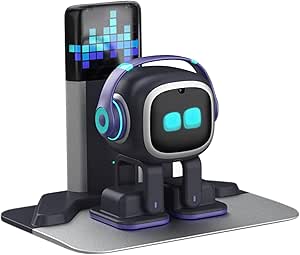 | Best for Playful Autonomy | Brand: EMOPET | Model: EMO GO HOME | Included components: Robot and charging station | VIEW LATEST PRICE | See Our Full Breakdown |
More Details on Our Top Picks
ENERGIZE LAB Eilik Desktop Companion Robot
Eilik’s strength is physical personality: touch and movement trigger expressive animations, reactions, and mini games, so it feels more like a playful desk pet than a chat assistant. It is ready to use out of the box, which makes it simpler to start enjoying than the conversation-focused PanniOhye HH1801YM, whose appeal depends on voice chat and storytelling. Eilik also has a social angle: two or more Eilik robots can interact, giving collectors a reason to add another character. The tradeoff is that its listed experience centers on animated play rather than smart chat or learning support. The optional AI Station and Panxer add experiences but are sold separately, so buyers should be comfortable with the core robot’s feature set on its own.
Pros:- Touch and movement trigger expressive animations and reactions
- Ready to use out of the box
- Includes mini games
- Can interact with other Eilik robots
Cons:- The listed core experience emphasizes animated play rather than chat or learning features
- AI Station and Panxer accessories are sold separately
Best for: People who want an expressive, touch-responsive desk pet that works without setup, especially Eilik collectors.
Not ideal for: Buyers seeking voice-based conversation, learning support, or a broad AI assistant experience.
- Brand:ENERGIZE LAB
- Model:Eilik
- Type:Desktop companion robot
- Interaction:Touch-responsive interactions and movement reactions
- Activities:Expressive animations and mini games
- Setup:Ready to use out of the box
- Multi-robot interaction:Two or more Eilik robots can interact
- Optional accessories:AI Station and Panxer, sold separately
Our verdict“Choose Eilik for ready-to-play personality and touch interactions; pick PanniOhye HH1801YM if voice chat and storytelling matter more.”
PanniOhye HH1801YM Interactive AI Robot Companion
PanniOhye HH1801YM puts conversation first. Voice recognition, smart chat, memory, custom storytelling, and learning support give it a different role from the animation-led ENERGIZE LAB Eilik. Its compact 4.3 by 2.5 by 5.5-inch body and 9.6-ounce weight suit a crowded desk or a small companion to carry around, while the included USB-C cable covers charging basics. The listed age range is 14 and up, making it a fit for teens and adults interested in conversational play. I would weigh the broad claims about memory and learning carefully: the supplied product details do not explain how those features work or what limits they have. Battery life and charging time are also unspecified, so buyers who need predictable all-day use have less to go on than with a simpler, ready-to-play Eilik.
Pros:- Combines voice recognition, smart chat, memory, and storytelling
- Compact dimensions suit a small desk or portable companion use
- USB-C charging cable is included
- Learning support is part of the feature set
Cons:- Battery life and charging time are not specified
- The supplied details do not explain the scope of memory or learning features
Best for: Teens aged 14 and up or adults who want a compact desk companion centered on voice chat and custom storytelling.
Not ideal for: Buyers who need clearly documented battery runtime, charging time, or detailed learning capabilities.
- Brand:PanniOhye
- Model:HH1801YM
- Dimensions:4.3 × 2.5 × 5.5 inches
- Weight:9.6 ounces
- Features:Memory, voice recognition, storytelling, learning helper, and smart chat
- Age range:14+
- Included components:AI robot, manual, and USB-C charging cable
- Number of pieces:1
Our verdict“Pick PanniOhye for compact voice conversation and stories; choose Eilik if expressive touch play matters more than chat.”
Eilik Desktop Companion Robot with Expressive Animations and Touch-Responsive Play
This Eilik listing earns its place through the same easy, animated play that defines the line, with touch-responsive reactions and the ability for multiple Eilik robots to interact. That makes it a stronger match for someone building a small group of desk companions than the PanniOhye HH1801YM, which is described around one-to-one voice chat and storytelling. It is ready to use out of the box, so there is little friction before the animations and reactions begin. The tradeoff is a narrower feature emphasis: the supplied details do not list smart chat or learning support, and the optional AI Station and Panxer cost extra. Buyers comparing it with the other Eilik entries should note that its described core experience is similar; this version makes the most sense when the multi-robot angle is the deciding factor.
Pros:- Touch-responsive reactions and expressive animations
- Ready to use out of the box
- Two or more Eilik robots can interact
Cons:- Smart chat and learning support are not listed in the supplied details
- AI Station and Panxer accessories are sold separately
Best for: Eilik fans who want to pair or collect multiple robots and enjoy their interactions on a desk.
Not ideal for: Buyers choosing between distinct AI capabilities, such as voice chat, learning support, or detailed customization.
- Product type:Desktop companion robot
- Interaction:Touch-responsive reactions
- Animations:Expressive animations
- Setup:Ready to use out of the box
- Multi-robot interaction:Two or more Eilik robots can interact
- Optional accessory:AI Station, sold separately
- Optional accessory:Panxer, sold separately
Our verdict“Choose this Eilik when interaction between multiple robots is the draw; PanniOhye is a better fit for voice-led companionship.”
EMOPET EMO AI Desk Robot Companion with ChatGPT, Voice Commands & Dancing
EMO combines conversational AI with a more active, sensor-driven desk presence. ChatGPT-powered conversation, voice commands, touch and gesture responses, dancing, and app-based games give it broader interaction modes than the animation-focused Eilik. The app also adds achievements and life event tracking, which may appeal to buyers who want a companion with activities beyond quick reactions. Its simulated moods and weather-related illness add character, though they also make the experience more pet-like than a straightforward chat device. The package includes a skateboard and smart light, but this edition is specified without a charging station. That omission matters for buyers who want a dedicated home for the robot between interactions. At a recommended age of 15 and up, it is aimed at older teens and adults rather than very young children.
Pros:- ChatGPT-powered conversation and voice commands
- Touch and gesture sensors support varied interactions
- App includes games, achievements, and life event tracking
- Dancing and simulated moods add character beyond chat
Cons:- This edition does not include a charging station
- App-connected features add complexity compared with ready-to-play Eilik models
Best for: Older teens and adults who want ChatGPT-style conversation, sensor-based play, and app activities in one desk robot.
Not ideal for: Buyers who want a charging station included or prefer a simple, screen-free animated desk pet.
- Brand:EMOPET
- Model:EMO
- Manufacturer:Living AI
- Conversation:Powered by ChatGPT
- Interaction features:Voice commands, touch and gesture sensors, dancing, and app games
- Recommended age:15 years and up
- Included components:Adapter, EMO robot, skateboard, smart light, and user manual
- Edition:Without Charging Station
Our verdict“Choose EMO for a broader mix of AI conversation, sensing, and app play; choose Eilik for simpler touch-triggered animations.”
Eilik DQ (Desert Quester) Desktop Companion Robot
Eilik DQ adds a distinct explorer theme to the familiar Eilik style of touch-based play. Its four pieces of explorer gear, exclusive startup animation, and Antmeow Boss monster-shooting mission give collectors more specific themed content than the standard ENERGIZE LAB Eilik. Like that model, DQ works without setup and can interact with other Eilik characters, so it fits naturally into an existing collection. The main difference is the built-in theme and mission, not a shift toward voice chat or learning features; buyers drawn to those functions may prefer the PanniOhye HH1801YM. DQ’s strongest case is for someone who values its desert-explorer character and included gear. The wider ecosystem can expand play, but additional characters and accessories are sold separately.
Pros:- Includes four pieces of explorer gear
- Exclusive startup animation and Antmeow Boss mission add themed play
- Works out of the box with no setup
- Interacts with other Eilik characters
Cons:- Core interactions remain touch-based rather than voice-chat focused
- Additional characters and accessories are sold separately
Best for: Eilik collectors and gift buyers looking for a themed explorer character with included gear and a dedicated mission.
Not ideal for: Buyers who want voice chat, learning support, or a substantially different interaction style from standard Eilik.
- Character:Desert Quester (DQ)
- Included accessories:4 pieces of explorer gear
- Setup required:No
- Interaction type:Touch-based
- Special feature:Antmeow Boss monster-shooting mission
- Startup animation:Exclusive
- Compatibility:Other Eilik characters, AI Station, and Panxer
- ASIN:B0DBVM5BCY
Our verdict“Choose Eilik DQ for its explorer theme and included mission; opt for standard Eilik if you want the core animated play without a specific character theme.”
OVAQUIXI AI Desktop Robot Companion with Emotion Recognition
What sets the OVAQUIXI apart in a crowded field of desk-bound companions is its willingness to travel. While the Eilik and LOOI are designed to live on one desk, this little cube ships with a magnetic base and adhesive mount, so it works just as well on a car dashboard as beside a monitor. The 70-plus animated expressions on its 2.01-inch screen give it real personality, and the built-in 36 mm speaker lets it double as a music and hands-free call device — something purely decorative companions like the Eilik DQ can’t manage.
The tradeoff is conversational depth. Compared with the AIPI Lite, its chat functions feel secondary to its expressive animations, and the documentation leaves some interactions vaguely explained. Buyers who want a character-rich mascot with flexible placement will be happy; those chasing serious AI dialogue should look elsewhere.
Pros:- More than 70 animated expressions create genuine personality
- Magnetic base plus adhesive mounting works on desks and dashboards
- Doubles as a 3 W speaker for music and hands-free calls
- Gyroscopic tilt response makes interaction feel physical, not just visual
Cons:- Car mount is not included despite dashboard placement being a selling point
- Documentation is vague about some interactions, leaving capabilities unclear
Best for: Commuters and multi-space users who want one companion that moves between desk and car
Not ideal for: Buyers who prioritize deep AI conversation, since chat here plays second fiddle to animations
- Screen size:2.01 inches, 240 x 296 resolution
- Battery:Built-in 1000 mAh lithium-ion
- Speaker:36 mm, 3 W
- Dimensions:64 x 63 x 55 mm
- Weight:165 g
- Interaction:Tap and gyroscopic tilt response
- Mounting:Magnetic base with adhesive
Our verdict“This pick makes the most sense for buyers who want an expressive desk mascot that can tag along in the car, not a serious conversationalist.”
Oiumhru AI Interactive Desktop Robot
The Oiumhru leans into education harder than anything else in this lineup. Where the OVAQUIXI is about personality and the EMO is about play, this robot centers on bilingual conversation, study guidance, riddles, and stories — a genuinely different job description. The seven-color eye lights that sync to music add playfulness without distracting from the learning focus, and its rotatable joints give it poseability that screen-only companions lack.
Two caveats temper the value. Its connected features hinge on Wi-Fi or 2.4 GHz network support, so offline it loses much of its appeal, and the 120-minute battery life is shorter than all-day companions like the plush AI Companion that sip less power. Compared with the AIPI Lite, it trades deep customization for a ready-made, kid-friendly curriculum out of the box.
Pros:- Bilingual conversation plus stories, riddles, and study guidance in one device
- Customizable roles keep the character fresh over time
- Music-synced seven-color eye lights add entertainment value
- USB-C charging with rotatable joints for posing
Cons:- Connected features require Wi-Fi or 2.4 GHz network support
- 120-minute battery life limits longer study or play sessions
Best for: Parents wanting a bilingual study companion that mixes learning content with light play
Not ideal for: Households without reliable 2.4 GHz Wi-Fi, since most features depend on a connection
- Dimensions:3.74 x 2.17 x 5.12 inches
- Battery:3.7 V, 500 mAh rechargeable lithium
- Battery life:Up to 120 minutes
- Charging:USB Type-C
- Connectivity:Wi-Fi and 2.4 GHz network support
- Material:ABS plastic
- Lighting:Seven-color eye lights synced to music
Our verdict“This model is better suited to families who want a language-learning sidekick than buyers chasing an autonomous desk pet.”
AI Companion Robot Plush Interactive Chat Buddy
Most desktop robots are hard plastic; this one you can actually hug. The plush AI Companion trades the articulated joints of the Oiumhru and the expressive screens of the OVAQUIXI for something rarer: a soft, portable body backed by cloud AI. It connects to ChatGPT, DeepSeek, and Gemini for real-time multilingual conversation that improves as it learns your habits — noticeably smarter chat than screen-mascot rivals offer.
The privacy angle deserves attention too: no camera, no GPS, with encrypted app chats, which makes it easier to hand to kids than the camera-equipped Anki Vector. The catch is dependence on 2.4 GHz Wi-Fi — offline, it collapses into a limited set of pre-loaded phrases — and with no onboard storage, everything lives in the cloud. Travelers should plan accordingly.
Pros:- Cloud AI via ChatGPT, DeepSeek, and Gemini gives genuinely capable conversation
- Soft plush body doubles as a comforting desk mascot
- Multilingual support suits bilingual households
- Privacy-first design with no camera or GPS
Cons:- Full functionality requires 2.4 GHz Wi-Fi
- Offline mode is limited to a handful of pre-loaded phrases
Best for: Buyers who want a huggable, kid-safe AI chat companion with serious conversational ability
Not ideal for: Frequent travelers or offline users, since unconnected mode offers only pre-loaded phrases
- Connectivity:2.4 GHz Wi-Fi
- Supported AI models:ChatGPT, DeepSeek, Gemini
- Memory:Cloud memory, no onboard storage
- Design:Soft plush portable robot
- Languages:Multilingual support
- Privacy:No camera or GPS; encrypted app chats
- Warranty:12 months
Our verdict“This option stands out for anyone who values comfort and privacy over screens and gadgetry — as long as reliable Wi-Fi is a given.”
Anki Vector Autonomous AI Robot
Every other robot in this roundup sits still and waits for you. The Anki Vector roams. Its autonomous navigation, facial recognition, and obstacle detection mean it actively explores a desk or shelf, greets you by face, and reacts to its environment — behavior none of the static picks like the LOOI or OVAQUIXI can replicate. That autonomy is exactly why it earned a devoted following, and its HD camera enables interaction based on what it actually sees.
The cost structure is the sticking point. ChatGPT-powered conversation requires an active subscription, and setup demands a 2.4 GHz network — two hurdles the AIPI Lite avoids with its free tier. It also lacks the plush comfort of the AI Companion Robot and the learning curriculum of the Oiumhru. But if the appeal of a robot is that it acts like one, nothing else here comes close.
Pros:- Genuine autonomy — navigates, explores, and reacts without prompts
- Facial recognition makes greetings feel personal
- Expressive animations give it a distinct personality
- Multilingual support plus ChatGPT conversation options
Cons:- ChatGPT features require an active subscription
- Strictly needs a 2.4 GHz Wi-Fi network for setup
Best for: Enthusiasts who want a robot that moves, sees, and initiates interaction on its own
Not ideal for: Buyers avoiding recurring fees, since the smartest conversational features sit behind a subscription
- Connectivity:2.4 GHz Wi-Fi
- Camera:HD camera
- Autonomy:Navigation, obstacle detection, facial recognition
- Language support:Spanish, French, German, Chinese, and more
- AI chat:ChatGPT-powered with active subscription
Our verdict“Compared with static desk companions, Vector is the only pick that truly behaves autonomously — worth it if you accept the subscription reality.”
AIPI Lite AI Robot Companion, Blue
The AIPI Lite is less a pet and more a platform. Its standout capability — custom AI characters with persistent memory and user-supplied knowledge bases — lets you build a companion that actually knows your documents, something neither the Oiumhru nor the plush AI Companion can do. The free tier with 20 AI agents and unlimited conversations makes it more generous out of the box than the subscription-gated Anki Vector.
Two quirks demand attention. The listing omits the battery, USB-C cable, and power adapter, so budget and plan before it arrives, and it refuses public Wi-Fi login networks — home or hotspot only. At 23 grams and barely two inches wide it’s the most portable pick here, but it has no screen animations or physical charm; buyers wanting personality-forward interaction like the OVAQUIXI‘s expressions will find it dry.
Pros:- Custom characters with memory create a genuinely personalized companion
- Upload or paste knowledge sources for context-aware answers
- Free tier includes 20 AI agents with unlimited conversations
- Tiny 23 g footprint fits any desk edge
Cons:- Battery, USB-C cable, and power adapter are not included
- Voice cloning and advanced features require a paid plan
- No support for public Wi-Fi login networks
Best for: Tinkerers and professionals who want a personalized AI assistant built on their own knowledge
Not ideal for: Casual buyers expecting plug-and-play fun, given the missing power accessories and setup demands
- Dimensions:2.18 x 1.87 x 0.3 inches
- Weight:23 g
- Connectivity:Password-protected 2.4 GHz Wi-Fi
- Character system:Custom AI agents with memory and knowledge base
- Free tier:20 AI agents, unlimited conversations
- Material:Plastic
- Included:AIPI Lite robot and manual only
Our verdict“This pick makes the most sense for customization-minded users who see a desk robot as a tool, not a toy — just source your own power gear first.”
Loona Deskmate AI Desktop Companion with 165W GaN Charging
Loona Deskmate suits buyers who want a work assistant and a capable charging hub in one desktop companion. Its context-aware interaction can connect with supported email, calendar, and productivity tools, while processing privacy-sensitive perception on a compatible iPhone. Compared with LOOI, which leans into expressive behavior, games, and visual recognition, Loona is more focused on fitting into a work routine. Its 165W GaN charging, three USB-C ports, USB-A port, and Qi2 charging can reduce desk clutter even when you are not using its AI features. The main tradeoff is a firm platform requirement: you need an iPhone 12 or later running iOS 16 or higher, and it is not included. That makes this a poor fit for Android users or anyone seeking a self-contained robot.
Pros:- Context-aware interaction supports work reminders without a wake word
- Connects with supported email, calendar, and productivity tools
- 165W GaN charging adds three USB-C and one USB-A port
- 15W Qi2 wireless charging and aluminum construction suit a permanent desk setup
Cons:- Requires an iPhone 12 or later with iOS 16 or higher
- The required iPhone is sold separately
- Its work-focused approach offers less emphasis on games and autonomous play than LOOI or EMO
Best for: iPhone users who want calendar and productivity connections alongside a multi-device charging hub
Not ideal for: Android users and buyers who want a companion robot that works without a required phone
- Material:Aluminum
- Color:Obsidian Black
- Wired charging:165W GaN
- Ports:3 USB-C, 1 USB-A
- Wireless charging:15W Qi2
- Dimensions:4.45 x 4.17 x 4.45 inches
- Weight:0.88 kg
- Compatibility:iPhone 12 or later with iOS 16 or higher
Our verdict“Choose Loona Deskmate if you use a compatible iPhone and want work-aware assistance with substantial desk charging built in.”
LOOI AI Desktop Companion Robot with Voice Interaction, Visual Recognition, Memory, and 10W Wireless Charging
LOOI is the pick for someone who wants a desktop robot to react to them, not just answer a voice prompt. English voice conversations, face tracking, visual recognition, gesture and facial-cue responses, and short- and long-term memory give it a more socially expressive role than Loona Deskmate, which is built around work connections and charging. App-updated extras such as reminders, weather, games, and a standby clock add ways to use it between conversations. The tradeoff is that its many behaviors may feel unpredictable to buyers who prefer a quiet, utilitarian desk device. Language support is English only, and wireless charging depends on a separate adapter rated at 9V/2A or higher. Choose LOOI for interaction and personality; skip it if predictable routines or multilingual use matter more.
Pros:- Combines voice conversation with visual recognition and gesture responses
- Short- and long-term memory features support a more personalized interaction
- Face-tracking camera and expressive animations add visible responses
- Reminders, weather, games, and standby clock broaden everyday use
Cons:- Supports English only
- Wireless charging requires a separate 9V/2A-or-higher adapter
- Autonomous behavior may be unpredictable
Best for: English-speaking buyers who want a responsive desk companion with face tracking, memory, and casual features
Not ideal for: Multilingual households or people who want restrained behavior and wireless charging without checking adapter requirements
- Color:Space Black
- Voice interaction:ChatGPT and Gemini
- Language support:English only
- Wireless charging:10W
- Power adapter requirement:9V/2A or higher
- Camera:Face-tracking
- Features:Reminders, weather, standby clock, games, visual recognition, and memory
Our verdict“Pick LOOI if expressive, memory-enabled interaction matters more to you than multilingual support or predictable behavior.”
umissfun Emotional AI Companion Device – Desktop Robot with Voice Understanding, Personality Design, and Long-Term Memory (Gray)
The umissfun Emotional AI Companion is aimed at buyers who want a desktop presence centered on conversation and familiar media. Its 8-inch HD display and stereo speakers give photos and voice messages from loved ones more room than the compact screen and expressive face of LOOI. Long-term conversational memory and personality design are intended to make exchanges feel more tailored over time, while Chinese, English, and Japanese support suits multilingual homes better than LOOI’s English-only setup. Privacy controls are part of the offer, though buyers should check how those controls work for their own needs. This is the most screen-centered option in this group, so it takes up more space and may feel less like a small, animated desk robot. Choose it for shared media and conversation; skip it if you want games or a compact footprint.
Pros:- 8-inch HD screen gives photos and messages a prominent place
- Stereo speakers support voice message playback
- Supports Chinese, English, and Japanese
- Long-term memory and personality design are aimed at personalized conversation
Cons:- The larger screen-centered format may take more desk space than LOOI or ciciglow
- Its emotional companionship focus may not suit buyers seeking mainly practical desk functions
- The provided product details do not specify screen resolution or battery runtime
Best for: Families seeking a multilingual desktop device for conversations, photos, and voice messages from loved ones
Not ideal for: Buyers wanting a compact animated robot, practical work tools, or a clearly specified small-desk footprint
- Screen:8-inch HD display
- Audio:Stereo speakers
- Languages supported:Chinese, English, and Japanese
- Weight:4.02 pounds
- Package dimensions:13.27 x 7.6 x 6.18 inches
- Color:Gray
- Manufacturer:SmartApe Tech Limited
Our verdict“Choose umissfun if a large shared display and multilingual companionship matter more than compact robot behavior.”
ciciglow AI Desktop Robot Companion with Voice Chat, Yellow
ciciglow is a straightforward choice for buyers who want voice chat in multiple languages and the freedom to move a robot around without keeping it plugged in. Its support for 37 languages gives it a broader stated language range than LOOI or Loona Deskmate, while its built-in 1000 mAh battery is listed for up to 200 minutes of use. Expressive LED eyes and motivational quotes give it a lighter, simpler personality than EMO, which adds games, touch responses, and automatic charging. That simplicity also means fewer detailed interaction features are described here; the product data does not list camera recognition or memory. Setup requires QR scanning and registration, and it needs 2.4 GHz Wi-Fi for connected use. Pick ciciglow for basic multilingual chat, not a feature-rich autonomous companion.
Pros:- Supports voice-activated conversation and answers
- 37-language support exceeds the stated language range of LOOI and Loona Deskmate
- Expressive LED eyes respond during conversations
- Built-in battery provides up to 200 minutes of use
Cons:- Requires a 2.4 GHz Wi-Fi connection
- Setup requires scanning a QR code and registering
- Listed runtime is limited to up to 200 minutes per charge
Best for: Multilingual users who want a cordless voice-chat robot for short sessions at different spots around the home
Not ideal for: Buyers who need long sessions between charges, advanced sensing, memory, or setup without account registration
- Type:AI chat robot
- Color:Yellow
- Material:ABS
- Battery capacity:1000 mAh
- Usage time:Up to 200 minutes
- Charging time:120 minutes
- Language support:37 languages
- Wi-Fi requirement:2.4 GHz
Our verdict“Choose ciciglow for portable multilingual voice chat if a short battery runtime and QR-based setup fit your routine.”
EMOPET EMO Interactive Desk Robot with Charging Station
EMO makes the most sense for buyers who want a small desk robot to move, react, and play. Voice commands and network-connected ChatGPT conversations cover talking, while dancing, app-based games, and responses to touch and movement make it more activity-focused than Loona Deskmate, whose strengths are work integrations and charging. Its automatic return to the included charging station is a practical advantage for someone who does not want to manage every recharge manually. That mobility and play come with dependencies: complex conversations need a network connection, and the app is required to adjust volume. The supplied dimensions describe the charging station package footprint rather than a clear robot-only size, so desk fit may need checking. Pick EMO for interactive play and self-docking; skip it for offline conversation or app-free controls.
Pros:- Voice commands and network-connected ChatGPT conversations support spoken interaction
- Dancing and app-based games make it more play-oriented than Loona Deskmate
- Responds to touch and movement
- Automatically locates its included charging station
Cons:- Complex conversations require a network connection
- The app is needed to adjust volume
- Provided dimensions do not distinguish the robot from its charging station
Best for: People who want an animated desk robot for games, dancing, touch reactions, and automatic recharging
Not ideal for: Buyers who need offline AI conversations, app-free volume controls, or clear robot-only dimensions before choosing
- Brand:EMOPET
- Model:EMO GO HOME
- Included components:Robot and charging station
- Connectivity:Network connection and EMO app
- Features:Voice commands, ChatGPT-powered conversations, dancing, interactive games, and automatic charging
- Dimensions:11 x 8.5 x 2.95 inches
- Recommended age:15 years and up
Our verdict“Choose EMO if you want a playful robot that returns to its charger, and can accept network and app dependence.”

How We Picked
I ranked these desktop companion robots by how clearly their design supports a distinct desk use: spontaneous play, voice conversation, autonomous behavior, or an added practical function. The top position goes to Eilik because touch-led expression offers a straightforward companion experience; EMOPET EMO follows for buyers who prefer voice interaction, while LOOI earns a distinct place for combining companionship with charging. I weighed usability, interaction variety, desk footprint, setup expectations, and whether a feature changes the buyer’s day-to-day experience.
I also considered build and maintenance, the likely role of apps or network access, and how well each product’s format fits its stated purpose. Screen-based AI devices and products advertising memory or recognition may suit buyers seeking conversation, but those labels alone do not establish consistency or privacy practices. Several listings provide limited detail, so I avoid treating unverified claims as proven performance. The order reflects the clearest fit and most legible tradeoffs for a desktop companion, not a promise that one interaction style suits everyone.
Factors to Consider When Choosing Best Desktop Companion Robots
Before choosing, decide what you want the robot to do during an ordinary workday. A companion that invites quick interaction has different demands from one expected to hold conversations or roam around a desk. These broader checks can help you avoid buying a feature list that does not fit your habits.
Choose an interaction style you will actually use
Touch, voice, movement, and screen-based conversation each ask for a different kind of attention. Touch-led play can work well for short breaks because it needs little explanation, while voice interaction is more useful when you want to talk without picking up a device. A robot that moves around may be entertaining, but it needs clear desk space and a setup that supports movement. Think about whether you want quiet background presence or an activity that interrupts your focus. A common mistake is choosing the longest feature list instead of the interaction you are likely to repeat.
Check what works without an internet connection
AI conversation, cloud knowledge, and app-linked features may depend on a network, account, or service that can change over time. Before buying, look for a clear explanation of which functions remain available offline and what happens if the service is unavailable. This matters most if you expect the robot to be part of a daily routine rather than an occasional novelty. Ask whether voice commands are processed locally or sent to an external service, and review the maker’s privacy information. A device can still be enjoyable with limited connectivity, but only if its offline behavior matches your expectations.
Treat memory and recognition as claims to verify
Terms such as long-term memory and emotion recognition can sound more dependable than the actual experience. Look for concrete examples of what the robot remembers, how you can edit or delete that information, and whether recognition works in ordinary room conditions. Avoid assuming that a screen, camera, or microphone means the robot understands context reliably. If several people share the desk or room, consider whether the device can distinguish users and how it handles their data. Prioritize clear controls and predictable behavior over an impressive-sounding AI label.
Measure the desk and account for movement
A robot’s footprint includes more than its body: charging docks, cables, movement paths, and room for interaction all take space. Compact models may suit a crowded workstation, while mobile designs need a stable surface without clutter near edges. Check how the product charges and whether its dock can remain accessible without becoming a permanent obstacle. If the robot will sit beside a keyboard or monitor, consider whether animations, sound, or movement could distract you. Choosing for the real desk layout prevents a charming device from becoming something you move out of the way.
Separate companion features from useful extras
Charging, a plush exterior, or a dedicated screen can make a robot fit a particular routine, but those additions do not automatically improve its companion behavior. Decide whether an extra solves a recurring problem or simply adds complexity. A charging feature may be worthwhile when it replaces a dock you already need; otherwise, a simpler expressive robot may be easier to place and use. Plush models can feel more approachable but may not offer the same desk-friendly controls as a rigid device. Compare the core interaction first, then count the extras that matter to you.
Plan for upkeep and long-term support
Moving parts, screens, batteries, software, and companion apps each create different maintenance needs. Check how updates are delivered, whether replacement parts or support information are available, and whether the robot remains usable if its app is retired. A model with more connected features can offer more variety but may also depend on services outside your control. For a gift, simpler setup and clear controls can matter more than advanced capabilities. The best fit is one whose upkeep feels reasonable for the amount of interaction you expect.
Frequently Asked Questions
Which desktop companion robot is the easiest to interact with during a work break?
A touch-responsive robot such as ENERGIZE LAB Eilik is a straightforward choice when you want a quick interaction without starting a conversation or opening an app. Voice-oriented options such as EMOPET EMO make more sense if speaking to the device is part of the appeal. Consider the noise level and whether the robot can be used quietly in a shared workspace. The right choice is the one that fits the length and style of your breaks.
Do AI desktop robots need Wi-Fi to work?
It depends on the model and the feature. Basic animations or local responses may work without a network, while cloud-based chat, knowledge features, or app controls may require connectivity. Check the product documentation for a feature-by-feature explanation rather than assuming the whole robot works offline because it powers on. If you need dependable use during internet outages, prioritize a clearly documented offline mode.
Is a robot with memory or emotion recognition a better companion?
Those features may make an interaction feel more personalized, but their value depends on what the robot actually records and how consistently it responds. Look for details about data storage, deletion controls, and whether the processing happens locally or through a service. If you mainly want playful reactions, a simpler touch-led robot may be more predictable. Choose memory or recognition only when the specific behavior is useful to you and its privacy terms are clear.
Should I choose a desktop robot that also charges my phone?
A combined device like LOOI can make sense if wireless charging would already earn space on your desk. The practical benefit depends on compatibility with your phone, charging placement, and whether the robot remains easy to interact with while charging. If charging is not a regular need, a dedicated companion may offer a simpler setup and more focused interaction. Check the charging requirements before treating the extra function as a deciding advantage.
What should I prioritize when buying a desktop companion robot as a gift?
Start with the recipient’s comfort with voice assistants, apps, and connected devices. A simple expressive robot can be easier to enjoy without setup, while an AI chat model may suit someone who likes experimenting with voice features. Check the recipient’s available desk space and whether they share a quiet workspace where sounds could bother others. Clear setup instructions, privacy controls, and ongoing support are useful signals for a gift that should remain enjoyable after the first day.
Conclusion
For the best overall fit, I’d choose ENERGIZE LAB Eilik for expressive, touch-led interaction that stays focused on companionship. EMOPET EMO is my pick for buyers who specifically want voice features, while LOOI suits someone who will use its charging function as well as its companion features. For a beginner, Eilik’s direct interaction style is the easiest starting point; for a plush, chat-oriented format, the AI Companion Robot Plush is a more specialized option. I’d treat the listings with broad AI, memory, or recognition claims as choices for curious buyers willing to verify connectivity and privacy details before settling on a daily desk companion.
Fall Picks
fall essentials
As an affiliate, we earn on qualifying purchases.