The Sabrent Thunderbolt 4 KVM Switch positions itself as a high-end solution for users who need to seamlessly manage two computers sharing a single set of peripherals and displays. Its standout feature is the ability to support 8K@60Hz display output, catering to professionals working with ultra-high-resolution content. The switch also offers fast data transfer via Thunderbolt 4, multiple USB ports, and a built-in power supply for charging devices. Its biggest strength lies in its capacity to simplify complex workflows with high performance, but the need for an external power supply and its primary focus on Windows and macOS devices are notable limitations. For users heavily invested in a multi-device setup requiring 8K resolution, this switch offers compelling value. For others with less demanding needs or different OS environments, alternatives may be more appropriate. Overall, it makes sense for those prioritizing top-tier display quality and fast data transfer in a durable form factor.

Get the latest gadgets delivered free with Prime
- Fast, free delivery on millions of items
- Prime Video, Amazon Music and more included
- Member-only deals all year
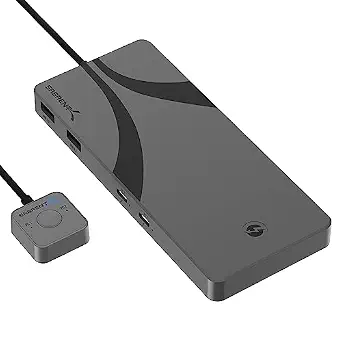
Sabrent Thunderbolt 4 KVM Switch
- ✔ Transfer Speed (Thunderbolt): 40Gbps
- ✔ Display Output: Up to 8K@60Hz or 5K@60Hz
- ✔ USB Ports: 4 USB Type-A, USB 3.2 Gen 2×1
Why This Product Stands Out
The Sabrent Thunderbolt 4 KVM Switch stands out primarily due to its ability to support 8K@60Hz resolution. In the realm of KVM switches, this level of display support is uncommon, especially combined with the high data transfer rate of 40Gbps. Many competing models focus on HDMI or DisplayPort connections, but few integrate Thunderbolt 4 with this resolution capacity, making it particularly appealing for high-end content creators and professionals who need uncompromised visual fidelity. Its aluminum chassis not only offers durability but also aligns with the aesthetic expectations of professional-grade equipment. While some might see the need for an external power supply as a drawback, it ensures stable operation and charging capacity, which is critical during intensive workflows. Overall, this product sets itself apart by pairing top-tier display support with fast, versatile peripheral connectivity, an essential combination for demanding users.
Key Features and What They Mean
The support for 8K@60Hz output makes this switch a go-to for professionals who need the absolute highest display fidelity, such as high-resolution video editors or digital artists. This feature guarantees crisp detail and color accuracy, which less capable switches might compromise or support only at lower resolutions.
The Thunderbolt 4 transfer speed of 40Gbps translates into rapid data movement, reducing wait times when transferring large files or streaming high-bandwidth content. This is especially valuable in workflows where time savings directly impact productivity.
Multiple USB ports (4 USB Type-A, USB 3.2 Gen 2×1) support fast peripheral sharing — from external drives to input devices — with minimal latency, making it versatile for various hardware setups. This flexibility is crucial for users who rely on multiple peripherals simultaneously.
The power delivery of up to 60W ensures that laptops and compatible devices stay charged during operation, simplifying desk setups and reducing the need for additional chargers. This feature is optional but highly practical for busy workspaces.
The durable aluminum construction aligns with expectations for high-performance equipment, providing both protection and heat dissipation, which prolongs product lifespan and stability during continuous use.
Performance and Real-World Use
Designed with high-end users in mind, the Sabrent Thunderbolt 4 KVM Switch promises a seamless experience with minimal lag or compatibility issues when used within its supported ecosystems. Its setup process involves connecting the Thunderbolt and USB cables to the respective computers, then configuring display and peripheral preferences — a straightforward process for those familiar with such hardware. The switch’s hot-swap capability supports quick device switching, which is crucial in multitasking environments.
In daily operation, the switch maintains stable performance, with its aluminum chassis providing robust protection against knocks and heat buildup. The inclusion of a dedicated power adapter ensures consistent operation, even under heavy workloads. Maintenance involves occasional cleaning of ports and ensuring firmware updates if applicable, but no extensive upkeep is necessary. Durability is a key selling point, with the switch designed to withstand rigorous use in professional or demanding settings.
While the device’s feature set is impressive, potential users should be aware that compatibility might be limited outside of Windows and macOS, and the external power dependency could be a minor inconvenience. Nonetheless, for its target audience, the combination of high resolution, fast data transfer, and robust construction makes it a reliable and future-proof choice.
Who Should Buy This
This switch is ideal for professional content creators, high-end workstation users, or those managing multiple powerful computers who require high-resolution display output and fast peripheral data transfer. It suits users with setups that demand 8K display fidelity, particularly in video editing, 3D rendering, or digital art environments. If your workflow benefits from quick device switching and reliable charging—especially in a fixed workspace—this product aligns well with those needs.
Who Should Skip This
Individuals seeking budget-friendly solutions or using lower-resolution displays will find this switch less justified, as many cheaper options support only 4K or less. Users with non-Windows/macos devices or those requiring more than two computers might need alternative solutions, since this model is primarily tailored for two-device setups within its supported ecosystems. Additionally, those who prefer bus-powered switches without external power supplies may view this as an inconvenience.
Value for Money
Given its premium price point and specialized feature set, this switch offers strong value for high-end professionals who need 8K support, fast data transfer, and reliable charging. Its high resolution support ensures that users can work with the most detailed visuals, which is vital for creative fields demanding precision. While the price is on the higher side, the high build quality, top-tier display capabilities, and versatile connectivity make it a worthwhile investment for those who rely on high performance to meet their productivity or creative goals. It is a compelling choice for demanding users who prioritize quality and reliability over cost, providing a clear return on investment through enhanced efficiency and output. For more casual or budget-conscious users, however, more affordable options might suffice, but this product excels in its intended high-end segment.
Sabrent Thunderbolt 4 KVM Switch
The Sabrent Thunderbolt 4 KVM Switch stands out primarily due to its ability to support 8K@60Hz resolution . In the realm of KVM switches, this level of display support is uncommon, especially combined with the high data transfer rate of 40Gbps.
Pros:
- Supports high-resolution displays up to <strong>8K@60Hz</strong>, ideal for professional color grading, 3D rendering, or high-end video editing.
- Multiple USB ports (4 USB Type-A, USB 3.2 Gen 2×1) facilitate fast peripheral sharing without bottlenecks.
- Durable <strong>aluminum construction</strong> ensures longevity and heat dissipation, suitable for demanding environments.
- Includes a <strong>power adapter</strong> capable of charging laptops up to 60W, reducing cable clutter and power management complexity.
- High transfer speeds of <strong>40Gbps</strong> via Thunderbolt 4 support large data transfers and quick device responsiveness.
Cons:
- Primarily designed for <strong>Windows and macOS</strong>; compatibility with other OS or specialized devices may be limited.
- Requires an <strong>external power supply</strong>, which can be less convenient compared to bus-powered solutions.
- Price is not specified but is likely positioned in the <strong>premium segment</strong>, which might deter budget-conscious buyers.
- Limited to two computers; for multi-device environments, other switch configurations may be required.
Best for: Professionals working with high-resolution displays, such as video editors, 3D artists, or high-end workstation users who need to switch between two powerful computers efficiently.
Not ideal for: Users with a limited budget, casual users, or those with devices outside Windows and macOS ecosystems, as compatibility may be limited and the price may be hard to justify.
Bottom line: The Sabrent Thunderbolt 4 KVM Switch justifies its premium cost for users who prioritize 8K display support and fast data transfer .
Frequently Asked Questions
Can I use this KVM switch with Linux or other operating systems?
While primarily designed for Windows and macOS, some Linux configurations may work, but compatibility isn’t guaranteed. Check your OS support before purchasing.Is external power supply necessary for basic operation?
Yes, the switch requires an external 24V/5A power adapter to operate all features, including charging connected devices.Does it support multiple monitors or just a single high-resolution display?
This switch supports a single output up to 8K@60Hz, making it suitable for one high-resolution monitor rather than multiple displays.Can I connect peripherals other than USB devices?
The switch provides four USB Type-A ports and Thunderbolt connection, but additional peripherals like audio or Ethernet would require separate adapters or switches.Is the setup process complex?
Setup is straightforward for users familiar with KVM or Thunderbolt devices, involving connecting cables and configuring display settings, with minimal configuration needed.Final Thoughts
The Sabrent Thunderbolt 4 KVM Switch justifies its premium cost for users who prioritize 8K display support and fast data transfer. It’s well-suited for demanding professional environments where visual fidelity and device responsiveness are critical. However, those with simpler setups, limited budgets, or different OS requirements should consider other options. If you need a durable, high-performance switch for two powerful computers and can accommodate its external power requirement, this device makes a worthwhile investment.
Halloween Picks
halloween
As an affiliate, we earn on qualifying purchases.