To get the most from your flight sim switch panels, you need a good workflow. Organize your controls based on real cockpit layouts and assign functions thoughtfully to physical buttons. Position the panels for easy reach and natural use, reducing your reaction times and fatigue. This setup streamlines your actions, making the experience more realistic and immersive. Keep these tips in mind, and you’ll see just how much smoother your flights can become. The key to success is closer than you think.
Key Takeaways
- A well-structured workflow ensures quick access and efficient use of switch panels during flight operations.
- Proper ergonomic placement minimizes physical effort and reaction time, maximizing panel utility.
- Customizing controls to match cockpit workflows enhances realism and operational clarity.
- Seamless integration with flight systems prevents hardware clutter and streamlines cockpit management.
- A logical setup reduces confusion, allowing pilots to focus on navigation and decision-making.
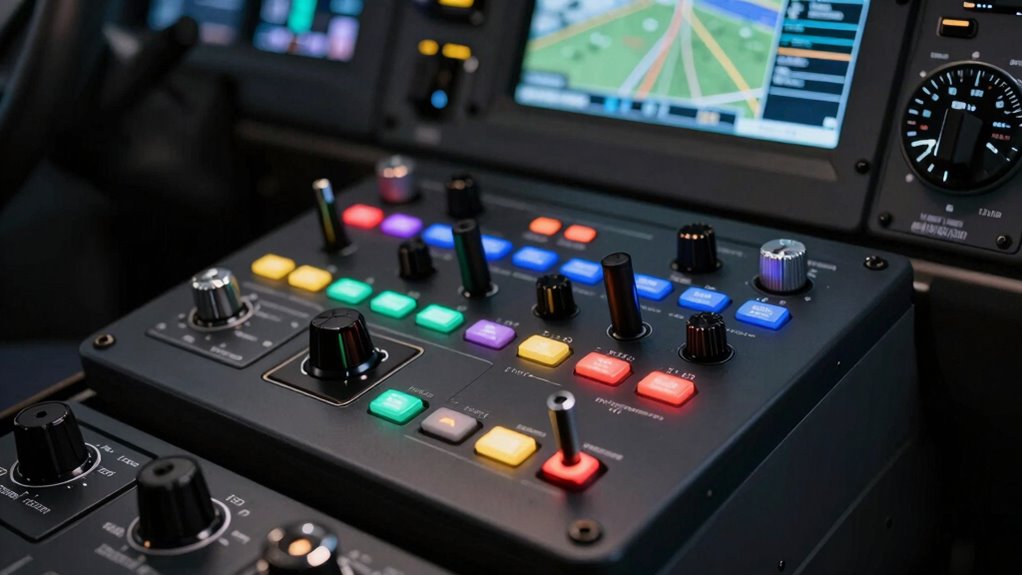
Flight sim switch panels can considerably enhance your flying experience, but only if you have a solid workflow in place. These panels add realism and convenience, but their true potential is accessed through thoughtful integration into your setup. To maximize their benefits, you need to focus on hardware customization. Tailoring the switch panels to fit your specific needs—whether that means assigning controls for landing gear, flaps, or autopilot functions—makes your simulation more intuitive. Customization allows you to configure physical buttons to mirror real aircraft controls, reducing the time spent searching through menus and increasing immersion. When you invest in hardware customization, you’re not just adding gadgets; you’re creating a seamless interface that works naturally with your flying style.
Customizing switch panels ensures a more intuitive, immersive flight simulation experience tailored to your needs.
Equally important is the ergonomic design of your cockpit arrangement. If your switch panels are awkwardly positioned or uncomfortable to reach, your workflow suffers. You want your controls to be within easy reach, allowing you to operate them instinctively without breaking immersion or causing fatigue. Proper placement reduces reaction times and helps you maintain focus during complex procedures. Take the time to arrange your hardware thoughtfully, ensuring that switches are logically grouped and positioned at a comfortable height. This way, you can execute commands quickly and confidently, mimicking real-world cockpit workflows. Additionally, understanding the importance of hardware customization ensures your setup aligns perfectly with your preferences and aircraft models. Incorporating ergonomic principles into your setup can significantly improve your overall experience and efficiency.
A well-designed workspace combines hardware customization with ergonomic principles, creating an environment where your switch panels feel like natural extensions of your aircraft. When your controls are customized to match your specific aircraft models and ergonomic considerations, your interaction becomes more fluid. You won’t need to hunt for buttons or awkwardly stretch to reach controls, which keeps your attention on flying rather than managing your hardware. This reduces frustration and allows you to concentrate on navigation, communication, and decision-making—key elements of a realistic flight simulation. Recognizing the importance of workflow optimization can help you refine your setup further for smoother operation. Moreover, a thoughtfully organized setup can help prevent hardware fatigue and improve your overall performance during long flights. Incorporating ergonomic design principles can further enhance comfort and reduce physical strain over extended sessions. Paying attention to hardware ergonomics can also enhance your setup’s overall comfort and usability.
In the end, a good workflow isn’t just about having the right hardware; it’s about integrating that hardware into your setup in a way that feels natural and efficient. Hardware customization and ergonomic design are the pillars of this process. They guarantee your switch panels enhance realism and usability, transforming your flight simulation from a simple game into a convincing and immersive experience. Without a clear workflow that considers these elements, even the best switch panels won’t deliver their full potential. But with careful planning, they become powerful tools that elevate your flying to new heights.
As an affiliate, we earn on qualifying purchases.
Frequently Asked Questions
Can Switch Panels Improve Immersion in Flight Simulation?
Yes, switch panels can considerably boost your immersion in flight simulation. They give you quick access to controls, making your experience feel more realistic. When combined with virtual reality, switch panels enhance the tactile feel, deepening immersion. Auditory feedback from switches also adds to the realism, helping you stay engaged. Overall, integrating switch panels creates a more authentic environment, making your flight sim sessions more immersive and enjoyable.
What Are the Best Switch Panels for Beginners?
As a beginner, you should consider the Logitech Switch Panel or the Saitek Switch Panel; both are user-friendly and compatible with popular flight sim hardware. They fit various hardware setups and are budget-friendly, making them great choices to enhance your experience. Keep in mind your specific hardware compatibility and budget to select a switch panel that seamlessly integrates into your setup, boosting immersion without overwhelming your initial investment.
Do Switch Panels Require Custom Programming?
Switch panels generally don’t require complex custom programming, especially for beginners. They often come pre-configured for common functions, making hardware customization straightforward. However, if you want to tailor buttons to specific controls or add advanced features, some programming complexity may arise. Luckily, many panels have user-friendly software options that simplify this process, so you can customize your setup without needing advanced coding skills.
How Do Switch Panels Compare to Touchscreen Controls?
Think of switch panels as the sturdy steering wheel of your cockpit, offering tactile feedback and quick access, unlike touchscreen controls which are more like a delicate touchscreen map. Switch panels excel in hardware aesthetics and durability, but come at a higher cost. Touchscreens are more affordable and versatile but lack the physical feel, making them less ideal for realistic, hands-on simulation. Your choice depends on your budget and desire for realism.
Are Switch Panels Compatible With All Flight Simulators?
Switch panels are generally compatible with many flight simulators, but hardware compatibility varies depending on the brand and model. You should check the manufacturer’s specifications to guarantee seamless software integration with your simulator. Most panels connect via USB, making setup straightforward, but some may require additional drivers or configuration. Before purchasing, verify that the switch panel supports your specific simulator version to avoid compatibility issues.
Conclusion
To get the most out of your flight sim switch panels, you need a solid workflow. Without one, they’re just buttons gathering dust. With a good workflow, they streamline your controls, enhance your immersion, and boost your confidence. Without a plan, they’re clutter; with a plan, they’re clarity. Remember, the panels are only as useful as the workflow you build around them—so invest in both, and watch your flying skills take off.