
TL;DR
Prebuilt AI workstations now often cost less and save time thanks to bulk buying and validation. Building offers control and upgrade flexibility, but involves more effort. Your choice depends on your workflow and priorities.
Imagine turning on your AI workstation and jumping straight into training your model. No fuss, no tinkering. That’s the promise of a prebuilt system. But if you crave control, customization, or just love the process, building your own might seem tempting.
The real question today isn’t just about saving a few bucks — it’s about what works best for your workflow, budget, and how much time you want to spend tuning. With component shortages and rising prices, the classic ‘build is cheaper’ rule no longer always holds. Now, it’s a more nuanced decision. Let’s explore the pros, cons, and hidden tradeoffs of each choice, so you can make the right call for your AI projects.
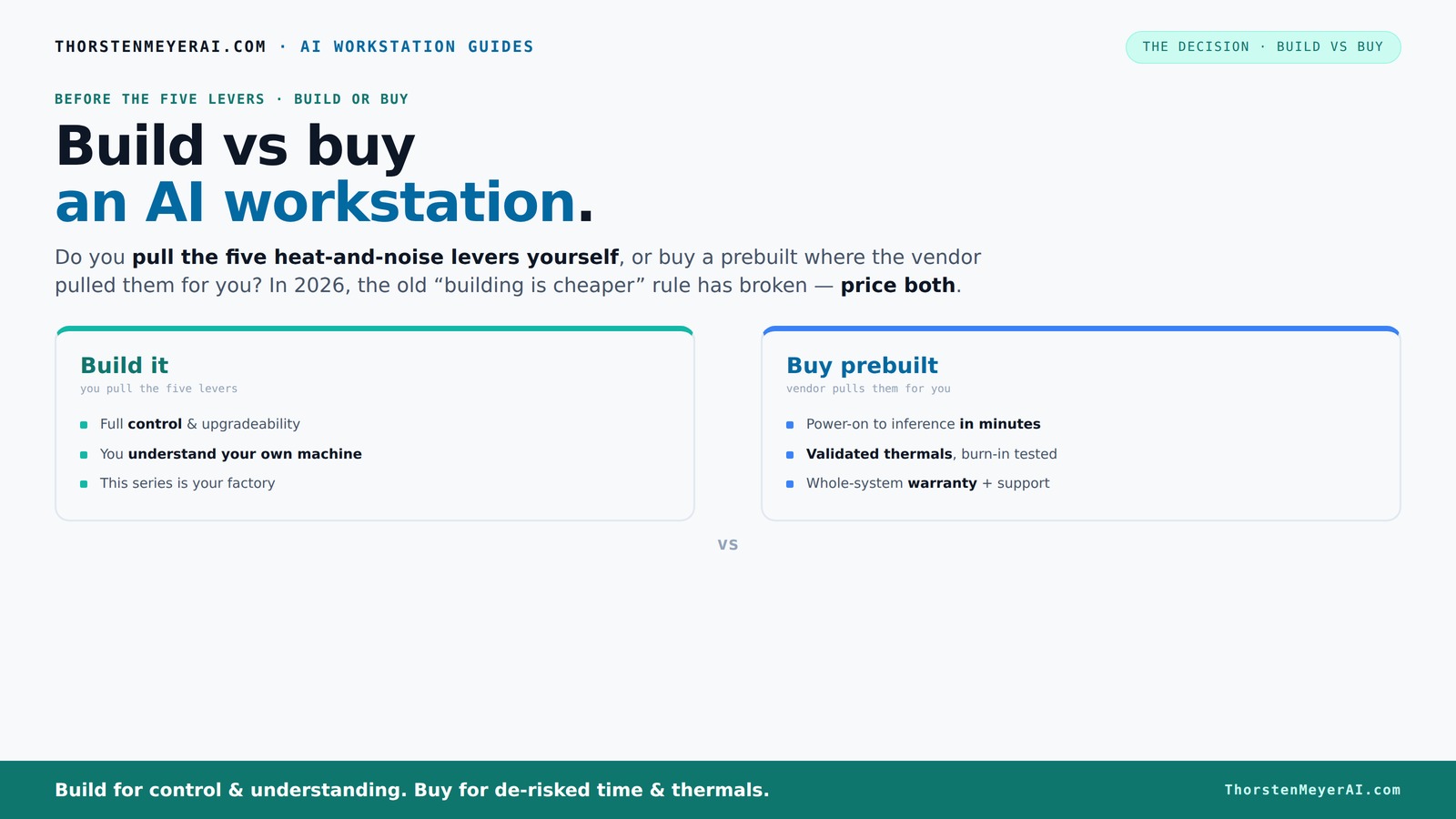
Build vs buy
an AI workstation.
The real question behind this whole series: do you pull the five heat-and-noise levers yourself, or buy a prebuilt where the vendor pulled them for you? And in 2026, the old “building is cheaper” rule has broken. Match your situation in Part 3.
Key Takeaways
- Component shortages in 2026 make prebuilt AI workstations often cost-competitive or cheaper than DIY builds.
- Prebuilts save time, validate thermals, and include support, making them ideal for quick deployment and reliability.
- Building your own offers maximum control, upgradeability, and customization, but requires time and technical skill.
- Evaluate your workflow, budget, and support needs carefully — the best choice depends on your specific situation.
- Stay aware of proprietary parts in some OEM prebuilts, which can limit future upgrades or repairs.

WIWB Gaming PC Desktop Core I9-14900HX, RTX 5060 Ti 8G, 1TB NVME SSD
- Powerful Processor: Intel Core i9-14900HX with 24 Cores
- High-Performance Graphics: GeForce RTX 5060 Ti 8GB GDDR7
- Fast Memory & Storage: 16GB DDR5 RAM with 1TB NVMe SSD
As an affiliate, we earn on qualifying purchases.
As an affiliate, we earn on qualifying purchases.
Why the old 'build is cheaper' rule no longer applies in 2026
For years, building your own AI workstation was a no-brainer for saving money. But in 2026, that’s changed. The reason: component shortages and price spikes. DDR5 RAM, GPUs, SSDs — all have become more expensive amid supply chain issues.
For example, a DIY build with a high-end GPU used to cost around $1,000. Today, the same setup easily pushes past $1,250 — sometimes more. Meanwhile, prebuilt manufacturers bulk-buy parts, locking in lower prices and offering systems at prices that are tough to beat.
This shift matters because it alters the fundamental tradeoff between cost and control. Previously, DIY was almost always cheaper, which justified the extra effort and time. Now, the increased component costs mean that building your own might not save as much money, or could even be more expensive. This forces you to consider whether the value of customization and upgradeability outweighs the potential cost savings. It also emphasizes the importance of comparing current market prices carefully, rather than relying on traditional assumptions. The implication: your decision now must weigh not just initial cost, but also factors like time investment, future upgrades, and risk of thermal or compatibility issues.
The heat and noise lever: who pulls the levers?
Building or buying your AI workstation boils down to who manages the heat, noise, and thermals. These factors are critical in high-power setups because they directly impact performance, reliability, and longevity. Poor thermal management can cause thermal throttling, system crashes, or hardware degradation, which could significantly disrupt your workflow and increase costs over time. For more on optimizing your system, see our guide on thermal management techniques.
Buy a prebuilt → the vendor handles these thermals. Companies like Lambda or Puget Systems invest heavily in validating thermals, running burn-in tests, and tuning fan curves to optimize cooling and noise levels. They often include advanced cooling solutions such as water-cooling or customized airflow paths to ensure the system remains cool under sustained AI workloads. This not only prevents thermal throttling but also extends hardware lifespan, providing peace of mind and consistent performance. Paying for this expertise means you get a system that’s ready to handle intense workloads with minimal fuss, reducing downtime and maintenance costs.
Build it yourself → you are responsible for these levers. You must select components like quiet GPUs, appropriate cases, and cooling solutions. You’ll need to tune fan curves, optimize airflow, and sometimes undervolt components to reduce heat and noise. This process is rewarding because it grants you maximum control, but it requires knowledge, patience, and ongoing adjustments. Missteps in thermal management can lead to overheating, system instability, or excessive noise, which may compromise your workflow or damage hardware. Therefore, understanding the tradeoffs between noise, thermal performance, and energy consumption is crucial, especially when working with high-power GPUs and CPUs in demanding AI tasks. The choice impacts not only your system’s performance but also your long-term maintenance and satisfaction.
When does a prebuilt make sense? 5 clear signs
Prebuilt AI workstations offer tangible advantages when time and reliability are critical. Here are five clear signs they’re your best choice, because they directly address common pain points and operational needs: If you’re considering a prebuilt, check out our comprehensive review at Toksick Magazine.
- You need to start training yesterday: Systems arrive fully assembled, with software preinstalled and tested, eliminating delays caused by assembly or troubleshooting. This is vital when project deadlines are tight or immediate deployment is required, ensuring your AI projects stay on schedule.
- You value support and warranty: Vendors validate thermals, handle troubleshooting, and cover hardware failures. This reduces your risk of unexpected downtime and allows you to focus on your work rather than hardware issues. For organizations or individuals lacking in-house technical expertise, this support can be a game-changer, providing peace of mind and faster problem resolution.
- You’re pushing multi-GPU configurations: These setups are complex to assemble and tune correctly. Prebuilts are tested for sustained high loads and thermal stability, ensuring your multi-GPU systems perform reliably without you having to troubleshoot hardware conflicts or thermal issues.
- You want to avoid compatibility headaches: Prebuilts come with validated parts and preconfigured BIOS and drivers, reducing the risk of incompatibilities that can cause system instability or performance bottlenecks. This is especially important if you lack deep technical expertise or want to minimize setup time.
- You’re okay with a slightly higher cost for peace of mind: The convenience, support, and validated performance often justify the premium. For many users, the time saved and reduced risk outweigh the extra expense, making prebuilts an efficient choice in fast-paced or mission-critical environments.
Building your own: when it pays off big
Building your own AI workstation remains a compelling option if you prioritize control, upgradeability, and customization — especially when these factors directly impact your productivity, security, or future-proofing. Here’s why DIY can pay off significantly, but also what considerations come into play: For detailed guides and tips, visit Best CAD Papers.
- You have time and enjoy the process: Building your own system can be a rewarding experience, especially if you like tinkering or want to learn more about hardware. It allows you to tailor every aspect, from component selection to cooling solutions, aligning precisely with your specific needs. The process also deepens your understanding of hardware performance, enabling better troubleshooting and optimization in the long run.
- You want maximum control over components: Choosing specific GPUs, CPUs, memory, and cooling options lets you optimize for your workload. For example, selecting components with lower power consumption or specialized features can improve efficiency and security. This level of control is crucial when working with proprietary hardware or software pipelines that require customized hardware configurations, or when you want to avoid vendor lock-in.
- Upgrades matter: Standard parts and open layouts make future upgrades more straightforward. You can swap out GPUs, add RAM, or upgrade cooling without compatibility issues, extending your system’s lifespan and adapting to evolving AI workloads. This flexibility can be essential if your projects are expected to grow or change over time.
- You’re on a tight budget: Sourcing older or used hardware can significantly reduce costs, especially if you already have some components or can find deals. Building allows you to balance performance and price, but only if you’re comfortable troubleshooting hardware or BIOS configurations. It’s a strategic choice for those willing to invest time and effort to save money.
- You need a customized setup: Unique software pipelines, proprietary hardware, or specialized cooling needs often demand tailored solutions. DIY offers the ability to implement custom modifications that prebuilt systems cannot provide, ensuring your hardware aligns perfectly with your project requirements. This is particularly relevant for research labs, startups with specific hardware needs, or hobbyists pushing hardware limits.
For example, a hobbyist aiming to optimize airflow and reduce noise for a local LLM inference setup might prefer building their own, following detailed tips from [reduce heat and noise](https://thorstenmeyerai.com/reduce-heat-noise-ai-workstation/). This approach enables precise control over every aspect, potentially leading to better performance and longer hardware lifespan, but only if you’re prepared for the troubleshooting and tuning process involved.
Comparison table: build vs buy for AI workstations
| Aspect | Prebuilt | Build Yourself |
|---|---|---|
| Cost (current market) | Often similar or slightly higher due to added validation and support | Potentially lower, but depends on sourcing and patience |
| Time to deploy | Minutes to hours — ready to go | Hours to days — assembly and testing required |
| Thermal validation | Validated in factory, with warranty coverage | Depends on your skills; risk of thermal issues without proper tuning |
| Upgrade flexibility | Limited by proprietary parts in some models | High — standard parts, easy upgrades |
| Support and warranty | Single vendor, comprehensive support | Self-managed; support from individual component vendors |
| Customization | Limited; mostly pre-selected options | Maximum; from CPU to cooling, software, and more |
What should you consider before deciding?
Your decision hinges on several practical factors:
- Budget: Can you afford a prebuilt’s premium for quick setup and support?
- Timeline: Need a working machine fast or willing to spend time building?
- Technical skill: Do you have experience with PC assembly and tuning?
- Upgrade plans: Will your workload grow and require future upgrades?
- Support needs: Do you prefer vendor support or DIY troubleshooting?
For example, a small startup might prioritize quick deployment and support, leaning toward a prebuilt. An enthusiast with a flexible budget and time might prefer building for ultimate control.
Frequently Asked Questions
Is it cheaper to build or buy a prebuilt AI workstation?
In 2026, component shortages and bulk buying have made prebuilt systems often as affordable or even cheaper than DIY options. Always compare current prices for your exact specs before deciding. The tradeoff now involves not only cost but also time, support, and future upgrade potential. While DIY might still save money in some scenarios, the increased component prices and complexity mean that the overall value proposition has shifted. Consider your technical skill and willingness to troubleshoot when evaluating costs.Which option offers better performance for local AI workloads?
Both can deliver high performance, but prebuilts are tested for sustained loads and thermal stability, especially with multi-GPU configurations. This testing ensures consistent performance over time and reduces the risk of thermal throttling that can occur unexpectedly in DIY setups without proper tuning. DIY systems allow for fine-tuning, which can optimize performance if you know what you’re doing, but they require ongoing maintenance and troubleshooting. The choice depends on whether you prioritize plug-and-play reliability or customization flexibility.Do I need an NPU, or is a strong GPU enough?
A powerful GPU is generally sufficient for most local AI workloads, especially with current software frameworks optimized for GPU acceleration. NPUs (Neural Processing Units) are becoming more prevalent in OEM systems, offloading specific AI tasks to specialized hardware for efficiency gains. However, for many applications, investing in a high-end GPU provides the necessary compute power without added complexity. The decision depends on your workload specifics and whether offloading certain operations offers tangible benefits in your setup.Are prebuilts easier to upgrade later?
Generally, yes. Prebuilts are designed with user upgrades in mind, but beware that some OEM systems use proprietary components or configurations that can limit future upgrades. For example, certain power supplies, motherboard formats, or cooling solutions may restrict compatibility. DIY systems with standard parts and open layouts are typically more flexible, allowing you to swap out GPUs, add RAM, or upgrade cooling with minimal hassle. Your long-term upgrade strategy should consider these factors, especially if you anticipate hardware evolution.What are the hidden costs of building myself?
Time and effort are the most obvious costs, but there are also potential hidden expenses. Troubleshooting hardware compatibility, thermal tuning, and BIOS configurations can require multiple attempts and research. You might spend extra on specialized tools, thermal paste, or additional cooling solutions. Support is fragmented, meaning you’ll need to coordinate with multiple vendors if issues arise. These hidden costs can extend project timelines and increase expenses beyond initial hardware prices, so plan accordingly if you choose the DIY route.Conclusion
Choosing between building and buying your AI workstation isn’t just about dollars — it’s about what fits your workflow, timeline, and comfort with hardware. If speed, support, and reliability are top priorities, a prebuilt often wins. But if you love tinkering, want maximum control, or are on a tight budget, building your own remains a rewarding challenge.
Remember, market conditions in 2026 have shifted the playing field. Check current prices and support options before making your move. Whichever path you take, focus on aligning your choice with your AI goals and comfort level. Your perfect AI workstation awaits — now more than ever, it’s about what you want to build or buy.