

🔍 Read the full analysis: How To Pick Among 13 Best Portable SSDs For Fast Storage In 2027 on ThorstenMeyerAI.com

Get the latest gadgets delivered free with Prime
- Fast, free delivery on millions of items
- Prime Video, Amazon Music and more included
- Member-only deals all year
TL;DR
The source guide compares 13 portable SSD options by capacity, advertised speed, connection requirements, portability and intended workload. It recommends the Samsung T7 1TB as a balanced starting point, while warning that faster claims from the Samsung T9 and some SanDisk Extreme models require compatible USB 3.2 Gen 2×2 hardware.
A ThorstenMeyerAI.com buying guide compares 13 portable SSD choices for 2027, identifying the Samsung T7 1TB as a balanced starting point and advising buyers to check their device’s USB support before paying for higher advertised speeds. The guide says the Samsung T9 and SanDisk Extreme 4TB options may suit larger workloads, but their maximum speed claims depend on compatible hardware.
The comparison weighs advertised transfer speed, capacity, connection requirements and portability, rather than treating the highest speed or largest capacity as the best choice for everyone. It favors balanced options and matches drives to likely uses, including everyday transfers, mobile work and larger photo or video libraries. The material supplied names product families and capacity variants, but does not provide a complete numbered list of 13 distinct model names.
The guide describes the Samsung T7 1TB as an everyday option using USB 3.2 Gen 2. The Samsung T9 1TB, 2TB and 4TB versions advertise up to 2,000 MB/s; the guide says approaching that performance requires a compatible USB 3.2 Gen 2×2 host connection and suitable cable. It also cautions that published maximums are not guaranteed real-world transfer rates.
For SanDisk, the source distinguishes standard Portable SSD models from the more rugged-style Extreme family. It mentions a 500GB Portable SSD for lighter carry needs, a 2TB option for expanded storage, and 4TB Extreme models for larger collections or projects. Because some listings with similar names and capacities show different speed claims, the guide advises checking the exact model specification.
The 13 picks
- 1
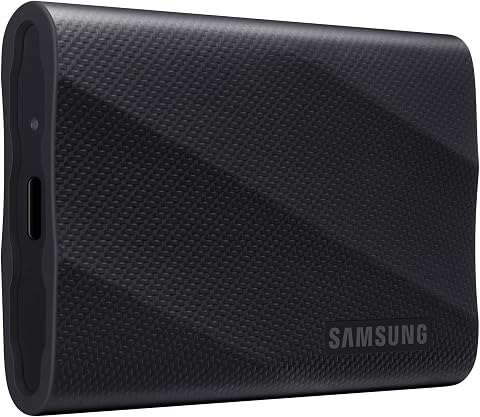 Samsung T9 Portable SSD 4TB, USB 3.2 Gen 2×2 External Solid State DriveView on Amazon →
- 2
 SanDisk Extreme Portable SSD, 4TB, Up to 2000MB/sView on Amazon →
- 3Samsung T9 Portable SSD 2TB, USB 3.2 Gen 2×2, Up to 2,000 MB/sView on Amazon →
- 4SanDisk Extreme Portable SSD, 2TB, Up to 2000MB/sView on Amazon →
- 5
 SanDisk Extreme 2TB Portable SSDView on Amazon →
- 6
 SanDisk 2TB Portable SSD, Up to 1000 MB/s Read Speed, BlackView on Amazon →
- 7Samsung T9 Portable SSD 1TB, USB 3.2 Gen 2×2, Up to 2,000 MB/sView on Amazon →
- 8SanDisk Extreme Portable SSD, 1TB, Up to 2000MB/sView on Amazon →
- 9
 Samsung T7 Portable SSD 1TB Titan Gray, USB 3.2 Gen 2, Up to 1,050MB/sView on Amazon →
- 10SanDisk 1TB Extreme Portable SSD, Up to 1050MB/sView on Amazon →
- 11SanDisk 1TB Portable SSD, Up to 1000MB/s Read Speed, BlackView on Amazon →
- 12SanDisk 500GB Portable SSD, Up to 1000MB/s Read Speed, BlackView on Amazon →
- 13
 SSK Portable SSD 500GB External Solid State Drive USB-C/USB-AView on Amazon →
Match SSD Speed to Your Setup
The main practical consequence is that buying the fastest-rated drive does not guarantee the fastest transfers. A USB-C socket describes connector shape, not necessarily the USB standard or speed supported by the device. Buyers who do not have USB 3.2 Gen 2×2 may be unable to approach the T9’s advertised maximum, making a less expensive or more modest speed tier a better match.
Capacity and design also affect the purchase. A 500GB drive may suit current documents and modest projects, while people holding growing media libraries may prefer 1TB, 2TB or 4TB. A rugged-style model can make more sense for travel or camera-bag use, but the source warns that such design does not prevent data loss. Important files still need another copy.
Products Worth Considering

Apple MacBook Air 13-inch with M5 Chip, 16GB Memory, 512GB SSD, Sky Blue

Jackery Solar Generator 1000 V2 with 100W Solar Panel, 1024Wh

Apple Watch Series 12 GPS 42mm Smartwatch
As an affiliate, we earn on qualifying purchases.
How the 13-Drive Comparison Works
The source says it ranks drives by speed claims, usable capacity, connection needs, portability and workload fit. It treats capacity variants according to the people they may serve, rather than assuming a larger drive automatically performs better. Its method also separates standard SanDisk Portable SSD products from SanDisk Extreme models.
The comparison’s central caution is that maximum speed figures depend on more than the SSD. Host port, cable, file size and sustained workload can all affect performance, and transfers involving many small files may fall short of published maxima. Buyers moving a drive between operating systems or using it with a phone should also check formatting, device support and available storage before purchase.
“The Samsung T7 is the balanced starting point.”
— ThorstenMeyerAI.com buying guide
Details Buyers Still Need to Check
The supplied source does not include a full, clearly itemized list of all 13 distinct SSD models, nor does it provide prices, retailer availability or a dated testing table. It also does not give independent benchmark results or establish how closely any model’s real-world performance reaches its advertised maximum. The comparison should therefore be read as a buying guide based on stated specifications and intended use, not as a complete account of verified performance.
Some SanDisk Extreme listings are said to differ in advertised speed despite sharing similar names and capacities. The source does not identify every listing or explain those specification differences, so buyers need to verify the exact product code and specifications. Protection details should likewise be checked for the specific model rather than assumed across an entire product family.
Check Model and Port Before Buying
Before choosing a drive, check the computer or mobile device’s supported USB standard, confirm the cable connection and estimate the storage needed for active projects. Then compare the exact model’s capacity, speed claim and documented protection features. For a drive used across operating systems, verify formatting and file-size requirements; reformatting can erase existing data, so files should be copied elsewhere first.
The guide gives no forthcoming review date, price update or product launch to watch. The next practical step for readers is to confirm current listings and specifications against their own setup, and to keep a separate copy of irreplaceable data rather than relying on a portable SSD alone.
Key Questions
Which portable SSD does the guide recommend as a starting point?
The guide names the Samsung T7 1TB, citing its USB 3.2 Gen 2 connection and balance of capacity, speed and broad device compatibility.
Will the Samsung T9 always reach 2,000 MB/s?
No. The T9 versions advertise up to 2,000 MB/s, but the guide says approaching that maximum requires a compatible USB 3.2 Gen 2×2 host connection and suitable cable. Actual results can also vary by workload.
How much capacity should I choose?
The guide suggests matching capacity to the files and projects you expect to keep on the drive. 500GB may fit lighter needs, while 1TB or 2TB provides more room for active work and 4TB can suit larger media collections.
Are SanDisk Extreme models guaranteed to be faster or safer?
No such guarantee is established in the supplied material. Some Extreme listings advertise higher speeds, but those depend on compatible hardware; buyers should check the exact model’s speed and protection specifications. A rugged-style design does not eliminate data-loss risk.
Does the source provide a complete list of all 13 drives?
The supplied material describes a comparison of 13 choices but does not itemize all 13 distinct model names. It identifies several Samsung and SanDisk families and capacity variants, so the full list cannot be confirmed from this source alone.
Source: ThorstenMeyerAI.com