

🔍 Read the full analysis: How To Match A Wireless Gaming Mouse To Your Play Style: 9 Picks on ThorstenMeyerAI.com

Get the latest gadgets delivered free with Prime
- Fast, free delivery on millions of items
- Prime Video, Amazon Music and more included
- Member-only deals all year
TL;DR
A buyer’s guide compares nine wireless gaming mouse listings by shape, controls, battery approach and intended use. It names the Logitech G502 LIGHTSPEED as a broad-use option and notes that the three Logitech G305 entries are the same model in different colors.
ThorstenMeyerAI.com’s wireless gaming mouse roundup compares nine product listings by how their shapes, controls and power setups correspond to different play styles. It identifies the Logitech G502 LIGHTSPEED as its versatile pick, the Razer Viper V3 HyperSpeed for players seeking a simpler design, and the Razer Naga V2 HyperSpeed for MMO players.
The guide ranks products by how clearly they serve a particular need, rather than treating a larger number of buttons or lighting features as automatic advantages. Its recommendations span general-purpose, streamlined and MMO-focused layouts, as well as compact models and alternatives from other brands. The stated comparison factors include shape and likely fit, control layout, wireless convenience, battery setup and usefulness across game types.
Alongside the G502, Viper and Naga, the roundup includes the Razer Basilisk V3 X HyperSpeed, which it describes as an option between a straightforward layout and the Naga’s denser MMO controls. It also lists the Redragon M810 PRO and INPHIC A9 V2 Explorer, without describing their feature sets as a universal upgrade over the Logitech and Razer choices.
The remaining three entries are blue, black and white versions of the Logitech G305. The source identifies them as the same model, so the color listings do not represent separate performance categories. The roundup’s nine listings cover seven distinct named models, with the G305 represented three times.
The 9 picks
- 1
 Logitech G502 LIGHTSPEED Wireless Gaming MouseView on Amazon →
- 2
 Razer Naga V2 HyperSpeed Wireless MMO Gaming MouseView on Amazon →
- 3
 Razer Viper V3 HyperSpeed Wireless Gaming MouseView on Amazon →
- 4
 Logitech G305 LIGHTSPEED Wireless Gaming Mouse, BlueView on Amazon →
- 5
 Razer Basilisk V3 X HyperSpeed Wireless Gaming MouseView on Amazon →
- 6
 Logitech G305 LIGHTSPEED Wireless Gaming Mouse, WhiteView on Amazon →
- 7
 Redragon M810 PRO Wireless RGB Gaming MouseView on Amazon →
- 8
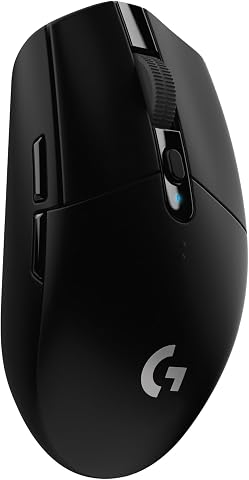 Logitech G305 LIGHTSPEED Wireless Gaming Mouse, BlackView on Amazon →
- 9
 INPHIC A9 V2 Explorer Wireless Gaming MouseView on Amazon →
Why Layout Matters More Than Extras
The guide emphasizes matching a mouse to a player’s hand and routine rather than selecting one solely for its specifications. It notes that a broad button array can support MMO commands but may be unnecessary for someone seeking a simpler layout or may affect grip comfort. It therefore identifies shape, reach and button placement as buying considerations.
The guide groups recommendations by game preferences. It suggests that players switching between genres may consider a versatile layout, while players focused on one type of game may prefer controls designed for that use. The recommendations are a buyer’s guide, not a controlled product test: the supplied material describes selection criteria but provides no comparative measurements, prices or test results.
Products Worth Considering

Logitech MX Master 4 Ergonomic Wireless Mouse with Haptic Feedback, Graphite

Logitech MX Mechanical Wireless Illuminated Performance Keyboard, Clicky

Sony WH-1000XM4C (M4 2nd Gen) Wireless Noise-Cancelling Headphones, Black
As an affiliate, we earn on qualifying purchases.
How the Nine Listings Were Grouped
The source says it considered day-to-day fit, wireless convenience and the usefulness of controls for a buyer’s games. It gives greater weight to a design that addresses a specific need than to feature counts. The G502 is the broad-use choice in that framework; the Viper and Naga represent different preferences for a streamlined mouse and MMO-oriented controls.
For shoppers comparing products, the article advises checking grip and hand fit, identifying commands that could benefit from extra buttons, and verifying the exact model’s battery type and connection options. It notes that advertised battery-life figures can depend on settings and use. The source does not provide a detailed test protocol or supporting measurements for each listing, so its rankings are editorial recommendations based on stated criteria.
“The biggest tradeoffs are not just wireless performance, but also mouse shape, control layout, battery approach, and how many extra features you actually need.”
— ThorstenMeyerAI.com, in the supplied roundup
What the Roundup Does Not Establish
The supplied source does not state when the guide was published, provide current prices, or specify a testing period. It also does not include measured comparisons for latency, sensor performance, battery life, weight or durability. Those details cannot be inferred from the recommendations, and product prices and availability may change.
Several entries receive only broad descriptions rather than a full model-by-model explanation of their strengths and limitations. The source also does not spell out every connection method or battery specification for each mouse. Buyers should check the manufacturer’s current product information and retailer listing for the exact configuration before purchasing.
Check Fit Before You Buy
Readers can identify their main games, preferred grip and need for extra controls, then compare exact model specifications and current listings. Trying a mouse or comparing its dimensions with a familiar device may help assess fit. The source does not announce follow-up testing or an update schedule; prices, availability and product revisions are not covered by the roundup.
Key Questions
Which mouse does the guide recommend for broad use?
The roundup names the Logitech G502 LIGHTSPEED as its versatile pick, citing its feature-rich control layout. It also notes that the larger, busier design may not suit players who want a simpler mouse.
Which picks are aimed at streamlined play and MMO controls?
The guide presents the Razer Viper V3 HyperSpeed for players who prefer a simpler shape and the Razer Naga V2 HyperSpeed for MMO players seeking many buttons.
Are the three G305 listings different models?
No. The source identifies the blue, black and white G305 entries as color versions of the same model, not separate performance options.
Does the roundup provide measured performance results?
The supplied material describes selection criteria and recommendations but gives no comparative test data for latency, battery life, sensor performance or durability. Its rankings are editorial guidance; buyers should verify specifications for the exact product.
Source: ThorstenMeyerAI.com