

The best iPad tablets balance performance, screen size, storage, and long-term usefulness for the way you plan to use them. I’d put the iPad Air 11-inch (M4) first for its mix of power and portability, while the iPad (A16) is the simpler everyday choice and the iPad mini (A17 Pro) suits readers who want a small tablet. The main tradeoffs are paying for performance you may not need, choosing a screen that feels cramped or cumbersome, and weighing renewed condition against a newer model. Storage and accessory compatibility can also matter more than a chip upgrade for some buyers. Read on for how all 15 options compare and which one fits your priorities.

Get the latest gadgets delivered free with Prime
- Fast, free delivery on millions of items
- Prime Video, Amazon Music and more included
- Member-only deals all year
Complete the kit



Key Takeaways
- The Air 11-inch (M4) is my leading all-round choice because it pairs a portable screen with a powerful current-generation chip; the A16 iPad costs less in features and complexity for basic tasks.
- The iPad mini (A17 Pro) is the clear portability specialist, but its 8.3-inch display gives less room for split-screen work, drawing, and long documents than the 11-inch models.
- The Pro models separate by screen size and workload. The 11-inch M5 favors power in a smaller footprint, while the 13-inch M5 makes more sense when a large workspace is central to the job.
- Storage changes the value of a model. The 256GB mini and Pro options offer more headroom than 128GB everyday iPads, while 64GB and 32GB configurations call for tighter app and download habits.
- Renewed iPads are not one uniform choice. Their generation, storage, and listed condition differ, so the low-cost appeal should be weighed against battery condition, warranty, and remaining software support.
| Apple iPad 10.9-inch (10th Generation, Wi-Fi, 64GB) – Silver (Renewed) |  | Best Renewed Mid-Size Pick | Model year: 2022 | Display: 10.9-inch Liquid Retina with True Tone | Chip: A14 Bionic | VIEW LATEST PRICE | See Our Full Breakdown |
| Apple 2025 iPad 11-inch, Wi-Fi, 128GB, Silver (Renewed) |  | Best Renewed Everyday Upgrade | Model year: 2025 | Display: 11-inch Liquid Retina with True Tone | Processor: Apple A16 | VIEW LATEST PRICE | See Our Full Breakdown |
| Apple iPad 10.2-Inch Wi-Fi 32GB, Space Gray (Renewed) |  | Best for Basic iPad Tasks | Model year: 2019 | Display: 10.2-inch Retina | Processor: A10 Fusion | VIEW LATEST PRICE | See Our Full Breakdown |
| Apple iPad 11-inch (A16 chip, 128GB, Wi-Fi, Silver) |  | Best Overall for Most Buyers | Display: 11-inch Liquid Retina with True Tone | Chip: Apple A16 | Storage: 128GB | VIEW LATEST PRICE | See Our Full Breakdown |
| Apple iPad mini (A17 Pro), 8.3-inch Liquid Retina Display, 256GB, Wi-Fi 6E, Space Gray |  | Best Compact iPad | Display: 8.3-inch Liquid Retina with True Tone and P3 wide color | Chip: A17 Pro | Storage: 256GB | VIEW LATEST PRICE | See Our Full Breakdown |
| Apple iPad Pro 13-inch (M5) — 256GB, Wi-Fi 7, Space Black |  | Best for Large-Screen Creative Work | Display: 13-inch Ultra Retina XDR with ProMotion, P3 wide color, and True Tone | Chip: Apple M5 | Storage: 256GB | VIEW LATEST PRICE | See Our Full Breakdown |
| Apple iPad (11-inch, Wi-Fi, 128GB, Silver, Renewed Premium) |  | Best Renewed Pick for Everyday Use | Model: Apple iPad (2025) | Display: 11-inch | Connectivity: Wi-Fi | VIEW LATEST PRICE | See Our Full Breakdown |
| Apple iPad 2021 10.2-inch Wi-Fi 64GB – Space Gray (Renewed) |  | Best Compact Renewed Budget Option | Year: 2021 | Display: 10.2-inch Retina | Storage: 64GB | VIEW LATEST PRICE | See Our Full Breakdown |
| Apple iPad Air 11-inch (M4), 128GB, Wi-Fi 7, Space Gray |  | Best Midrange Performance Pick | Display: 11-inch Liquid Retina with P3 wide color, True Tone, and ultralow reflectivity | Chip: Apple M4 | Storage: 128GB | VIEW LATEST PRICE | See Our Full Breakdown |
| Apple iPad Pro 11-inch (M5), 256GB, Wi-Fi 7, Space Black |  | Best Premium Compact iPad | Display: 11-inch Ultra Retina XDR with ProMotion, P3 wide color, and True Tone | Chip: Apple M5 | Storage: 256GB | VIEW LATEST PRICE | See Our Full Breakdown |
| Apple iPad (10th Generation) 64GB Wi-Fi – Silver |  | Best for Everyday Use | Display: 10.9-inch Liquid Retina | Chip: A14 Bionic | Storage: 64GB | VIEW LATEST PRICE | See Our Full Breakdown |
| Apple iPad Air 13-inch (M4), 128GB, Wi-Fi, Starlight |  | Best for a Large Screen Without Pro | Display: 13-inch Liquid Retina, P3 wide color, True Tone, ultralow reflectivity | Chip: Apple M4 | Storage: 128GB | VIEW LATEST PRICE | See Our Full Breakdown |
| Apple iPad Pro 13-inch (M4), 512GB, Wi-Fi, Space Black | 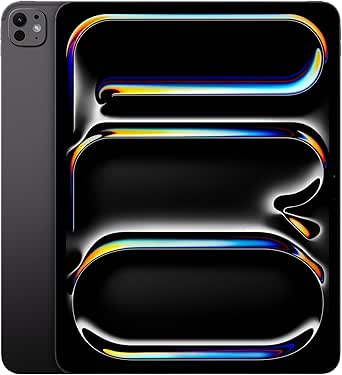 | Best for Creative Professionals | Display: 13-inch Ultra Retina XDR | Processor: Apple M4, up to 10-core CPU and 10-core GPU | Storage: 512GB | VIEW LATEST PRICE | See Our Full Breakdown |
| Apple iPad Pro 12.9-inch (Wi-Fi, 256GB) – Space Gray (Renewed) |  | Best Renewed Large-Screen Pick | Display: 12.9-inch Liquid Retina with ProMotion, True Tone, and wide color | Storage: 256GB | Connectivity: Wi-Fi | VIEW LATEST PRICE | See Our Full Breakdown |
| Apple iPad Pro 11-inch (4th Generation) with M2 Chip, 256GB, Wi-Fi 6E, Space Gray |  | Best Compact Pro | Generation: 4th | Display: 11-inch Liquid Retina with ProMotion, True Tone, and P3 wide color | Chip: Apple M2 | VIEW LATEST PRICE | See Our Full Breakdown |
| iPad tablet | Display | Storage | Connectivity | Chip |
|---|---|---|---|---|
| Apple iPad 10.9-inch | 10.9-inch Liquid Retina with True Tone | 64GB | Wi-Fi 6 | A14 Bionic |
| Apple 2025 iPad 11-inch | 11-inch Liquid Retina with True Tone | 128GB | Wi-Fi 6 | — |
| Apple iPad 10.2-Inch Wi-Fi 32G | 10.2-inch Retina | 32GB | Wi-Fi | — |
| Apple iPad 11-inch | 11-inch Liquid Retina with True Tone | 128GB | Wi-Fi 6 | Apple A16 |
| Apple iPad mini | 8.3-inch Liquid Retina with True Tone and P3 wide color | 256GB | Wi-Fi 6E | A17 Pro |
| Apple iPad Pro 13-inch | 13-inch Ultra Retina XDR with ProMotion, P3 wide color, and True Tone | 256GB | Wi-Fi 7 with Apple N1 | Apple M5 |
| Apple iPad | 11-inch | 128GB | Wi-Fi | — |
| Apple iPad 2021 10.2-inch Wi-F | 10.2-inch Retina | 64GB | Wi-Fi | — |
| Apple iPad Air 11-inch | 11-inch Liquid Retina with P3 wide color, True Tone, and ultralow reflectivity | 128GB | Wi-Fi 7 with Apple N1 | Apple M4 |
| Apple iPad Pro 11-inch | 11-inch Ultra Retina XDR with ProMotion, P3 wide color, and True Tone | 256GB | Wi-Fi 7 with Apple N1 | Apple M5 |
| Apple iPad | 10.9-inch Liquid Retina | 64GB | Wi-Fi 6 | A14 Bionic |
| Apple iPad Air 13-inch | 13-inch Liquid Retina, P3 wide color, True Tone, ultralow reflectivity | 128GB | Wi-Fi 7 with Apple N1 | Apple M4 |
| Apple iPad Pro 13-inch | 13-inch Ultra Retina XDR | 512GB | Wi-Fi 6E, USB-C with Thunderbolt / USB 4 | — |
| Apple iPad Pro 12.9-inch | 12.9-inch Liquid Retina with ProMotion, True Tone, and wide color | 256GB | Wi-Fi | — |
| Apple iPad Pro 11-inch | 11-inch Liquid Retina with ProMotion, True Tone, and P3 wide color | 256GB | Wi-Fi 6E | Apple M2 |
More Details on Our Top Picks
Apple iPad 10.9-inch (10th Generation, Wi-Fi, 64GB) – Silver (Renewed)
The 10th-generation iPad gives everyday buyers a roomy screen for reading, streaming, video calls, and light productivity, with True Tone adjusting the display to the surrounding light. Its A14 Bionic chip is a step up from the older 7th-generation iPad, making this a better fit for multitasking and current apps. The landscape 12MP front camera with Center Stage can keep you in frame on calls, while USB-C makes charging more convenient than the older model’s Lightning connector.
Its main compromise is the renewed configuration. The 64GB capacity leaves less room for downloaded media and large apps than the 128GB 2025 iPad, and the listed warranty is 90 days. It also supports only the first-generation Apple Pencil. I’d choose this model for a larger display at a lower-spec tier, but buyers wanting more storage or a longer runway should look to the 2025 iPad.
Pros:- 10.9-inch Liquid Retina display with True Tone
- A14 Bionic chip is newer than the 7th-generation model’s A10 Fusion
- Landscape 12MP front camera with Center Stage
- USB-C charging and compatibility with Magic Keyboard Folio
Cons:- 64GB storage can fill quickly with apps and downloaded media
- Renewed condition and a 90-day limited warranty
- Supports only the first-generation Apple Pencil
Best for: Readers and families who want a renewed, full-size iPad for streaming, video calls, browsing, and light schoolwork.
Not ideal for: People who keep large game libraries, need ample offline storage, or want support for newer Apple Pencil models.
- Model year:2022
- Display:10.9-inch Liquid Retina with True Tone
- Chip:A14 Bionic
- Storage:64GB
- Connectivity:Wi-Fi 6
- Connector:USB-C
- Rear camera:12MP Ultra Wide
- Condition and warranty:Renewed; 90-day limited warranty
Our verdict“Choose it for a capable renewed iPad with a roomy screen, provided 64GB and the short warranty fit your needs.”
Apple 2025 iPad 11-inch, Wi-Fi, 128GB, Silver (Renewed)
This 2025 iPad pairs an A16 chip with 128GB of storage, giving everyday users more room for apps, documents, and downloads than the renewed 10th-generation iPad’s 64GB configuration. The 11-inch Liquid Retina display with True Tone suits video, reading, and split-screen work, while Wi-Fi 6 and USB-C cover familiar home and school routines. Its newer processor also gives it more headroom for demanding apps than the 7th-generation iPad with A10 Fusion.
The tradeoff is condition, not a feature shortage. This unit is renewed, and the supplied data does not specify a warranty, so buyers should check the listing terms before choosing it. The iPad mini is easier to carry and has a more powerful A17 Pro chip, but its smaller screen makes it less suited to desk work. I’d pick this model for a balanced full-size renewed tablet.
Pros:- A16 chip for responsive everyday performance
- 128GB storage, twice the capacity of the renewed 10th-generation model listed here
- 11-inch Liquid Retina display with True Tone
- USB-C and Wi-Fi 6 connectivity
Cons:- Renewed condition rather than new
- Warranty details are not provided in the supplied product data
Best for: Students and home users who want a recent full-size iPad with enough storage for a broad mix of apps and media.
Not ideal for: Buyers who require a new device, need cellular connectivity, or prefer a compact tablet for one-handed use.
- Model year:2025
- Display:11-inch Liquid Retina with True Tone
- Processor:Apple A16
- Storage:128GB
- Connectivity:Wi-Fi 6
- Connector:USB-C
- Color:Silver
- Condition:Renewed
Our verdict“Pick this renewed model for a modern, full-size iPad with more storage and processing headroom than older generations.”
Apple iPad 10.2-Inch Wi-Fi 32GB, Space Gray (Renewed)
The 7th-generation iPad is the simplest fit for basic tablet routines: web browsing, reading, video, and light note-taking on a 10.2-inch Retina display. Touch ID gives it a familiar home-button layout, and support for the first-generation Apple Pencil and Smart Keyboard can extend its use for handwritten notes or simple schoolwork. Compared with the renewed 10th-generation iPad, it has a smaller screen, an older A10 Fusion chip, and a Lightning connector; its appeal is a straightforward feature set rather than modern performance.
That older hardware sets real limits. The 32GB storage can constrain app installs and offline media, and demanding apps are a less comfortable fit than on the A16 2025 iPad. The supplied data lists support up to iPadOS 18, so buyers should weigh software longevity. I’d choose it only for light tasks where the familiar home button matters more than speed or storage.
Pros:- 10.2-inch Retina display for reading and video
- Touch ID home button
- Supports first-generation Apple Pencil and Smart Keyboard
- Stereo speakers
Cons:- 32GB storage is restrictive for apps and offline media
- A10 Fusion chip is older than the A14 and A16 options in this roundup
- Lightning charging and support listed only through iPadOS 18
Best for: Readers, young students, or a household looking for a renewed iPad for browsing, video, and occasional handwritten notes.
Not ideal for: People who need space for many apps and downloads, run demanding creative software, or want newer iPadOS support beyond the listed maximum.
- Model year:2019
- Display:10.2-inch Retina
- Processor:A10 Fusion
- Storage:32GB
- Connectivity:Wi-Fi
- Rear camera:8MP
- Front camera:1.2MP FaceTime HD
- Maximum listed iPadOS:iPadOS 18
- Connector:Lightning
Our verdict“Choose this renewed iPad for light, familiar tablet use only if its limited storage and older hardware suit your needs.”
Apple iPad 11-inch (A16 chip, 128GB, Wi-Fi, Silver)
This 11-inch iPad is the most balanced pick in this group: its A16 chip, 128GB of storage, True Tone display, and USB-C cover everyday work, study, and entertainment without the older hardware limits of the renewed 10th-generation and 7th-generation models. The 12MP Center Stage front camera is useful for video calls, while the 12MP rear camera records 4K video. Touch ID adds a familiar way to unlock the tablet and authorize purchases.
It sits between the basic iPad and the compact mini in practical fit: more screen for documents and split-screen tasks than the mini, but less portability. Apple Pencil and Magic Keyboard Folio support make it adaptable, though those accessories are sold separately. The listing describes a Wi-Fi model, with no cellular option specified. I’d choose it as the versatile default for buyers who want a new, full-size iPad without stepping up to an Air or Pro.
Pros:- A16 chip for everyday apps and creative tasks
- 128GB storage
- 11-inch Liquid Retina display with True Tone
- 12MP Center Stage front camera and 4K-capable rear camera
Cons:- Apple Pencil and Magic Keyboard Folio are sold separately
- Wi-Fi model; cellular connectivity is not specified
- Less portable than the 8.3-inch iPad mini
Best for: Students, families, and general users who want a new full-size iPad for mixed work, video calls, media, and note-taking.
Not ideal for: Travelers who prioritize a compact one-handed tablet, or users who need cellular data or a Pro-level display and performance.
- Display:11-inch Liquid Retina with True Tone
- Chip:Apple A16
- Storage:128GB
- Connectivity:Wi-Fi 6
- Connector:USB-C
- Front camera:12MP Center Stage
- Rear camera:12MP Wide with True Tone flash; 4K video
- Security:Touch ID
- Stylus support:Apple Pencil (USB-C) and Apple Pencil (1st generation)
Our verdict“For most buyers seeking a new, versatile full-size iPad, this A16 model balances screen space, storage, and performance.”
Apple iPad mini (A17 Pro), 8.3-inch Liquid Retina Display, 256GB, Wi-Fi 6E, Space Gray
The iPad mini puts the most capable chip in this batch into the smallest screen. Its A17 Pro processor and 256GB storage give it more performance and room than the full-size A16 iPad, while the 8.3-inch display makes it easier to carry and hold for reading, travel, and quick notes. Wi-Fi 6E, USB-C, Touch ID, and support for Apple Pencil Pro add modern conveniences in a compact package. The 12MP Center Stage camera also makes video calls practical on the go.
That portability comes with less workspace. The 11-inch A16 iPad is more comfortable for split-screen documents, keyboard work, and long video sessions. The mini’s smaller display may also feel cramped for detailed creative tasks, despite its stronger chip. Apple Pencil Pro is sold separately. I’d choose this model for buyers who will carry their tablet often and value compact size and storage over a larger canvas.
Pros:- Compact 8.3-inch design with Liquid Retina and P3 wide color
- A17 Pro chip
- 256GB storage
- Wi-Fi 6E, USB-C, and Apple Pencil Pro support
Cons:- Smaller display is less suited to split-screen work than the 11-inch A16 iPad
- Apple Pencil Pro and Smart Folio are sold separately
- Compact screen may feel limiting for detailed drawing or long typing sessions
Best for: Frequent travelers, commuters, and readers who want a powerful iPad that fits easily into a small bag.
Not ideal for: People who regularly use split-screen apps, type long documents, or want a large canvas for drawing and video.
- Display:8.3-inch Liquid Retina with True Tone and P3 wide color
- Chip:A17 Pro
- Storage:256GB
- Connectivity:Wi-Fi 6E
- Connector:USB-C
- Front camera:12MP Ultra Wide with Center Stage
- Rear camera:12MP Wide with True Tone flash; 4K video
- Security:Touch ID
- Stylus support:Apple Pencil Pro and Apple Pencil (USB-C)
Our verdict“Choose the iPad mini if portability and strong performance matter more to you than a full-size workspace.”
Apple iPad Pro 13-inch (M5) — 256GB, Wi-Fi 7, Space Black
The 13-inch iPad Pro is the lineup’s large-screen choice for demanding creative and productivity work. Its M5 chip and up to 16GB of memory suit intensive multitasking and on-device AI, while the Ultra Retina XDR display with ProMotion gives detailed work more room than the 11-inch iPad Pro (M5). That bigger canvas also makes this model less convenient to carry and handle one-handed. Wi-Fi 7 supports fast wireless transfers, and LiDAR adds capability for compatible spatial workflows. The 256GB configuration offers a useful starting capacity, though large project libraries may call for more. I’d factor in the separately sold Pencil or Magic Keyboard if your workflow depends on them; the nano-texture display option is limited to higher-capacity configurations.
Pros:- 13-inch Ultra Retina XDR display with ProMotion, P3 wide color, and True Tone
- M5 chip and up to 16GB of memory support demanding tasks and on-device AI
- Wi-Fi 7 with Apple N1 supports fast wireless connectivity
- Face ID, LiDAR, and a landscape Center Stage front camera
Cons:- Larger body is less convenient for one-handed use than the 11-inch iPad Pro
- Apple Pencil and Magic Keyboard are sold separately
- Nano-texture display glass is limited to 1TB and 2TB configurations
Best for: Digital artists, video editors, and professionals who want a large, high-refresh display for demanding work on the go
Not ideal for: Readers and commuters who prioritize one-handed use, compact dimensions, or a lighter everyday tablet
- Display:13-inch Ultra Retina XDR with ProMotion, P3 wide color, and True Tone
- Chip:Apple M5
- Storage:256GB
- Memory:Up to 16GB
- Connectivity:Wi-Fi 7 with Apple N1
- Cameras:12MP landscape Center Stage front; 12MP Wide rear with adaptive True Tone flash
- Biometrics and sensors:Face ID; LiDAR Scanner
- Dimensions and weight:8.48 x 11.09 x 0.2 inches; 1.28 pounds
Our verdict“Choose this Pro if you need the largest display and high-end performance for creative work, and can accept its bigger footprint.”
Apple iPad (11-inch, Wi-Fi, 128GB, Silver, Renewed Premium)
This Renewed Premium 11-inch iPad is the straightforward choice for buyers who want a newer everyday iPad and are comfortable with a renewed device. Its 128GB capacity is double the storage of the 2021 iPad 10.2-inch Renewed in this roundup, leaving more room for apps, downloads, and photos. The stated inspection and cleaning process, lack of visible cosmetic imperfections at arm’s length, and battery capacity above 80% of new offer concrete condition expectations. Still, it is not Apple certified, accessories may be non-original, and the packaging may be generic. That makes it less predictable than buying new, even with a 365-day replacement or refund window. I’d choose it for general browsing, reading, and streaming, rather than for buyers seeking the M4 or M5 performance tier.
Pros:- 128GB storage gives more room than the 64GB 2021 renewed model
- Professionally inspected, tested, and cleaned
- No visible cosmetic imperfections at arm’s length
- Battery capacity exceeds 80% of new, with a 365-day replacement or refund eligibility window
Cons:- Renewed Premium condition is not Apple certified
- Compatible accessories may be non-original
- May arrive in generic packaging
Best for: Students and families who want a renewed, general-purpose iPad with 128GB for schoolwork, browsing, and streaming
Not ideal for: Buyers who require Apple-certified refurbishment, original accessories, or the higher performance of an iPad Air or Pro
- Model:Apple iPad (2025)
- Display:11-inch
- Connectivity:Wi-Fi
- Storage:128GB
- Condition:Renewed Premium
- Battery:Exceeds 80% of original capacity
- Accessories and packaging:Compatible accessories may not be original; packaging may be generic
- Return eligibility:Replacement or refund within 365 days of receipt if dissatisfied
Our verdict“Pick this renewed iPad for everyday tasks if 128GB and stated refurbishment checks matter more to you than Apple-certified condition.”
Apple iPad 2021 10.2-inch Wi-Fi 64GB – Space Gray (Renewed)
The 2021 10.2-inch iPad is the older, smaller-screen route into this roundup, aimed at buyers with modest needs and a preference for a manageable tablet. Its Retina display and access to iPadOS cover reading, video, and everyday apps, while the smaller size is easier to carry than either the 11-inch iPad Air (M4) or the 13-inch Pro. Its age and 64GB of non-expandable storage are the main compromises: large app libraries and offline media can fill that space quickly, and this listing provides less detail about battery condition than the Renewed Premium 2025 iPad. The renewed device has been inspected and tested, but minor cosmetic wear may remain. I’d favor it for light use, not as a long-term choice for storage-heavy work.
Pros:- 10.2-inch Retina display suits reading and video in a compact format
- Smaller and lighter to carry than the 11-inch Air and 13-inch Pro models
- Provides access to the Apple iPadOS ecosystem
- Inspected and tested as a renewed device
Cons:- 64GB of storage is non-expandable and can fill quickly
- Older 2021 model compared with the 2025 renewed iPad and current M-series models
- Renewed condition may include minor cosmetic wear
Best for: Light-use buyers seeking a smaller renewed iPad for reading, video, and basic apps, with limited storage needs
Not ideal for: Students or creators who keep large app libraries, download lots of media, or want a newer model with more storage
- Year:2021
- Display:10.2-inch Retina
- Storage:64GB
- Connectivity:Wi-Fi
- Color:Space Gray
- Condition:Renewed; inspected and tested
Our verdict“Choose this renewed iPad for light everyday use if its smaller display and limited 64GB storage fit your needs.”
Apple iPad Air 11-inch (M4), 128GB, Wi-Fi 7, Space Gray
The 11-inch iPad Air with M4 sits between the everyday iPad and the Pro models: it brings strong performance and a color-rich display without making the Pro tier the default choice. The M4 chip is suited to smooth multitasking and demanding apps, while the 11-inch iPad Pro (M5) adds an Ultra Retina XDR display, ProMotion, and Face ID for buyers who want more advanced screen and biometric features. The Air’s Liquid Retina display still includes P3 wide color, True Tone, and low reflectivity, and Wi-Fi 7 gives it current wireless capability. Its 128GB storage may constrain large creative libraries, and the Pencil and Magic Keyboard are separate purchases. I’d pick the Air for capable everyday work and creativity when the Pro’s extra display features are not worth prioritizing.
Pros:- M4 chip supports smooth multitasking and demanding apps
- Liquid Retina display offers P3 wide color, True Tone, and ultralow reflectivity
- Wi-Fi 7 with Apple N1 and all-day battery life
- 12MP Center Stage front camera and 12MP rear camera with 4K video
Cons:- 128GB may limit users with large creative projects or offline media libraries
- Apple Pencil and Magic Keyboard are sold separately
- Lacks the Pro models’ Ultra Retina XDR display and ProMotion
Best for: Students and mobile professionals who want M-series performance for multitasking and creative apps in an 11-inch tablet
Not ideal for: Users who need ProMotion, an Ultra Retina XDR display, Face ID, or more than 128GB of built-in storage
- Display:11-inch Liquid Retina with P3 wide color, True Tone, and ultralow reflectivity
- Chip:Apple M4
- Storage:128GB
- Connectivity:Wi-Fi 7 with Apple N1
- Cameras:12MP Center Stage front; 12MP Wide rear with 4K video recording
- Authentication:Touch ID
- Battery life:All-day
Our verdict“Choose the M4 Air for capable everyday work and creative apps if you do not need the Pro’s more advanced display features.”
Apple iPad Pro 11-inch (M5), 256GB, Wi-Fi 7, Space Black
For buyers who want Pro-level capability in a more manageable size, the 11-inch iPad Pro (M5) is the premium compact pick. Its M5 chip, ProMotion, and Ultra Retina XDR display target demanding work and fluid onscreen motion, while 256GB gives it twice the listed capacity of the 128GB iPad Air (M4). The Air remains a strong choice for general multitasking and creative apps; this Pro makes more sense when its higher-end display and Face ID matter to your work. The 11-inch body is easier to carry than the 13-inch iPad Pro (M5), but it offers less room for timelines, canvas work, and split-screen tasks. Budget for a separately sold Pencil or keyboard, and note that nano-texture glass is not offered at this storage tier.
Pros:- M5 chip with Neural Accelerators supports demanding work and on-device AI
- 11-inch Ultra Retina XDR display with ProMotion, P3 wide color, and True Tone
- 256GB storage exceeds the 128GB capacity of the iPad Air (M4)
- Face ID, Wi-Fi 7, and a landscape 12MP Center Stage front camera
Cons:- Smaller display offers less room for creative timelines and split-screen work than the 13-inch Pro
- Apple Pencil and Magic Keyboard are sold separately
- Nano-texture display glass is limited to 1TB and 2TB configurations
Best for: Mobile creatives and professionals who want a high-end display, strong performance, and Face ID in an 11-inch tablet
Not ideal for: Buyers who need a large workspace or whose everyday tasks do not call for Pro display features
- Display:11-inch Ultra Retina XDR with ProMotion, P3 wide color, and True Tone
- Chip:Apple M5
- Storage:256GB
- Connectivity:Wi-Fi 7 with Apple N1
- Cameras:12MP Center Stage front; 12MP Wide rear with adaptive True Tone flash
- Biometrics:Face ID
- Audio:Four-speaker system and four microphones
- Color:Space Black
Our verdict“Choose this Pro if you want premium display and M5 performance in a portable 11-inch size and can use its advanced features.”
Apple iPad (10th Generation) 64GB Wi-Fi – Silver
The 10th-generation iPad is the straightforward pick for browsing, video calls, streaming, and schoolwork. Its 10.9-inch Liquid Retina display gives everyday tasks room to breathe, while the A14 Bionic chip and Wi-Fi 6 provide capable performance for common apps. Compared with the iPad Air 13-inch (M4), it has a smaller screen and less headroom for demanding creative work, but it avoids paying for power and display space many casual users may not need. The main constraint is its 64GB storage, which can become tight if you keep lots of downloaded media or large apps. Pencil and keyboard support add flexibility, though both accessories are separate purchases. I’d choose it for a familiar, versatile iPad experience, provided your storage needs are modest.
Pros:- 10.9-inch Liquid Retina display with True Tone
- A14 Bionic chip suits everyday apps and multitasking
- 12MP front camera with Center Stage for video calls
- Wi-Fi 6 and Touch ID
Cons:- 64GB storage leaves limited room for large apps and downloaded media
- Apple Pencil (1st generation) and Magic Keyboard Folio are sold separately
Best for: Students and households who want a capable iPad for browsing, streaming, video calls, and basic schoolwork
Not ideal for: People who keep large offline libraries or need a large workspace for creative projects, since 64GB storage and the 10.9-inch screen can feel limiting
- Display:10.9-inch Liquid Retina
- Chip:A14 Bionic
- Storage:64GB
- Connectivity:Wi-Fi 6
- Front camera:12MP Ultra Wide with Center Stage
- Biometrics:Touch ID
- Weight:1.05 pounds
- Color:Silver
Our verdict“Choose this iPad for everyday family or school use if 64GB is enough and you do not need the larger screen or stronger performance of the iPad Air 13-inch (M4).”
Apple iPad Air 13-inch (M4), 128GB, Wi-Fi, Starlight
The 13-inch iPad Air gives multitaskers and media fans a broad workspace, with the M4 chip supplying room for demanding apps and Apple Intelligence features. Its P3 color support, True Tone, and low-reflectivity display suit reading, drawing, and watching video across a large panel. Compared with the iPad Pro 13-inch (M4), the Air offers the same screen size and M4 generation in a simpler display and connectivity package; the Pro adds Ultra Retina XDR, Thunderbolt, and LiDAR for workflows that can use them. The Air’s 128GB storage may be restrictive for large creative libraries, and the Pencil Pro and Magic Keyboard are separate. I’d favor it when screen area matters more than Pro-specific display and port features.
Pros:- 13-inch Liquid Retina display with P3 wide color and True Tone
- M4 chip supports demanding apps and multitasking
- Wi-Fi 7 with Apple N1 connectivity
- Supports Apple Pencil Pro and Magic Keyboard
Cons:- 128GB storage may be limiting for large project files and media libraries
- Apple Pencil Pro and Magic Keyboard are sold separately
Best for: Students, remote workers, and media users who want a roomy 13-inch screen for split-screen tasks, note-taking, and entertainment
Not ideal for: Professionals who need the iPad Pro 13-inch’s Ultra Retina XDR display, Thunderbolt connectivity, or LiDAR scanner
- Display:13-inch Liquid Retina, P3 wide color, True Tone, ultralow reflectivity
- Chip:Apple M4
- Storage:128GB
- Connectivity:Wi-Fi 7 with Apple N1
- Front camera:12MP Center Stage
- Back camera:12MP Wide, 4K video
- Security:Touch ID, Apple Pay
- Color:Starlight
Our verdict“Pick the 13-inch Air if you want a large M4 iPad for work and media but do not need the Pro’s XDR display or Thunderbolt port.”
Apple iPad Pro 13-inch (M4), 512GB, Wi-Fi, Space Black
The iPad Pro 13-inch (M4) is the specialist choice for people whose work benefits from a large, high-end display and fast connections. Its Ultra Retina XDR screen with ProMotion is the clearest step up from the iPad Air 13-inch (M4), while Thunderbolt / USB 4 can fit workflows involving external storage and displays. The M4 chip, 512GB capacity, and LiDAR scanner add useful scope for graphics-heavy apps, video, and spatial projects. That hardware is more than most readers need for browsing, notes, or streaming, and the compatible Pencil Pro and Magic Keyboard are not included. Compared with the smaller iPad Pro 11-inch (4th Generation), this model gives more working area and storage, but it is less compact. I’d choose it when the screen and pro connections earn their space in your workflow.
Pros:- 13-inch Ultra Retina XDR display with ProMotion and True Tone
- M4 chip and 512GB storage support demanding creative workflows
- Thunderbolt / USB 4 and Wi-Fi 6E connectivity
- LiDAR scanner and 4K ProRes video support
Cons:- Apple Pencil Pro and Magic Keyboard are compatible accessories sold separately
- Large size is less convenient for one-handed or compact use
Best for: Video editors, illustrators, and 3D or spatial content creators who need a large color-rich display, substantial storage, and Thunderbolt
Not ideal for: Casual users and travelers who prioritize a compact tablet or do not need the Pro display, LiDAR, and high-speed port
- Display:13-inch Ultra Retina XDR
- Processor:Apple M4, up to 10-core CPU and 10-core GPU
- Storage:512GB
- Connectivity:Wi-Fi 6E, USB-C with Thunderbolt / USB 4
- Front camera:12MP Ultra Wide with Center Stage
- Rear camera:12MP Wide with adaptive True Tone flash and 4K ProRes video support
- Security:Face ID
- Scanner:LiDAR Scanner
- Weight:1.27 pounds
Our verdict“Choose this Pro for demanding creative work that benefits from its XDR display, 512GB storage, and Thunderbolt, and choose the iPad Air 13-inch (M4) if those extras are unnecessary.”
Apple iPad Pro 12.9-inch (Wi-Fi, 256GB) – Space Gray (Renewed)
This renewed 12.9-inch iPad Pro earns a place for buyers who want a roomy screen, ProMotion, and four-speaker audio in a pre-owned model. Its 256GB capacity is more generous than the 64GB in the iPad (10th Generation), which helps if you store files and media locally. The tradeoff is age: its A12X Bionic chip belongs to an older generation than the M2 in the iPad Pro 11-inch (4th Generation), and the listing describes renewed condition, so prior use may be visible. It also lacks the newer models’ specified Wi-Fi 6E and newer camera capabilities. I’d put it ahead of a basic iPad for screen and sound, but only for someone comfortable with older hardware and renewed condition.
Pros:- 12.9-inch Liquid Retina display with ProMotion, True Tone, and wide color
- 256GB storage exceeds the 64GB in the iPad (10th Generation)
- Four-speaker audio with wider stereo sound
- Face ID authentication
Cons:- Renewed condition may show signs of prior use
- Older A12X Bionic chip trails the M2 in the iPad Pro 11-inch (4th Generation)
Best for: Readers and video viewers who want a large ProMotion screen, 256GB storage, and four-speaker sound in a renewed tablet
Not ideal for: Buyers who want current-generation performance, newer connectivity, or a new device condition
- Display:12.9-inch Liquid Retina with ProMotion, True Tone, and wide color
- Storage:256GB
- Connectivity:Wi-Fi
- Processor:A12X Bionic chip with Neural Engine
- Authentication:Face ID
- Rear camera:12MP
- Front camera:7MP TrueDepth
- Audio:Four speakers with wider stereo sound
- Condition:Renewed
Our verdict“Consider this renewed Pro if a large display and four-speaker audio matter more to you than newer chip performance and connectivity.”
Apple iPad Pro 11-inch (4th Generation) with M2 Chip, 256GB, Wi-Fi 6E, Space Gray
The 11-inch iPad Pro (4th Generation) brings much of the Pro experience to a more portable size. Its M2 chip, ProMotion display, and 256GB storage suit demanding apps and large files, while Face ID and Wi-Fi 6E round out a strong travel or desk setup. Compared with the iPad Pro 13-inch (M4), it gives up the larger XDR screen, newer M4 chip, Thunderbolt / USB 4 listing, and LiDAR, but its 11-inch panel is easier to carry and handle. It remains a step above the iPad (10th Generation) for display smoothness and performance, though that extra capability may be unnecessary for basic tasks. Apple Pencil and Magic Keyboard are separate, so budget for accessories if you want a laptop-like setup.
Pros:- M2 chip with 8-core CPU and 10-core GPU
- 11-inch Liquid Retina display with ProMotion, True Tone, and P3 wide color
- 256GB storage and Wi-Fi 6E
- Face ID and advanced cameras with Center Stage and 4K ProRes video
Cons:- Apple Pencil and Magic Keyboard are sold separately
- Lacks the 13-inch iPad Pro’s Ultra Retina XDR display and listed Thunderbolt / USB 4 connectivity
Best for: Mobile professionals and students who want ProMotion, strong performance, and 256GB storage in a portable tablet
Not ideal for: People who need a 13-inch creative workspace, the iPad Pro 13-inch’s XDR display, or a simpler tablet for basic use
- Generation:4th
- Display:11-inch Liquid Retina with ProMotion, True Tone, and P3 wide color
- Chip:Apple M2
- Storage:256GB
- Connectivity:Wi-Fi 6E
- Front camera:12MP Ultra Wide
- Rear cameras:12MP Wide and 10MP Ultra Wide
- Security:Face ID
- Battery life:All-day
Our verdict“Choose this 11-inch Pro if portability and a smooth display matter more than the larger workspace and newer features of the iPad Pro 13-inch (M4).”

How We Picked
I ranked these iPads by how well their performance, screen size, storage, and connectivity match common buyer needs. I gave the highest positions to models that offer a useful mix for everyday work, study, browsing, and media without requiring buyers to pay for specialist capabilities. The mini earns a distinct place for compact use, while the Air and Pro models rank higher for buyers who need more demanding apps, larger displays, or greater working room.
I also considered generation and purchase condition. A renewed listing can make an older iPad an appealing entry point, but model age, capacity, battery condition, warranty, and seller terms affect its practical value. Similar configurations are grouped by their meaningful differences: for example, the A16 iPad is easier to justify for basic use than an M-series Pro, while a larger Pro is easier to justify when screen space itself improves the work. Since specific warranty, battery, and accessory details can vary by listing, buyers should verify those before choosing a renewed unit.
| iPad tablet | Chip | Connectivity |
|---|---|---|
| Apple iPad 10.9-inch | A14 Bionic | Wi-Fi 6 |
| Apple 2025 iPad 11-inch | — | Wi-Fi 6 |
| Apple iPad 10.2-Inch Wi-Fi 32G | — | Wi-Fi |
| Apple iPad 11-inch | Apple A16 | Wi-Fi 6 |
| Apple iPad mini | A17 Pro | Wi-Fi 6E |
| Apple iPad Pro 13-inch | Apple M5 | Wi-Fi 7 with Apple N1 |
| Apple iPad | — | Wi-Fi |
| Apple iPad 2021 10.2-inch Wi-F | — | Wi-Fi |
| Apple iPad Air 11-inch | Apple M4 | Wi-Fi 7 with Apple N1 |
| Apple iPad Pro 11-inch | Apple M5 | Wi-Fi 7 with Apple N1 |
| Apple iPad | A14 Bionic | Wi-Fi 6 |
| Apple iPad Air 13-inch | Apple M4 | Wi-Fi 7 with Apple N1 |
| Apple iPad Pro 13-inch | — | Wi-Fi 6E, USB-C with Thunderbolt / USB 4 |
| Apple iPad Pro 12.9-inch | — | Wi-Fi |
| Apple iPad Pro 11-inch | Apple M2 | Wi-Fi 6E |
Factors to Consider When Choosing Best IPad Tablets
I’d start with the work the iPad needs to handle, then choose its size, storage, and condition. A model name alone won’t tell you whether a particular configuration fits your routine.
Match the chip to your workload
For reading, browsing, video calls, streaming, and school tasks, an entry iPad can cover the basics without an M-series chip. Buyers using creative apps, large files, demanding games, or several intensive tasks should look more closely at the Air and Pro families. A newer processor can extend the range of demanding tasks a tablet handles, but it does not automatically improve a simple web and media routine enough to justify the upgrade. Think about which apps you use now and whether your work is likely to change during the tablet’s life. If you expect to use advanced creative tools, reserve capacity for those tasks. If not, putting that budget toward more storage or a keyboard may help more.
Choose a screen size you will carry and use
An 8.3-inch mini is easy to take along and comfortable to hold for reading, but it leaves less room for two apps or detailed creative work. An 11-inch model is a flexible middle ground for browsing, notes, and travel. A 13-inch iPad gives documents, drawings, and multitasking more space, though it is less compact in a bag and in the hand. Buyers often focus on screen area without accounting for how they will hold or transport the tablet every day. If the iPad will act as a laptop substitute, test the intended workspace and keyboard setup before committing to a large screen. If it is mostly for reading on the move, the smallest display may be the better fit.
Estimate storage from your offline habits
Capacity affects how many large apps, downloaded shows, games, and project files you can keep on the device. Cloud storage helps with documents and photos when you have reliable internet, but it does not replace local space for offline travel or large creative files. A 32GB or 64GB iPad may suit light use, yet can require more frequent cleanup as apps and downloads accumulate. Choosing 128GB or 256GB adds breathing room for people who keep more content on the tablet. Avoid paying for extra capacity based only on an abstract fear of running out; think through what you actually save locally. If you cannot routinely remove or offload files, favor the larger configuration.
Compare the full cost of a renewed iPad
Renewed models can provide a lower-cost route to an iPad, but the label does not describe the battery’s health, cosmetic wear, included accessories, or seller warranty by itself. Check the exact generation and model number, the return window, the battery terms, and whether the listing includes the charger you need. Older hardware may also have less time remaining for software updates than a newer model, which changes the value of an apparent bargain. Compare the renewed option with a new base iPad on both storage and likely years of use. A newer model with a smaller capacity can be a better fit than an older one with more storage if you need longer software support. Read the listing details before relying on condition labels such as “renewed” or “renewed premium.”
Check accessory and connection needs before buying
Apple Pencil and keyboard support varies by iPad generation, so confirm compatibility with the exact model rather than relying on the family name. A tablet used for handwritten notes, drawing, or regular typing may need accessories that change both its cost and portability. Also decide whether Wi-Fi is enough: Wi-Fi-only models rely on a nearby network or a phone hotspot when you are away from home. Newer wireless standards can be useful with compatible routers, but they do little for someone whose network or usage does not benefit from them. Buyers who travel often should consider how they will connect before treating a Wi-Fi-only iPad as a stand-alone work device. Confirm accessory fit and connection plans before choosing a configuration.
Frequently Asked Questions
Is an M-series iPad worth choosing over the A16 iPad?
I’d choose an M-series model when demanding creative apps, heavier multitasking, or a laptop-like workflow are part of the plan. For browsing, streaming, email, video calls, and ordinary schoolwork, the A16 iPad is the more practical match. The Air adds performance headroom without the Pro line’s larger focus on high-end work, while the Pro makes more sense when its screen and capabilities support a specific task. Consider your apps and accessories together, since a keyboard or Pencil can shape daily usefulness as much as the chip. If you cannot name a workload that needs the extra power, the A16 is likely enough.
Should I buy a renewed iPad or a newer base model?
I’d compare the exact generation, storage, battery terms, warranty, and return policy before deciding. A renewed iPad may offer a stronger chip or more storage for your needs, but its condition and remaining software support depend on the model and seller. A newer base iPad can be preferable if you value a clearer warranty path and a longer expected update window. Do not assume that “renewed premium” tells you everything about battery health or included accessories; check the listing’s definitions. The best choice is the one whose total ownership terms suit you, not simply the one with the more advanced family name.
Is 64GB enough for an iPad?
It can be enough if you mainly use web apps, stream media, store files in the cloud, and keep only a few large apps installed. It becomes restrictive when you download shows for travel, play large games, save many photos or videos, or work with substantial creative files. Remember that the operating system and apps occupy some of the available space, so the full listed capacity is not free for personal files. Buyers who dislike managing storage should favor a larger configuration where available. If you are choosing between an older iPad with more capacity and a newer one with less, weigh storage against age and software support.
Should I choose an 11-inch or 13-inch iPad for work?
An 11-inch model is easier to carry and works well for notes, browsing, and occasional typing. A 13-inch display gives more room for documents, drawing, and side-by-side apps, which can help when the iPad is a primary work surface. The larger device takes up more space and can feel less natural to hold for long reading sessions. Include the keyboard and stand in your decision, since they affect how much room the setup needs. If you move around often, portability may matter more; if the iPad stays at a desk for focused work, the larger canvas may pay off.
Is the iPad mini a good choice as my only tablet?
The mini can work as an only tablet if portability, reading, travel, and one-handed use matter more than a large workspace. It handles many everyday tasks, but its smaller display can feel constrained for spreadsheets, detailed drawing, extended typing, and using two apps side by side. An 11-inch iPad is a more balanced choice when the tablet needs to cover both entertainment and work. Consider the apps you use most and whether you regularly connect a keyboard or stylus. Choose the mini when compact size is a daily benefit, rather than assuming the smallest iPad will suit every task.
Conclusion
For most people seeking one iPad for everyday use, study, and demanding apps, I recommend the iPad Air 11-inch (M4) as the best overall balance of power and portability. The A16 iPad is my best value direction for straightforward everyday tasks, and its familiar 11-inch format is also my pick for beginners who want a capable first iPad without moving into the Air or Pro tiers. For a premium large-screen setup, choose the 13-inch iPad Pro (M5); for a powerful tablet that is easier to carry, the 11-inch iPad Pro (M5) is the more focused premium option. I’d steer frequent travelers and readers to the iPad mini (A17 Pro), while creative users should compare the Air and Pro models against their apps, display needs, and accessory plans. Choose a renewed older iPad only after checking its precise generation, battery terms, warranty, storage, and expected software support.