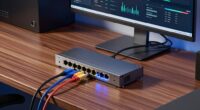
Finding the right 4 bay NAS enclosure for home backups involves balancing performance, ease of use, and budget. The QNAP TS-462A-4G stands out for its versatile features and user-friendly interface, making it a top overall choice. The Synology RS822+ is ideal for those seeking a rackmount option with robust expandability, while the TERRAMASTER F4-425 Plus offers powerful hardware at a competitive price. Each option presents tradeoffs: some prioritize performance, others focus on simplicity or expandability. Keep reading to explore detailed comparisons and find the best match for your needs.

Get the latest gadgets delivered free — and shop member deals
- Fast, free delivery on millions of items
- Access to Prime Big Deal Days deals on October 6–7
- Prime Video, Amazon Music and more included
Complete the kit



Key Takeaways
- The top picks balance performance, usability, and cost, with no single model excelling in all areas.
- Hardware features like CPU power and RAM significantly impact backup speeds and multitasking capabilities.
- Ease of setup and management varies widely; user-friendly interfaces save time and reduce frustration.
- Expandability and future-proofing are important for long-term use, especially with models like rackmount enclosures.
- Buyers should weigh the tradeoff between hardware robustness and budget constraints; premium options deliver more power but cost more.
| QNAP TS-462A-4G 4-Bay Desktop NAS |  | Best Overall for Home Multimedia and Personal Cloud Storage | Number of Bays: 4 | RAM: 4G | Network: 2.5GbE | VIEW ON AMAZON | See Our Full Breakdown |
| Synology 4-Bay RackStation RS822+ (Diskless) |  | Best for High-Speed Data Transfer and Expandability | Maximum Throughput: 2,103/1,074 MB/s | Drive Bays: 4 (expandable to 8) | Network Ports: 4 x 1GbE | VIEW ON AMAZON | See Our Full Breakdown |
| QNAP TR-004 4-Bay USB Type-C DAS with Hardware RAID |  | Best for Flexible External Storage with RAID Options | Drive Bays: 4 | Supported RAID: 0, 1, 5, JBOD, individual | Interface: USB Type-C | VIEW ON AMAZON | See Our Full Breakdown |
| TERRAMASTER D4-320 External Hard Drive Enclosure 4-Bay | 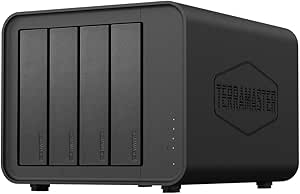 | Best Budget External Enclosure for Basic Data Storage | Maximum Capacity: 120TB | Supported Drives: 3.5/2.5 inch SATA HDD/SSD | Interface: USB 3.2 Gen2, Type-C, Thunderbolt 3/4 | VIEW ON AMAZON | See Our Full Breakdown |
| QNAP TR-004U-US 1U 4-Bay Hard Drive Enclosure |  | Best Rackmount External Storage for Enterprise-Grade Backup | Device Type: Hard Drive Enclosure | Form Factor: 1U | Number of Bays: 4 | VIEW ON AMAZON | See Our Full Breakdown |
| Asustor Drivestor 4 Gen 2 AS1204T 4-Bay NAS |  | Best Overall for Home Media and Personal Cloud Backup | Processor: Realtek RTD1619B 1.7GHz Quad-Core | RAM: 1GB DDR4 | Network: 2.5GbE Port | VIEW ON AMAZON | See Our Full Breakdown |
| TERRAMASTER F4-425 Plus NAS 4-Bay with Intel N95 Quad-Core CPU and 8GB RAM |  | Best for Power Users and Demanding Workloads | Processor: Intel N95 Quad-Core CPU (up to 3.6GHz) | Memory: 8GB RAM | Number of Bays: 4 | VIEW ON AMAZON | See Our Full Breakdown |
More Details on Our Top Picks
QNAP TS-462A-4G 4-Bay Desktop NAS
The QNAP TS-462A-4G stands out as the most well-rounded choice for home users wanting a versatile NAS. Its hardware transcoding and fast 2.5GbE network make it ideal for streaming multimedia and quick backups, outperforming models like the TERRAMASTER D4-320 in network speed. While the 4GB RAM supports everyday multitasking, it may struggle with heavy simultaneous tasks, unlike higher RAM options. The inclusion of hot-swappable trays simplifies drive management, but the setup complexity and need for additional drives can be hurdles for less technical users. Compared to the Synology RS822+, it offers easier home deployment without the need for extensive expansion. Its support for hardware encryption and snapshots enhances data security, though at a higher price point. Best for users seeking a multimedia-friendly, scalable, and user-friendly NAS system.
Pros:- Supports hardware transcoding for smooth multimedia streaming
- Fast 2.5GbE network connectivity
- Scalable storage with hot-swappable trays
- Snapshot protection and AES encryption
Cons:- Limited RAM at 4GB may hinder heavy multitasking
- Complex initial setup may challenge beginners
- Additional drives are an extra cost
Best for: Home users who want a multimedia-capable, easy-to-manage personal cloud with scalable storage.
Not ideal for: Power users needing extensive RAM or enterprise-level features, or those with limited technical skills for setup.
- Number of Bays:4
- RAM:4G
- Network:2.5GbE
- SSD Slots:2 M.2 PCIe
- Storage Type:SATA
- Backup Speed:10Gbps USB 3.2 Gen2
- Encryption:AES-NI
- Additional Features:Snapshot protection, hot-swappable trays
Our verdict“This NAS is best suited for home multimedia enthusiasts who value ease of use and scalability.”
Synology 4-Bay RackStation RS822+ (Diskless)
The Synology RS822+ caters to users prioritizing raw performance and future growth. Its impressive maximum throughput of over 2,100 MB/s outpaces most competitors like the TERRAMASTER D4-320, making it ideal for fast backups and large file transfers. Its four network ports with failover provide robust connectivity, but the need for an additional expansion unit (RX418) to reach full capacity can increase costs and complexity. The support for SSD cache and optional 10/25GbE upgrades makes it highly adaptable for demanding tasks, unlike the more basic QNAP models. Its diskless configuration gives flexibility in choosing drives, but this also means setup is less straightforward for beginners. Best for small offices or home users needing performance and expandability without sacrificing reliability.
Pros:- High sequential read/write speeds over 2,100 MB/s
- Expandable to 8 drives with RX418
- Multiple network ports with failover
- Supports SSD cache and network upgrades
Cons:- Requires additional expansion units for full capacity
- No included drives, increasing initial cost
- Setup complexity for less experienced users
Best for: Power users or small offices needing high throughput, expandability, and flexible networking.
Not ideal for: Home users with limited technical skills or those who prefer an all-in-one solution without additional upgrades.
- Maximum Throughput:2,103/1,074 MB/s
- Drive Bays:4 (expandable to 8)
- Network Ports:4 x 1GbE
- Expansion Support:Yes, with RX418
- Optional Upgrades:10/25GbE, SSD cache
- Drive Type:Supports up to 8 drives
Our verdict“This NAS is best for users seeking enterprise-level performance and scalability in a home or small office setting.”
QNAP TR-004 4-Bay USB Type-C DAS with Hardware RAID
The QNAP TR-004 excels as a flexible external RAID storage solution, ideal for those who need quick expansion or backup for existing systems. Its support for multiple RAID levels—including RAID 0, 1, 5, and JBOD—offers versatile data protection, surpassing the basic single-disk options of external enclosures like the TERRAMASTER D4-320. Its USB Type-C connection ensures fast transfers, but at a maximum of 3 Gbps, it may lag behind network-based NAS options in speed for large backups. The lockable bays and compatibility with Windows, macOS, and Linux provide added security and flexibility, yet it cannot operate as a standalone NAS nor manage multiple drives as a unified pool. It’s ideal for users needing external RAID expansion rather than a full NAS system. Best for users seeking portable, versatile RAID storage for backups and data transfer.
Pros:- Supports multiple RAID configurations for flexible data management
- Compatible with Windows, macOS, and Linux
- Lockable bays add security
- Supports USB Type-C for fast data transfer
Cons:- Limited to 3 Gbps transfer speed, slower than NAS-based solutions
- No standalone NAS capabilities or data pooling
- Requires connected host device for operation
Best for: Users who want external RAID storage for backups or quick data sharing, especially across different OS platforms.
Not ideal for: Home users seeking a standalone NAS or those wanting a fully integrated storage system with multiple network features.
- Drive Bays:4
- Supported RAID:0, 1, 5, JBOD, individual
- Interface:USB Type-C
- Supported OS:Windows, macOS, Linux
- Lockable Bays:Yes
- Max Speed:3 Gbps
Our verdict“This external RAID enclosure suits users needing portable, multi-OS compatible RAID storage for backups and quick data transfer.”
TERRAMASTER D4-320 External Hard Drive Enclosure 4-Bay
The TERRAMASTER D4-320 offers a straightforward, budget-friendly way to house up to four drives, making it a practical choice for simple backups. Its hot-swappable design and tool-free installation simplify drive swaps for less technical users. While it supports various drive types and interfaces like Thunderbolt 3/4, its lack of RAID support limits it to basic disk management, unlike the RAID-enabled options from QNAP or QNAP TR-004. Its maximum transfer speed of 10Gbps over USB 3.2 Gen2 makes it reasonably fast for everyday tasks, but it may fall short in high-demand scenarios. This model is ideal for users who prioritize low cost and straightforward storage, accepting the tradeoff of no RAID or advanced features. Best for budget-conscious users needing simple, reliable external storage.
Pros:- Supports multiple drive types and interfaces
- Tool-free, hot-swappable drives
- Quiet operation with efficient cooling
- High-speed data transfer up to 10Gbps
Cons:- No RAID support limits data redundancy options
- Requires external power supply
- Limited to 4 drives without RAID functionality
Best for: Home users or small businesses seeking an affordable, easy-to-use external enclosure for backups without RAID or complex features.
Not ideal for: Power users or those requiring RAID redundancy or high-speed data transfers for large workloads.
- Maximum Capacity:120TB
- Supported Drives:3.5/2.5 inch SATA HDD/SSD
- Interface:USB 3.2 Gen2, Type-C, Thunderbolt 3/4
- Transfer Speed:Up to 10Gbps
- Fan:Temperature-controlled
- Noise Level:Below 21 dB(A)
Our verdict“This enclosure is best for budget-conscious users who need simple, reliable external storage without RAID complexity.”
QNAP TR-004U-US 1U 4-Bay Hard Drive Enclosure
The QNAP TR-004U-US is a robust 1U rackmount enclosure designed for data centers or advanced home setups. Its support for RAID 0, 1, 5, 10 and JBOD offers comprehensive redundancy options, surpassing many external enclosures like the TERRAMASTER D4-320. The rackmount form factor lends it a professional appeal, but its slower maximum transfer speed of 3 Gbps limits rapid large data transfers, especially compared to network-based NAS options. Compatibility with Windows, macOS, and Linux makes it versatile, though setup and integration are more involved, suitable for technically skilled users. Its front-accessible bays and support for hot-swapping make it ideal for enterprise or advanced backup solutions, though overkill for casual home use. Best for users needing a high-capacity, flexible external RAID solution in a professional environment.
Pros:- Supports multiple RAID levels including RAID 5 and 10
- Compatible with various operating systems
- Supports hot-swapping and front-access bays
- High-capacity storage expansion
Cons:- Limited to 3 Gbps transfer speed, slower for large data loads
- Requires rackmount setup, less suitable for casual use
- More complex installation and configuration
Best for: IT professionals or advanced home users requiring high redundancy, multiple RAID levels, and rackmount installation.
Not ideal for: Average home users or those seeking simple plug-and-play storage without rack infrastructure.
- Device Type:Hard Drive Enclosure
- Form Factor:1U
- Number of Bays:4
- Supported Drives:2.5/3.5 inch SATA
- Max Speed:3 Gbps
- Connectivity:USB Type-C
- RAID Support:RAID 0, 1, 5, 10, JBOD
Our verdict“This enclosure is best suited for professional environments or advanced users who need high redundancy and rackmount capabilities.”
Asustor Drivestor 4 Gen 2 AS1204T 4-Bay NAS
The Asustor Drivestor 4 Gen 2 AS1204T stands out for its combination of speed and versatility, making it a well-rounded choice for home users who want quick access and solid data protection. Its 2.5GbE network port ensures faster transfers than traditional gigabit models, which is a step up from basic NAS options like the QNAP TS-462A-4G. The device supports a variety of RAID levels, providing flexible redundancy options, and includes advanced features like Btrfs snapshots and WORM technology for reliable data protection. However, with only 1GB of RAM, it might struggle during simultaneous heavy multitasking, and since it’s diskless, you’ll need to purchase drives separately, adding to the initial cost. Compared to the TerraMaster F4-425 Plus, this NAS emphasizes simplicity and media streaming, but sacrifices some raw power and expandability.
Pros:- Fast 2.5GbE network for quicker file transfers
- Supports multiple RAID configurations for flexible data redundancy
- Includes Btrfs snapshots and WORM for advanced data protection
- Ideal for media streaming and personal cloud storage
Cons:- Limited 1GB RAM may hinder multitasking performance
- Requires separate purchase of drives, increasing initial setup costs
- No included drives or expansion options out of the box
Best for: Home users seeking a reliable, easy-to-use NAS with fast network speeds and robust media support.
Not ideal for: Power users or small offices needing intensive multitasking or higher RAM capacity, as this model may bottleneck during demanding tasks.
- Processor:Realtek RTD1619B 1.7GHz Quad-Core
- RAM:1GB DDR4
- Network:2.5GbE Port
- Drive Bays:4
- Supported RAID:0/1/5/6/10
- Media Support:4K streaming
- Features:Btrfs snapshots, WORM technology, remote access
Our verdict“This NAS suits home users prioritizing speed and data protection with straightforward media features, but may be less ideal for demanding multitasking environments.”
TERRAMASTER F4-425 Plus NAS 4-Bay with Intel N95 Quad-Core CPU and 8GB RAM
The TERRAMASTER F4-425 Plus is designed for those who need serious performance and expandability in a home or small office setting. Its Intel N95 quad-core processor and 8GB of RAM make it much better suited for multitasking, intensive data processing, and running demanding applications compared to the Asustor Drivestor. The inclusion of triple M.2 SSD slots and support for up to 144TB of storage provide impressive flexibility for high-capacity setups. Dual 5GbE ports with link aggregation ensure rapid data transfer, even under heavy loads. The aluminum chassis offers durability and efficient cooling, but the setup process can be complex for beginners, and you’ll need to purchase drives separately, increasing upfront costs. Compared to the other option, this NAS emphasizes performance over simplicity, making it less suitable for casual or less tech-savvy users.
Pros:- Powerful Intel N95 quad-core processor for demanding tasks
- 8GB RAM supports heavy multitasking
- Triple M.2 SSD slots for cache and performance boost
- Dual 5GbE ports with link aggregation for fast data transfer
Cons:- Complex setup process may challenge less experienced users
- Requires additional purchase of drives, adding to costs
- Features may be overkill for simple backups or basic home use
Best for: Advanced users, creative professionals, or small business owners who need high performance and extensive storage options.
Not ideal for: Beginners or users with basic backup needs, as its advanced features and setup complexity may be overwhelming.
- Processor:Intel N95 Quad-Core CPU (up to 3.6GHz)
- Memory:8GB RAM
- Number of Bays:4
- Maximum Storage Capacity:144TB
- Network Interfaces:Dual 5GbE LAN ports
- Expansion Support:Triple M.2 SSD slots
- Drive Mounting:Hot-plug with Direct Data Drive Mounting technology
- Chassis Material:Aluminum-alloy
Our verdict“This NAS is ideal for users who need high-end performance and expandability, accepting a steeper learning curve and higher initial investment.”

How We Picked
These products were evaluated based on key factors relevant to home backup needs, including hardware performance, ease of setup, interface usability, expandability, and value for money. We prioritized models that are reliable, versatile, and suitable for different levels of user experience. Each product’s strengths and weaknesses were considered to ensure a balanced perspective, helping readers find a solution that fits their specific backup requirements and technical comfort level. The ranking reflects a combination of features, build quality, and overall value, rather than brand popularity alone.Factors to Consider When Choosing 4 Bay Nas Enclosures For Home Backups
When choosing a 4 bay NAS enclosure for home backups, it’s important to consider several factors that influence long-term satisfaction and performance. A well-chosen enclosure not only safeguards your data but also offers room for upgrades and easy management. Understanding the tradeoffs between hardware power, usability, expandability, and price can help you avoid common pitfalls and select a device that truly meets your needs.Performance and Hardware Power
For backup tasks, especially with large data sets or multiple users, hardware specs like CPU speed, RAM, and network interfaces matter. Higher-powered models can handle simultaneous backups and multimedia serving without slowdown. However, more robust hardware usually comes at a higher cost, so assess how much performance you actually need versus what you can afford.
Ease of Use and Management
A straightforward setup process and an intuitive management interface are essential, especially for users new to NAS systems. Look for models with clear documentation, user-friendly apps, and good customer support. Overly complex systems may require technical expertise, which can cause frustration or delays in routine backups.
Expandability and Future-Proofing
Some NAS enclosures support additional drives or hardware upgrades, which can extend their usefulness over time. Consider whether you might need more storage or advanced features down the road. Rackmount options tend to offer more expansion slots, but they also require more space and technical know-how.
Price and Value
Balance your budget with the features you need. High-end models deliver superior performance and expandability, but many users will find good value in mid-range options that provide reliable backups without the premium cost. Avoid paying for features you won’t use, but be cautious of overly cheap models that may lack durability or essential capabilities.
Build Quality and Reliability
Since NAS devices are often running 24/7, durability and build quality are vital. Look for reputable brands with positive user reviews regarding longevity and customer support. Investing a little more upfront can prevent costly replacements or data loss later.
Frequently Asked Questions
Can I use any hard drives with a 4 bay NAS enclosure?
Most 4 bay NAS enclosures support standard 3.5-inch SATA drives, but compatibility can vary, especially with enterprise-grade or SSDs. It’s important to check the manufacturer’s specifications for supported drive types and sizes. Using drives designed for NAS use can improve longevity and reliability, reducing the risk of failure during backups or data access.
Is it better to buy a diskless NAS or one with drives included?
Opting for a diskless NAS provides flexibility to choose drives suited to your specific needs, whether prioritizing capacity, speed, or cost. It also allows for easier upgrades later. However, pre-populated models might be more straightforward for beginners, as they are ready to use immediately, but typically at a higher initial cost. Consider your comfort with installing drives and your future upgrade plans when making this choice.
How important is the CPU in a NAS for home backups?
The CPU directly influences backup speed, multitasking, and media serving capabilities. For basic backups, a modest dual-core processor may suffice, but if you plan to run multiple services or large data transfers, a more powerful CPU can save time and improve performance. Balance CPU power with your budget and expected workload to avoid overspending on unnecessary specs.
Should I prioritize a rackmount or desktop enclosure?
Rackmount enclosures typically offer more expandability and professional-grade features but require rack space and technical setup. Desktop models are more compact and easier to install in a home environment. Your choice depends on your space constraints, future expansion plans, and comfort with technical setup. For most home users, a desktop model offers sufficient flexibility and simplicity.
What security features should I look for in a NAS?
Security features such as encrypted data transfer, user access controls, and regular firmware updates are essential to protect your backups. Some models include hardware encryption and VPN support for remote access security. Prioritize devices with robust security options if you plan to access your data remotely or store sensitive information, reducing the risk of unauthorized access or data breaches.
Conclusion
For most home users, the QNAP TS-462A-4G offers the best overall performance combined with user-friendly features, making it ideal for those who want a reliable, versatile system without complexity. The Synology RS822+ is perfect for users who need a rackmount setup with expandability, suitable for more advanced or future-proofed backups. Budget-conscious buyers will appreciate the TERRAMASTER F4-425 Plus, which delivers strong hardware at a lower price point. Beginners should consider the easier setup of desktop models, while power users seeking maximum performance should look at models with higher CPU and RAM specs. Ultimately, your choice depends on your technical comfort, space, and future backup needs.Fall Picks
fall essentials
As an affiliate, we earn on qualifying purchases.